






Feature
Localize
Agentic translation in Webflow Localize
We’re introducing agentic translation to improve translation workflows inside Webflow Localize with the help of agents, so your team can launch new markets faster, while ensuring translated content is always up-to-date
Historically, standing up a new locale in Webflow Localize required teams to manually identify which content needed translating. For teams managing frequent content updates across markets, that manual overhead created thousands of extra clicks; slowing down launches and translation efforts for critical content.
Today we’re introducing agentic translation to improve translation workflows inside Webflow Localize with the help of agents, so your team can launch new markets faster, while ensuring translated content is always up-to-date.
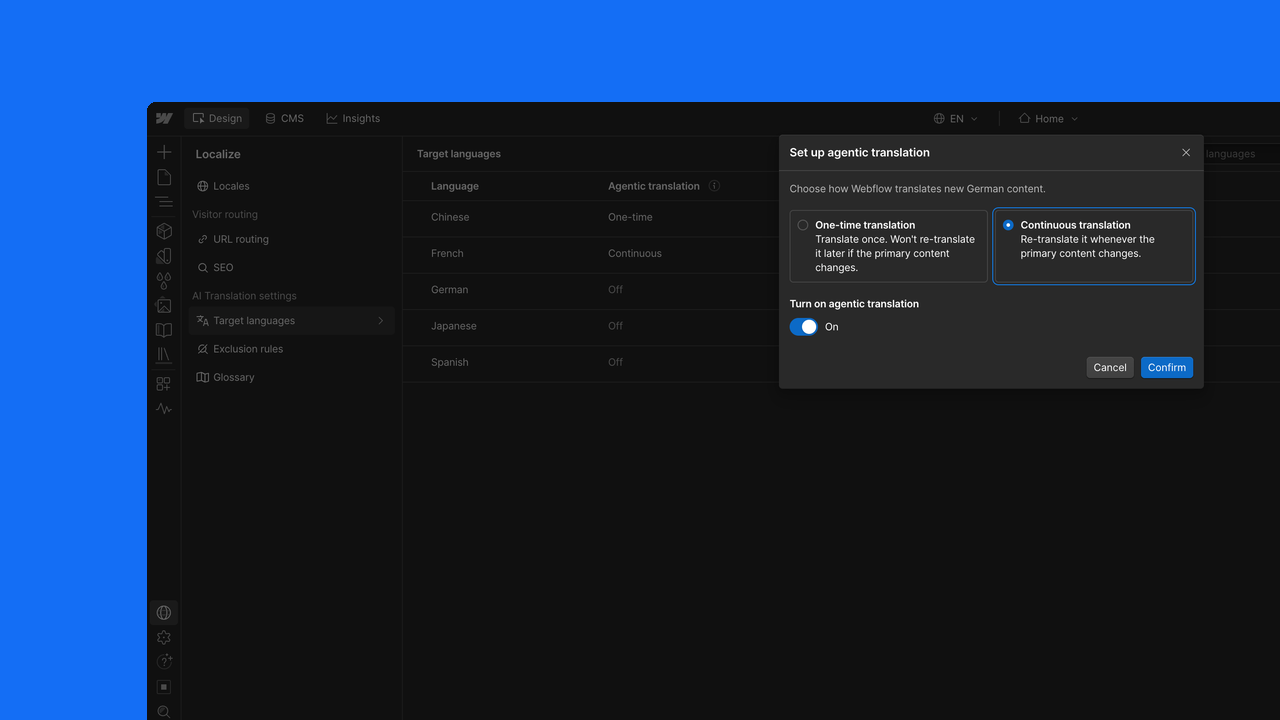
When you turn on agentic translation in your target language settings, your team can choose between two new ways to manage your translation workflows, from hands-on review to hands-off automation:
- One-time translation asks the agents to do a one-time pass on your content for you to review. Content translated using one-time translation will not be automatically updated when the original content is updated or changed.
- Continuous translation will keep the target locale automatically updated to reflect the primary content, using your site's tone, formality, and glossary settings to keep translations on-brand. Your primary content will be translated on a first pass, and every subsequent change will be automatically translated and applied to the target locale.
As part of this update, we’re also introducing two new features to help govern how agents handle your content translation inside Webflow:
- Exclusion rules let you proactively identify the specific pages, components, CMS fields, and component props you want to keep out of the translation process entirely–content like the SKUs, reference codes or internal-only fields. Excluded content is filtered out entirely and never passed to a model for translation.
- Translation memory helps us ensure effective AI usage throughout the process by ensuring the content you have already translated doesn't run through AI again when a page gets updated. If the source text, language, and settings stay the same, the existing translation gets reused instead of running through AI again.
Agentic translation begins rolling out today and is included on all Webflow Localize plans. Translated words count toward your plan's word limits, which are pooled across your locales, and you can choose to use AI credits to cover any translations beyond your built-in limits.
Visit the Help Center for all the details on setup and configuration.
Related updates






















Get started for free
Try Webflow for as long as you like with our free Starter plan. Purchase a paid Site plan to publish, host, and unlock additional features.
Try Webflow for as long as you like with our free Starter plan. Purchase a paid Site plan to publish, host, and unlock additional features.