






Enhancement
Localize
Show primary page names in Webflow
Navigate Webflow with confidence, even after you've translated your page names.
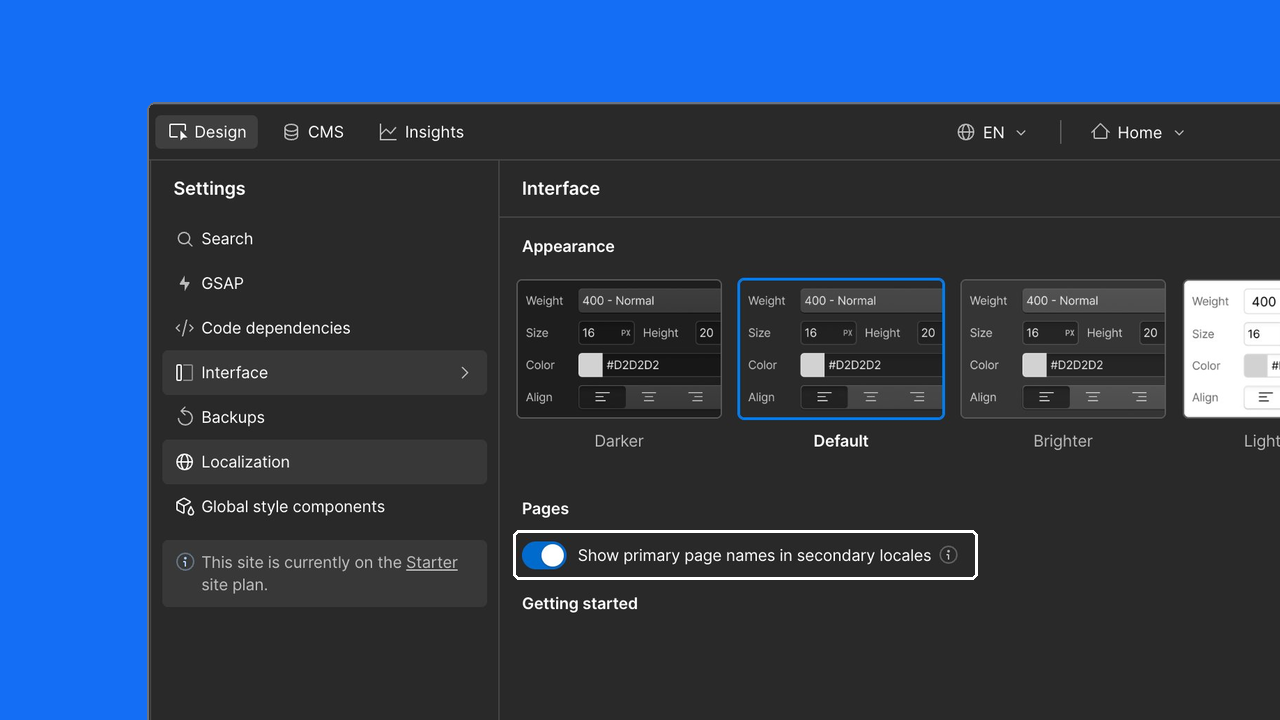
Translating your page names is a natural part of localizing your site — but it can make navigating in Webflow surprisingly difficult. Once translated, the Pages panel shows only the translated names in secondary locales, making it hard to find the right page fast.
A new toggle in Settings → Interface → Pages puts you back in control. Enable "Show primary page names in secondary locales" and the Pages panel displays your primary locale page names while you're working in any secondary locale.
Keep your bearings while you build
Your Pages panel stays familiar no matter which locale you're in — no more second-guessing which translated name maps to which page.
Your setting, your choice
This is a per-user preference. You can enable or disable it independently from your teammates, and it persists across sessions.
Nothing on your site changes
This is a Designer interface setting only. Your published page names, slugs, SEO metadata, and site design are unaffected.
Related updates


%204%20(1).png)




















Get started for free
Try Webflow for as long as you like with our free Starter plan. Purchase a paid Site plan to publish, host, and unlock additional features.
Try Webflow for as long as you like with our free Starter plan. Purchase a paid Site plan to publish, host, and unlock additional features.