



The best CMSs for SEO let your marketing team create and optimize without waiting on a developer. Some platforms put those controls in the editor, while others leave them to plugins or engineers who build the front end.
The right content management system (CMS) for your SEO needs depends on what your business sells and which pages bring in organic traffic. Ecommerce brands rank on product and collection pages, B2B and SaaS companies rely on blogs, resource libraries, and landing pages, and local service businesses center around a small set of service pages.
Each platform handles those page types differently, from how it builds URLs to who can change redirects, schema templates, or the settings behind Core Web Vitals.
In this article, we compare eight popular platforms on how much control they give marketing teams, where those settings live, and how easy they are to use without developer support. The comparisons come from the POV of a marketing lead who reports on organic pipeline and has limited developer support.
Key takeaways:
- Choose Webflow if your marketing team runs a content-led site, such as a blog, resource library, or landing pages, and wants to ship redirects, metadata, and schema without a developer.
- WordPress and Drupal give the deepest control through plugins and modules, but you'll need a developer to keep that stack updated.
- HubSpot Content Hub fits B2B teams that already report pipeline in HubSpot's CRM, as long as someone manually adds campaign landing pages to the sitemap.
- Shopify suits ecommerce brands whose organic traffic comes from product and collection pages, but its fixed URL prefixes mean every migrated URL needs a redirect.
- Wix and Squarespace work best for small service, portfolio, and brochure sites.
- Contentful fits teams publishing the same content to a website and apps, but every SEO change becomes a developer deploy.
How we evaluated the best CMS platforms for SEO
Our shortlist covers the two types of CMS that marketing teams will choose from when replacing a site:
- Managed platforms with SEO settings built in (e.g., Webflow, HubSpot Content Hub, Wix, Shopify, Squarespace)
- Plugin-driven open source (e.g., WordPress, Drupal)
- Headless CMS (e.g., Contentful)
The criteria that separate them are redirect behavior, crawl and schema access, audience, entry price, and one standout control per platform:
| Tool | Where SEO controls live | Best for | Starting price (as of September 2026) | Rating (G2, as of September 2026) | Standout SEO control |
|---|---|---|---|---|---|
| Webflow | Page and site settings in the visual editor | Marketing and SEO teams that publish without a developer | Free plan; Premium plan (first paid tier with a CMS) is $39/month (or $25/month billed annually) | 4.4 | Title and meta description templates built from CMS fields |
| WordPress (self-hosted) | Plugins you install and update | Marketing teams with a developer or agency on retainer | Free software; hosting billed separately, and Yoast SEO Premium is $118.80/year | 4.4 | Built-in wp-sitemap.xml with a choice of Yoast SEO or Rank Math |
| HubSpot Content Hub | Admin UI, gated by tier | Marketing teams reporting pipeline from HubSpot CRM | Free plan; paid from $10/month/seat (or $7/month/seat billed annually) on a new-customer promotion | 4.5 | SEO scanner that also checks pages hosted outside HubSpot |
| Wix | Admin UI | Small marketing teams with no developer | Free plan; paid from $17/month | 4.2 | AI Visibility Overview for ChatGPT, Gemini, and Perplexity |
| Shopify | Admin UI, theme files for crawl rules | Marketing teams at product-led commerce brands | From $39/month (or $29/month billed annually) | 4.4 | Editable robots.txt.liquid template with Shopify-maintained defaults |
| Squarespace | Platform defaults | Small marketing teams on design-led brochure sites | From $25/month (or $19/month billed annually) | 4.4 | Image metadata in the auto-generated sitemap.xml |
| Drupal | Modules a developer configures | Enterprise marketing teams with in-house Drupal developers | Free software; hosting from $148/month | 3.9 | Pathauto URL aliases by content type |
| Contentful | Front-end code | Marketing teams that rely on in-house engineers | Free plan; paid from $300/month | 4.3 | SEO fields modeled per content type |
| Tool → Where SEO controls live → Best for → Starting price (as of September 2026) → Rating (G2, as of September 2026) → Standout SEO control |
|---|
| Webflow |
| Page and site settings in the visual editor |
| Marketing and SEO teams that publish without a developer |
| Free plan; Premium plan (first paid tier with a CMS) is $39/month (or $25/month billed annually) |
| 4.4 |
| Title and meta description templates built from CMS fields |
| WordPress (self-hosted) |
| Plugins you install and update |
| Marketing teams with a developer or agency on retainer |
| Free software; hosting billed separately, and Yoast SEO Premium is $118.80/year |
| 4.4 |
| Built-in wp-sitemap.xml with a choice of Yoast SEO or Rank Math |
| HubSpot Content Hub |
| Admin UI, gated by tier |
| Marketing teams reporting pipeline from HubSpot CRM |
| Free plan; paid from $10/month/seat (or $7/month/seat billed annually) on a new-customer promotion |
| 4.5 |
| SEO scanner that also checks pages hosted outside HubSpot |
| Wix |
| Admin UI |
| Small marketing teams with no developer |
| Free plan; paid from $17/month |
| 4.2 |
| AI Visibility Overview for ChatGPT, Gemini, and Perplexity |
| Shopify |
| Admin UI, theme files for crawl rules |
| Marketing teams at product-led commerce brands |
| From $39/month (or $29/month billed annually) |
| 4.4 |
| Editable robots.txt.liquid template with Shopify-maintained defaults |
| Squarespace |
| Platform defaults |
| Small marketing teams on design-led brochure sites |
| From $25/month (or $19/month billed annually) |
| 4.4 |
| Image metadata in the auto-generated sitemap.xml |
| Drupal |
| Modules a developer configures |
| Enterprise marketing teams with in-house Drupal developers |
| Free software; hosting from $148/month |
| 3.9 |
| Pathauto URL aliases by content type |
| Contentful |
| Front-end code |
| Marketing teams that rely on in-house engineers |
| Free plan; paid from $300/month |
| 4.3 |
| SEO fields modeled per content type |
Below, we look at each platform in detail, starting with managed CMS options before turning to open-source software and headless frameworks.
1. Webflow
Webflow puts SEO controls where marketers already build pages. Each page's settings hold the title, meta description, Open Graph fields, and canonical URL.
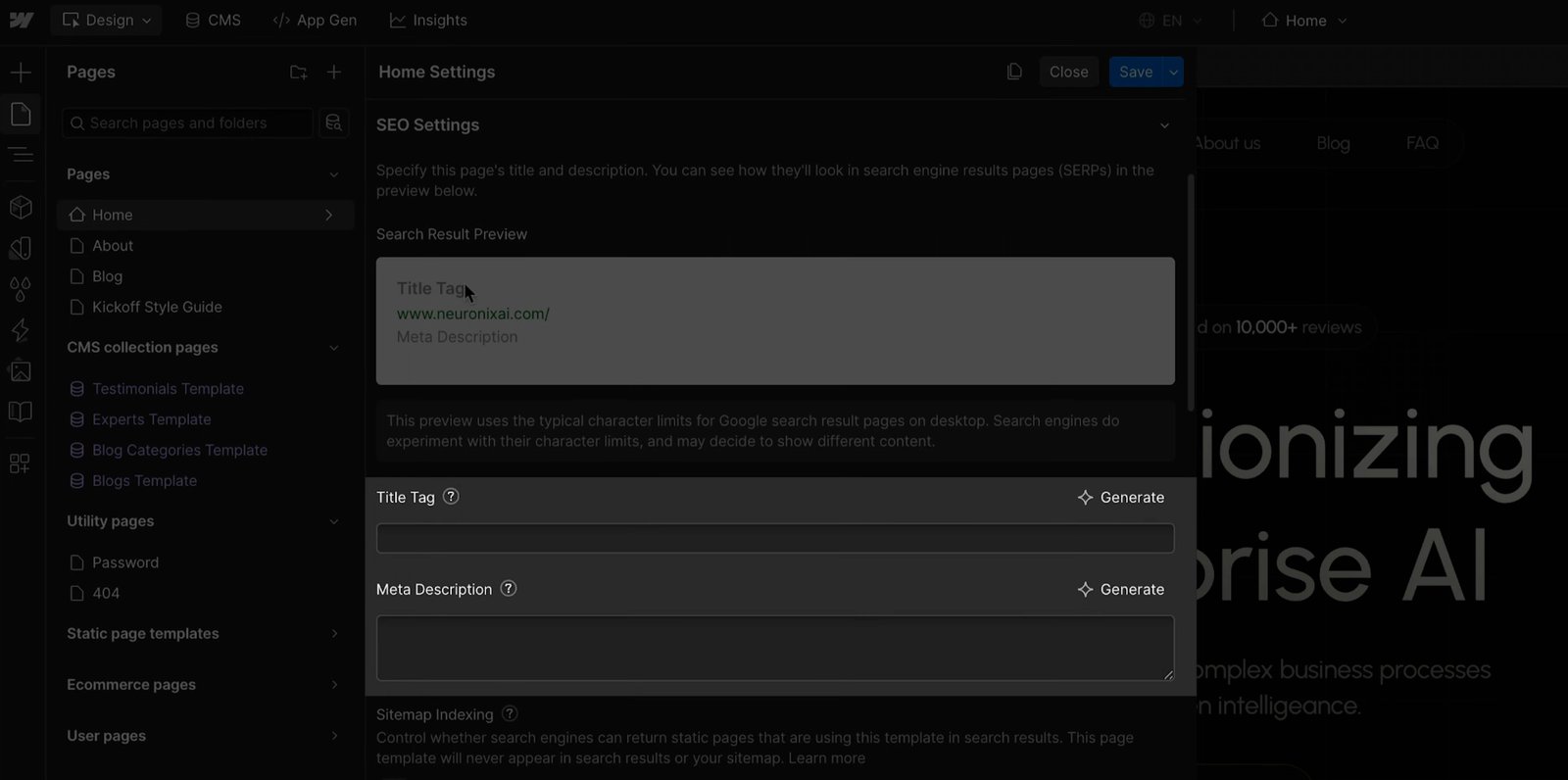
On CMS templates, those fields pull from Collection fields, so a blog with many posts gets a unique title and description for each one without anyone typing them individually.
Site-wide controls sit together in the site settings, where you can add 301 redirects, turn on the auto-generated XML sitemap, edit robots.txt, and upload an llms.txt file. Webflow AI can draft schema markup, meta descriptions, and missing alt text, and you can keep the JSON-LD editable on the page or in the CMS template.
Pages publish as semantic HTML on managed hosting, with no plugin or theme file sitting between an SEO fix and the live page. For multilingual sites, Webflow Localize (paid add-on) generates a localized sitemap with hreflang tags and serves each language from its own subdirectory.
Webflow pros:
- Redirects and crawl rules without a ticket: A marketer can add a 301, edit robots.txt, or keep a single CMS item out of search, then publish the change the same day.
- Metadata that scales with the CMS: Title and description templates built from Collection fields automatically fill in every new item. Webflow AI can also fill gaps in bulk, so a large resource library doesn't depend on manual entry.
Webflow cons:
- Content limits on the self-serve plans: The Premium plan holds 20,000 CMS items across 40 Collections. A larger resource library requires extra items on the Team plan or a move to Enterprise.
- AI-search recommendations require contract plans: Webflow's AEO agents, which recommend site-wide fixes for visibility in AI answers, come with the Team and Enterprise plans. Self-serve sites get the AI-assisted SEO and AEO audit, and the Analyze paid add-on reports AI agent traffic.
What users say about Webflow
Reviewers credit Webflow's markup and SEO controls, and their complaints center on who can realistically operate the platform:
- Strong search performance: Capterra reviewers call it SEO-friendly, report strong Google performance, and use the CMS for blogs and case studies.
- Marketers self-serve most updates: A Gartner Peer Insights reviewer reported how their team handles most page and CMS updates without a developer.
- Learning curve for non-designers: A Gartner reviewer in a marketing manager role found the Designer hard to learn without coding knowledge. Capterra reviewers describe the same steep start.
- Harder to move off later: A Hacker News commenter noted that Webflow's code export leaves out CMS content, which matters for teams planning a future move.
Sources checked September 2026.
Webflow pricing
The Starter plan is free on a webflow.io subdomain with a limited CMS and two static pages. The Basic plan is $25 per month (or $15 per month billed annually) and adds a custom domain and 301 redirects, but it has no CMS.
That makes the Premium plan the starting point for SEO teams running a blog or resource library. It costs $39 per month (or $25 per month billed annually) and is the first tier with the full Webflow CMS, CMS item indexing control, and site search. The Team plan is $2,500 per month on an annual contract and adds Webflow Localize, AEO agents, and publishing workflows; Enterprise is custom-priced.
On the self-serve plans, Localize is an add-on priced by locale count. Localize Essential starts at $12 per month (or $9 per month billed annually) for up to three locales. Localize Advanced starts at $35 per month (or $29 per month billed annually) and covers up to 10 locales and adds localized URLs.
Pricing from Webflow's pricing page. Verified September 2026.
Best for: Marketing and SEO teams running a large blog or resource library who want to ship redirects, metadata, schema, and crawl changes themselves, without a plugin stack or a developer queue.
2. WordPress (self-hosted)
WordPress comes in two versions. WordPress.com is a fully managed service that limits server access and ties some SEO controls to higher plans. Self-hosted WordPress is free, open-source software you install on hosting you choose, with full access to plugins, themes, and server files. Marketing teams replacing a CMS almost always evaluate the self-hosted version for that control, so it's the version we cover here.
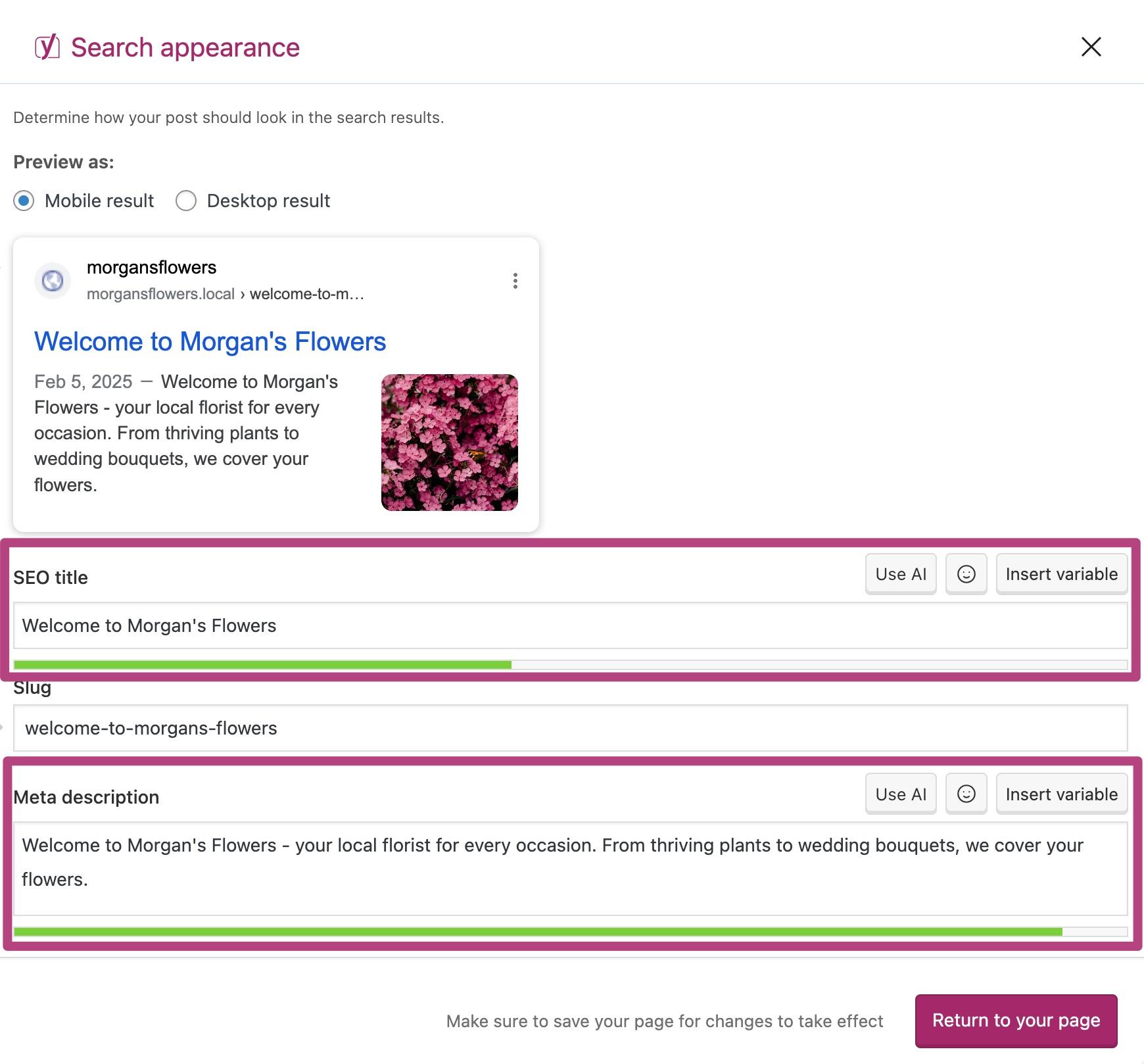
WordPress core generates an XML sitemap at wp-sitemap.xml, and plugins such as Yoast SEO and Rank Math supply everything else, from meta fields to schema, canonicals, and redirects.
For a marketing team, the plugin model is both the appeal and the workload. Nearly every SEO setting is configurable, and every plugin that configures it needs updating.
WordPress pros:
- Schema types beyond the defaults: Rank Math's free tier includes sitemaps and schema markup, and plugins add FAQ, Product, and Event types beyond Squarespace's fixed six.
- Server-level access: You can edit robots.txt and .htaccess directly, which lets you fix crawl directives and server redirects yourself instead of filing a request with platform support.
WordPress cons:
- SEO controls are only as stable as the plugin stack: Canonicals, redirects, and schema all come from third-party plugins. A plugin conflict or a core update can break output Google reads without warning.
- Speed depends on your setup: Core Web Vitals depend on the host, caching layer, and plugin count you assemble, so a slow shared host or a script-intensive theme drags down Largest Contentful Paint.
What users say about WordPress
Recent reviews of the self-hosted version and a developer discussion describe the same maintenance burden:
- Plugin choice: Reviewers value swapping between Yoast and Rank Math without rebuilding content.
- Block editor confidence: Reusable blocks and patterns cut repetitive layout work, and non-developers say they update content without fear of breaking a page.
- Update fatigue: The most repeated complaint is constant plugin and theme updates that eat up troubleshooting time, plus major core releases that reviewers say often break something.
- Growing attack surface: Developers framed each added plugin as more exposure, with sites falling behind on updates because the updates themselves break things.
Sources checked September 2026.
WordPress pricing
Self-hosted WordPress is free to download and use. You pay separately for hosting, a domain, and any premium plugins or themes, and your host sets your page-speed baseline.
Rank Math's core plugin is free. Yoast SEO Premium is sold annually at $118.80 per year (excluding VAT) for one site.
Pricing from Yoast's SEO plugin page. Verified September 2026.
Best for: Marketing teams with a developer or agency on retainer who run a large blog or resource library and want to choose their own schema types, redirect rules, and hosting.
3. HubSpot Content Hub
Inside HubSpot Content Hub, the website and blog share a database with the contacts and deals in HubSpot's customer relationship management (CRM) suite.
Managed hosting includes a global content delivery network (CDN), Secure Sockets Layer (SSL), and a web application firewall on every tier, and canonical settings are configurable globally or per page.
The SEO tooling is built around recommendations. A scanner checks alt text, titles and descriptions, canonicals, pages blocked from search, link crawlability, image size, insecure resources, and blog posts under 300 words. Basic per-page checks are available on every tier, and on the Professional and Enterprise plans, it can scan pages hosted outside HubSpot.
Templates use HubSpot's proprietary HubL language, so design changes beyond drag-and-drop modules require a developer who knows it.
HubSpot Content Hub pros:
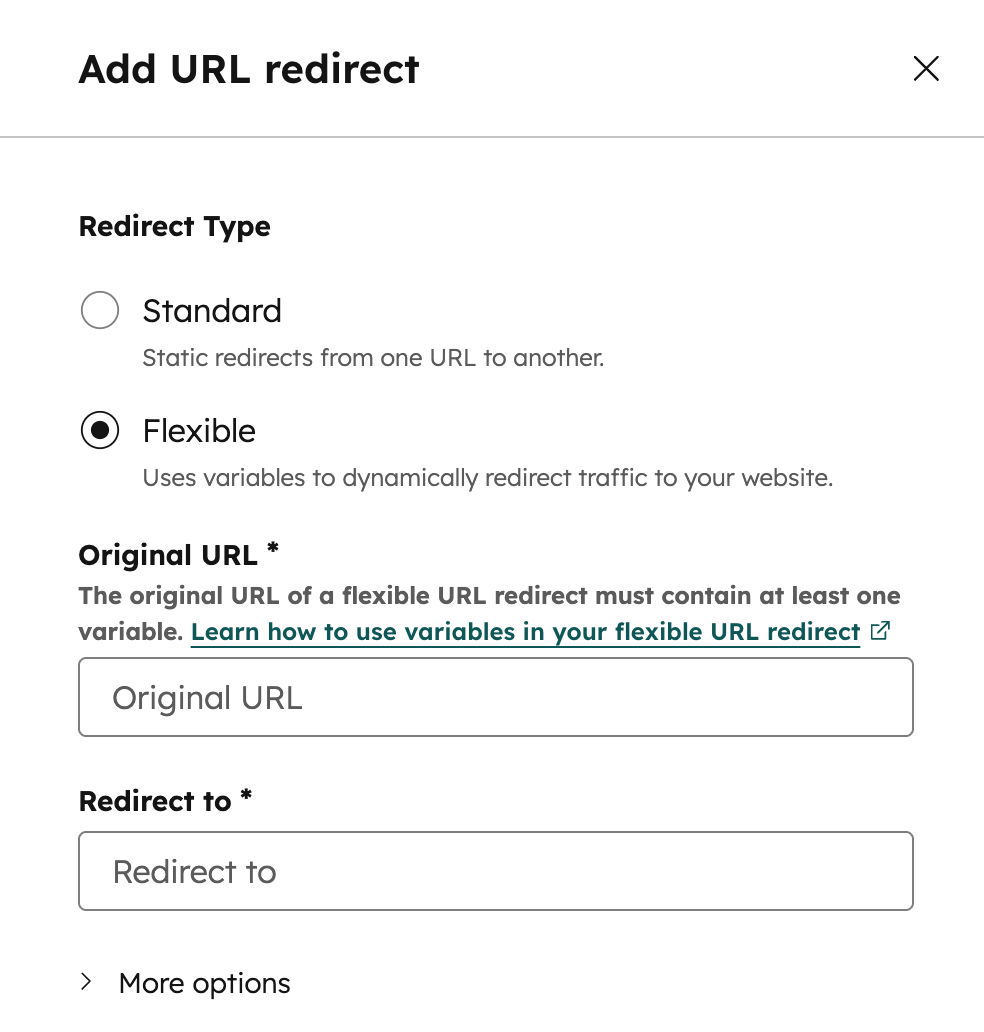
- Redirect manager across the product: URL mappings support 301s, flexible pattern redirects, and bulk CSV import. A URL restructure takes one CSV upload.
- Hreflang without a plugin: Multi-language pages get valid language codes in their hreflang tags automatically; the SEO tool flags invalid codes, and higher tiers raise the language limit.
HubSpot Content Hub cons:
- Landing pages skip the sitemap: The XML sitemap auto-includes website pages and blog posts. You add landing pages by hand. Demand-gen teams running dozens of campaign pages can leave indexable pages out of the sitemap without noticing.
- AI-answer tracking requires a separate product: AEO monitoring (i.e., tracking brand visibility across ChatGPT, Gemini, Perplexity, etc.) is not part of Content Hub. It costs $50 per month as a standalone HubSpot AEO subscription or comes with Marketing Hub Professional, so a content team buying Content Hub still pays extra to see AI answers.
What users say about HubSpot Content Hub
In reviews, users praise the CRM connection while raising concerns about templates, feature gates, and performance:
- CRM connection: Reviewers described the native link between content and contact records as removing friction between publishing and reporting on what it produced.
- Template friction: Some users said they felt constrained by HubSpot's defined workflows and template system.
- Paid past the basics: There are reviews noting that many features are paid, including A/B testing, smart content, and full SEO recommendations.
- Speed and developer depth: Reports also cited slow site speed due to HubSpot's servers and a limited pool of developers for custom work.
Sources checked September 2026.
HubSpot Content Hub pricing
HubSpot's Free plan includes up to two users, 30 landing pages, one blog with up to 100 posts, an auto-generated XML sitemap, URL mappings, and a custom domain (with HubSpot branding on pages, blog, landing pages, and live chat).
The Starter plan is $10 per seat per month (or $7 per seat per month billed annually) as a limited-time new-customer promotion (the standard rate is $20 per seat per month).
The Professional plan is $500 per month (or $450 per month billed annually) and includes three core seats; additional seats cost $50 per seat per month (or $45 per seat per month billed annually).
The Enterprise plan is $1,500 per month billed annually, with five core seats, and additional seats start at $75 per seat per month. Bundling Marketing Hub Professional adds a mandatory $3,000 onboarding fee.
Pricing from HubSpot's Content Hub pricingpage. Seat add-on prices from HubSpot's product catalog. Verified September 2026.
Best for: Marketing teams that already run pipeline reporting in HubSpot's CRM and want blog, landing pages, and on-page SEO checks inside the same login. Expect a higher paid plan if site-wide audits and smart content matter.
4. Wix
Wix gives marketers control over their SEO through its page settings and SEO dashboard. Page settings cover the title, meta description, slug, and canonical on each page, while the dashboard handles site-wide crawl and redirect settings.
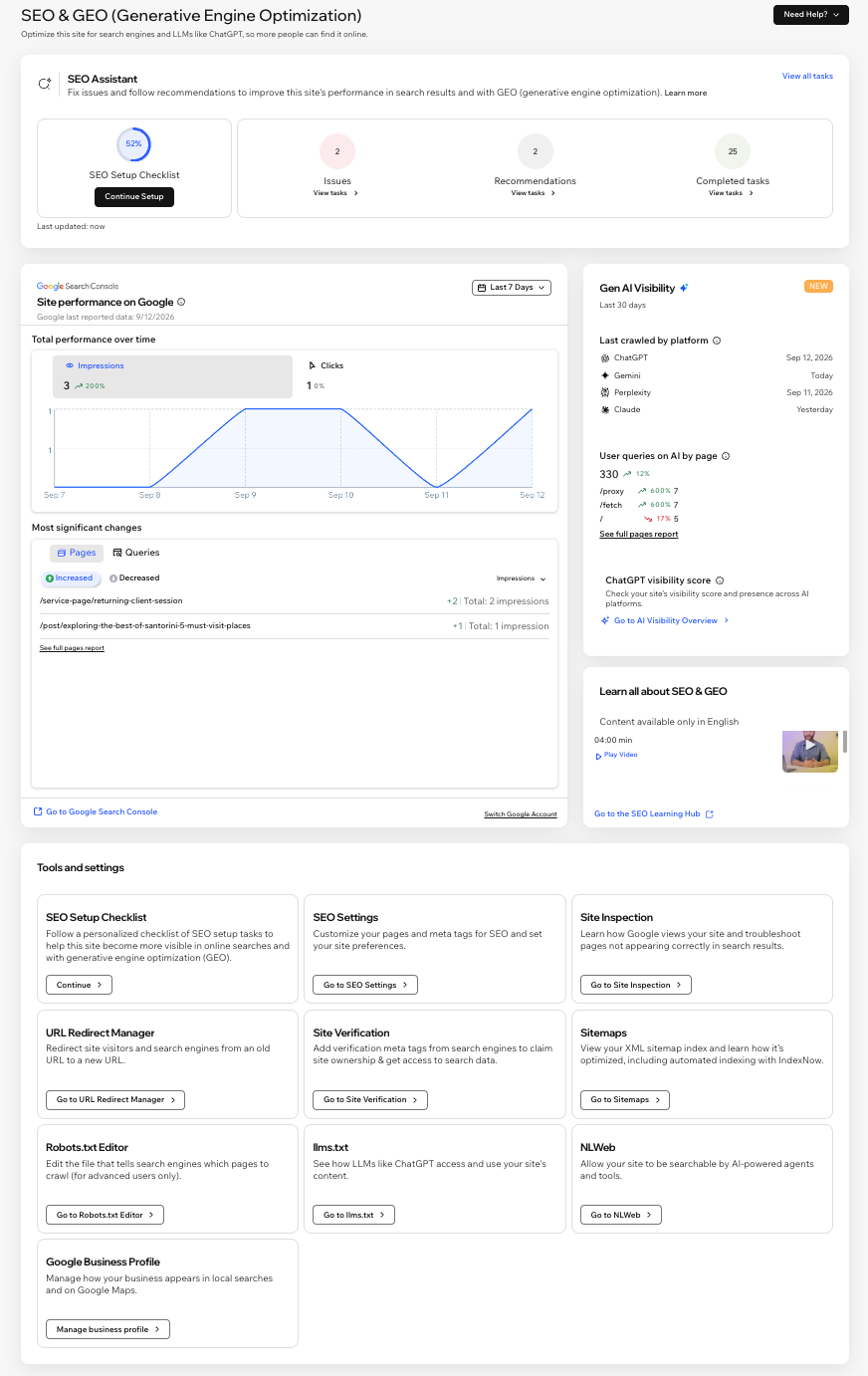
Structured data applies automatically to Stores products, Bookings services, blog posts, and events, with a panel for custom markup.
Wix Multilingual produces per-language titles, descriptions, slugs, and image alt text, and lets you verify each language subdomain in Google Search Console with its own sitemap. A Site Speed dashboard pairs field data from visitors with a PageSpeed simulation for performance insights. And the AI Visibility Overview reports how a site surfaces in answers from ChatGPT, Gemini, and Perplexity and tracks AI referral traffic.
Wix pros:
- Redirects create themselves: Changing a slug on an Editor page, store product or category, Bookings service, Online Program, or event automatically generates a 301.
- Crawl control from the dashboard: The robots.txt editor and per-page robots meta tags are the broadest crawl controls among the hosted builders (Squarespace shares one platform-managed robots.txt, and Shopify requires editing a theme file).
Wix cons:
- Blog slugs are the exception: Wix does not auto-create a 301 when a blog post's slug changes. Content teams that retitle posts must add each redirect manually in the redirect manager or lose the old URL's equity.
- Structured data has a size and scope limit: Custom markup accepts JSON-LD only, caps at 7,000 characters, and the AI-generated option works only for blog posts.
What users say about Wix
Reviews discussed how Wix helps small teams and where its generated code creates limits:
- Checklist-driven setup: Reviewers like the built-in SEO Setup Checklist that walks through on-page tasks without leaving the editor.
- SEO still requires implementation: A community commenter reported no real SEO penalties for Wix sites while noting that teams still have to complete the SEO work.
- Speed under load: Elaborate features, high-resolution images, animations, and third-party apps slow pages noticeably, which reviewers attribute to the amount of code the editor produces.
- One-way door: A reviewer called migration off Wix difficult because export options are limited.
Sources checked September 2026.
Wix pricing
The Free plan runs on a wixsite.com subdomain, displays Wix ads and doesn't let you set up a 301 redirect from free-plan URLs to a paid site later. Billed annually, the Light plan is $17 per month, the Core plan is $29, the Business plan is $39, and the Business Elite plan is $159. Enterprise is custom-priced.
A one-year domain voucher comes with a first-time yearly or multi-year plan (must be redeemed within two months), excludes domain privacy, and renews at the regular price after year one. Wix Studio plans are priced on a separate page.
Pricing from Wix's plans page. Verified September 2026.
Best for: Small marketing teams and solo marketers running service, portfolio, or small store sites who want redirects, schema, and crawl settings in an admin panel without a developer.
5. Shopify
Products, collections, blogs, and web pages give Shopify its CMS layer within a commerce platform.
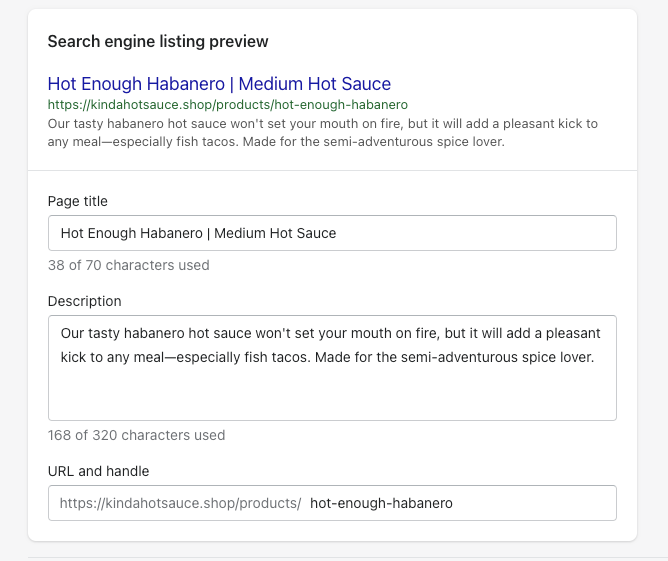
You can edit title tags and meta descriptions on each of those page types, and the platform automatically generates sitemap.xml and canonical tags. Any theme you install from the Shopify Theme Store already outputs titles, meta descriptions, canonical tags, and product rich-snippet markup, so a store gets those basics without code.
Shopify Markets automates most international SEO. You can update crawl directives through a robots.txt.liquid template, with defaults that Shopify updates itself. The blog has no categories, so editorial sites are likely to outgrow it.
Shopify pros:
- Hreflang, canonicals, and sitemaps per market with no app: Shopify Markets handles all three once domains and languages are set, across subfolder, subdomain, and country-domain structures.
- Faster field data than the WordPress commerce path: The HTTP Archive's 2025 Web Almanac reports a higher share of Shopify storefronts passing Core Web Vitals than WooCommerce stores on both desktop and mobile.
Shopify cons:
- URL prefixes are permanent: /products/, /collections/, /pages/, and /blogs/ cannot be removed or renamed, and collections cannot nest into subcategory paths. A brand migrating from a flat or category-based URL structure needs a redirect for every old URL and accepts the new pattern for good.
- Redirects only fire from 404s: A live URL cannot be redirected until it is taken offline, collection tag-filter URLs cannot be redirected at all, and non-Plus stores cap at 100,000 redirects, which hurts merchants consolidating active product pages.
What users say about Shopify
Most reviews focus on product administration, customization, and added costs:
- One dashboard for SEO and inventory: A reviewer found it convenient to edit product page SEO in the same admin used for orders and stock.
- Duplicate schema: A community report shows theme JSON-LD and an SEO app's JSON-LD both rendering, which produces duplicate structured data with conflicting validity until the theme default is disabled.
- Customization falls short: A marketing leader reported that customization depth is underwhelming and pricing scales quickly once you need features beyond the basics.
- App costs stack up: A reviewer noted how app costs sit on top of subscription and transaction fees.
Sources checked September 2026.
Shopify pricing
The free trial runs for three days, followed by three months at $1 per month. The Basic plan is $39 per month (or $29 per month billed annually), and the Grow plan is $105 per month (or $79 per month billed annually).
The Advanced plan is $399 per month (or $299 per month billed annually), and the Plus plan starts at $2,300 per month on a three-year term (or $2,500 per month on a one-year term). Headless storefronts are limited to one below Plus and 25 on Plus.
Pricing from Shopify's pricing page. Verified September 2026.
Best for: Marketing teams at retail and direct-to-consumer brands whose organic traffic and revenue come from product and collection pages, with the blog as a supporting channel. Brands selling in several countries get the most from Shopify Markets.
6. Squarespace
Squarespace builds the technical SEO basics into every template, so a new site is ready for search engines without plugins or setup.
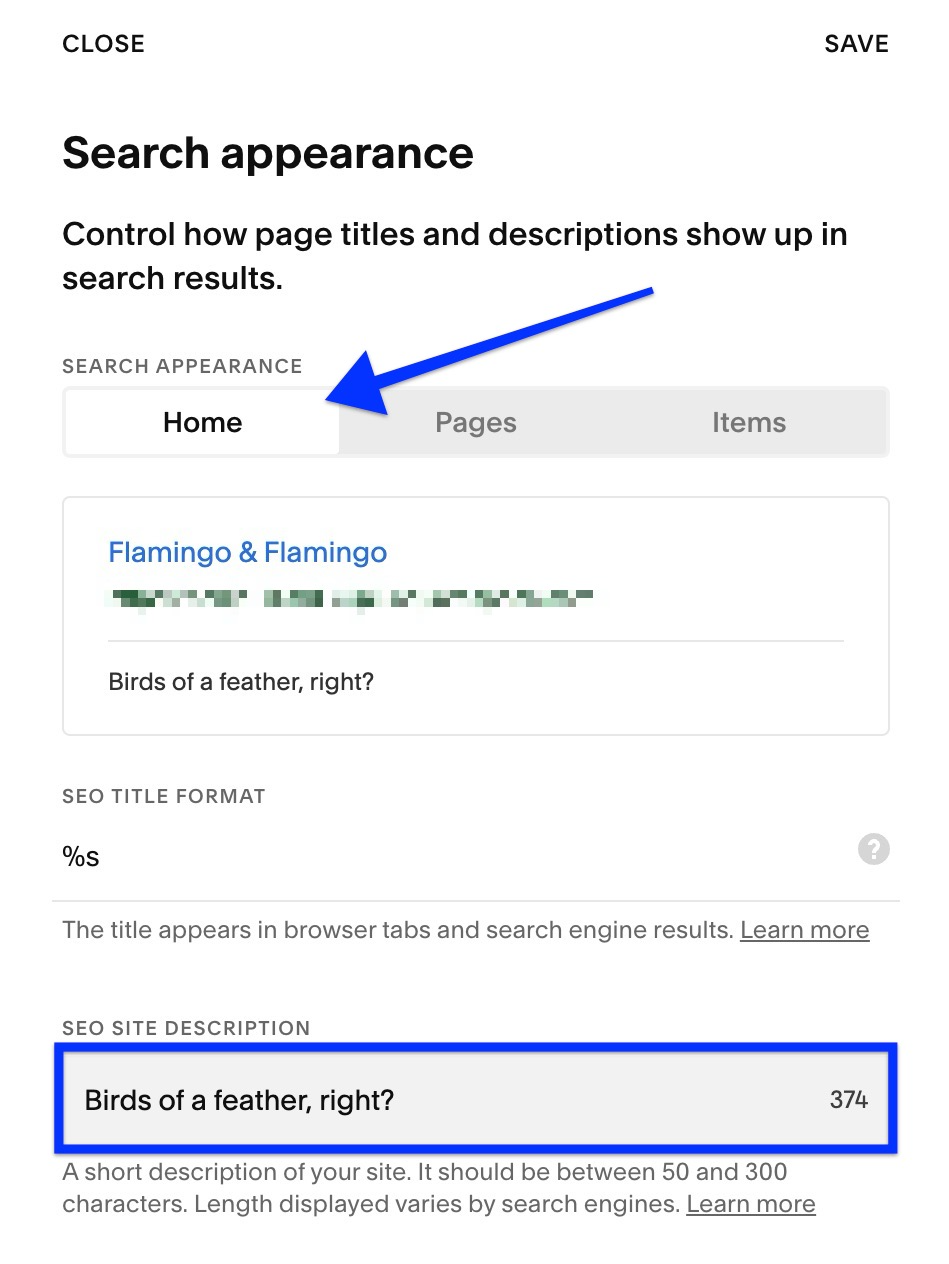
Squarespace creates each slug from the page title, and you can edit it. Product URLs always include /p/ before the slug, and blog posts always sit under the blog page's slug. Multilingual sites rely on the third-party Weglot integration, which adds hreflang tags on 7.1 sites; without it, teams must duplicate pages by hand.
Squarespace pros:
- Nothing to install for the baseline: Sitemap, canonicals, HTTPS, and six schema types are available out of the box. This means small teams avoid the plugin upkeep WordPress requires and the theme requirements Shopify imposes.
- Metadata where editors already work: The per-page SEO tab sits in the Pages panel. On Squarespace 7.1 sites, the SEO report can also generate descriptions, which cuts the time a two-person team spends filling in metadata across a site.
Squarespace cons:
- A changed slug strands the old URL: Squarespace does not create a 301 when you edit a slug; you set each redirect by hand. A content refresh that renames twenty pages means twenty manual entries.
- Page-level controls are the ceiling: The robots.txt is shared and uneditable, the sitemap is fixed, and schema can't be edited or extended without code injection. A marketing team hits a wall on FAQ or How-to markup and on crawl directives that Wix exposes in its dashboard.
What users say about Squarespace
Comments focus on the point where the all-inclusive setup reaches its technical ceiling:
- All-inclusive baseline: A reviewer listed built-in SEO as one reason the all-in-one package works for a small business.
- Search visibility assists: Some users described the SEO and AI-visibility tools as helpful for bringing in customers.
- Code injection is the only escape hatch: A reviewer flagged missing advanced controls and notes that anything further depends on code injection, which non-technical users cannot safely do.
- Behind the competition on depth: A user rated the SEO tooling as less advanced than WordPress or Shopify, and a community discussion left open whether owning a domain through the platform creates SEO risk.
Sources checked September 2026.
Squarespace pricing
Squarespace offers a 14-day free trial and no permanent free tier. The Basic plan is $25 per month (or $19 per month billed annually), and the Core plan is $39 (or $29 per month billed annually). The Plus plan is $65 (or $49 per month billed annually), and the Advanced plan is $139 (or $99 per month billed annually).
Every annual plan includes one custom domain free for the first year, which renews afterward at the standard price for that domain ending.
Pricing from Squarespace's pricing page. Verified September 2026.
Best for: Small marketing teams building a design-led brochure, portfolio, or service site with a modest blog. It fits best when URLs are set once at launch and structured data needs stay within the six built-in types.
7. Drupal
Modules supply Drupal's SEO controls: Metatag for meta tags, Pathauto for automatic URL aliases by content type, Schema.org Metatag for JSON-LD, Simple XML Sitemap for multilingual sitemaps with hreflang, and Redirect for redirect management.
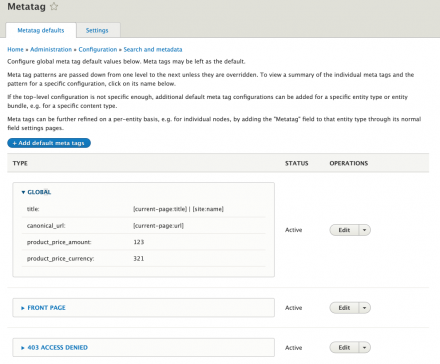
Drupal CMS bundles several of these in an SEO Tools add-on with a checklist and real-time content analysis.
This platform requires separate hosting, and that choice shapes page speed and uptime. Acquia, the largest contributor to Drupal core, sells a managed platform built for it.
Recent core releases also help with Core Web Vitals. Drupal 11.4 (released in July 2026) cut database queries and added Brotli compression for CSS and JavaScript, so pages load faster on every site that upgrades.
Drupal pros:
- JSON-LD and hreflang without paid add-ons: Schema.org Metatag outputs structured data per content type, and Simple XML Sitemap writes hreflang into the sitemap itself. A multilingual site gets both from free modules, with no locale cap.
- Speed work happens in core: Drupal 11.3 reduced cold-cache SQL queries by 31% and moved BigPipe to HTMX to cut JavaScript weight; every site inherits these gains on upgrade instead of buying them through a caching plugin.
Drupal cons:
- Major upgrades break contributed modules: Version jumps have left contributed modules unusable until maintainers caught up, and Drupal 7 reached end of life on January 5, 2025. Teams on older sites may face a rebuild.
- Hosting and CDN require a separate contract: Drupal ships without either service. Page speed and uptime become a second contract with Acquia or another host, a cost and a coordination point the managed builders fold into one bill.
What users say about Drupal
Feedback pairs extensive customization with a difficult editing experience and substantial staffing costs:
- Stable headless: A community commenter called Drupal dependable as a headless back end and open to any customization, free of the paid-plugin dependence WordPress carries.
- Deep control without custom code: Reviewers say Drupal lets you customize in ways other platforms cannot match without writing code, and describe it as flexible and controllable.
- Hostile admin for editors: Some reviewers described the admin panel as cluttered and confusing.
- The expensive part is the person: Community feedback noted that the highest cost is paying whoever sets up, maintains, and documents the site, and reviewers report continual upgrades destabilizing theirs.
Sources checked September 2026.
Drupal pricing
Drupal itself is free to download. Acquia Cloud Platform's self-serve tiers are the Personal plan ( 296 per month). The Enterprise and Site Factory tiers go through an account manager, with pricing based on the number of sites, traffic volume, storage, and support level.
As of July 1, 2026, Acquia offers a 14-day free trial with no forms and no sales calls. Implementation partner costs are separate.
Pricing from Acquia's Cloud Platform page. Verified September 2026.
Best for: Marketing teams at large organizations with an in-house Drupal developer or a Drupal agency, running multilingual or multi-site content. SEO module configuration works best when treated as a project with an owner, with editors trained on the admin before launch.
8. Contentful
APIs, including GraphQL, deliver content from Contentful to a front end that engineers build in Next.js, Nuxt, Astro, or a similar framework.
If the front end renders on the client, Google receives a near-empty shell until a slower second rendering pass.
Content publishes to web, apps, and other channels from one source. A Model Context Protocol (MCP) server gives AI agents API-level access to entries, and AI Actions, which rewrite or translate many entries in one pass, are a paid add-on priced separately from the core plans.
Contentful pros:
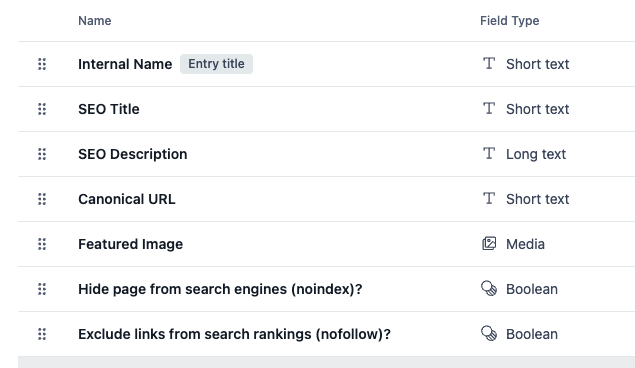
- One metadata structure for editors: Engineers can add SEO title and description fields, or a reusable SEO Metadata content type, to each content type, so editors fill in the same fields on every entry.
- Image delivery tuned at the edge: The Images API resizes, converts formats, and compresses on request over a global CDN, so hero images that drive Largest Contentful Paint ship at the right size without an image-processing plugin.
Contentful cons:
- Every SEO change is a deploy: Because Contentful renders no HTML, a canonical fix, a new redirect, or a sitemap change is an engineering ticket in the front end. A marketing team without a dedicated developer waits on fixes that Wix or HubSpot editors make themselves.
- Locales run out on lower plans: The two lower plans cap locales at two and three. An hreflang site serving four or more languages needs a custom contract, while HubSpot and Drupal cover more languages at lower cost.
What users say about Contentful
Most users emphasize editorial independence after setup, alongside pricing gaps and interface limits:
- Content ships without a release: A reviewer credited the editor for updating text, images, and assets without waiting on a development deploy.
- Structure and reuse: Another reviewer praised the freedom to define content types, reuse content across channels, and keep presentation separate. The reviewer adds that SEO elements are easy to manage once configured.
- No middle tier: Users cited rising costs and the absence of smaller plans, and an October 2025 review reports web UI timeouts when searching entries.
- Rigid outside marketing pages: The platform is too rigid for non-marketing pages, and other reviewers describe a steeper learning curve than WordPress.
Sources checked September 2026.
Contentful pricing
The Free plan is $0 with no expiration and includes 10 users, two roles, two locales, 100,000 API calls per month, and 50 GB of CDN bandwidth per month (all as hard caps with no overage billing).
The Lite plan is $300 per month with 20 users, three roles, three locales, 1 million API calls, and 100 GB of bandwidth; overages cost $5 per additional 1,000,000 API calls and $0.15 per GB.
The Enterprise plan is custom-priced. Custom roles require a plan above Lite, and Contentful Studio, Personalization, and AI Actions are priced separately from the core plan. Billing is per organization.
Pricing from Contentful's pricing page. Verified September 2026.
Best for: Marketing teams that rely on in-house engineers and publish the same product and campaign content to a website, a mobile app, and other channels. Technical SEO sits with the developers who own the front end and its deployment pipeline.
How to choose the right CMS for SEO
Selecting an SEO-friendly CMS comes down to matching your content structure, workflow, and internal technical capabilities with the platform that best supports them.
Answer these in order:
- How many pages and languages will the site run at launch? Small single-language sites are a good fit on Squarespace or Wix, while HubSpot's entry option has a defined website-page cap. For multi-language sites, look at Webflow with Localize, Drupal, Shopify Markets, or HubSpot's higher tiers. Steer those sites away from Squarespace, where hreflang depends on a third-party integration, and from Contentful's lower-plan locale caps.
- What are your most important organic traffic pages? If product and collection pages account for the traffic, Shopify is the stronger fit, and its Markets feature also covers multi-country hreflang. A blog or resource library is better suited to Webflow, WordPress, or HubSpot Content Hub, depending on whether you want visual control of every template, plugin depth, or CRM reporting.
- What will you pay to keep pages fast? Webflow, Wix, Squarespace, HubSpot Content Hub, and Shopify include managed hosting, so speed depends on their editor output and your app count. WordPress and Drupal move speed to your host, caching layer, and plugin discipline, so budget for those. Contentful moves it to the framework and host your engineers pick, so budget their hours.
Start migration planning before platform selection. Constrained URL structures increase the number of redirects a future move will require.
Flatten dev tickets and streamline your SEO with Webflow
Transitioning your website to Webflow gives marketing and SEO teams direct control over technical settings, publishing speed, and page optimization. When the answer to most questions on your current CMS is "a developer," Webflow moves that work to the marketers who publish the pages.
Start a Webflow site and test the SEO settings on a staging site before you pick a paid plan.

Unlock growth with SEO
Join Webflow and leading growth agency Graphite as they discuss actionable insights for scaling and achieving growth with SEO
Frequently asked questions
How much should you budget for an SEO-friendly CMS?
Published entry prices in this comparison run from $0 to $2,500 per month, with enterprise contracts extending beyond that public range. Your total depends on hosting, user seats, commerce fees, implementation work, and whether redirects, audits, schema, or AI-answer tracking require a higher tier or separate product. Build your budget around the controls and staffing you need, not the software license alone.
Which CMS is the most SEO-friendly for your team?
Test each finalist with three changes your team makes often, such as publishing a new template, retiring a URL, and correcting metadata across several pages. Record who can complete each change, how long it takes, and whether the change requires code or a deployment. The CMS with the lowest repeatable operating burden is usually the best fit for your team.
How do you switch CMS without losing rankings?
Start by inventorying every live URL with indexing value, then build a one-to-one 301 redirect map from each old URL to its new one; Google's documentation on redirects recommends permanent server-side 301 or 308 redirects for any URL change. Verify both the old and new properties in Google Search Console before you cut over, and use the Change of Address tool if the domain itself is moving. Check that every title, description, canonical, and noindex setting carries over, then resubmit the XML sitemap once the new site is live. Watch Search Console for crawl errors in the following weeks.
Do AI answers make SEO irrelevant for you?
Google's generative AI guidance says SEO best practices still apply because AI Overviews and AI Mode use the core Search ranking systems. Your page must be indexed and eligible to appear with a snippet before it can qualify as a supporting link. For ChatGPT search citations, allow OAI-SearchBot if you want OpenAI to find the page; GPTBot controls training access instead. Treat llms.txt as a community proposal because Google's AI documentation does not list it as a factor.
Which SEO ranking factors can your CMS affect?
Google's How Search Works identifies content relevance, quality and helpfulness, and page usability. Your CMS affects usability through hosting, theme weight, markup, and plugin or app load. You still control relevance and helpfulness through the information you publish and how well it answers the searcher's need.
Can I improve a CMS for SEO without technical expertise?
Yes, if you audit the editor before committing to the platform. Confirm that you can change titles, descriptions, slugs, redirects, canonicals, noindex settings, and image alt text on a test site, then publish a page and inspect the rendered output. Ask for technical help when a required control exists only in a theme file, module configuration, custom code field, or front-end deployment.
Yes, if you audit the editor before committing to the platform. Confirm that you can change titles, descriptions, slugs, redirects, canonicals, noindex settings, and image alt text on a test site, then publish a page and inspect the rendered output. Ask for technical help when a required control exists only in a theme file, module configuration, custom code field, or front-end deployment.

Choose the right CMS for a scaling enterprise
Discover how the right CMS can allow teams to efficiently scale rich, complex content – all without writing code.