










The ROI you can expect from a CMS migration relies on how well you execute the process as well as the platform you’re moving to.
Migrating to a new content management system (CMS) is a complex task, so it takes plenty of financial and operational planning. Yet many large organizations find this process well worth the investment. Modernizing your enterprise CMS can be one of the most impactful ways to improve both your company’s bottom line and its operational efficiency.
Just as with any high-impact project, though, stakeholders will want a clear idea of the ROI for an enterprise CMS migration. This article will help you calculate that ROI, and explain the expected benefits in terms everyone in the decision chain can understand.
How can you measure ROI for a CMS migration?
When you’re calculating the ROI for an enterprise CMS migration, you’re measuring the expected value of moving to a new platform. Often, this means leaving behind an outdated or monolithic CMS, and adopting a modern solution with features like content workflow automation and website governance guardrails.
Those tools can offer quantifiable improvements in areas like operational speed and development costs. And they can benefit broader business goals, such as quick campaign launches and strong conversion opportunities.
Baseline metrics to establish before migration
To break down the ROI for decision makers, you’ll compare the current cost of your CMS platform to the expected cost of the new one. You’ll also factor in the expense of the migration itself, and convert the result into a percentage:
(total gains from migration – total migration costs) / total migration costs x 100 = ROI%
Migration costs aren’t typically hard to estimate, especially if you opt for an enterprise-focused platform that can lay out the expected experience and timeline for you. ‘Total gains from migration’ is harder to quantify, since there are several factors involved and they don’t all come with a clear dollar amount attached.
So you’ll need to bring together a lot of information to create a reasonably accurate ‘before’ picture. This analysis should focus on what your current tech stack lacks, so you can gauge the value of filling in those gaps with the new CMS.
Here are some of the major aspects to consider:
- On-page metrics: Website KPIs like page speeds and Core Web Vitals that show how well the website performs, and how effective it is at attracting and engaging visitors.
- Developer productivity: A breakdown of how many hours developers spend on routine requests every week, such as data integration and new content updates.
- Time to publish: The average amount of time it takes for a typical content update or marketing campaign to go from idea to launch.
- Organic traffic and rankings: Search engine optimization (SEO) and answer engine optimization (AEO) analytics for key pages, including their average ranks and impacts on conversions.
- Workflow efficiency: The number of stakeholders involved in every website project and which departments they come from.
In addition, keep an eye out for anything about your current CMS setup that absorbs significantly more time and/or resources than it should. Common issues when using legacy systems include technical debt, integration complexity, redirect mapping, and inefficient handoffs.

Choose the right CMS for a scaling enterprise
Discover how the right CMS can allow teams to efficiently scale rich, complex content – all without writing code.
How long does it take to see ROI from a CMS migration?
An enterprise CMS migration is no small project, you aren’t likely to see big improvements or bottom-line savings immediately. Even when the migration goes quickly, it takes time for teams to learn and master the new systems. That process tends to happen in three main stages.
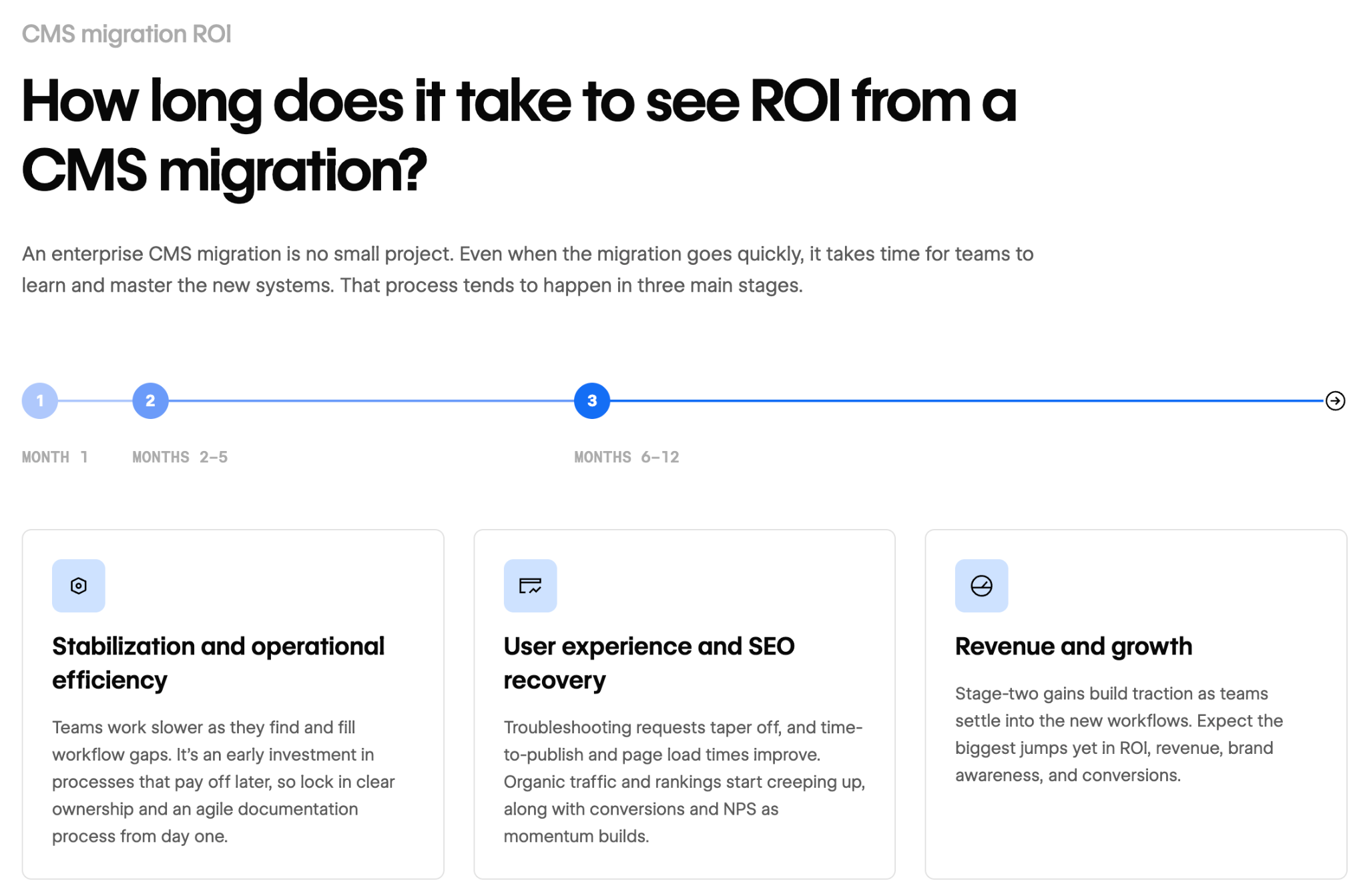
Month 1: Stabilization and operational efficiency
In the first month, teams work slower and spend time discovering and filling holes in their workflows. This early investment helps teams build processes to make the most of the new CMS’s capabilities over the long term. It can also be a turbulent time, though, so put clear ownership and an agile documentation process in place first.
Months 2–5: User experience and SEO recovery
By the second or third month, you should start seeing small decreases in troubleshooting requests, as well as key metrics like time to publish and page loading times. Organic traffic may also start creeping up soon, along with the average rankings for important content pieces. You might even see an uptick in conversions and net promoter scores as you start to build momentum with more users.
Months 6–12: Revenue and growth
Once you reach the sixth month, the positive trends you saw in the second stage should build traction as marketers and developers grow accustomed to the new workflows. This is when you may start to see significant improvements to ROI, revenue, brand awareness, and conversions.
What are the expected improvements from an enterprise CMS migration?
During the three stages of an enterprise CMS migration, you’ll check in on KPIs to measure progress and make adjustments. While the specific metrics you track should reflect your industry and business goals, most fall into one of three categories.
Those categories are:
- Performance. Modern CMS platforms can help your website’s pages load faster and with fewer errors. These changes should be evident in your Core Web Vitals, and they’ll also show up in your measurements of developer productivity. Better performance can positively impact both user experience and search rankings.
- Efficiency. With faster manual and automated workflows, teams can find solutions quickly and course-correct when needed. Time-to-publish metrics and stakeholder involvement should decrease as teams gain confidence with the new CMS. And developer productivity should increase as the team becomes accustomed to a more streamlined tech stack.
- Business outcomes. Improved website metrics and better team efficiency combine to create desirable outcomes, enhancing your migration ROI. You may see quicker campaign launches, more organic traffic, higher click-through rates, and/or increased conversions.
How Webflow Enterprise can improve your migration ROI
Webflow Enterprise offers control at scale and fast, automated workflows. Here are just a few examples of Webflow features that can significantly impact your ROI calculations:
- Collections store structured content based on custom-defined structures, letting you organize and publish from a centralized database.
- A composable CMS lets you create reusable layouts and other components, giving teams a quick way to build consistent, branded content.
- The visual canvas empowers teams to build and edit pages visually, seeing content just how it will appear on the front end.
- Autogeneration creates titles, slugs, and metadata automatically, eliminating tedious rote tasks and improving SEO.
- Bulk imports happen quickly through CSV files or the Webflow API, helping your teams automatically upload existing CMS content.
Many of these features also reduce your company’s reliance on developers, since you don’t need to involve them in every content update or new campaign. Instead, devs can focus on architecture improvements that improve site performance and your overall tech stack. Meanwhile, marketers can spend time growing your brand and running efficient campaigns that drive results.
Plan a cost-effective CMS migration with Webflow
The ROI for an enterprise content management system migration depends on many factors, starting with the foundational numbers like migration costs and development time. You’ll also need to consider outcome-oriented metrics, such as team efficiency and governance impacts. So know what KPIs matter most to an acceptable ROI, and track the results of your migration plan carefully over at least 12 months to gauge the full impact.
If you’re still deciding what CMS to migrate to, Webflow is an agentic web marketing platform built for modern content at scale. Webflow’s composable CMS offers tools for creating content visually, automating workflows, improving SEO and AEO, and tracking key website analytics.
Build an efficient, scalable content engine by migrating to Webflow Enterprise.

Build with Webflow
Break free from the constraints of traditional platforms. Migrate your site to visual-first platform that combines design flexibility with powerful CMS capabilities.


















