






Twitter share buttons
Dynamically embed Twitter share buttons.

With dynamic embeds, you can create custom Twitter share links for your content. In this example, we will create a Twitter link that will pull information from fields that we’ve created in a Blog collection.
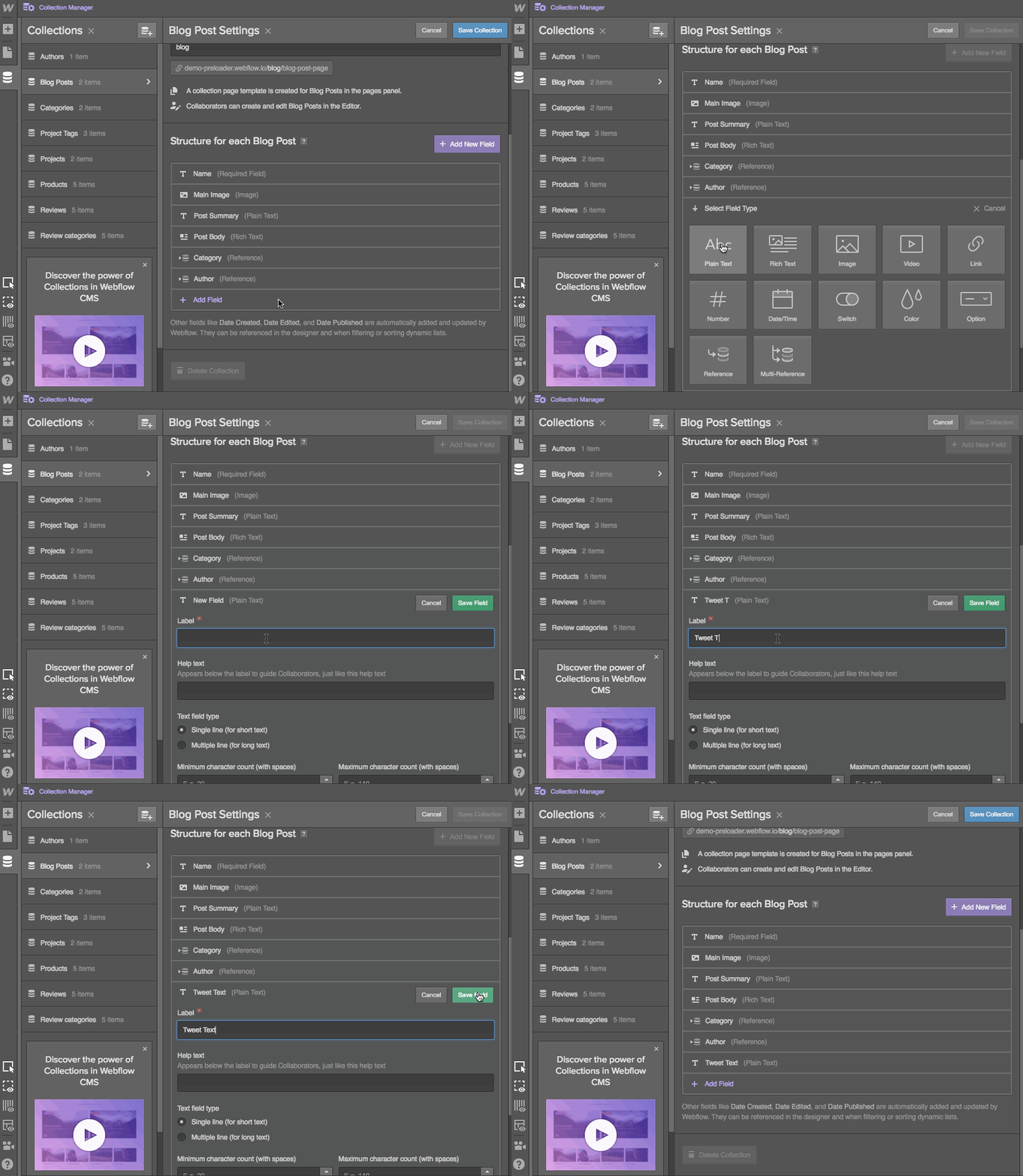
- Create a Text Field for the Tweet Text
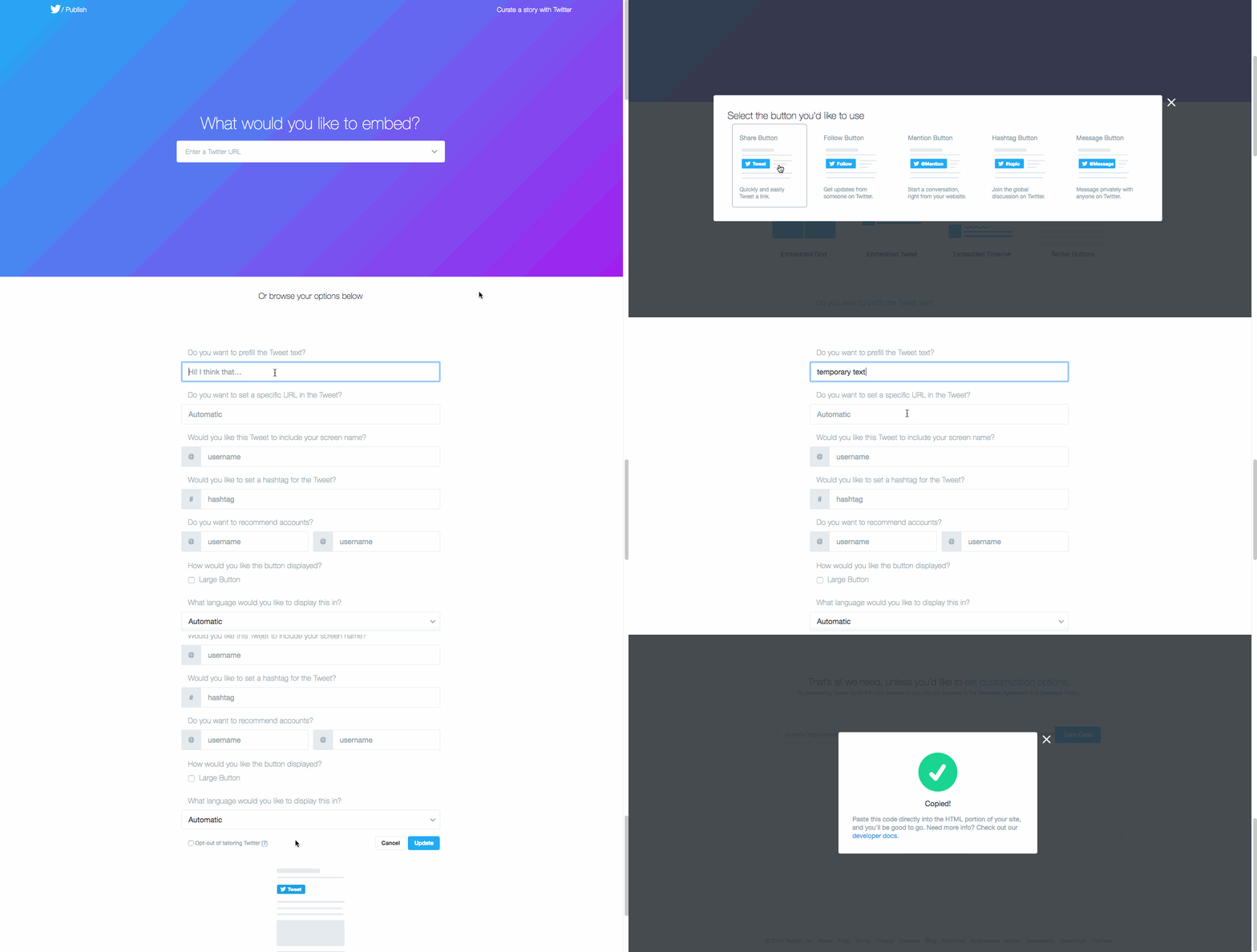
- Get the Tweet button embed from Twitter
- Paste the Twitter code in the Embed and add your dynamic tweet text
Create a Text Field for the Tweet Text
You can either create a new plain text field for your tweet text or use an existing text field in your Collection. You might want to set a character count limit, given Twitter's 140-character restriction.
Get the Tweet button embed from Twitter
Next, you’ll need to create the Twitter embed text using Twitter’s Share Button generator. Make sure that you add something (anything) to the prefill text field before you copy the code. You'll replace this text with a dynamic field in the last step.
Paste the Twitter code in the Embed and add your dynamic tweet text
Dynamic embeds only work with dynamic content, so you need a Collection Page or a Collection List.
In this example, we’ll use an Embed Component on the Collection Page for our Blog Post collection.
Just drag the Embed component from the Add Panel onto your site, and paste the full code from the Twitter Button generator into the Embed. Then find your temporary text in the code and replace it with the dynamic field you want as your real tweet text.

Done!
Now when we go to our published Blog Post page, and navigate to where we added our Twitter Button, we can initiate a tweet that is pulling information from both our page (URL) and Twitter Text Collection Field.

Share
Frequently asked questions
Description
This integration page is provided for informational and convenience purposes only.

Connect Pinterest with Webflow to turn site content into Pins and show Pinterest boards on your pages.

Connect LinkedIn, a professional networking and advertising platform, with Webflow to install the Insight Tag for ad tracking, embed posts and follow buttons, and auto-publish CMS content to your company page.


Flockler social media feed plugin

Connect Facebook to Webflow to track ad conversions, sync product catalogs, and add social features through a Marketplace app, native site settings, or direct API integration.

EmbedSocial
Connect EmbedSocial with Webflow to add live social media feeds, review widgets, and shoppable UGC galleries that update automatically without republishing.

embedstories
Connect EmbedStories with Webflow to display auto-syncing Instagram Stories on any page of your site.

Elfsight YouTube Video Gallery
Connect Elfsight YouTube Video Gallery with Webflow to show a whole YouTube channel or playlist as one self-refreshing gallery, instead of embedding each video by hand.
embedalbum
Related integrations
Get started for free
Try Webflow for as long as you like with our free Starter plan. Purchase a paid Site plan to publish, host, and unlock additional features.
