






Happyning Events
Connect Happyning Events with Webflow to publish Riviera event listings and capture guest inquiries on your own site.

Webflow has no built-in event registration or ticket checkout. A site can publish a good looking page for a retreat or a summer party, but nothing in Webflow holds the guest list or keeps the dates in step with whoever actually runs the event. Teams that promote someone else's gatherings usually end up hand building a fresh page per event, then chasing replies through scattered inbox threads.
Happyning Luxury Events is an event and hospitality company on the French Riviera rather than a software product, which shapes every method below. Happyning publishes no Webflow app and no public API, so the connection runs on features you already have: you build the listing and inquiry layer on your own site and send guests to happyningevent.com to reserve. What you get is a branded events site that stays current without any vendor tooling.
This setup suits agencies and marketers promoting Happyning gatherings such as the Villa Oxygene retreats or weddings, and hospitality teams that want structured event listings with inquiries landing in their own inbox. Freelance builders looking after a venue's web presence can ship the same thing without waiting on the vendor. If you need card payment at the moment of registration, plan for Webflow Ecommerce or a dedicated payments tool, because Happyning bills by invoice after booking.
How to integrate Happyning Events with Webflow
What is Happyning Events? Happyning Events, which trades as Happyning Luxury Events, is an event and hospitality company based in Cannes on the French Riviera. It runs Villa Oxygene, an architect-designed private estate with three terraces and a large pool above the Mediterranean. The business covers weddings plus corporate and private events, with add-ons such as a personal concierge, private chefs, and chauffeurs. Its own site runs on WordPress and takes reservations through a form rather than a checkout.
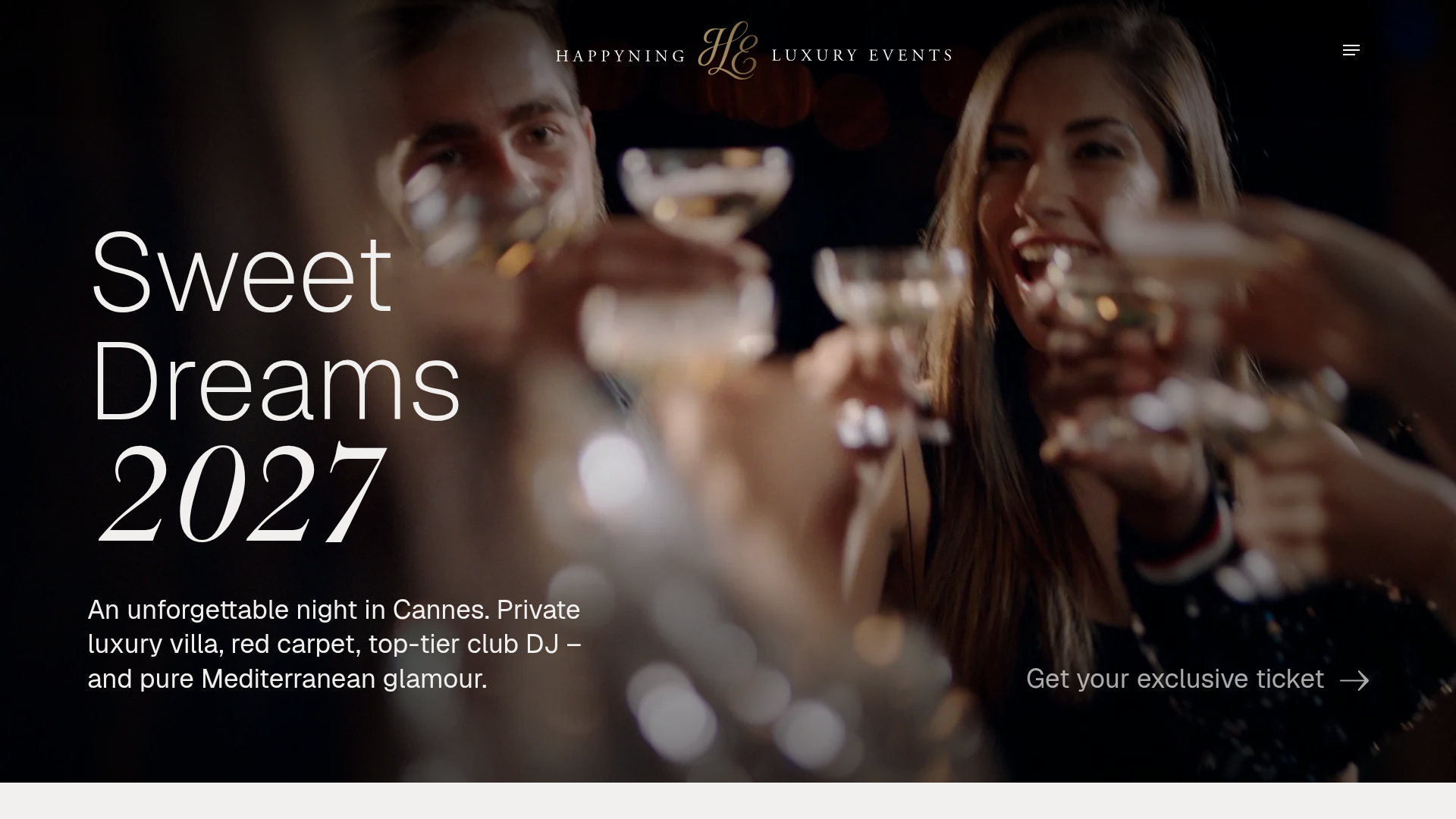
An agency promoting Villa Oxygene retreats builds the listing and inquiry layer in Webflow, then points guests at happyningevent.com to reserve. A hospitality team can do the same for the corporate events and weddings it resells. Because Happyning publishes no app and no public API, every method below runs on the Webflow side of the connection.
The Happyning Events-Webflow integration supports four approaches:
- Webflow CMS Collections: Publish each event as a structured item so one template page renders your whole Happyning schedule.
- Direct links and Code Embed: Point buttons at happyningevent.com today, and accept a vendor snippet later if Happyning ever publishes one.
- Webflow forms: Capture guest inquiries on your own pages and route them by email or webhook into the systems your team already runs.
- The Webflow Data API: Create and retire event items programmatically and pull submissions into your stack, which takes server-side work.
Most builds combine the first three and reach for the API only once you publish enough events that manual upkeep gets tedious.
Publish Happyning event listings with CMS Collections
Happyning lists its gatherings on its own site, so mirror them on yours with a Collection and point each item at happyningevent.com. Each event becomes a structured record instead of a page someone builds by hand, which starts paying off the moment you track more than one date. Set up the fields in Webflow CMS and render them with a Collection List.
To set up event listings:
- Create a Collection with fields for event name, date, venue, description, and a link field for the Happyning page.
- Add a Collection List to your events page and bind the Collection fields to it.
- Set a link block's destination to that link field so visitors land on happyningevent.com.
- Publish the site.
Update one item when a date moves and every listing page reflects it after the next publish. Booking still happens on Happyning's side: the Happy Retreat 2026 page, for example, runs September 16 to 20, 2026 and is settled by invoice after booking, so your Collection is a promotion and routing layer rather than a source of truth for availability. If you would rather not build the grid yourself, an event calendar app can render the schedule instead.
Add Happyning links and Code Embed elements
A hyperlink to happyningevent.com connects the two sites on any plan and needs no vendor cooperation, which is why most Happyning builds stop here. Happyning publishes no embed snippet today. If one appears, the Code Embed element takes up to 50,000 characters of HTML, CSS in <style> tags, and JavaScript in <script> tags, and it needs a paid Workspace plan or an active Site plan.
To connect a page to Happyning:
- Add a link block or button and point it at the event's page on happyningevent.com.
- If Happyning supplies a snippet, drag a Code Embed element onto the page and paste the code in.
- Publish the site.
Embedded code shows in preview but does not go live until you publish, and Code Embed will not run server-side languages such as PHP or Python. Site-wide scripts belong in Site settings > Custom code instead; see head and body tags.
Route Happyning booking inquiries with Webflow forms
Happyning takes reservations through a modal form on its own site, and you can collect the same details on your Webflow site so the inquiry reaches you first. Its buttons read "Get your exclusive ticket" or "Book Your Happy Retreat", and the form asks for a combined first and last name, an email address, a phone number with country code, and a free text message, under a submit button labeled "Book your exclusive spot". Name and email are the only required fields. The forms overview covers each routing option, including webhooks that post submission data to an endpoint you control.
To route submissions to an external endpoint:
- Select the form on your page and open the Settings panel on the right.
- Click the add icon next to Send to and choose Webhook.
- Enter the destination URL where submissions should post.
Add the one field Happyning's own form leaves out: which event the guest means. A custom action URL turns off Webflow's built-in form submission notifications, so pick a single handling path and stay on it, and remember that submission limits depend on your Site plan.
Build with the Webflow Data API
The API covers your half of the workflow and only your half, because Happyning exposes no endpoint to call. You can create and retire event items programmatically and pull inquiry data into your own systems, which needs server-side development. Use Site, Workspace, or OAuth tokens as Bearer tokens in the Authorization header.
Four Webflow-side interfaces cover an events build:
- Collections: The Webflow API creates the events Collection and its fields through the collections endpoint.
- Items: Live item endpoints publish, update, and unpublish individual events without anyone opening Webflow.
- Form submissions: The submissions endpoint pulls guest inquiries into your CRM or warehouse on whatever schedule you choose.
- Webhooks: A webhook registration pushes each submission to your server as it arrives, with a documented limit of 75 registrations per trigger type per site.
Anything that needs Happyning's own data has no API path, so route it through the Happyning team by email. If you would rather not write the scripts yourself, the Webflow MCP server hands an AI coding agent the same Webflow side, including creating Collections with their fields and publishing or unpublishing items in bulk.
Manage event items programmatically
Because Happyning publishes no feed to sync from, a script writes the details your team collects straight into your Collection. Live item endpoints let it publish and retire events on a schedule, and each call authenticates with a Bearer token carrying the cms:write scope.
Use the live item endpoints for event maintenance:
- Create a live event with
POST /v2/collections/{collection_id}/items/liveand sendfieldDatawith at leastnameandslug. - Update details, such as a date change, with
PATCH /v2/collections/{collection_id}/items/{item_id}/live. - Unpublish an event once its date passes with
DELETE /v2/collections/{collection_id}/items/{item_id}/live, which setsisDraftto true rather than deleting the record.
The bulk items endpoint creates up to 100 items per request, which helps when you load a full season of Happyning dates at once.
Route inquiries with webhooks
Registering webhooks through the API pays off when you run several venue sites or keep webhook setup in version control; the form's Send to panel does the same job one site at a time. Webhook creation needs a token with the sites:write scope.
To set up submission routing:
- Register a webhook with
POST /v2/sites/{site_id}/webhooksand settriggerTypetoform_submission. - Parse the payload, which includes
name,siteId,dataas key-value pairs,submittedAt, andformId. - Forward each inquiry to your CRM or email pipeline, then confirm the booking with the Happyning team.
That last step is the honest constraint here: confirmation happens in a human conversation, because Happyning has no booking API to write to.
What you can build with the Happyning Events Webflow integration
With the listing and inquiry layer on your side, you can promote Riviera events and field guest interest without hand building a page for every date.
Four builds cover most of what teams ship on this pairing:
- Event listing site: Publish a CMS-driven schedule of Happyning gatherings, each item carrying its dates, description, and a booking link out to happyningevent.com.
- Venue landing page: Build a Villa Oxygene page covering the estate's terraces and Mediterranean views, paired with an inquiry form for weddings and corporate bookings.
- Inquiry pipeline: Collect name, email, phone number, and event choice in a Webflow form that mirrors Happyning's own reservation fields, with webhook routing into your CRM.
- Auto-expiring event calendar: Run a scheduled script that unpublishes each event once its date passes, so only upcoming dates such as Sweet Dreams 2027 stay live.
Follow our Webflow CMS API guide to script that listing layer end to end.
Once the events Collection exists, connect the Webflow MCP server to your AI coding agent and let it draft new event items and publish date changes from a prompt.
Frequently asked questions
No. Happyning publishes no Webflow Marketplace app, so nothing exists to install. Build the connection yourself with CMS Collections and Webflow forms, plus links out to happyningevent.com. For anything that needs the vendor's side, contact the Happyning team directly.
Yes, with a scheduled script. Call
DELETE /v2/collections/{collection_id}/items/{item_id}/liveonce an event date passes and only upcoming listings stay live. That call setsisDraftto true rather than deleting the item, and it uses the same Bearer token as your other CMS calls. Without a script, you unpublish by hand.No. Happyning documents no embed code or widget snippet on its site. If it supplies one later, paste it into a Code Embed element, which accepts HTML plus CSS and JavaScript in their own tags but will not run PHP or Python. Code Embed needs a paid Workspace plan or an active Site plan.
Mirror Happyning's own reservation form: full name, email address, phone number with country code, and a free text message. Name and email are the only fields it requires. Add an event field as well, so you know which gathering the guest means.
Contact Happyning through the reservation form on happyningevent.com. No public API or developer documentation exists on that domain, so a deeper connection has to start as a conversation. Meanwhile, build out the Webflow side with Collections and the Data API.
Description
Happyning Events has no Webflow app or public API, so the integration runs on your side. Publish event listings with CMS Collections and route guest inquiries through Webflow forms, with booking links out to happyningevent.com.
This integration page is provided for informational and convenience purposes only.

Events Management Website With Booking & Appointment Feature
Recreate the Events Booking showcase site in Webflow with a single-page layout, anchor navigation, service cards, and a consultation request form, plus when to add a real scheduling tool.

Luma
Connect Luma, an event hosting and ticketing platform, with Webflow to embed registration buttons, display calendar widgets, and sync event data to CMS collections automatically.

Zoom
Connect Zoom with Webflow to register webinar attendees from site forms, embed Zoom Scheduler booking pages, and publish sessions and recordings to the CMS.
Ticket Tailor
Connect Ticket Tailor with Webflow to sell tickets directly on your site, with no redirect to an external checkout.
LiveStorm
Connect LiveStorm with Webflow to automate registrations, embed webinar rooms, and sync attendee data.
Humanitix
Connect Humanitix, a B-Corp certified event ticketing platform that donates booking fee profits to charity, with Webflow to sell tickets through embedded widgets on your site.
Luma
Connect Luma, an event hosting and ticketing platform, with Webflow to embed registration buttons, display calendar widgets, and sync event data to CMS collections automatically.
Eventbrite
Connect Eventbrite, an event management and ticketing platform, with Webflow to embed on-site checkout, display event calendars, and sync event data to CMS collections automatically.

Enrollsy
Connect Enrollsy with Webflow to take program enrollments and payments on your own pages through embedded forms and program listings.
Related integrations
Get started for free
Try Webflow for as long as you like with our free Starter plan. Purchase a paid Site plan to publish, host, and unlock additional features.
