



Your agent can now create Webflow components from a screenshot, update over 50 design tokens in one conversation, and query your site analytics in plain language. Here's what shipped in MCP 2.0.
Reworking design tokens while building out new components can be a solid day of work because there are so many things to consider. But let me tell you, my Cursor agent just did both in a couple of conversations.
Webflow has always been built for the people who design and build on the web. With the new MCP 2.0 release, your AI agent can finally step into your shoes. It can build components with props and variants, wire them to your CMS, and your Webflow site can now serve conventions that are tailored for your new AI-first workflows. Forms, assets, SEO schemas, custom code, even your traffic analytics are now accessible in your agent conversations.
Webflow MCP 2.0 is a pretty big release! Let me share my highlights with you in this post.
And if you'd rather watch than read, head over to YouTube.
But first: no more bridge app!
Quick note before we jump into my favorite new features.
If you used the MCP server earlier this year, you might remember that you had to keep a browser tab with the running bridge app open so your agent could reach and interact with your site. With the new MCP server release, that requirement is gone for most actions, and we're working on making every tool and workflow work without the bridge app.
Only when your agent needs access to the current canvas, or you task it with something like "update the page I'm on," will it let you know about the bridge app and hand you instructions on how to enable it.
With that out of the way, let's get to the good stuff!
Hand off your design work
To scale your Webflow sites you should invest time in a properly defined design system. The design system's foundation is based on CSS variables. And you might have guessed it, MCP 2.0 gives your agent full access to them. It can read your variable collections, create and reorder variables, and add new variable modes. That means an agent can reason about the actual tokens driving your site instead of guessing hardcoded values.
In my example, I set up a new Webflow site. Initially, I was quite happy with its look and feel but after sleeping on it, the colors felt out of place and simply "too much". Adjusting all the colors would have been quite a bit of work. I also wasn't sure what colors would be a better fit.
So, instead of editing tokens one at a time to find the right look, I handed the problem to the Cursor agent.
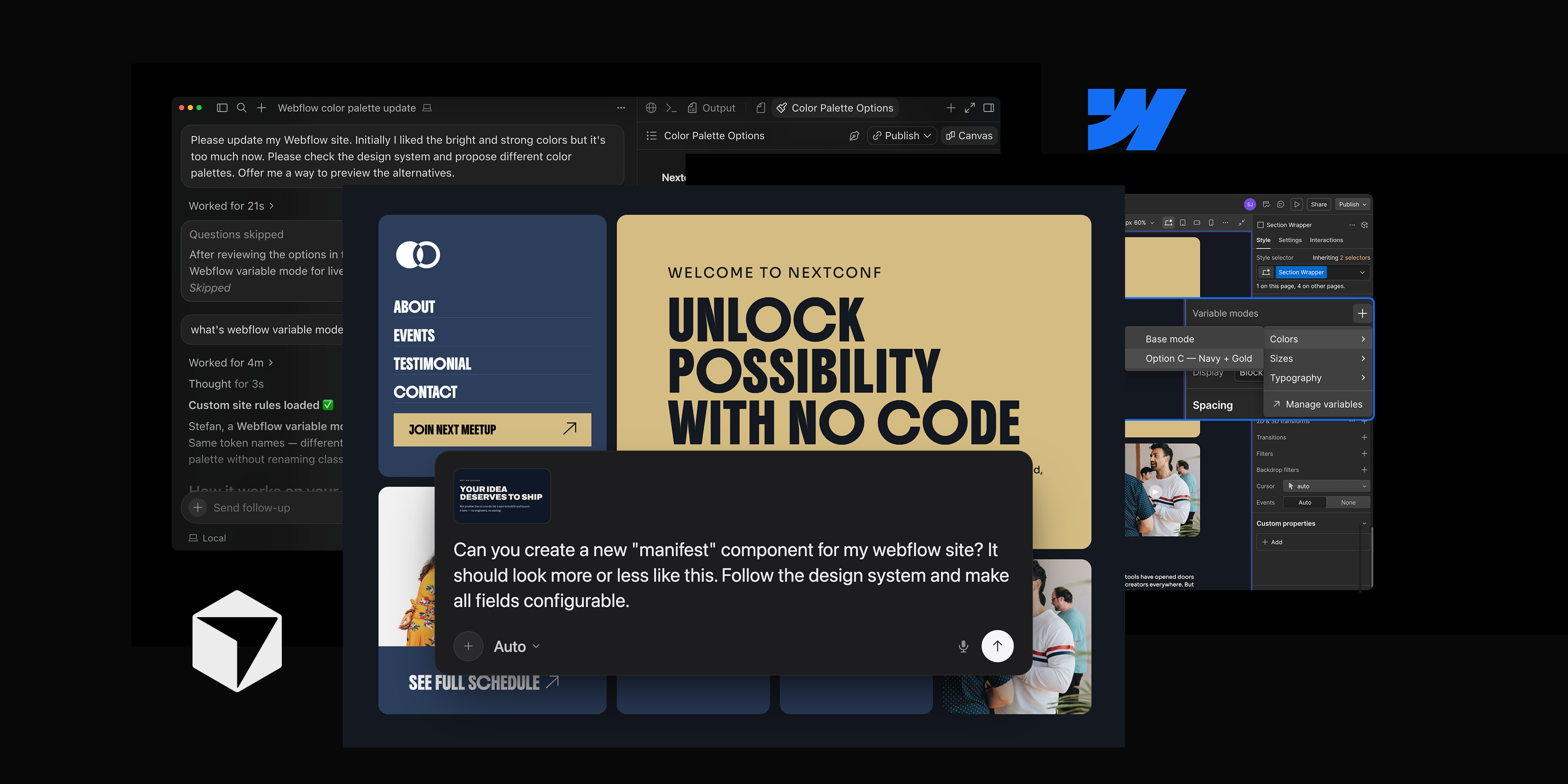
Please update my Webflow site. Initially I liked the bright and strong colors, but it's too much now. Please check the design system and propose different color palettes. Offer me a way to preview the alternatives.
With the established MCP connection, Cursor agent accessed my Webflow site, read the variable collections driving the design, and even built a quick prototype to preview calmer color palette alternatives. Instead of trying things out on my site, I could see these new colors in action.
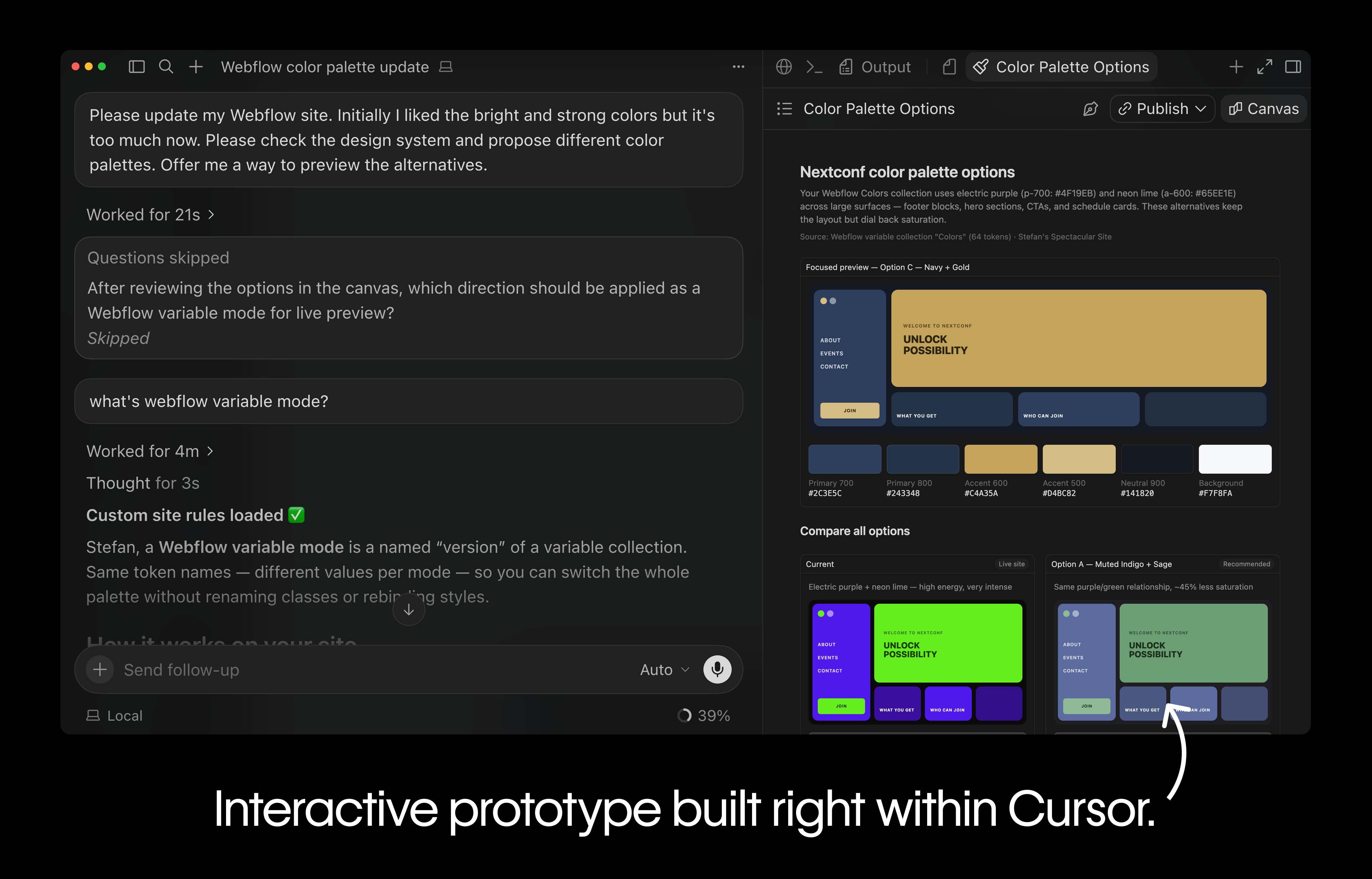
After deciding on a new color palette, the agent got to work and updated over 50 design tokens in one go while I was watching it. It even set up a new variable mode for the different color palettes so that I could switch between them easily.

I must admit, I'm still blown away by the quick turnaround here.
Build a component from a screenshot
Tweaking existing components and styles is one thing. MCP 2.0 also gives your agent full control over Webflow components: it can create them, add props, variants, and slots, and set metadata, all built from the existing elements and styles in your site.
One workflow that I discovered way too late on my AI journey is that you can feed AI agents screenshots to provide additional context. In my case, I had a rough component sketch. I screenshotted it and handed it to Cursor.
Can you create a new "manifest" component for my Webflow site? It should look more or less like this. Make all fields configurable.

With all this context, Cursor can analyze the screenshot, inspect the site's existing structure, and build new components using the existing elements and styles. It can even screenshot its progress to verify that the result aligns with the provided screenshot.

It still feels a bit unreal that I could "build" this component without any manual effort.
Teach your agent your preferences with skills and rules
To get the most out of your agent conversations, context is everything. Ideally, you don't want to rely on your model's training data; you want to provide all the information at the right time. But how do you provide context when your site lives in Webflow? How can your markdown instructions enter all these agent conversations?
To share context your Webflow site now has a new "Instructions" section accessible from the sidebar.

We divide your AI context into rules and skills.
Rules are your always-on guardrails. They apply to every agent interaction, no matter the task. Things like "use our design tokens", "never hardcode colors", or "match our naming" belong into global rules.
Skills are on-demand playbooks. The agent loads one only when a task calls for it. A "create a component" skill can capture exactly how your team builds components: structure, props, variables, naming. We recommend creating custom skills for every custom workflow.
You can then author your guardrails and workflows right in Webflow. And to make the context native, you can even reference Webflow primitives like variables, components, and styles in your AI context. This way your agent has access to actual data instead of working off outdated information.

And do you remember the component I mentioned above? I have a small confession to make: it heavily relied on a pre-defined skill. The agent didn't need to improvise or figure things out. A create-component skill told it exactly how a site's component should be structured, so that it nailed building it on the first try.
With rules and skills, your agent stays in its lane without you course-correcting every single step.
But there's a lot more
These are my favorite new features, but MCP 2.0 has plenty more to offer:
- Read your forms, list submissions, and update or delete them.
- Build on page branches and enforce roles and permissions.
- Manage assets and folders, and compress images to webp or avif without leaving the conversation.
- Read and write head and footer code, at the page level and the site level.
- Access your site's history (on Enterprise plans) to understand who changed what, and which changes came from an agent.
- Ask about your traffic in plain language: top pages, channels and sources, engagement, and time on site.

Try it yourself
Webflow MCP 2.0 is live. Connect it to your agent, teach it your conventions with skills and rules, and let it work across your whole site.
The setup instructions are on developers.webflow.com. Go build something, and if there's something you can't do with your agent yet, let us know.