



For larger marketing teams, Instapage's pricing forces a decision: negotiate an enterprise contract for its ad-level personalization, or move to a tool that publishes pricing for the plan their personalization methods need.
There are several reasons why marketing teams look for an Instapage alternative. Self-serve plans cap monthly visitors and team seats, which a growing campaign program can outgrow. Other teams want personalization that reaches past the ad click, such as messaging by company or CRM record.
Some want campaign pages built from the main site's design system instead of a separate tool. Others need a separate page experience for each ad, which Instapage sells only through a sales-negotiated contract.
The five tools Instapage replacements below take different approaches to personalization. They range from keyword insertion for paid search to company-level targeting for anonymous B2B visitors, CRM rules for known contacts, and personalization built into the main site.
Key takeaways:
- Choose Webflow if your personalized landing pages need your main site's components and CMS, but account-based and CRM targeting require Webflow Optimize's sales-led Enterprise add-on.
- Choose Unbounce if your paid-search campaigns need each headline to match the search term, but expect AI traffic routing only from the $249 Optimize plan.
- Choose HubSpot if your leads already live in HubSpot CRM, but list and lifecycle rules reach only known, tracked visitors.
- Choose Leadpages if you want to personalize pages by company for anonymous B2B visitors, but no plan lists enterprise single sign-on.
- Choose Landingi if you need hundreds of similar pages generated from a spreadsheet, but programmatic pages start on the $299 Scale plan.
The top Instapage alternatives at a glance
Webflow, Unbounce, HubSpot, Leadpages, and Landingi each personalize landing pages differently. To make this list, each tool had to run A/B tests, natively or through an add-on. Each also had to change what a page shows based on who the visitor is or which ad they clicked.
The table below shows where personalization starts on each tool's price list:
| Tool | Best for | Personalization approach | Starting price for personalization | Rating (G2, as of October 2026) | Standout feature |
|---|---|---|---|---|---|
| Webflow | Marketing teams that build landing pages from the main site's design system and CMS | Rules-based audiences and AI routing (Optimize), plus a page variation per audience (Campaigns) | Optimize add-on, $379/month (or $299/month billed annually), plus a paid site plan (starting at $25/mo or $15/mo billed annually) | 4.4/5 | Audiences built from UTM fields, location, device, and on-site behavior |
| Unbounce | Paid-search teams that match page copy to search terms | Keyword insertion, plus AI routing (from the Optimize plan) | Experiment plan, $149/month (or $112/month billed annually) | 4.3/5 | Smart Traffic, which sends each visitor to the variant that converted best for similar visitors |
| HubSpot | Marketing teams whose leads and lifecycle data already live in HubSpot CRM | Rules based on CRM records and URL parameters | Content Hub Professional plan, $500/month (or $450/month billed annually) | 4.4/5 | Smart content rules on eight criteria, from UTM source to lifecycle stage |
| Leadpages | B2B marketing teams that want company-based messaging without an enterprise contract | Keyword insertion and company-level rules | Grow plan, $99/month (or $79/month billed annually) | 4.3/5 | Visitor Intelligence, which matches anonymous visitors to a company, industry, and fit score |
| Landingi | Marketing teams that publish many similar pages from spreadsheet data | Keyword insertion, plus data-generated pages from the Scale plan | Build plan, $29/month (or $24/month billed annually) | 4.5/5 | Smart Sections, which push one edit to every page that uses the section |
| Tool → Best for → Personalization approach → Starting price for personalization → Rating (G2, as of October 2026) → Standout feature |
|---|
| Webflow |
| Marketing teams that build landing pages from the main site's design system and CMS |
| Rules-based audiences and AI routing (Optimize), plus a page variation per audience (Campaigns) |
| Optimize add-on, $379/month (or $299/month billed annually), plus a paid site plan (starting at $25/mo or $15/mo billed annually) |
| 4.4/5 |
| Audiences built from UTM fields, location, device, and on-site behavior |
| Unbounce |
| Paid-search teams that match page copy to search terms |
| Keyword insertion, plus AI routing (from the Optimize plan) |
| Experiment plan, $149/month (or $112/month billed annually) |
| 4.3/5 |
| Smart Traffic, which sends each visitor to the variant that converted best for similar visitors |
| HubSpot |
| Marketing teams whose leads and lifecycle data already live in HubSpot CRM |
| Rules based on CRM records and URL parameters |
| Content Hub Professional plan, $500/month (or $450/month billed annually) |
| 4.4/5 |
| Smart content rules on eight criteria, from UTM source to lifecycle stage |
| Leadpages |
| B2B marketing teams that want company-based messaging without an enterprise contract |
| Keyword insertion and company-level rules |
| Grow plan, $99/month (or $79/month billed annually) |
| 4.3/5 |
| Visitor Intelligence, which matches anonymous visitors to a company, industry, and fit score |
| Landingi |
| Marketing teams that publish many similar pages from spreadsheet data |
| Keyword insertion, plus data-generated pages from the Scale plan |
| Build plan, $29/month (or $24/month billed annually) |
| 4.5/5 |
| Smart Sections, which push one edit to every page that uses the section |
Webflow
Webflow is an agentic web marketing platform, and landing pages built on it use the same components and content management system (CMS) as the rest of the main site. Designers can set up a landing page template as a CMS Collection page. The headline, image, call to action, and body copy then pull from Collection fields, so each new Collection item becomes a new page.
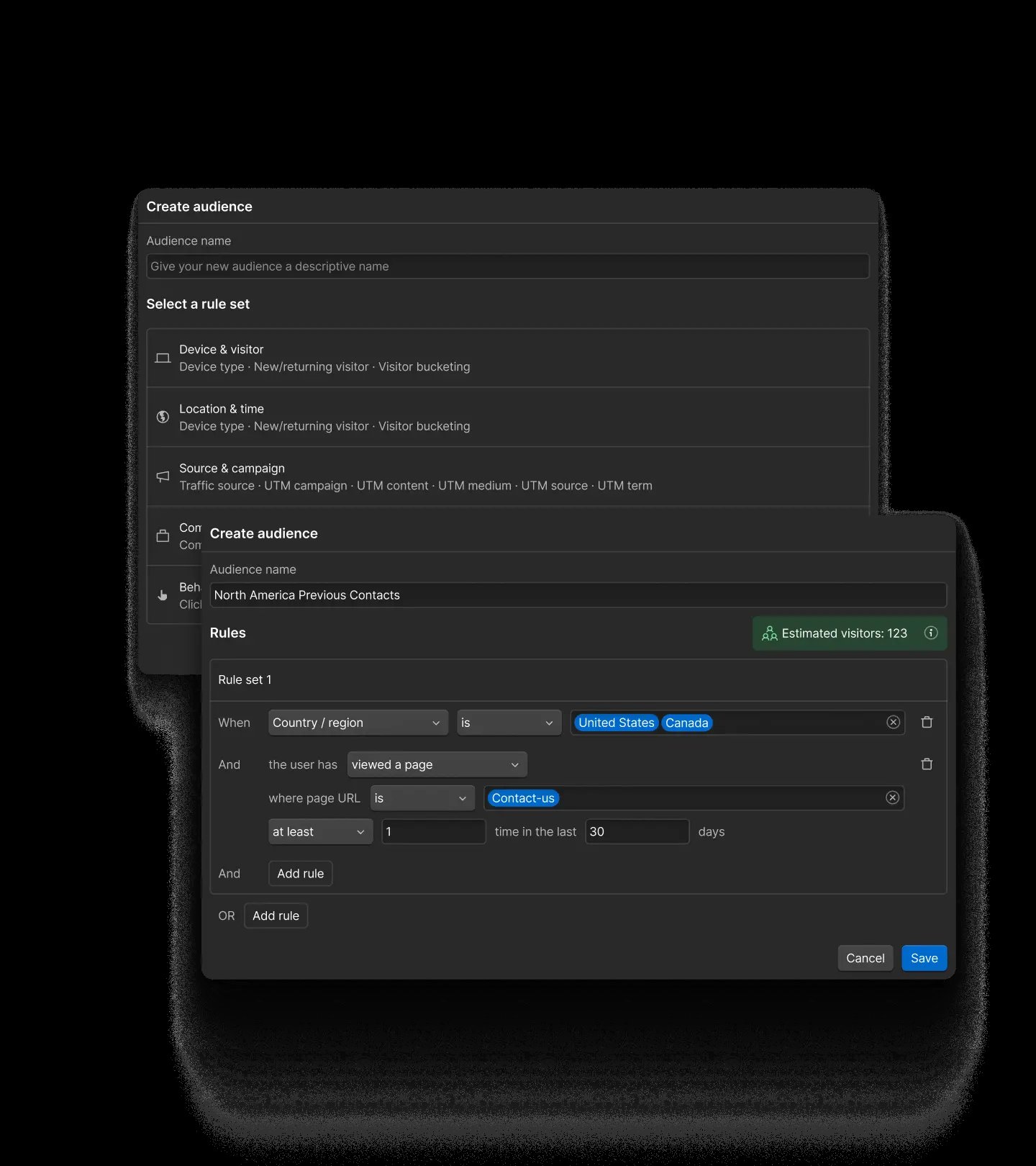
Webflow Optimize is a paid add-on for A/B testing and rules-based personalization where you can add your own variants and use AI to make real-time decisions about which audiences see what content to maximize conversions.
Each audience is a group of visitors defined by conditions, such as device, location, time of day, or traffic source. Audiences can also use the campaign tags on the link (UTM fields), whether someone has visited before, and the pages they've viewed. For example, a team could show a returning visitor from a LinkedIn campaign a different headline than a first-time visitor from search.
Webflow Campaigns, a new standalone product that works alongside any CMS, takes a different route to per-audience pages. From one approved brief, it generates an on-brand landing page plus a variation for each persona, industry, account, or keyword, each on its own URL. It also creates matching ads and sends each variation to Google Ads as a Performance Max asset group.
Webflow pros:
- Variations that stay on brand: Webflow’s Optimize variations change text, images, styles, and component properties on pages built from the site's own components. A personalized headline inherits the styles already set for the site.
- Campaign-specific variations: The self-serve add-on can target any of the five UTM fields, so each campaign gets its own variation. Variations are built in the same Webflow Designer as the site itself.
- Personalization beyond landing pages: Optimize works across the site, including the homepage, so that an ad click can land on a personalized homepage instead of a separate landing page.
Webflow cons:
- No keyword insertion: Webflow documents no keyword-based dynamic text replacement (swapping page text for a value from the ad's URL) and no AdMap-style ad mapping. Instead, its dynamic content feature inserts company data from Enterprise integrations such as 6sense and Demandbase. To match headlines to search terms, teams either build an Optimize audience for each keyword's UTM value or generate keyword variations in Webflow Campaigns, each on its own URL. Both add setup work across long keyword lists.
- Account-based targeting needs the Enterprise add-on: Company details (matching visitors to their company) and custom URL parameters beyond the five UTM fields require the sales-led Enterprise add-on. So do the 6sense, Demandbase, Salesforce, Marketo, and HubSpot integrations. Account-based programs therefore begin with a sales conversation.
- Five optimizations at a time: The self-serve add-on runs up to five tests and personalizations at once. One personalization can serve several audiences in priority order, but a busy testing calendar still means queuing tests or moving to Enterprise, which has no limit.
What users say about Webflow
Reviewers' verdicts on Webflow tend to follow their role. Those who publish and update pages describe the biggest gains, and those who build layouts or manage staging describe some friction:
- Less waiting on developers: A G2 reviewer who leads marketing design (April 2026) says non-designers manage content without breaking anything. Another G2 reviewer (March 2026) updates pages without relying on a developer.
- Faster page builds: A marketer at a company of up to 5,000 employees on Capterra (September 2026) says templates and reusable sections speed up new pages.
- A learning curve and hard-to-predict costs: A communications manager at a company of up to 5,000 employees (June 2026) values the control without coding. The same reviewer describes a learning curve and pricing that is hard to predict as needs grow.
- Team workflow gaps and seat costs: A growth lead (March 2025) can't design a page with another person at the same time. A reviewer in digital projects at a retail company (September 2025) finds staging before publishing awkward and the per-seat price high.
Sources checked October 2026.
Webflow pricing
Site plans:
- Starter: Free, on a webflow.io address, with no option to add Optimize.
- Basic: $25 per month (or $15 per month billed annually), without the CMS.
- Premium: $39 per month (or $25 per month billed annually), with the CMS, 20,000 CMS items, and 40 Collections.
- Team: $2,500 per month on an annual contract, with 100 Collections, 500 static pages, page branching, and publishing workflows.
- Enterprise: Custom pricing.
Webflow Optimize, priced by monthly page views:
- 25,000 page views: $379 per month (or $299 per month billed annually).
- 50,000 page views: $499 per month (or $399 per month billed annually).
- 100,000 page views: $699 per month (or $549 per month billed annually).
- 250,000 page views: $999 per month (or $799 per month billed annually).
- 500,000 page views: $1,499 per month (or $1,199 per month billed annually).
The Enterprise add-on has custom pricing and covers 1 million or more page views a year, with unlimited concurrent optimizations. Add-on billing follows the site plan's billing cycle.
Webflow Campaigns, the standalone product for campaign pages and ads, starts at $2,000 per month and is sold through Webflow's sales team.
Pricing from Webflow's pricing page. Verified October 2026.
Best for: Marketing teams at mid-size and larger companies that want landing pages built on the main site's design system and personalized by campaign, location, and behavior. Landing pages built from CMS Collections need at least the Premium site plan.
Unbounce
Unbounce is a landing page builder that publishes campaign pages to a custom domain or a WordPress site. On Unbounce, Dynamic Text Replacement swaps words on the page for values from the ad's URL, such as the search term.
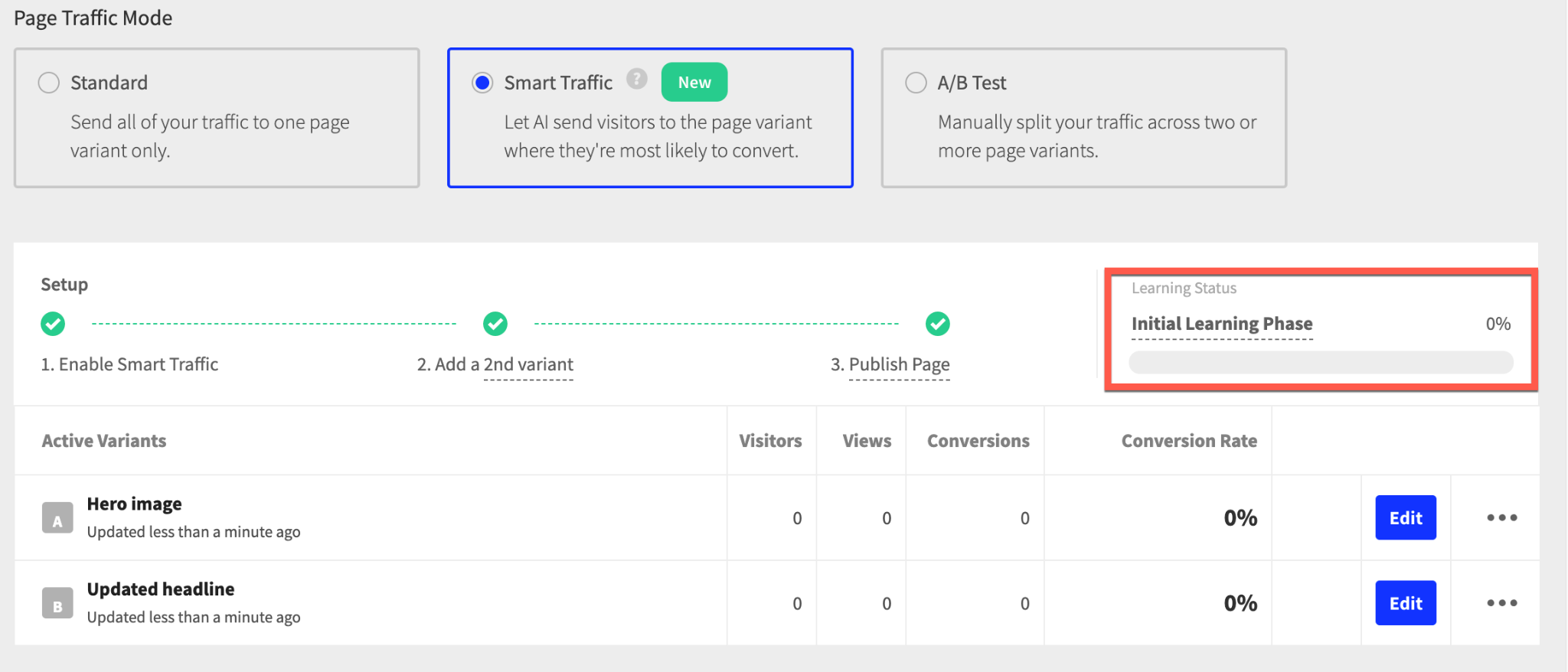
Smart Traffic (Unbounce's AI routing feature) also sends each visitor to the variant that converted best for other visitors with similar attributes (e.g., location, device, browser). Smart Traffic runs only on landing pages published to a custom domain, so teams need their domain connected before AI routing can start.
Unbounce pros:
- Keyword-matched copy with a fallback: Dynamic Text Replacement shows default text when the URL parameter is missing. Instapage's version, by contrast, has no fallback, so visitors without the parameter see the placeholder exactly as typed.
- AI routing after a short learning phase: Smart Traffic needs at least two variants and a conversion goal. Unbounce's product page says routing starts after as few as 50 visits, and the company says Smart Traffic raises conversions by 30% on average.
- Room to test every ad group: Unbounce's Experiment plan sets no limit on A/B tests or variants. Teams set the traffic split by hand and read confidence intervals for each test.
Unbounce cons:
- An overage fee in a strong month: Since November 10, 2025, Unbounce has charged a fee for each extra 10,000 visitors over the plan's cap, rounded up. Pages stay live, but a campaign that beats its forecast raises the bill.
- No shared components: Unbounce documentation shows no global blocks that update across pages, unlike Landingi's Smart Sections or Instapage's global elements. Changes to shared content, such as a common section, must be repeated on each campaign page.
- No SOC 2 Type II or self-serve audit logs: Unbounce lists only a SOC 2 Type I report. The missing Type II report matters to companies whose vendor security reviews require one. Audit logs come only with the custom-priced Concierge plan.
What users say about Unbounce
Unbounce reviewers who manage paid ads tend to judge the builder by its effect on campaign results and budgets:
- Testing and text insertion in one tool: A mid-market marketing director on G2 (May 2025) values A/B testing, Dynamic Text Replacement, and the HubSpot and Mailchimp integrations. A digital advertising manager (September 2025) finds duplicating variants and inserting text quick.
- Fast pages that help ad scores: The same manager says Unbounce pages load faster than the company site, which helps Quality Scores and conversions.
- Responsive design friction: The author of an r/PPC thread (March 2026) calls making pages responsive across screen sizes a nightmare, because sections have a fixed height and position. A commenter in the same thread says pages come together quickly once you learn the tools.
- A large price increase: A G2 reviewer (July 2025) reports a 415% subscription increase in under a year. Unbounce replied that the reviewer was likely on a legacy plan that is no longer offered.
Sources checked October 2026.
Unbounce pricing
Unbounce sells four self-serve plans according to monthly visitors, plus two custom-priced plans for larger teams and agencies:
- Starter: $29 per month (or $22 per month billed annually) for 500 visitors, five pages, and one root domain, without integrations.
- Build: $99 per month (or $74 per month billed annually) for 20,000 visitors and unlimited pages, with AI copywriting and integrations.
- Experiment: $149 per month (or $112 per month billed annually) for 30,000 visitors, two root domains, and three users, with A/B testing and Dynamic Text Replacement.
- Optimize: $249 per month (or $187 per month billed annually) for 50,000 visitors, three root domains, and five users, with Smart Traffic.
- Concierge and Agency: Custom pricing, with audit logs on Concierge only.
The 14-day trial needs no card but is limited to one user and no custom domains.
Pricing from Unbounce's pricing page. Verified October 2026.
Best for: Paid-search teams that run many ad groups and want landing page copy to mirror each keyword.
HubSpot
HubSpot Content Hub is HubSpot's CMS for websites and landing pages. It personalizes pages with smart content rules, some of which read the same customer relationship management (CRM) records as the rest of HubSpot.
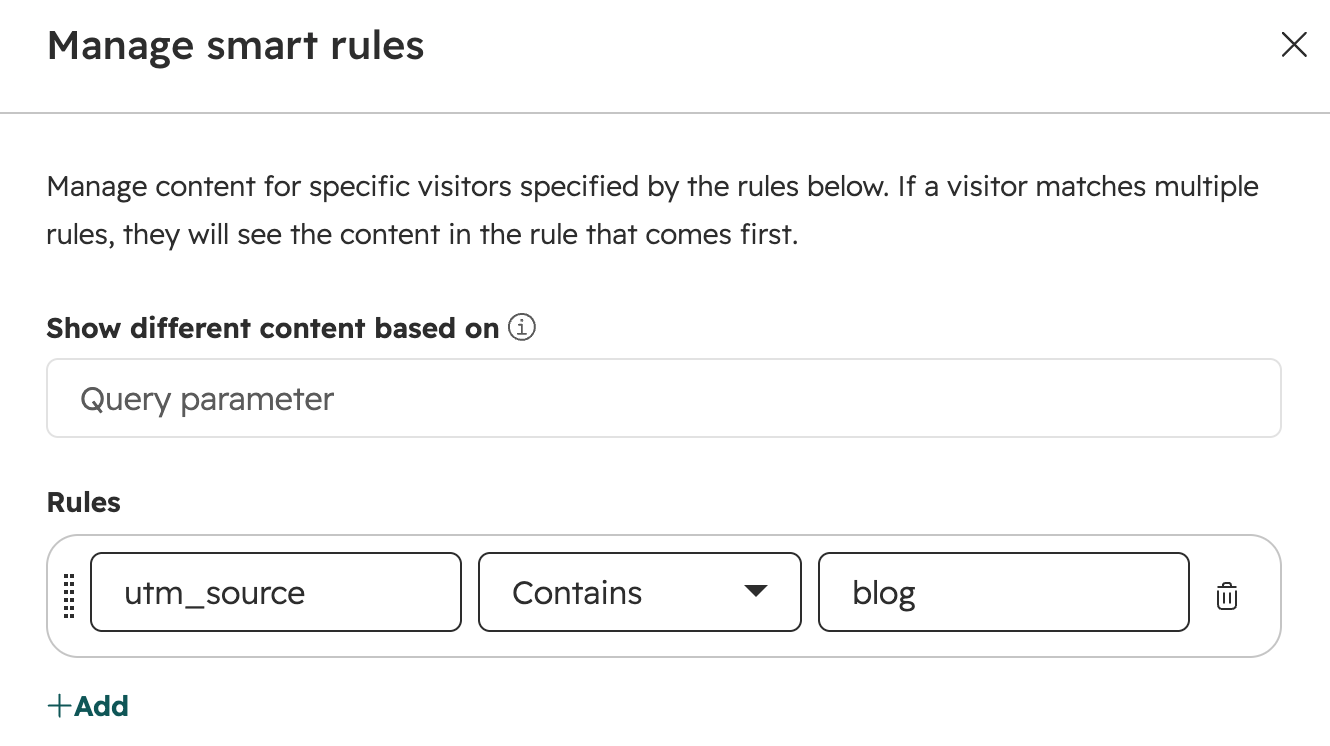
On HubSpot, a smart content rule swaps a module (HubSpot's term for a block of page content) based on one criterion. There are eight of them: ad source, query parameter, country, device type, referral source, preferred language, contact list, and lifecycle stage. (Smart content on pages starts on the Content Hub Professional plan; Marketing Hub Professional and Enterprise offer smart content in marketing email only.)
HubSpot offers two kinds of tests. An A/B test sends half of visitors to each of two versions on the same URL. An adaptive test runs up to five variations and shows the best performer more often. Adaptive test variations must each include a form.
HubSpot pros:
- Page content from CRM data: Contact list and lifecycle stage rules act on HubSpot's own contact records, with no connector to maintain. Editors can preview each smart rule's variation before publishing.
- Rules for first-time ad clicks: Ad source rules read the UTM parameters on the link, and query parameter rules read any URL parameter. Visitors from an ad can see matching content before they become contacts.
- Data-driven pages outside the page cap: Content Hub Professional can build dynamic pages from HubDB (HubSpot's built-in database tables) or from CRM records. Dynamic pages don't count against the plan's 10,000-landing-page limit.
HubSpot cons:
- Smart content depends on cookies: List and lifecycle stage rules work only for tracked contacts. Visitors who block cookies can't be matched to a contact record, so they see the default content under those rules.
- One rule type per module: A headline module can follow ad source or lifecycle stage, but not both. To layer targeting, teams assign each page section its own module and rule type.
- Brand review gated to the top tier: Content approvals need the Content Hub Enterprise plan. Teams with a brand review step pay at least three times the Professional plan price.
What users say about HubSpot
Reviews of HubSpot's landing pages sit on its Marketing Hub listings, so reviewers tend to rate page building alongside HubSpot's CRM and automation:
- CRM and CMS together: A content director at a company with more than 1,000 employees on Capterra (July 2026) values having the CRM and CMS in one platform. A mid-market G2 reviewer (September 2026) says workflows, lists, and contact properties all run on the same data.
- List-based audiences but basic pages: A digital marketing manager in insurance (January 2026) builds Google, Facebook, and LinkedIn audiences from customer lists. The same reviewer calls landing page creation relatively basic.
- Limited design control: A sales marketing coordinator at a company of up to 200 employees (June 2026) finds page customization limiting compared with specialized design tools.
- Costs that rise with each tier: A mid-market SEO specialist (November 2025) says the monthly cost rises quickly with more contacts or premium features like A/B testing. A mid-market e-commerce manager (September 2026) describes a new tier at nearly double the price.
Sources checked October 2026.
HubSpot pricing
Content Hub, which runs page personalization, sells four plans at these US list prices:
- Free: Up to 30 landing pages with HubSpot branding, for two users.
- Starter: $20 per seat per month, with 30 landing pages but no smart content or testing.
- Professional: $500 per month (or $450 per month billed annually). It includes three Core Seats (HubSpot's paid user seats), smart content, and A/B and adaptive testing.
- Enterprise: $1,500 per month on annual billing only, with five Core Seats and content approvals.
Content Hub Professional comes with a 14-day trial. Ad audiences built from CRM lists come with Marketing Hub, which HubSpot prices separately.
US prices from HubSpot's Content Hub pricing page. Verified October 2026.
Best for: Marketing teams whose leads, forms, and nurture emails already run in HubSpot and whose landing page traffic includes many known contacts. When most traffic is from first-time ad clicks, rules that don't need a contact record, such as ad source and query parameters, do most of the work.
Leadpages
Leadpages is a landing page builder that pairs Dynamic Text Replacement and A/B testing with Visitor Intelligence. Visitor Intelligence matches anonymous visitors to their company, industry, size and an ideal customer profile (ICP) score.
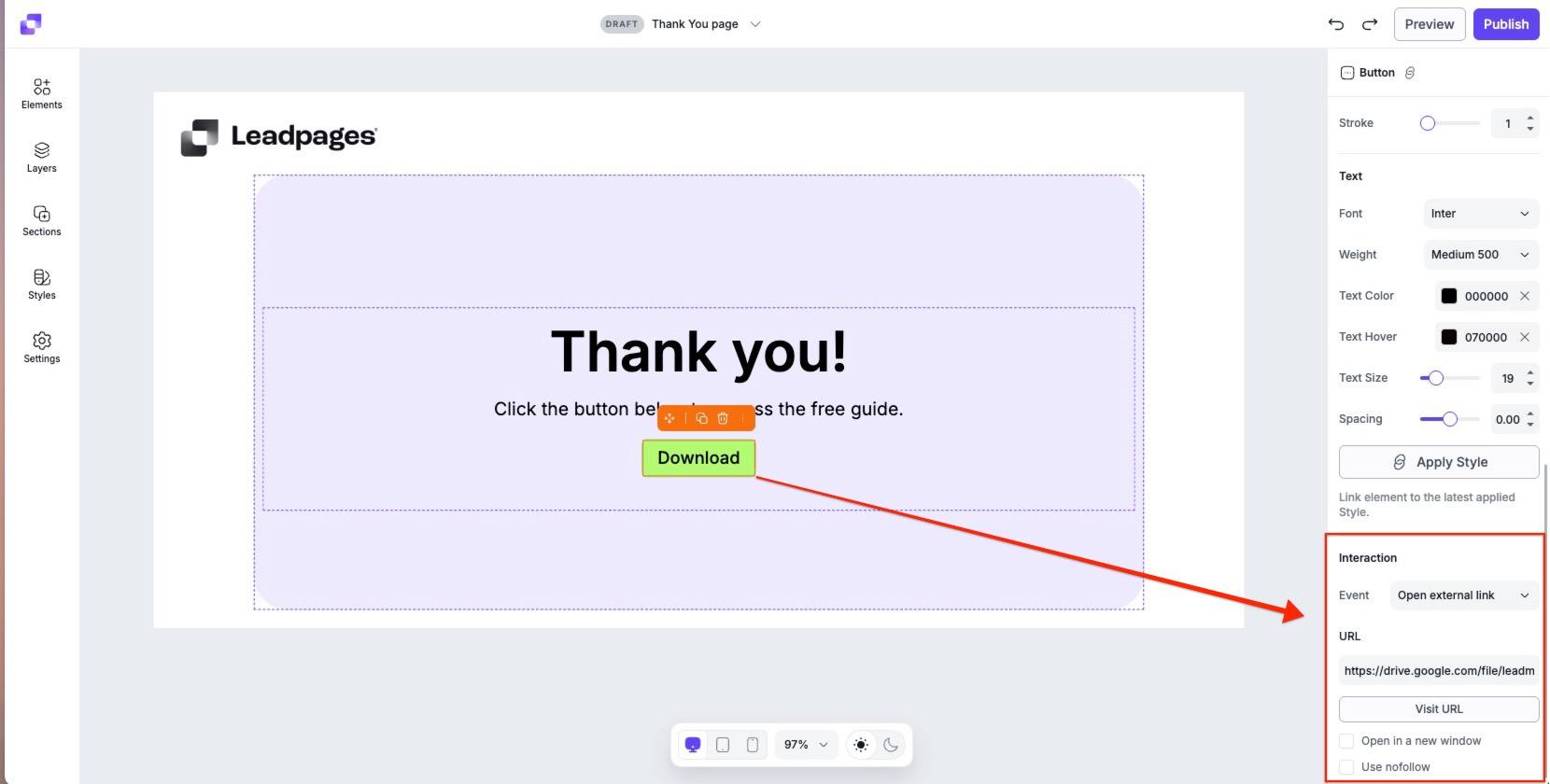
Visitors can see different content based on if-then rules for ad source, campaign, device, location, and time of day. Higher tiers add auto-personalization, which selects content for each visitor based on company data.
Leadpages pros:
- Company-level targeting without a form: Starting on the Grow plan, pages can target ICP audiences that Visitor Intelligence scores. High-scoring visitors see enterprise messaging, while everyone else sees the self-serve offer.
- Keyword insertion inside tests: Each A/B variant can carry its own Dynamic Text Replacement rules, with default text for visitors who arrive without the parameter.
- No traffic caps: No plan limits traffic or charges overage fees, so the bill stays the same when an ad campaign drives more traffic than planned.
Leadpages cons:
- Few enterprise controls: No plan lists enterprise single sign-on, and audit logs and workspaces come only with the Scale plan. Leadpages says it is still pursuing SOC 2 Type II, so it can't yet pass a vendor review that requires that report.
- CRM personalization starts on the Optimize plan: The Grow plan can target by company and ad source but not by a visitor's HubSpot or Salesforce pipeline stage. Teams that personalize for known contacts need the Optimize plan, the second of the three main plans.
- Seat limits on published plans: The Optimize plan includes three seats and the Scale plan includes 10. Larger teams need custom limits through Leadpages' sales team.
What users say about Leadpages
Company presidents, owners, and a COO wrote several of the recent Leadpages reviews:
- Five-minute page builds: A Capterra reviewer who runs a publishing company (August 2025) can build a landing page in under five minutes.
- A shift toward lead generation: A president on G2 (March 2026) says Leadpages has grown into a lead generation platform. Another G2 reviewer (January 2026) tests page versions and says Leadpages' page scoring shows whether a page follows best practices.
- Limits on exact layouts: An e-learning COO (July 2025) says the team can make a layout work nine times out of 10 but occasionally wants something more specific. The same COO calls the cost reasonable for opt-in pages.
- Support complaints: Three of the five 2025 and 2026 reviews on Leadpages' first G2 page give it the lowest rating, citing unanswered support requests or unexpected charges. One owner (July 2026) also says an update deleted pages built for a client.
Sources checked October 2026.
Leadpages pricing
Leadpages sells three plans with testing and personalization.
- Grow: $99 per month (or $79 per month billed annually) for four domains, with A/B testing, Dynamic Text Replacement, and 2,000 Visitor Intelligence lookups a month. It includes no team seats.
- Optimize: $199 per month (or $159 per month billed annually) for six domains and three seats, with Smart Traffic (Leadpages' AI routing between variants), auto-personalization, and 5,000 lookups.
- Scale: $399 per month (or $319 per month billed annually) for 10 domains and 10 seats, with workspaces, audit logs, and 10,000 lookups.
The seven-day trial requires a card and charges nothing until the final day. Annual billing saves 20%.
Pricing from Leadpages' pricing page. Complete plan details come from Leadpages' plans and pricing article, which lists all three plans. Verified October 2026.
Best for: B2B marketing teams that want to show anonymous visitors messaging by company, industry, or fit score on a plan with published pricing.
Landingi
Landingi's builder is designed for teams that publish many similar landing pages. Dynamic Text Replacement works once teams add a short script to each page. Server-side A/B tests choose each visitor's version before the page loads, and teams can set a custom traffic split.
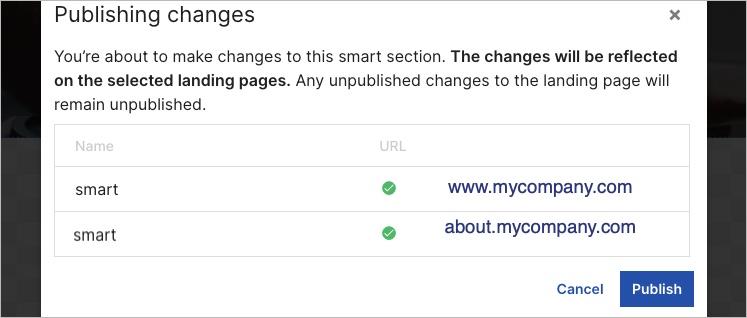
For large page sets, Landingi also cuts repeated work. Smart Sections (reusable page sections) keep shared content in sync, and Programmatic Landing Pages generate pages in bulk.
Landingi pros:
- Keyword insertion on the entry plan: Dynamic Text Replacement starts on the entry Build plan, with optional fallback text. By comparison, Instapage's Dynamic Text Replacement starts on its second tier.
- One edit updates every page: Instapage limits global elements to its custom-priced Convert plan, but Landingi includes Smart Sections on a published plan. Before an edit goes live, the publish dialog lists every affected landing page URL.
- Pages generated from a spreadsheet: Each programmatic page costs 100 credits, and the Scale plan includes 20,000 credits a month, enough for up to 200 pages a month. AI features draw on the same credits.
Landingi cons:
- Overage pricing behind a login: Landingi bills for visits over the plan limit, but from a price list shown only after login. Buyers can't check that rate before creating an account, which makes a traffic spike hard to budget for.
- No company or CRM targeting: Landingi documents personalization by URL parameter, language, and data feed only. Account-based or lifecycle-stage targeting would need a second tool.
- A steep step up for team controls: Team Workspaces and enterprise single sign-on require the Enterprise plan. The Scale plan below it has client subaccounts and an audit log but neither control. Companies that require enterprise single sign-on for every vendor face a large price jump.
What users say about Landingi
On G2, Landingi's recent reviews come from project and customer success managers as well as sales and marketing leaders:
- Reuse at volume: A project manager (January 2026) builds a pricing section once and uses it across 50 pages, calling Smart Sections a standout for agencies. A customer success manager (January 2026) builds hundreds of pages by filling in parameters.
- Strong value for A/B testing: A mid-market sales and marketing director (July 2025) runs A/B tests with ease and rates Landingi the best option at its price.
- Manual mobile rebuilds: The same project manager says free positioning in the editor means rebuilding mobile layouts by hand. Landingi's founder replied that the free-form editor's manual mobile work is a known trade-off.
- Form limits: The customer success manager finds contact form options limited, and a chief growth officer (April 2025) calls conditional form logic restrictive.
Sources checked October 2026.
Landingi pricing
- Build: $29 per month (or $24 per month billed annually) for 2,000 visits, 10 pages, one domain, and five users.
- Optimize: $149 per month (or $119 per month billed annually) for 30,000 visits, 100 pages, three domains, and 10 users.
- Scale: From $299 per month (or $229 per month billed annually) for 100,000 visits, with unlimited pages and users. The 200,000-visit tier costs $499 per month (or $379 per month billed annually), and the 500,000-visit tier costs $999 per month (or $769 per month billed annually).
- Enterprise: From $1,499 per month (or $1,199 per month billed annually) for 1 million or more visits and 100 domains.
The 14-day trial includes 200 visits. Extra domains cost $5 per month, and annual billing includes two months free.
Pricing from Landingi's pricing page. Verified October 2026.
Best for: Marketing teams that publish hundreds of similar pages across regions, products, or partners and want shared sections kept in sync. Page volume matters more to these teams than visitor-level targeting.
How to choose the right Instapage alternative
No single Instapage replacement is best; each alternative fits different use cases.
Answer these three questions to narrow down your options:
- Who arrives on your pages? Unbounce, Leadpages, and Landingi insert the ad's keyword for anonymous visitors, and Leadpages adds company-level targeting. Webflow Optimize targets by UTM field, location, device, and behavior. HubSpot's list and lifecycle rules reach known contacts. Webflow Campaigns builds a separate page variation for each persona, industry, account, or keyword.
- How many pages must stay on brand? Webflow builds landing pages from the main site's components and CMS templates. Landingi keeps shared sections in sync and generates pages from data. HubSpot's Content Hub Professional plan builds dynamic pages from HubDB or CRM records.
- What will your security review ask for? Webflow and HubSpot both maintain SOC 2 Type II compliance, and Unbounce lists Type I only. Leadpages is still pursuing Type II. Landingi offers enterprise single sign-on only on its Enterprise plan, and Leadpages lists no enterprise single sign-on on any plan. Teams with strict vendor reviews should request each vendor's SOC 2 report before starting a trial.
Paid-search teams get the most from keyword insertion, so Unbounce, Leadpages, and Landingi come first. Teams whose main site already runs on Webflow or HubSpot should start with that platform, so campaign pages match the site.
Keep personalized landing pages on brand with Webflow
Webflow fits marketing teams that want personalized campaign pages to live with the main site. Pages built from the site's components and CMS stay on brand, and marketers launch them without waiting on a developer.
Webflow Optimize then tests and personalizes those pages by campaign, location, and behavior. AI Optimize routes each visitor to the variation most likely to convert (much as Smart Traffic does at Unbounce and Leadpages).
The custom-priced version of Optimize includes account-based and CRM targeting, plus integrations with 6sense, Demandbase, Salesforce, and HubSpot, plus unlimited concurrent tests. For larger teams leaving Instapage, the first step is a conversation about which features your campaigns need.
Talk to Webflow sales about moving your personalized landing pages off Instapage.

Unlock growth with SEO
Join Webflow and leading growth agency Graphite as they discuss actionable insights for scaling and achieving growth with SEO
Frequently asked questions
What is Instapage used for?
Marketing teams use Instapage to build landing pages for paid campaigns, with unlimited pages, conversions, and contacts on every plan. Pages are assembled from Instablocks, reusable page sections that every plan includes. All three plans also publish pages to WordPress and Drupal, and Instapage lists more than 120 integrations with marketing and sales tools.
How much does Instapage cost?
The Create plan costs $99 per month (or $79 per month billed annually) for 15,000 unique visitors. The Optimize plan costs $199 per month (or $159 per month billed annually) for 30,000 visitors. Its 50,000-visitor level costs $299 per month (or $239 per month billed annually). The Convert plan, which includes ad-to-page personalization, has custom pricing. The 14-day trial requires a card, and the paid plan starts early if 2,500 unique visitors arrive first.
What is the difference between dynamic text replacement and rules-based personalization?
Dynamic text replacement swaps a word or phrase for a value in the page URL, such as the search term from an ad. Rules-based personalization defines an audience, such as visitors from one country or campaign, and shows that audience a different version of the page.
Do you need developers to run personalized landing pages?
Most setups don't need a developer. Webflow and Instapage let marketers launch personalized pages without a developer, and marketers can set HubSpot's smart rules in the page editor. Landingi's Dynamic Text Replacement needs a short script pasted into each page. Webflow's custom JavaScript attributes (an Enterprise add-on feature) need a developer to write the code.
Is there a free landing page builder with personalization?
None of these five tools includes personalization on a free plan. Webflow's free Starter plan and HubSpot's Free plan both publish pages but exclude testing and personalization. Instapage's 14-day trial turns into a paid plan at 2,500 unique visitors, and Landingi's 14-day trial includes 200 visits. Unbounce's 14-day trial needs no card but allows no custom domain. Leadpages offers a seven-day trial, and HubSpot offers a 14-day trial of Content Hub Professional.

Choose the right CMS for a scaling enterprise
Discover how the right CMS can allow teams to efficiently scale rich, complex content – all without writing code.