






Enhancement
Designer
See spacing values on the canvas
Margin and padding values now render directly on the canvas when you’re designing.
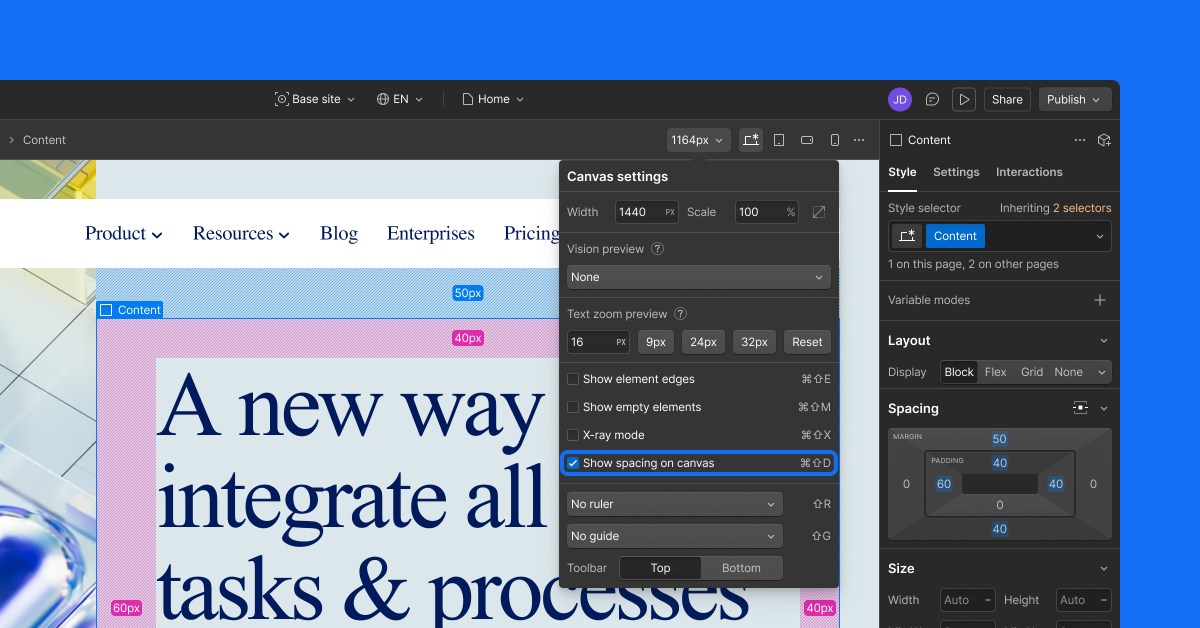
Spacing is where design systems start to slip — a few pixels off here, an inconsistent padding there — and until now, catching it meant selecting an element and checking the Style panel every time. Now, margin and padding values appear directly on the canvas.
Select any element to see its spacing
Check the spacing box in the Canvas settings, or enter Cmd+Shift+D, and every element you click will reveal its margins and padding.
Hold Alt/Opt+Shift to inspect without selecting
Hold Alt/Opt + Shift and hover over any element, and spacing values will now appear under your cursor. No selection, no click, no interruption to your workflow.
What the numbers reflect
The values you see are current calculated values, including values set through variables.What you see on the canvas matches exactly what ships to production..
Viewing, not editing
This release focuses on making spacing visible. To change a value, head to the Style panel. Your inspection and editing workflows stay separate.
Related updates

.png)
.png)



















Get started for free
Try Webflow for as long as you like with our free Starter plan. Purchase a paid Site plan to publish, host, and unlock additional features.
Try Webflow for as long as you like with our free Starter plan. Purchase a paid Site plan to publish, host, and unlock additional features.