






Phrase
Send Webflow pages, Collection items and SEO metadata to Phrase TMS for human review, then publish the approved translations to each locale.

Webflow Localize already handles the mechanics of a multilingual site. Secondary locales inherit everything from your primary locale until you override it, automatic translation rewrites canvas text and Collection fields while reading the tone and formality of the source, and Webflow writes hreflang tags into the head and the auto-generated sitemap without being asked. What it does not carry is the part translation teams argue about: there is no linguist queue, no revision step, no shared translation memory, and no term base holding your approved wording.
Phrase is a localization platform that supplies exactly those pieces, and it publishes a Webflow marketplace app that moves content between the two systems for you. Pages, Collection items, components, and SEO metadata leave Webflow as JSON, land in a Phrase TMS project as a translation job, and come back into the matching secondary locale where you apply them one at a time or in bulk. Nobody exports a spreadsheet and nobody pastes a translation back by hand.
Localization managers get the workflow control they are used to without leaving their TMS. Marketing teams opening a new market can send content themselves instead of filing a developer ticket. Agencies running multilingual client sites get a documented path on both sides, and developers wiring custom pipelines get two public APIs and webhooks on each end.
How to integrate Phrase with Webflow
What is Phrase? Phrase is a localization platform assembled from two products that were once sold separately. Phrase TMS is the translation management system that grew out of Memsource: it runs projects, jobs, translation memories, and term bases across a long list of file formats and machine translation engines. Phrase Strings is the key-based string manager that used to be PhraseApp, and it suits product copy addressed by identifier rather than page content. Both of the older brands now resolve to a single Phrase account, and the Webflow app is built on the TMS side.
Teams reach for Phrase when the built-in machine translation gets the words roughly right but nobody is willing to publish them unread. A marketer sends a page from inside Webflow, a linguist works on it in Phrase TMS against the site's own translation memory, a reviewer signs it off, and the approved version returns to the Spanish or German locale. The same memory and term base then apply to the next page, which is what keeps a product name spelled the same way in every market.
The Phrase and Webflow integration supports five approaches:
- The Phrase app sends pages, Collection items, components, and SEO metadata to Phrase TMS and returns finished translations, with no code involved.
- MCP servers on both platforms let an AI assistant read and change each side in plain language, though neither server carries content across the gap.
- Code Embed and head and body tags load the Phrase Strings In-Context Editor, which is useful for a front end you build rather than for Webflow-designed pages.
- General automation platforms pair Phrase job events with Webflow CMS actions, which is how you get event-driven behavior the app does not offer.
- The Webflow and Phrase APIs give you full control over a custom pipeline and require server-side development.
Most teams start with the app and add one of the other four once the volume of content justifies the engineering.
Install the Phrase app
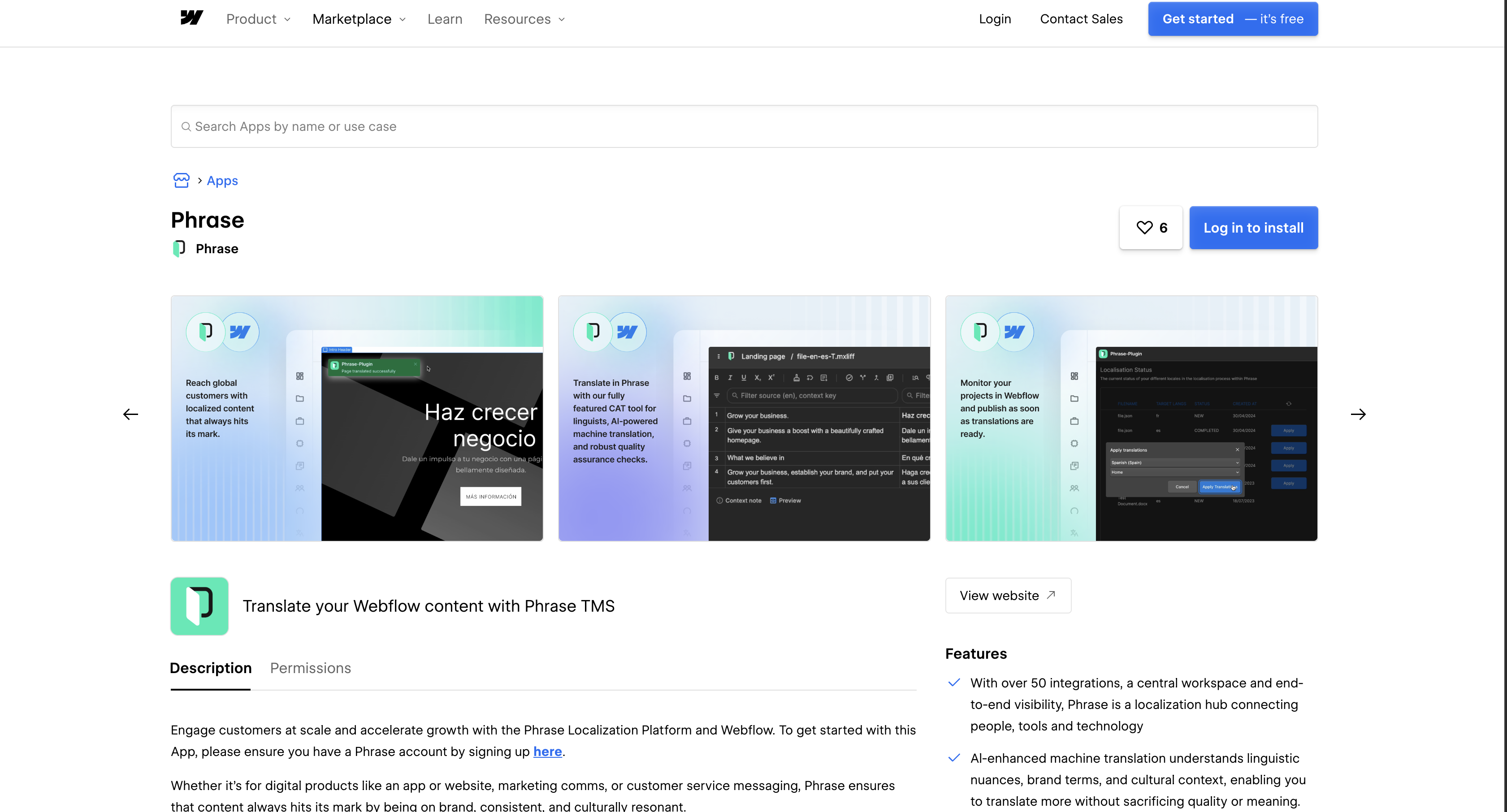
The Phrase app in the Webflow Marketplace is the only no-code path either vendor documents. Phrase built it across the Webflow Design and Data APIs, a middleware service of its own, and the Phrase TMS APIs, and it works on all paid Phrase plans. It is a plugin rather than a connector in Phrase's own vocabulary: plugins push content out for translation, while connectors pull it in and normally need an administrator to set them up.
The Webflow side has two requirements and one hard limit. Localization must be enabled with your target locales already created, and Localize is an add-on rather than a site plan feature: Localize Essential starts at $9 per month for up to three locales and Localize Advanced at $29 per month for up to ten, both priced by how many locales you add, with Enterprise sold separately. The limit is Ecommerce. Localize does not support Ecommerce Site plan features, so products, categories, and pages cannot be localized when both are enabled, and no third-party app changes that.
To set up the integration:
- Enable Localization and create your target locales.
- Search for Phrase in the Webflow Marketplace and install the app.
- Authenticate with your Phrase username and password. Login by email address is not supported, and the username sits in the Personal tab of your Phrase user profile settings.
- Select a page, a CMS Collection, or a single component to send, and decide whether to include SEO metadata.
- Choose an existing Phrase project or create one from a project template, then send the content.
- Apply the returned translations one by one, or import all of them in bulk.
Once connected, the app reaches most of the translatable surface of a site:
- Static pages: Whole pages go across in one job, including the text inside reusable components placed on them.
- Collection content: Collections and their items travel as jobs too, which is how blogs and help centers get translated without page-by-page work.
- SEO metadata: Page titles and meta descriptions are included when you tick the option, so a locale ships with its search listing already written.
- Form component strings: Select and Option elements and Submit button labels are covered too, which Phrase's plugin release notes record as later additions.
Content travels in both directions as JSON. The one gap worth planning around is that Automatic Project Creation is not supported for this plugin, so every project starts manually or from a template. The automation and API methods below are how teams close it.
Run each side from an AI assistant
Both platforms now publish an MCP server, so an assistant such as Claude can work on your Webflow site and your Phrase projects in the same conversation. Be clear about what this does not do: neither server is a bridge. Webflow's manages the Webflow site, Phrase's manages Phrase, and the content still crosses between them through the app or an API call you write.
The Webflow MCP server is available on every Site plan, including the free Starter plan, and its documented localization limit matters here: it does not support creating new localized CMS items, though it can read and update existing CMS items and static content in secondary locales. That makes it good for correcting a translation that has already landed and useless for standing up a locale from scratch. Agent Instructions let you set per-site rules an assistant has to work within, which is worth doing before you let one loose on published locales.
The Phrase MCP Server is a remote server you register by URL, at https://mcp.eu.phrase.com or https://mcp.us.phrase.com depending on your region. There is nothing to install and no token to store, because it authenticates over OAuth. In Claude Code the registration is a single command:
claude mcp add --transport streamable-http phrase-mcp-prod-eu https://mcp.eu.phrase.com
Authorization is where the guardrails live. When you connect, you pick whether the assistant may view data, create data, or modify and delete data, and that choice narrows your existing Phrase role rather than widening it. You can review or withdraw the grant at any time from the Consents tab in your Phrase profile settings, and the list is scoped to one organization at a time, so check each organization separately if you connect more than one. Phrase's MCP Server article puts the server on all Phrase plans at no additional cost currently, and marks the older self-hosted connection as deprecated.
Add the Phrase In-Context Editor with Code Embed or custom code
Phrase Strings ships an In-Context Editor, a JavaScript snippet that lets a translator edit strings on the rendered page instead of in a list. Read its requirements before you plan around it: it needs a key-value localization file structure and key names exposed to the view or template layer. Webflow serves finished HTML built on the canvas and from the CMS, not templates that look strings up by key, so the editor does not apply to Webflow-designed pages. Where it fits is a front end you build yourself that reads its copy from Phrase Strings, including an app you host on Webflow Cloud. Validate it on a staging domain either way. Adding custom code needs a Core, Growth, Agency, or Freelancer Workspace, or a site with an active Site plan.
The snippet combines a configuration object and the editor loader:
<script type="text/javascript">
window.PHRASEAPP_CONFIG={
  accountId: 'ACCOUNT_ID',
  projectId: 'PROJECT_ID',
  datacenter: 'eu',
  prefix: '{{__',
  suffix: '__}}',
  disableShortcuts: false,
  autoLowercase: true,
};
</script>
<script type="module" async="" src="https://cdn.phrase.com/strings/plugins/editor/latest/ice/index.js"></script>
Set datacenter to us if your Phrase organization is on the US data center, and match prefix and suffix to the key format your templates use. Account ID comes from Strings organization settings and Project ID from project settings.
Load the editor site-wide
Site-wide injection puts the editor on every page, which suits a full review pass. The Head code and Footer code fields accept HTML, CSS, and JavaScript only.
To add the snippet:
- Go to Site settings > Custom code and paste both scripts into Head code.
- Replace
ACCOUNT_IDandPROJECT_IDwith your Phrase Strings values. - Click Save changes and publish the site.
Embed the editor on a single page
A Code Embed element scopes the editor to one page, which keeps the script off the rest of the site while you test.
To embed the script:
- Open the Add panel and drag a Code Embed element onto the canvas.
- Paste both scripts into the modal and click Save.
- Publish the page.
Add your staging URL to the Phrase Strings project settings before you try to open the editor; the In-Context Editor workflow covers that step.
Connect through an automation platform
Neither vendor publishes a prebuilt Webflow to Phrase automation, so this route means assembling one yourself out of parts that do exist. It is still the shortest way to get the event-driven behavior the marketplace app leaves out, and it needs no server.
What each side actually offers:
- Phrase on Zapier: Phrase's Zapier app for Strings is trigger-only, firing on Job created, Job started, and Job completed, and it is limited to Business and Enterprise plans.
- Webflow on Zapier: Webflow supplies the actions Phrase's app lacks, so a Zap that creates or updates a Collection item when a Phrase job completes is something you build rather than something you install.
- Both directions on viaSocket: Webflow triggers such as Collection Item Changed, Collection Item Created, and Site Published can drive Phrase job actions including Start a Job, Complete a Job, and the job comment actions.
- One flow per direction: These platforms run a single trigger into a single action chain, so Webflow into Phrase and Phrase into Webflow are two separate flows that you maintain independently.
Treat the trigger catalogs on these directories as marketing copy rather than a contract. viaSocket still advertises Webflow User Account triggers, and Webflow retired User Accounts, so confirm a trigger actually fires on a test site before you build a localization workflow on top of it.
Build with the Webflow and Phrase APIs
Direct API work handles what the app cannot, chiefly opening a translation job the moment content changes. It needs server-side development, an API token on each platform, and care with two locale identifiers that are easy to confuse. The Get Site response returns both per locale: use id on page and component endpoints and cmsLocaleId on CMS endpoints. The wrong one on the wrong endpoint fails.
The APIs split by product and by platform:
- Phrase TMS API: Projects, jobs, and translation memories live at
https://cloud.memsource.com/web/api2/, and this is the side the marketplace app is built on. - Phrase Strings API: Keys, translations, and webhooks live at
https://api.phrase.com/v2in the EU andhttps://api.us.app.phrase.com/v2in the US. - Webflow Data API: Page content, component content, and CMS endpoints read from any locale and write to secondary ones.
- Webflow webhooks: Site and Collection events push to your endpoint, which is what removes polling from the Webflow half of the loop.
Most site-content pipelines therefore run on TMS endpoints, with Strings reserved for key-based product copy that never lived in Webflow in the first place.
Sync CMS items through a Phrase TMS job
This pipeline pulls source content out of the Webflow CMS, runs it through a Phrase TMS job, and writes the result back into secondary locales. It suits Collections that change often, such as a blog or a help center.
To build the pipeline:
- Pull source items with
GET /v2/collections/{collection_id}/items, passingcmsLocaleIdto choose the locale. - Create the job by uploading the file in the request body to
POST /web/api2/v1/projects/{projectUid}/jobs. SettingpreTranslatetotruestarts pre-translation once the import completes and saves you polling the import status yourself, which the create job endpoint recommends when pre-translation is the goal. - Download the finished file in two calls:
PUT /web/api2/v2/projects/{projectUid}/jobs/{jobUid}/targetFileto start the asynchronous request, thenGET /web/api2/v2/projects/{projectUid}/jobs/{jobUid}/downloadTargetFile/{asyncRequestId}to collect it. - Write the translations back with the update items endpoint, which takes up to 100 items per request and updates the primary locale unless you include a
cmsLocaleIdon each item. - Publish with
POST /v2/collections/{collection_id}/items/publish.
Two constraints shape how you sequence this. Adding a brand new locale to an existing CMS item is not something the API does, so create the secondary locale versions in Webflow first and let the API fill them. For static pages, GET /v2/pages/{page_id}/dom retrieves the content and its translatable parameter returns only nodes not excluded from AI translation, while the matching update static content endpoint writes to secondary locales only, up to 1000 nodes per request.
Automate the loop with webhooks
Webhooks take the polling out of both ends: one fires when Webflow content changes, another when a Phrase job moves. Note the plan gate before you design around them, because TMS webhooks and Strings webhooks are both limited to the Team, Professional, Business, Enterprise, and Software UI/UX plans.
To wire up event-driven sync:
- Register a Webflow webhook with
POST /v2/sites/{site_id}/webhookson thecollection_item_changedtrigger; its payload carries the item'scmsLocaleId. - In Phrase TMS, open Settings, scroll to Integrations, click Webhooks, then Add webhook, and subscribe to
JOB_STATUS_CHANGED. That event fires on every status change, so readstatusin the payload and act only on the status your workflow treats as final, which is usuallyCOMPLETEDorDELIVERED. - For Strings pipelines, create webhooks with
POST /v2/projects/{project_id}/webhooks, subscribe to events such asjobs:completeandtranslations:update, and verify each request by computing an HMAC of the body and comparing it with theX-PhraseApp-Signatureheader.
Respond quickly and handle retries idempotently, because the two products fail differently. Strings wants a 2xx response within five seconds and deactivates a webhook after ten consecutive failures, with no repeat callbacks. TMS retries up to ten times at intervals that grow to thirty minutes, keeps fourteen days of call history you can replay, and only deactivates an endpoint after three thousand failed deliveries.
What you can build with Phrase and Webflow
Pairing Phrase with Webflow gives you reviewed translations on a live site without anyone exporting a file or pasting copy between two browser tabs. The four patterns below are the ones teams reach first.
- Multilingual marketing sites: Send whole static pages to Phrase TMS and publish what comes back to each locale, with localized SEO titles and descriptions traveling in the same job, so search engines and AI answer engines both get a clean signal about which locale to serve.
- Translated CMS libraries: Route blog posts, case studies, and help articles through TMS and localize Collection content in bulk, reusing a project template as each new language is added.
- Reviewed, brand-consistent copy: Put site copy through the translation, revision, and client review steps a TMS defines, so a regulated site can require a compliance sign-off before any locale goes live.
- Continuous localization: Pair a
collection_item_changedwebhook with the TMS jobs API so an edit opens a translation job on its own, which keeps a weekly-publishing blog translated without anyone remembering to push it.
Start with the Webflow CMS API guide if you are building the pipeline yourself, then connect the Webflow MCP server so an assistant can audit and correct locales once the content is flowing.
Frequently asked questions
Yes. Localization has to be enabled and your target locales created before the app can send anything, and Phrase lists both as prerequisites in its Webflow guide. Localize is a paid add-on priced by locale count, so budget for it alongside your Phrase plan. You can preview Localize for free and pay when you are ready to publish.
Static pages, CMS Collections and their items, reusable components, and SEO metadata covering page titles and meta descriptions. Select and Option elements and Submit button labels are supported as well, recorded as later additions in Phrase's plugin release notes. Content moves in both directions as JSON.
No. Automatic Project Creation is not supported for the Webflow plugin, unlike Phrase's Contentful and WordPress connectors. Create each project manually or from a template, or build the trigger yourself with a
collection_item_changedwebhook and the TMS jobs API.The app authenticates with your Phrase username and password, and login by email address is not supported. Your username is shown in the Personal tab of your Phrase user profile settings, so retrieve it there before authenticating. Phrase documents the requirement in its Webflow guide.
Not for pages and components. Those endpoints write to secondary locales only, and primary locale content is edited directly in Webflow. CMS items behave differently: you can create and manage item content in both primary and secondary locales through the API. The localization guide sets out which endpoints take
localeIdand which takecmsLocaleId.
Description
Install the Phrase marketplace app to push Webflow content to Phrase TMS as JSON, then apply the returned translations to each locale one at a time or in bulk.
This integration page is provided for informational and convenience purposes only.

Smartling
Connect Smartling, a translation management platform, with Webflow to localize your site content through the official Webflow Connector or custom API integration.

Weglot
Connect Weglot, a website translation and localization platform, with Webflow to automatically translate pages, CMS content, and metadata into 110+ languages with language-specific URLs and hreflang tags.

Transifex

Text United
Connect Text United with Webflow to translate pages and Collection items into other languages and publish them in secondary locales or behind a language selector.

Localizer.co
Add Localizer's translation layer to a Webflow site, and see where Webflow Localize already covers the job natively.

Localize
Connect Localize, a translation management system, with Webflow to automatically detect and translate site content into 100+ languages through a single JavaScript snippet and a cloud dashboard.

Crowdin
Connect Crowdin, a cloud-based translation management system, with Webflow to sync pages and CMS collections for translation, automate multilingual content deployment, and preview translations in your actual layout.

ConveyThis
Translate a Webflow site with one script tag, including Ecommerce stores that Webflow Localize does not cover, with language URLs and hreflang tags generated for you.
Related integrations
Get started for free
Try Webflow for as long as you like with our free Starter plan. Purchase a paid Site plan to publish, host, and unlock additional features.
