






Closeby
Connect Closeby with Webflow to add a searchable store locator map that turns online visitors into in-person customers.

Webflow has no built-in store locator. Businesses with physical locations need distance-based search plus per-location hours and driving directions on their sites, and sending visitors to external mapping services pulls them off the page and raises bounce rates. Closeby fills that gap with an embeddable store and dealer locator map.
Connecting Closeby with Webflow puts a branded, interactive map directly on your pages. Visitors search by city/state or zip code and get results sorted by distance. Each result can show open hours and contact details, with automatic directions links. Your team manages location data in Closeby's dashboard, with updates also available through a synced Google Sheet and CSV imports, so map updates never require a Webflow republish.
This integration fits retail chains, franchises, dealer networks, and appointment-based businesses such as dental offices, physical therapy clinics, salon chains, and similar local-service brands. Marketers and content managers get a locator they can update without touching code. Freelancers and agencies get a fast way to ship "Find a Store" pages for multi-location clients.
How to integrate Closeby with Webflow
What is Closeby? Closeby is a store and dealer locator that embeds an interactive location map on brand websites. It supports distance-based search, per-location details like hours and phone numbers, custom categories, and 20+ map themes with custom colors and fonts. Location data lives in Closeby's dashboard, with synced Google Sheet updates and CSV imports also supported, and every map requires a free Mapbox account and access token to activate.
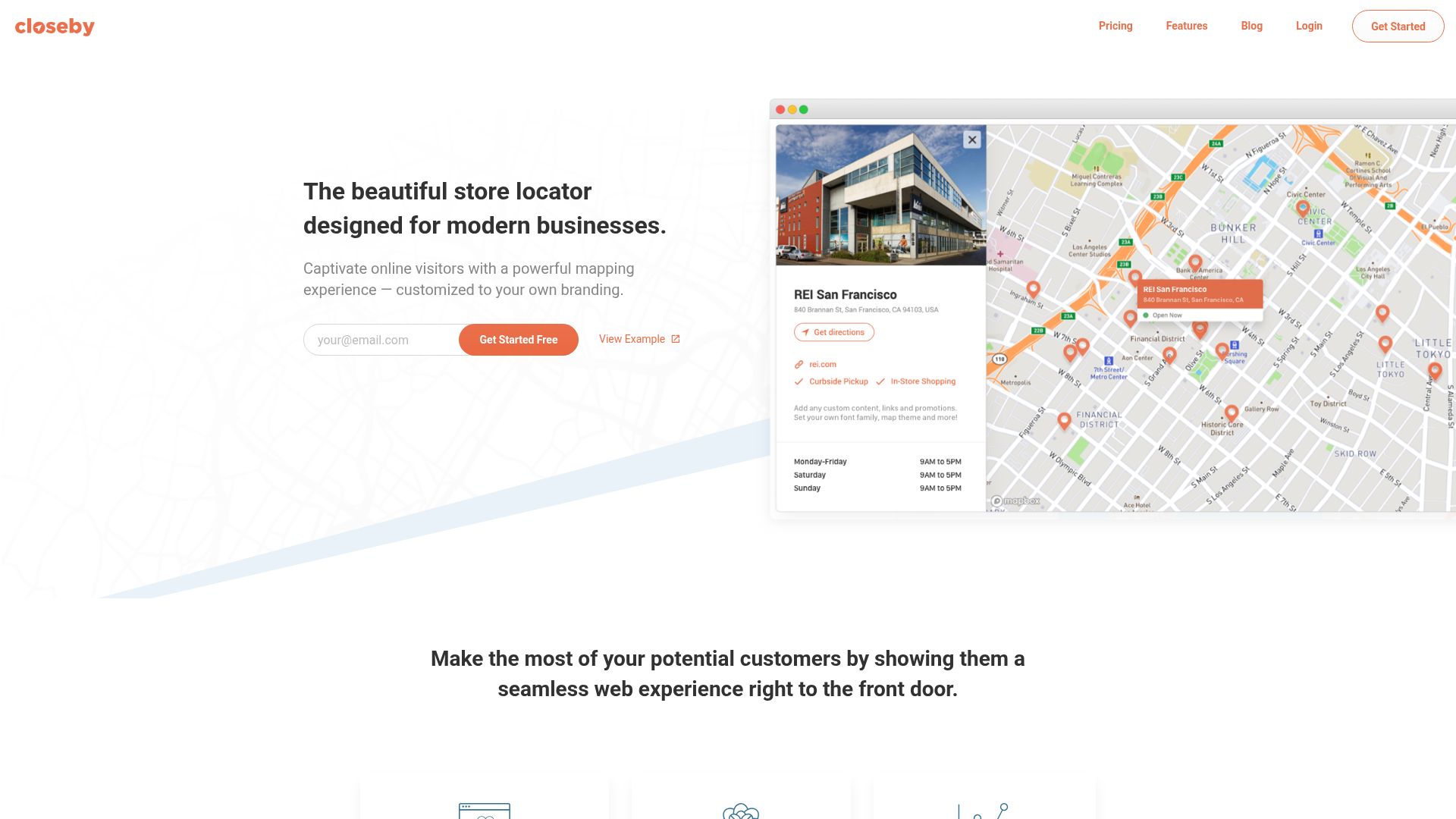
Teams pair Closeby with Webflow when a marketing site needs to route online traffic to physical locations. The map keeps visitors on your site instead of bouncing them to external mapping services, and location edits happen in Closeby without a Webflow publish cycle.
The Closeby-Webflow integration supports these approaches:
- The Closeby app installs the locator inside a page Section without writing code.
- Code Embed and custom code let you place an iFrame map on a specific page or run the overlay launcher site-wide.
- The Webflow Data API gives you programmatic control over script registration and Webflow CMS location data, but requires server-side development.
Most implementations use a single method, though teams managing location pages in the CMS often combine the embed with the API.
Install the Closeby app
The Closeby app is the fastest path and requires no coding. The listing carries an "Approved by Webflow" badge and describes Closeby as "a customizable store locator for Webflow sites whose businesses have physical locations." This method suits designers and marketers who want the locator live in minutes. You need a Closeby account and a free Mapbox account before the map activates.
To set up the integration:
- Install the Closeby app extension from the Webflow Marketplace.
- Select a Section on your page and launch the Closeby app inside it.
- Go to closeby.co to add locations and customize your store locator.
- Create a free Mapbox account, add your access token, and pick from 20+ map themes.
Once installed, the app delivers the full locator feature set:
- Visitors search by city, state, or zip code and see results sorted by distance from them.
- Each result shows open hours and contact fields such as phone number and email address.
- Over 20 pre-built map themes plus custom colors and fonts match the map to your brand.
- Google Sheets sync lets non-technical team members add or update store information directly.
- Built-in usage tracking or a Google Analytics connection reports how visitors use the map.
Closeby offers a free plan for up to 5 locations, and paid tiers reach 10,000 locations. If you need the map on a specific page layout or as a site-wide launcher instead of an app-managed Section, use the embed methods below.
Embed the map with Code Embed or site-wide custom code
Closeby documents two manual installation methods, and both work in Webflow. The iFrame embed places the map in-page and skips the Closeby JavaScript library entirely. The overlay launcher loads a JavaScript snippet and floats a map trigger on every page. Both require custom code access, which means an active Site plan or a Core, Growth, Agency, or Freelancer Workspace. The free Starter Site plan does not include custom code.
To get your snippet, open the map in your Closeby dashboard and click the Install Map button in the top right corner.
Add the iFrame with a Code Embed element
The iFrame method works best for a dedicated "Find a Store" page. Closeby's docs note that you do not need to install the Closeby JavaScript library for this path. You paste the embed code and the map appears.
To embed the map:
- Copy the iFrame embed code from the Install Map page in your Closeby dashboard.
- In Webflow, open the Add panel and drag a Code Embed element onto the canvas.
- Paste the embed code, then save and close the modal.
- Publish the site. Custom code renders in preview but only goes live on publish.
Each Code Embed element holds up to 50,000 characters, far more than the snippet needs. For responsive layouts, append height="100%" width="100%" to the iFrame so the map fills its container, and adjust the width and height attributes to fit your design.
Run the overlay launcher site-wide
The overlay method adds a launcher that opens the map from any page, which suits sites where visitors should reach the locator without leaving their current page. It requires the Closeby JavaScript snippet in your site's custom code in head and body tags. Place the snippet in the Footer code section so it loads late in the page.
To install the launcher:
- Copy the JavaScript snippet from the Install Map page in your Closeby dashboard.
- Go to Site settings > Custom code and paste the snippet into the Footer code section.
- Click Save changes and publish the site.
To limit the launcher to one page, paste the snippet into Page settings > Before body tag instead. Each custom code section holds up to 50,000 characters. If the launcher does not appear after publishing, check your map customizations in Closeby and confirm the "Enable Launcher" option is checked.
Build with the Webflow Data API
Closeby publishes no public API reference. It documents no endpoint paths, authentication details, or developer docs, and offers no webhooks. The programmable side of this integration runs entirely through Webflow's Data API v2 at https://api.webflow.com/v2. This path suits developers deploying the locator across many pages or sites, and teams that maintain location data in the Webflow CMS alongside their Closeby map. All requests need a bearer token, either a Site Token or an OAuth token, per Webflow's authentication docs.
For API builds, match the Webflow surface to the job:
- The Custom Code API registers and applies scripts to sites and pages programmatically.
- The CMS collection items endpoints create, update, and publish location entries.
- Webflow webhooks fire real-time events when CMS location items change.
Each surface handles a different job, so most builds use only the one that matches their workflow.
Register the Closeby snippet programmatically
Agencies rolling the locator out across many client sites can inject the Closeby script through the API instead of pasting it into each site's settings. Scripts must be registered to a site before they can be applied to a page.
To register and apply the script:
- Register the inline script with
POST https://api.webflow.com/v2/sites/{site_id}/registered_scripts/inline. Inline scripts are limited to 2,000 characters and must not include<script>tags. - Apply the registered script to a page with
PUT https://api.webflow.com/v2/pages/{page_id}/custom_code. - Publish the site with
POST https://api.webflow.com/v2/sites/{site_id}/publishto push the change live.
The Custom Code endpoints are only accessible with an OAuth token from a Webflow App, not a Site Token; the register and apply calls need the custom_code:write scope, and the publish call requires sites:write.
Keep CMS location pages in step with your Closeby map
Many teams pair the Closeby map with individual location detail pages built from a CMS collection and rendered through a Collection List. Since Closeby exposes no location endpoints, the sync runs from Webflow outward. Manage the canonical record in the CMS, then mirror changes into Closeby through its Google Sheets sync or the CSV import.
To wire up the CMS side:
- Create location items with
POST https://api.webflow.com/v2/collections/{collection_id}/items, or update one withPATCH https://api.webflow.com/v2/collections/{collection_id}/items/{item_id}. Both require thecms:writescope. - Publish updated items with
POST https://api.webflow.com/v2/collections/{collection_id}/items/publish. - Create a webhook with
POST https://api.webflow.com/v2/sites/{site_id}/webhookssubscribed to CMS item events such ascollection_item_createdandcollection_item_changed; includecollection_item_deletedif your workflow needs deletion notices so your system knows when a location record changes and your team can update Closeby.
Webhook payloads include id, siteId, collectionId, and the full fieldData object, which carries everything needed to update the matching Closeby record. Capacity is not a constraint for most locator builds, since the CMS plan supports 2,000 CMS items and the Business plan supports 10,000, the same as Closeby's top tier of 10,000 locations.
What you can build with the Closeby Webflow integration
Integrating Closeby with Webflow lets you convert online traffic into in-person visits without sending users to external mapping services.
- Retail chain store finder: Build a dedicated "Find a Store" page where customers search by zip code or address and see nearby locations with store hours, contact information, and driving directions.
- Franchise location directory: Create a searchable directory where each franchise location maintains its own contact details, hours, and special offerings, updated by non-technical staff through Google Sheets.
- Service area finder for appointment businesses: Display locations for dental offices, physical therapy clinics, or salon chains so customers find the nearest location to book an appointment.
- Multi-location ecommerce showrooms: Give online retailers with physical showrooms a locator where customers check showroom hours and plan a visit to see products in person.
All four builds start from the same in-page embed. To see that pattern applied to another hosted widget, learn how to embed a Booking.com widget in Webflow.
Frequently asked questions
Install the Closeby app from the Webflow Marketplace for a no-code setup. Select a Section on your page, launch the app inside it, then add your locations and pick a theme in the Closeby dashboard. Prefer to skip the app? The iFrame embed method only needs you to copy a snippet and paste it into a Code Embed element.
Yes, for the embed methods. Code Embed elements and site or page custom code require an active Site plan or a Core, Growth, Agency, or Freelancer Workspace, and the free Starter Site plan does not include custom code, per Webflow's Site plan documentation. Each Code Embed element and custom code section holds up to 50,000 characters, well beyond what the Closeby snippet needs.
Check your Mapbox access token first. Every Closeby map requires a free Mapbox account and token, added through the Closeby Map Installation page per the Mapbox token setup guide. If you used the overlay method, Closeby's docs say to "check your map customizations and make sure the 'Enable Launcher' option is checked." Also confirm you published the site, since custom code shows in preview but only goes live on publish.
No. Closeby publishes no public API, webhooks, or location endpoints, so no automated two-way sync exists. The documented options are managing locations in Closeby's dashboard, plus Google Sheet sync and CSV imports. On the Webflow side, the CMS items endpoints and webhooks let you automate location pages, but pushing that data into Closeby remains a manual step.
Description
Add a searchable, branded store locator map to any Webflow page. Install the Closeby app from the Webflow Marketplace for a no-code setup, or paste an iFrame or overlay snippet into your site's custom code.
This integration page is provided for informational and convenience purposes only.

OpenStreetMap
Connect OpenStreetMap's collaborative mapping platform to your Webflow site for cost-effective, customizable maps. Display store locations, visualize service areas, and create interactive location-based experiences without Google Maps fees or restrictions.

Dynamic Map
Connect Dynamic Map, a native app that turns any CMS collection into an interactive map, with Webflow to render filterable location pins without custom code.

Storepoint Locator
Connect Storepoint Locator with Webflow to embed a searchable store locator map and sync location data from the Webflow CMS.

Flowstar: Store Locator Map
Connect Flowstar: Store Locator Map with Webflow to add a searchable Google Maps store locator, with unlimited locations, opening hours and directions configured inside the app.
Google Business Profile
Display Google Business Profile data on Webflow through third-party widgets (Elfsight, SociableKIT, Shapo), custom API integration with backend infrastructure, or automation platforms that handle server-side API calls.

Stay22
Connect Stay22 with Webflow to monetize travel content with affiliate accommodation maps and automated booking links.

StoreRocket
Connect StoreRocket, a store locator widget, with Webflow to add a searchable map of your locations to any page.

Open Street Map
Connect OpenStreetMap, a free community-maintained map platform, with Webflow to build CMS-driven locators using the Dynamic Map app, Leaflet.js, or embeds.
Google Maps
Connect Google Maps with Webflow to display CMS-driven location pins with filtering, search, custom markers, and interactive pop-ups using the Dynamic Map app by No Code Flow.
Related integrations
Get started for free
Try Webflow for as long as you like with our free Starter plan. Purchase a paid Site plan to publish, host, and unlock additional features.
