






How we use plain language to describe a workflow and get a working one back. Learn how we built on n8n, with no workflow editor and no templates.
Workflows built in n8n encode multi-step, complex interactions to get things done across several systems. We are exploring ways to use plain language to describe a workflow and get a working one back, to dramatically simplify the process, while still leveraging n8n as a powerful orchestrator.
Running n8n headless
With an editor and chat as the only interface, and everything else can sit behind them.
One n8n Project per tenant
Isolating tenants from each other is critical. After talking with the n8n team, we decided to separate data on a per-Project basis. Each tenant's workflows, credentials, and executions live inside their own n8n Project, and n8n enforces that boundary for us. We didn't have to build our own isolation layer on top.
Hot and cold shards
We can create workflows that run at any volume, so we had to plan for noisy neighbors. A single tenant might enqueue tens or hundreds of thousands of executions, and we didn't want everyone else waiting behind them in the same queue.
To handle this, we split our infrastructure into temperature-based "shards." Each shard has an n8n main node, worker nodes, Redis, and Postgres, running in queue mode. Hot nodes take immediate, critical executions. Cold nodes take bulk and background work. Within a shard, the hot and cold nodes share that shard's Postgres database, which holds the workflow metadata.
Credentials
There is a need to connect their workflows to external services, and other parts of our product needed access to those third-party credentials too. So we put ourselves in front of n8n.
Webflow can run the OAuth app, holds the tokens, and owns rotation. The canonical credential then sits encrypted in a Secret Store service. n8n gets a mirror of that credential, which it uses during workflow executions. A binding maps one Webflow connection to one n8n credential, per Project and shard. When a token nears expiry, a scheduled job rotates it, writes the new token to Secret Store, and updates every n8n credential bound to that connection.
Triggers
Since n8n runs headless, it would be possible to start a workflow without clicking a button in the n8n UI. Instead, every workflow starts from a webhook node. We register the webhook at the resolved trigger path. When a trigger event fires, such as a form submission or a published CMS Collection item, the Webflow monolith sends a POST request to that webhook. Scheduled workflows work the same way: a cron job in Webflow checks which ones are due and sends the POST.
The architecture
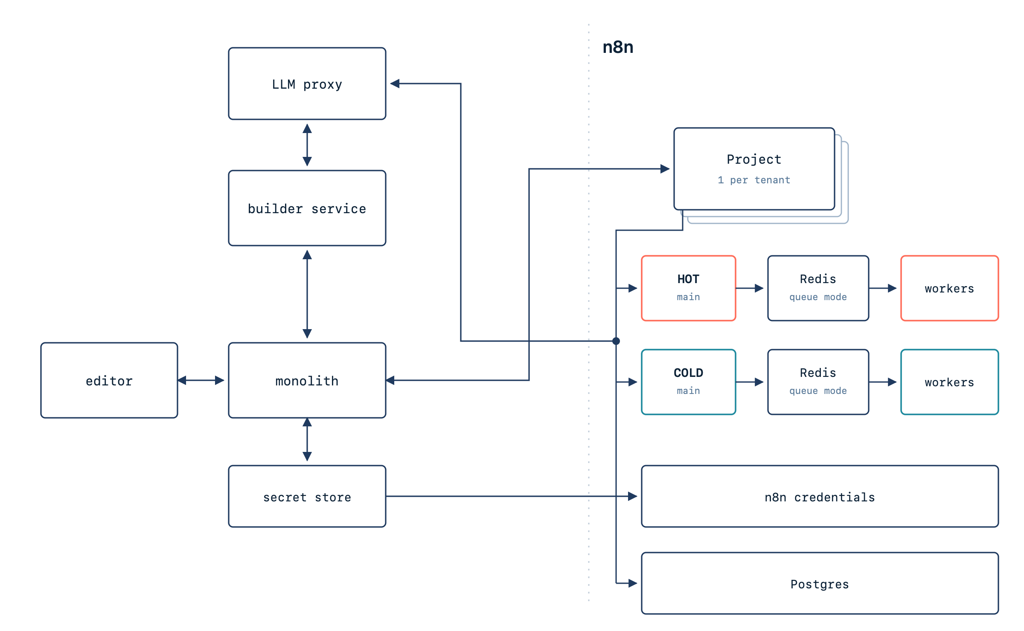
A few core pieces to highlight:
- The Webflow monolith serves the API for drafts, versions, runs, and permissions.
- The builder service turning a prompt into n8n workflow JSON.
- The LLM proxy handling every model call during execution. We use it to deduct tokens from customer budgets.
- n8n orchestrating the workflows, on shards we operate ourselves.
The builder service is a small, stateless HTTP service that lives outside the monolith. It has no database of its own and runs in the same network as the n8n shards. It has four routes: build, plan, import, and health.
From prompt to workflow
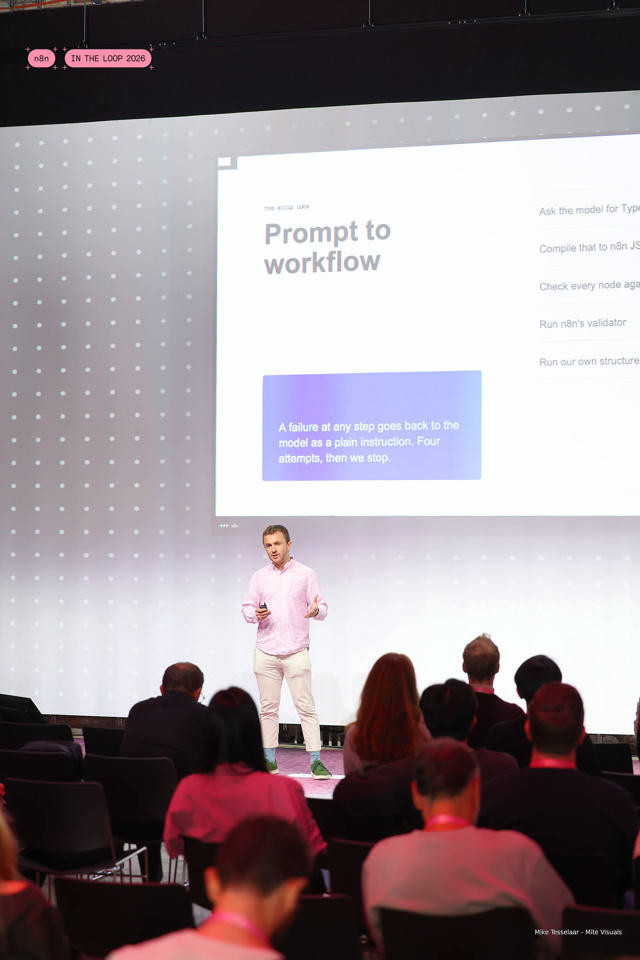
Here's what happens when the builder gets a prompt:
- Ask the model for TypeScript written against the n8n workflow SDK.
- Compile that TypeScript to n8n JSON.
- Check every node against our allowlist.
- Run n8n's validator based on their SDK.
- Run our own structural checks.
A failure at any step goes back to the model as a plain instruction, and it tries again, up to four attempts in total.
Compiling doesn't run the model's code. The SDK walks the TypeScript syntax tree with an interpreter that allows only SDK calls and blocks globals such as eval, require, process, and fetch.
Why TypeScript instead of JSON?
We started by asking the model for raw JSON. When you ask a model for large blobs of workflow JSON, you get something subtly wrong: an invented parameter that looks right, a node type that doesn't exist, or a connection shape from an older version of n8n. All of these survive a casual read, but the workflow fails when you actually run it.
Written against the SDK, the model can't get the connection shape wrong, because the SDK builds the connections. A syntax or API mistake fails with a line-numbered error that the retry loop sends back, and node types that don't exist get caught by our allowlist. LLMs are good at writing code. Switching from generating JSON to generating code against the SDK moved those failures from run time to build time, where the retry loop can fix them.
For example, here the model chains a .then() that the SDK doesn't have:
const form = trigger({ type: 'n8n-nodes-base.webhook', version: 2, config: { name: 'Form submitted' } });
const crm = node({ type: 'n8n-nodes-base.httpRequest', version: 4.2, config: { name: 'POST to CRM' } });
export default workflow('form-to-crm', 'Form to CRM').add(form).then(crm);
The build fails before anything reaches n8n, and this error goes back to the model:
Failed to parse workflow code: Method 'then' is not an allowed SDK method. Allowed methods: add, to, input, output, onError, onTrue, onFalse, onCase, onEachBatch, onDone, connect.

  1 | const form = trigger({ type: 'n8n-nodes-base.webhook', version: 2, config: { name: 'Form submitted' } });
  2 | const crm = node({ type: 'n8n-nodes-base.httpRequest', version: 4.2, config: { name: 'POST to CRM' } });
> 3 | export default workflow('form-to-crm', 'Form to CRM').add(form).then(crm);
    |                                                                 ^
The allowlist
n8n ships with more than a thousand nodes. We support fewer than 20 of them, on purpose. Because we sit in front of n8n for integrations, we need to make sure the builder doesn't, for example, generate a Slack node if we don't support Slack.
So we keep a list of permitted nodes. Every entry pins a version and includes a known-good parameter example, and we use the list as one of the validation steps.
Things that were harder than expected
Syncing workflow status
We wanted to show a live view of a workflow as it runs. To do that, we subscribe to n8n's log stream events and sync them to the client over a websocket.
This worked well until we hit long-running workflows. Some of them would get lost: when a worker ran out of memory or restarted during a deploy, n8n's queue failed the job without emitting a log stream event, so our UI showed it as running forever. The fix was to add polling for these kinds of jobs, along with telemetry on their state.
Edits
Once the agent generates a workflow, the customer has to decide whether it's correct. We're not going to ask anyone to point out what's wrong in the JSON.
Instead, edits rebuild the whole workflow. We pass the customer's feedback to the builder service along with the current workflow and ask for the full thing back. This repeats until the customer tells us it's right.
Rebuilding has a cost: the model can drop or change a step the customer never mentioned. So we give the builder the full current workflow, including disabled steps and settings like timeouts, and our edit evals fail if a step the request didn't mention disappears.
People leave things out
Natural language is hard. "Send me a summary" is a classic example: a summary of what? Sent where? How often?
To handle this, the builder runs a planning step first. It decides whether it has enough to build or needs to ask a question. It asks one question at a time, and once the trigger and the main action are clear, it builds.
Evals
Early on, our sense of quality came from someone trying a prompt and forming an impression. That doesn't scale. If you change the prompt, the model, or the allowlist, nothing tells you what happened.
So we wrote 20 evals based on representative customer requests, each with a written expected outcome, and split them into three tiers:
- Tier 0: Did it build, and on which attempt?
- Tier 1: Does it actually run against a sandbox site with fixture data?
- Tier 2: Did it do what was asked? A model reads the prompt and grades the resulting workflow graph.
Our bar is 70% correct on the first attempt.
Load testing
Webflow hosts sites for about 1% of the internet, so we wanted to know how n8n would hold up before customers started leaning on it.
We set up one n8n main node and four workers in an isolated staging environment and ran a few rounds of tests. One of our favorites was a workflow we called the "fibonacci hammer." It ran a CPU-heavy Fibonacci calculation with almost no I/O, to put as much strain on the hardware as possible.
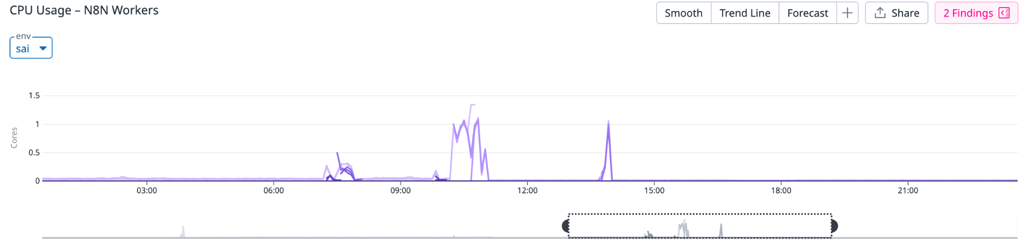
We ramped from two executions per second up to 550 and ran about 300,000 executions in roughly an hour. Here's what we saw:
- The main node was steady until about 500 executions per second. Past that point, it went down and recovered on its own about a minute later.
- Each worker saturated a CPU core without staying pegged.
- Autoscaling took the worker pool to its ceiling of four.
- Redis and Postgres held throughout.
We also found we were missing some metrics, so we added CPU telemetry and a Redis queue-depth metric. The short version is that n8n in queue mode handled up to about 500 executions per second. We chose a CPU-bound test because it strains workers the most. Real workflows mostly wait on I/O, so they put less load on a worker.

What we learned
A few takeaways we'd pass along to anyone building something similar:
- Treat workflow JSON as a compile target, and give your generator a typed surface.
- n8n Projects work well for multi-tenancy.
- You can throw a lot at n8n workers in queue mode.
- Syncing workflow status across multiple systems is hard. Plan for missed events early: poll as a backstop to the event stream, and alert on runs that stay in a running state too long.
We first presented this work at n8n's In the Loop conference in Berlin.