




A job board is only as credible as its oldest listing. Automating the import is the easy half. Automating the expiry is what keeps it eligible for Google.
A job board is a content problem with a deadline attached. New roles arrive from an applicant tracking system, a spreadsheet, or a partner feed, and every one of them stops being true on a date somebody has to remember. Doing that by hand works until you have a dozen roles, and then it quietly stops working.
The Webflow CMS gives you the templates, the filtering, and the URLs. Make gives you the scheduled workflow that keeps the collection honest.
What decides whether the board earns traffic, rather than just existing, is the structured data attached to each listing, and the discipline of taking listings down when they close.
What do you need to automate a job board in Webflow?
A Webflow site with a Jobs collection, a Data API token with write access, a Make account, and a source of roles. The collection design matters more than the automation, because it determines what markup you can output later.
The full list:
- A Webflow site with a Jobs collection and a collection page template
- A Webflow Data API token with CMS write access
- A Make account. The plan you need depends on how often the scenario runs and how many operations each run consumes, so check current operations allowances on Make's pricing page
- A source of roles: an applicant tracking system with an API, a shared sheet, or a partner feed
Once these are in place, the board hinges on the markup each listing emits and on taking listings down the moment they close. Here's how.
How Webflow and Make fit together for a job board
Make polls or receives your source, transforms each role, and writes it into the Webflow CMS, where content lands as staged before it becomes a published listing.
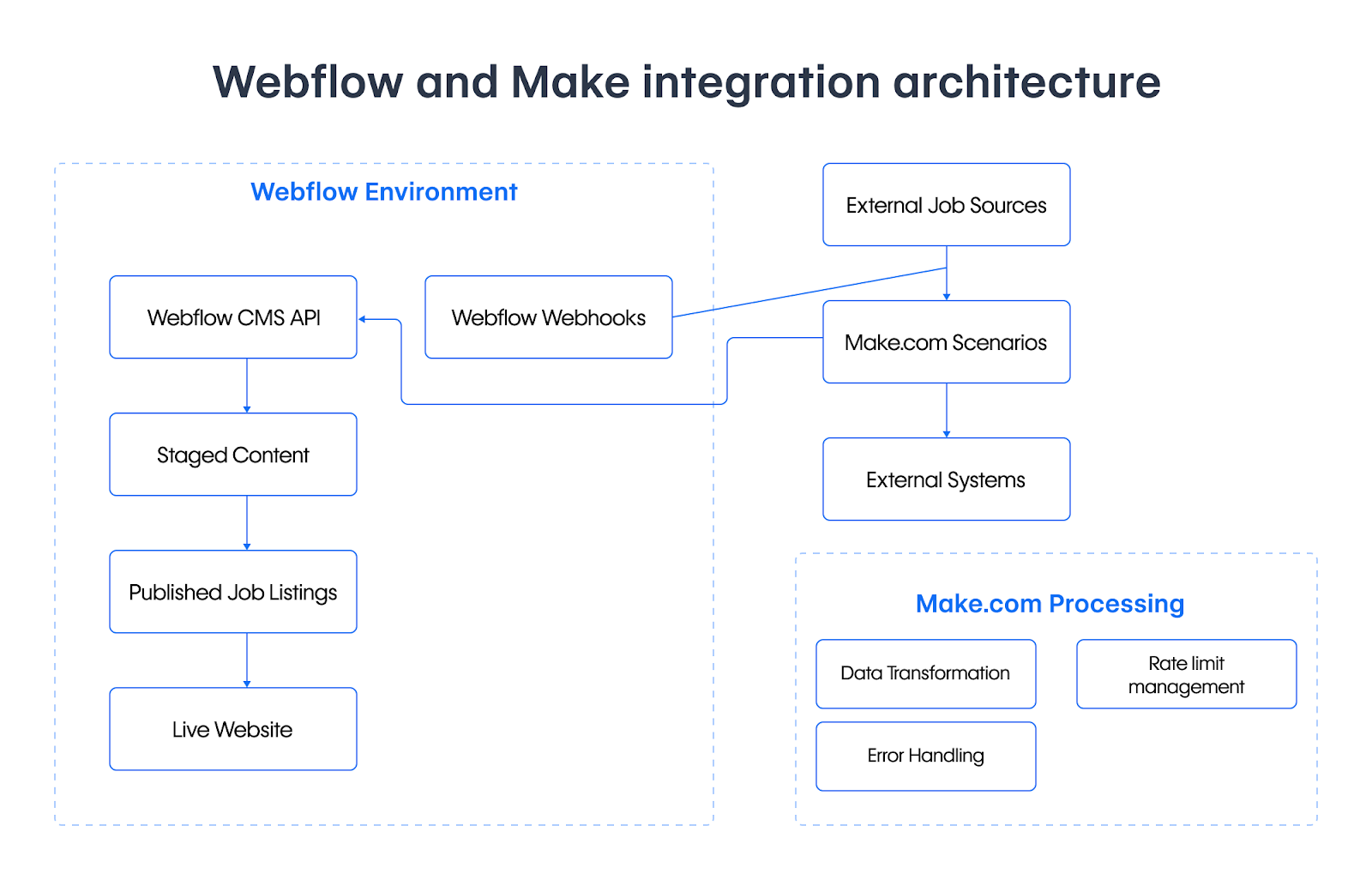
Two details in that diagram do the real work. Content arriving as staged gives you a review point between an external feed and a public page. And the processing box exists because an integration that ignores rate limits and errors will appear to work during testing, when you are moving three roles, and fall over on the first real import.
The structured data most Webflow job boards get wrong
A job board without JobPosting markup is invisible to the job search experience in Google. This is not an SEO nicety on a job board; it is the difference between listings that can appear and listings that cannot.
Google supports a defined set of JobPosting properties, built on the schema.org type. These five are required, and each carries a trap worth knowing before you model the collection:
One exception to that list: for a role that is remote all of the time, Google says to use jobLocationType, and jobLocation is not required when applicantLocationRequirements is present. A board carrying remote roles needs both modelled from the start.
Here is a complete listing as JSON-LD, which you bind to CMS fields in your collection page template so every listing generates its own:
<script type="application/ld+json">
{
  "@context": "https://schema.org/",
  "@type": "JobPosting",
  "title": "Senior Product Designer",
  "description": "<p>We are hiring a senior product designer to own...</p>",
  "identifier": {
    "@type": "PropertyValue",
    "name": "Acme",
    "value": "ACME-1042"
  },
  "datePosted": "2026-08-04",
  "validThrough": "2026-09-30T00:00",
  "employmentType": "FULL_TIME",
  "hiringOrganization": {
    "@type": "Organization",
    "name": "Acme",
    "sameAs": "https://www.example.com",
    "logo": "https://www.example.com/images/logo.png"
  },
  "jobLocation": {
    "@type": "Place",
    "address": {
      "@type": "PostalAddress",
      "streetAddress": "1 Example Street",
      "addressLocality": "Manchester",
      "addressRegion": "England",
      "postalCode": "M1 1AA",
      "addressCountry": "GB"
    }
  }
}
</script>
Include validThrough even though it is not required, because it is what makes automatic expiry possible. And expiry, as the next section covers, is not optional.
Expired jobs are an obligation, not a tidiness preference
Google's guidance is unusually direct here: jobs no longer open for applications must be expired, and "failure to take timely action on expired jobs may result in a manual action". A manual action is a human review decision that can pull your listings out of the job search experience, rather than an algorithmic ranking nudge.
You have three acceptable ways to expire a listing: let validThrough fall into the past, remove the page so it returns 404 or 410, or strip the JobPosting structured data from it. Any of those is fine. Leaving a filled role live with valid markup is not.
This is the strongest argument for automating the board rather than maintaining it by hand. The failure mode of manual maintenance is not an untidy page, it is a review decision against your site caused by the one role nobody remembered to take down.
5 steps to automate job listings with Webflow and Make
The build is a collection modelled around the schema, an import scenario that upserts, and a second scenario that expires. The external ID is the field that makes the repeat runs safe.
1. Model the collection around the schema
Design the collection fields to match the properties you will output, rather than designing them for how the list looks and retrofitting the markup later. At minimum you want the job title, a rich text description, employment type, date posted, valid through, and the employer.
Add one more field that has nothing to do with the page: an external ID holding the source system's identifier for the role. That field is how the scenario knows whether a role already exists. Encode it into the slug as well, for the reason covered in step 3. You finish this step with a collection whose fields map one to one onto the markup you intend to emit.
2. Build the import scenario
In Make, create a scenario with your source as the trigger, then a Webflow module to write the item. Map fields explicitly rather than passing everything through, and remember that Webflow's fieldData keys are the field slugs from your collection, so "Valid Through" is valid-through.
The item payload looks like this:
{
  "isArchived": false,
  "isDraft": false,
  "fieldData": {
    "name": "Senior Product Designer",
    "slug": "senior-product-designer-acme-1042",
    "description": "<p>We are hiring a senior product designer to own...</p>",
    "employment-type": "FULL_TIME",
    "date-posted": "2026-08-04",
    "valid-through": "2026-09-30",
    "external-id": "ACME-1042"
  }
}
Set the scenario to run on a schedule rather than continuously. Job feeds do not change by the minute, and every run consumes operations whether or not anything changed. A successful first run creates items you can see in the collection, still unpublished.
3. Make the run repeatable
Before creating anything, search the collection for an item carrying that external ID. Found means update, not found means create. Without that lookup, the second run duplicates every open role, and it does so silently.
One caveat that shapes the design: the list items endpoint filters on exact name or slug and on created and updated dates, but not on an arbitrary field. You cannot query your external ID field directly. The practical answer is to build the slug from the external ID, as in senior-product-designer-acme-1042, and filter on slug. The alternative is paging the collection and matching inside Make, which costs an operation per page.
Run the scenario twice against the same source. A correct implementation leaves the item count unchanged on the second run.
4. Respect the rate limit
The Webflow Data API enforces a per-minute request limit that varies by site plan. A first import of a hundred roles is exactly the workload that meets it.
Add a delay between iterations and handle a 429 by retrying on the interval given in the Retry-After header rather than dropping the item. The error handling box in the diagram earns its place here: a scenario that fails halfway through an import and reports success leaves you with a partial board and no list of what is missing. A well-behaved import finishes slower and complete rather than fast and partial.
5. Automate the expiry
Run a second, simpler scenario on a daily schedule. It lists published job items, checks each valid-through date against today, and unpublishes or archives anything that has passed. Roles that vanish from the source feed get the same treatment.
This is the scenario that protects you from the manual action, so build it at the same time as the import rather than after the first stale listing is found. If you want expiry to happen the moment a role closes rather than at the next daily run, a collection item changed webhook can trigger downstream work when an item is updated, since the created event fires only on creation. You know this step works when a role whose date has passed disappears from the live board without anyone touching it.
What causes an automated job board to fail? Tips to troubleshoot
Four failures cover nearly everything: markup that does not qualify, an import with no memory, a rate limit met mid-run, and dates in the wrong format.
Listings do not appear in Google Jobs
Cause: a missing required property, a description that is a summary rather than the full text, or a jobLocation without real address components including addressCountry.
Fix: test the rendered page rather than the template, since the markup is only complete once CMS values are bound. Correct the failing property and re-test the live URL.
Every run creates duplicates
Cause: no external ID lookup, so the scenario has no memory and creates rather than updates.
Fix: add the field, encode it into the slug, and search before writing. Clean up the existing duplicates once, then the upsert holds on every later run. Catch this in testing by running the scenario twice against the same source, since a single-pass test will never surface it and the damage compounds daily on a scheduled run.
The import stops partway through
Cause: almost always the rate limit, met during a large first import.
Fix: add a delay between iterations and retry on the Retry-After interval rather than dropping the item. Let the run take longer rather than fail. This is worth building before your first large import rather than after, because the run that discovers the limit is also the run that leaves the board half populated.
Dates arrive in the wrong format
Cause: structured data wants ISO 8601, and a source system exporting a localised date string produces markup that validates as text and fails as a date.
Fix: convert in the scenario before writing. This one is worth checking explicitly, because it is a silent failure rather than a loud one and the listing looks fine to a human reader.
What you can build next with Make and Webflow
Once roles flow in and expire on their own, the board becomes a place to build on: alerts when a role matching saved criteria appears, an application form that writes back to the applicant tracking system, or a feed out to aggregators.
The same import-and-upsert shape applies to any external content source. Our Notion to Webflow guide builds it in code rather than in a visual scenario, including the ID mapping that makes repeat runs safe. For the connection details and what the modules cover, see the Webflow and Make integration. If you would rather publish straight to the live site, the live items endpoints exist for that, though staged plus a review step is the safer default for content you did not write.
For deeper customization beyond what Make handles, Webflow's developer docs cover the CMS API, webhooks, and rate limits in full.
Frequently asked questions
Do I need structured data for a job board?
If you want listings eligible for Google's job search experience, yes. Without JobPosting markup the pages are ordinary pages. The required properties are the job title, a full HTML description, the date posted, the hiring organisation, and a location with real address components.
What happens if I leave filled roles on the site?
Google states that jobs no longer open for applications must be expired, and that failing to act on expired jobs in good time may result in a manual action against your site. Expire by letting the valid-through date pass, removing the page so it returns 404 or 410, or removing the structured data from it.
Should the automation publish listings directly?
Prefer staged for anything fed by an external source. Staged items land in the CMS and wait for a person to publish, which gives you a check on content you did not write. Move to direct publishing once the mapping has proven itself over real roles.
Why do I need an external ID field?
It is how the scenario recognises a role it has already imported. Without it, each run has no memory and creates a second copy of everything, and it does so silently.
Make or code?
Make is a good fit when the mapping is simple and the people maintaining it are not developers. Code becomes worthwhile when you need transformation that a visual mapper handles awkwardly, such as converting a source description into clean HTML, or when operation costs at your volume start to exceed the effort of maintaining a small script.