






Publish Pilot
Connect Publish Pilot with Webflow to automate [CMS item publishing](https://help.webflow.com/hc/en-us/articles/33961307099027-Intro-to-the-Webflow-CMS), draft or archive actions, timed element changes, and full-site publishes.

Built-in scheduling covers only CMS items that have never gone live. You cannot schedule a republish of an already-published item, a timed draft or archive action, or a full-site publish. Webflow also has no way to show or hide page elements on a schedule. Someone on the team ends up publishing manually, often at midnight or over a weekend.
Publish Pilot adds a scheduling layer on top of Webflow. Connected through the Marketplace app, it can schedule CMS item publish, draft, archive, and republish actions at a precise time. It also shows or hides elements on a schedule using CSS selectors and schedules complete site publishes. A calendar view and an audit log track every scheduled action.
The integration fits marketing and editorial teams running content calendars, along with freelancers handling a couple of sites. Agencies get the most from the multi-site dashboard, which manages schedules for client sites from one place.
How to integrate Publish Pilot with Webflow
Publish Pilot is a publishing scheduler and automation app for Webflow, built by Brandzway. It schedules CMS item actions and full-site publishes, and it can time HTML element changes. It authenticates through OAuth 2.0 and is available as an Approved app in the Webflow Marketplace, listed as "Approved by Webflow."
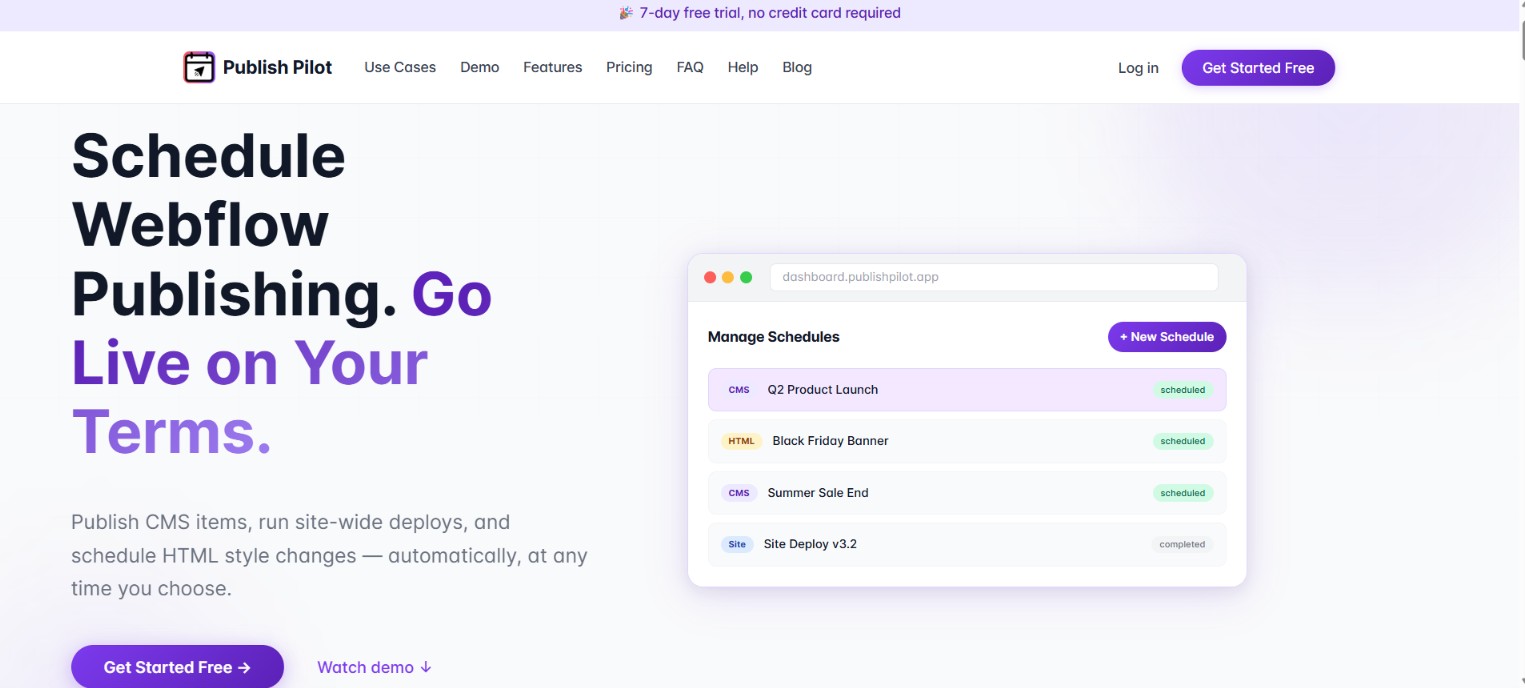
Teams reach for this combination when publishing timing matters more than publishing effort, such as a blog post that needs to go live at 9 AM or a sale banner that needs to disappear the moment a campaign ends. Redesign publishes can also be scheduled for off-peak hours. Publish Pilot's homepage uses the names "The Midnight Alarm," "The Babysit Deploy," and "The Expired Banner" for these problems.
The Publish Pilot-Webflow integration supports two approaches:
- The Publish Pilot app handles CMS publish actions, CMS draft or archive actions, element scheduling, and full-site publish scheduling without writing code.
- The Webflow Data API and webhooks let developers track scheduled publishes and build custom publishing workflows around the app, but require server-side development.
Most teams only need the app. The API path adds room for custom automation on top of it.
Install the Publish Pilot app
The Publish Pilot app is the only documented way to connect the two products. No third-party automation connector covers it, and Publish Pilot documents no other way in. Publish Pilot advertises a "60-second setup" with "Zero code required to get started," and the connection runs on OAuth 2.0. During authorization, the app requests read and write access to CMS data, custom code, Ecommerce store, and site data and publishing. It also requests read access to authorized user information.
To set up the integration:
- Open the Publish Pilot listing in Webflow Apps and click Install.
- Authorize the requested permissions.
- Select what to schedule: CMS item actions, HTML element changes, full-site publishes, or recurring actions if your plan supports them.
- Set the target date, time, and action type through the calendar interface.
- Monitor execution status through real-time alerts and the audit log.
Once connected, the app schedules and manages publishing actions across your sites:
- Change any CMS item's status at a set time, including items that are already live. Start and end windows make content appear and disappear automatically.
- Show or hide elements and change CSS properties such as visibility, display, colors, and backgrounds using class or ID selectors.
- Schedule full-site publishes for redesign launches, off-peak updates, or seasonal campaigns.
- Run recurring schedules daily, weekly, or monthly on supported Publish Pilot plans, such as Pro and Business.
- Manage everything through Agenda, Weekly, or Monthly calendar views, a bulk queue, a multi-site dashboard, and an audit log with auto-retry.
You need a Site plan with the CMS, which since May 2026 means Premium or higher, because the scheduling features depend on Webflow CMS collections and per-item publishing. Element scheduling also needs support for Custom code in head and body tags.
Schedule a CMS item to publish automatically
Publish Pilot documents CMS item scheduling, its most common workflow, in a step-by-step guide on its blog. The guide covers the flow for a CMS item, and the same steps apply whether you publish, republish, draft, or archive.
To schedule a CMS item:
- Prepare the item in Webflow by creating or editing it.
- Connect the site to Publish Pilot using Webflow OAuth.
- Select the CMS item and the action you want, whether publish, republish, draft, or archive.
- Select the execution date and time.
- Confirm and close.
The action runs at the scheduled time, and the audit log records whether it succeeded.
Build with the Webflow Data API and webhooks
Publish Pilot exposes no public API, so there is no programmatic way to control its scheduling layer from outside its dashboard. Developers who need custom publishing automation work directly with the Data API v2. Its base URL is https://api.webflow.com with the /v2/ prefix. The same path fits teams that want downstream systems to react when scheduled publishes run, since these are the operations Publish Pilot automates on your behalf. This path requires server-side development.
The relevant endpoints and events:
- The create items endpoint (
POST /v2/collections/{collection_id}/items) creates staged CMS items, withisDraftdefaulting totrue - The publish items endpoint (
POST /v2/collections/{collection_id}/items/publish) moves staged items live - The site publish endpoint (
POST /v2/sites/{site_id}/publish) pushes all staged changes live across the site - Webhooks send real-time
site_publishevents and collection item events such ascollection_item_publishedandcollection_item_unpublishedto any endpoint
Requests authenticate with a Bearer token in the Authorization header. Use a Site Token or OAuth 2.0, as covered in the authentication reference.
Track scheduled publishes with webhooks
When Publish Pilot publishes a CMS item or the full site, the corresponding webhook events fire. Registering webhooks lets your backend react to those scheduled actions, for example to sync content to another system or notify a Slack channel.
To implement this:
- Register a webhook with
POST /v2/sites/{site_id}/webhooks, selecting a trigger type such ascollection_item_publishedorsite_publish. - Handle the payload on your server. The
site_publishpayload includessiteId,publishedOn,domains, andpublishedBy. - Validate each request using the
x-webflow-timestampandx-webflow-signatureheaders before processing it.
Collection items queued in Webflow's built-in scheduler sit outside CMS API control, so a programmatic publish will not move them. Keep built-in scheduling and Publish Pilot on separate items so the two never race each other on the same content.
What you can build with the Publish Pilot Webflow integration
Integrating Publish Pilot with Webflow lets you run time-based publishing across CMS content, page elements, full-site updates, and recurring schedules without manual publishes or late-night logins.
- Automated blog calendar: Queue posts as staged CMS items in a Collection List and schedule each to go live at its slot, so a weekly publishing cadence runs without anyone at a keyboard. Recurring schedules handle repeating content like weekly roundups.
- Seasonal promotion pages: Publish a sale collection item when the campaign starts and archive it automatically when it ends, so expired offers never linger on a live site.
- Timed promotional banners: Target a discount banner by its CSS class or ID, use the campaign window to show it, and schedule the style change back afterward, with optional revert.
- Coordinated site launches: Schedule a complete site publish for a redesign at an off-peak hour, and manage launch schedules for multiple client sites from one dashboard.
If you need more control over how publishing events reach downstream systems, the API path covers those cases. Start with our Webflow CMS API guide, and if you would rather have an AI agent handle CMS publishing and site updates directly, connect the MCP server to your Webflow workspace.
Frequently asked questions
A Webflow Site plan that includes the CMS, which since the May 2026 plan changes means Premium or higher. Publish Pilot needs CMS collections and per-item publishing, plus custom code support for its element scheduling. The Site plan comparison shows Basic without CMS access and Starter capped at 50 CMS items.
Yes, but only for CMS items that have never been published. Built-in scheduling cannot republish a live item, schedule draft or archive actions, apply timed CSS changes, or schedule a full-site publish. Items scheduled that way also sit outside CMS API control, per the publishing documentation.
Publish Pilot retries automatically and logs the outcome in its audit log, with real-time alerts on success or failure. If a schedule keeps failing, contact support@publishpilot.app.
No. Publish Pilot documents no public API endpoints or webhook schemas anywhere on publishpilot.app. For programmatic publishing work, use the Data API v2 and the webhook events listed in the event index, which fire when scheduled publishes run.
Recurring daily, weekly, or monthly schedules run on the Pro and Business plans. The Starter plan handles one-off schedules only, and the plans also differ in how many sites you can connect and how long the audit log is kept.
Description
Schedule CMS item actions and full-site publishes on Webflow sites, with timed element changes through the Publish Pilot Marketplace app. Developers can extend the setup with the [Webflow Data API](https://developers.webflow.com/data/reference/rest-introduction) and webhooks.
This integration page is provided for informational and convenience purposes only.

Superflow
Connect Superflow, a website QA and visual feedback platform, with Webflow to collect pinned client feedback and run AI QA on staging and published pages.

Wized
Connect Wized, a low-code JavaScript framework, with Webflow to turn static sites into reactive web applications that authenticate users and call APIs.

albato

IDX with Firebase Studio
Connect IDX with Firebase Studio with Webflow to add application features to a Webflow front end.

BuildShip
Connect BuildShip with Webflow to run backend workflows from form, CMS, e-commerce, and other site events.

Boost.space
Connect Boost.space, a centralized data platform, with Webflow to sync CMS items, form submissions, and orders through one record database.

Byteline
Connect Byteline with Webflow to integrate Webflow eCommerce data with various platforms through OAuth-authenticated synchronization.
Webflow Pack for Coda
Connect Webflow with Coda to sync CMS collections as spreadsheet-style tables, manage content, and automate workflows without switching platforms.

SyncFlow
SyncFlow is a Webflow Marketplace app that syncs a Notion database into a Webflow CMS collection in one direction, with automatic sync, page linking, code highlighting, and TeX support.
Related integrations
Get started for free
Try Webflow for as long as you like with our free Starter plan. Purchase a paid Site plan to publish, host, and unlock additional features.
