










For B2B marketing teams, the right CRO stack depends first on whether pages get enough conversions to support A/B tests, where visitors drop off, and which site platform and CRM you use.
Conversion rate optimization (CRO) tools help marketing teams identify where visitors drop off, validate messaging, test fixes, and turn more form fills into pipeline.
B2B CRO differs from B2C CRO in what counts as a conversion. An online store can record a sale on a single visit, while a B2B buyer often returns several times and brings colleagues into the decision before requesting a demo. B2B sites also tend to draw less traffic than consumer sites, so many key pages take months to collect enough conversions for a reliable A/B test result.
The tools below cover the four stages of a B2B conversion program: research, message validation, testing, and converting leads to pipeline. This article covers three research tools, one message-testing panel, two testing platforms, and two pipeline tools, and compares them on stage fit and published pricing.
Key takeaways:
- Choose Webflow Optimize if your site runs on Webflow and marketers want to launch tests and personalization without a developer, but plan on a separate tool for session replays.
- Pick Contentsquare to find the friction points on key pages at no cost to start, but expect a sales-quoted tier before you get field-level analytics on lead forms.
- Go with Fullstory when buyers convert across several visits, and you want journeys captured without tagging events, but budget for a separate testing tool.
- Choose UserTesting if you need prospects to explain their reactions on video, but expect a sales call before you can see a price.
- Use Wynter when your pages lack the conversion volume for A/B tests, but treat its panel feedback as direction for copy, since it can't prove a conversion lift.
- Choose VWO for testing, heatmaps, and surveys from one vendor, but check how the separately priced modules add up before you sign on.
- Pick Chili Piper if form fills stall before a meeting gets booked and several reps share inbound leads, but plan on an experienced admin to maintain the routing rules.
- Go with Qualified if high-intent visitors arrive outside SDR hours and your CRM is Salesforce or HubSpot, but expect to keep tuning the AI agent after launch.
How the top CRO tools compare
The tools on our short list favor B2B lead generation (over ecommerce checkout, for example), and are categorized by the conversion stage they focus on. Pricing comes from each vendor's own pricing page (where available).
Contentsquare, Wynter, Webflow Optimize, and Chili Piper publish a paid entry price, and Fullstory and Contentsquare offer a free plan.
| Tool | Conversion stage | Best for | Starting price (as of October 2026) | Rating (G2, as of October 2026) | Standout feature |
|---|---|---|---|---|---|
| Webflow Optimize | Testing | Marketing teams whose site already runs on Webflow | $379/month (or $299/month billed annually) for 25,000 page views, on a paid Site plan | No G2 listing | Tests and cookie-free personalization built inside the Designer |
| Contentsquare | Research | Demand-gen teams diagnosing page drop-offs | Free plan; Growth plan is $49/month (or $39/month billed annually) | 4.6/5 | Zone-based heatmaps that score engagement for each page element |
| Fullstory | Research | Growth analysts tracking multi-visit buyer journeys | Free plan; contact sales for paid plans | 4.5/5 | Autocapture with rage, dead, and error click signals |
| UserTesting | Research | Marketing teams that need prospect reactions on video | Contact sales | 4.4/5 | Recorded sessions with AI-generated insight summaries |
| Wynter | Message validation | Product marketers on low-traffic B2B pages | Pay-as-you-go per test; Pro plan is $20,000/year | 4.8/5 | Verified B2B buyer panel with results typically within 12 to 48 hours |
| VWO | Testing | CRO leads who want testing and insights from one vendor | Contact sales | 4.4/5 | SmartStats Bayesian sequential testing engine |
| Chili Piper | Convert to pipeline | Demand-gen teams handing leads to several reps | $1,250/month billed annually (no monthly billing) | 4.6/5 | Live rep calendar shown the moment a form is submitted |
| Qualified | Convert to pipeline | Marketing ops teams running Salesforce or HubSpot | Contact sales | 4.9/5 | AI SDR agent that qualifies visitors and books meetings around the clock |
| Tool → Conversion stage → Best for → Starting price (as of October 2026) → Rating (G2, as of October 2026) → Standout feature |
|---|
| Webflow Optimize |
| Testing |
| Marketing teams whose site already runs on Webflow |
| $379/month (or $299/month billed annually) for 25,000 page views, on a paid Site plan |
| No G2 listing |
| Tests and cookie-free personalization built inside the Designer |
| Contentsquare |
| Research |
| Demand-gen teams diagnosing page drop-offs |
| Free plan; Growth plan is $49/month (or $39/month billed annually) |
| 4.6/5 |
| Zone-based heatmaps that score engagement for each page element |
| Fullstory |
| Research |
| Growth analysts tracking multi-visit buyer journeys |
| Free plan; contact sales for paid plans |
| 4.5/5 |
| Autocapture with rage, dead, and error click signals |
| UserTesting |
| Research |
| Marketing teams that need prospect reactions on video |
| Contact sales |
| 4.4/5 |
| Recorded sessions with AI-generated insight summaries |
| Wynter |
| Message validation |
| Product marketers on low-traffic B2B pages |
| Pay-as-you-go per test; Pro plan is $20,000/year |
| 4.8/5 |
| Verified B2B buyer panel with results typically within 12 to 48 hours |
| VWO |
| Testing |
| CRO leads who want testing and insights from one vendor |
| Contact sales |
| 4.4/5 |
| SmartStats Bayesian sequential testing engine |
| Chili Piper |
| Convert to pipeline |
| Demand-gen teams handing leads to several reps |
| $1,250/month billed annually (no monthly billing) |
| 4.6/5 |
| Live rep calendar shown the moment a form is submitted |
| Qualified |
| Convert to pipeline |
| Marketing ops teams running Salesforce or HubSpot |
| Contact sales |
| 4.9/5 |
| AI SDR agent that qualifies visitors and books meetings around the clock |
Webflow Optimize
Webflow Optimize is the A/B testing and personalization add-on for Webflow, the agentic web marketing platform where marketers build and publish their own pages. For marketing teams whose sites already run on Webflow, Optimize puts testing inside the Designer they already use to build pages.
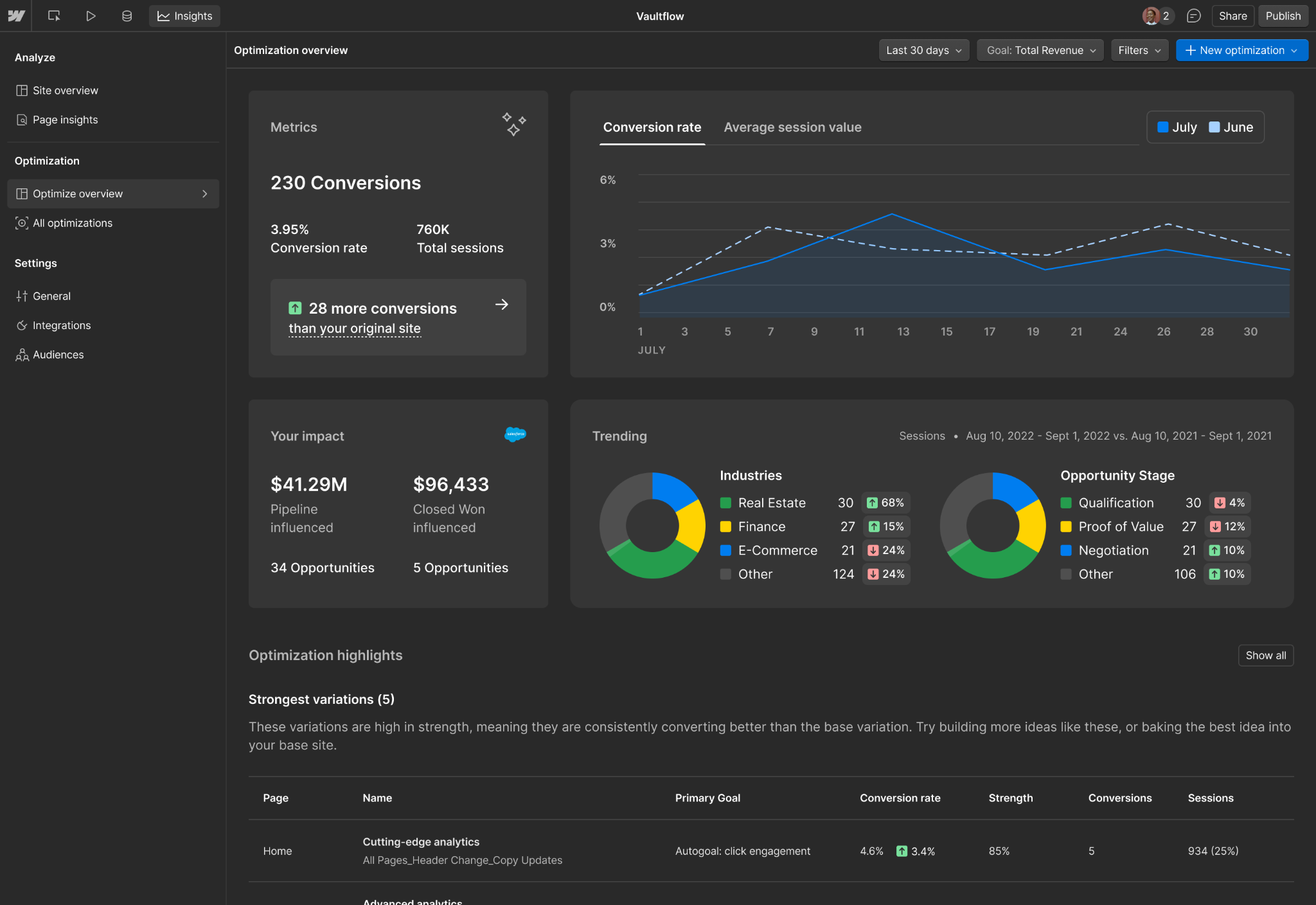
Image source: Webflow
Teams on other content management systems (CMSs) can add Optimize's JavaScript snippet to every page that runs a test or records a conversion. An optimization can be a standard A/B test, rules-based personalization, or an AI-driven test through Optimize, which uses Bayesian neural networks to move visitors toward better-performing variations.
Webflow Optimize pros:
- No testing script to install or maintain: On Webflow sites, teams turn Optimize on without adding code, so there's no snippet for a developer to keep current.
- Personalization without cookies or personally identifiable information: Rules-based audiences use device type, UTM parameters, geolocation, and behavior. For example, teams can give visitors from a paid LinkedIn campaign a headline written for that campaign.
Webflow Optimize cons:
- No session replay: Webflow has no native replay product, so teams that need to watch why a test lost must add a research tool such as Contentsquare or Fullstory.
- CRM and analytics connections need a sales contract: Segment, Mixpanel, GA4, Salesforce, Marketo, and HubSpot integrations come only at the top tier. Below it, B2B teams that judge tests by pipeline can't trace a winning variant to deals in their CRM.
What users say about Webflow Optimize
We found no G2 reviews of Webflow Optimize under its current name, so these themes come from marketers reviewing the parent platform (Webflow) on Capterra. They describe the platform the add-on runs in:
- Updates without a developer: A marketing team member at a large company (September 2026) says marketing keeps content current without a developer.
- Marketers ship pages themselves: A head of content (July 2025) reports building landing pages quickly without writing code.
- Costs are hard to predict: A communications manager (June 2026) says pricing can be hard to judge up front when bandwidth or site needs grow quickly.
- Clunky on complex builds: The same reviewer says the platform can feel clunky on complex builds or when hunting for a specific setting.
Sources checked October 2026.
Webflow Optimize pricing
Webflow Optimize is an add-on to a paid Site plan, priced by monthly page views. The entry band costs $379 per month (or $299 per month billed annually) for 25,000 page views. Self-serve bands run at 25,000, 50,000, 100,000, 250,000, and 500,000 page views, and the 500,000 band costs $1,499 per month (or $1,199 per month billed annually).
The self-serve add-on runs up to five optimizations at once. Optimize Enterprise, for 1M+ page views a year, is custom-priced through sales and has no cap on concurrent optimizations. Add-ons are not available on the free Starter plan or on Ecommerce Site plans, and there is no free trial.
The first month over your page-view limit costs nothing extra, but a second consecutive month over the limit triggers an automatic upgrade. Bot traffic is filtered out of the count, and sites built outside Webflow get pricing through a sales call. AI Optimize does not consume Webflow AI credits.
Pricing from Webflow's pricing page. Verified October 2026.
Best for: Marketing teams that build their own site in Webflow and want to test layouts and campaign-specific headlines on high-traffic pages without filing developer tickets. Teams on another CMS can use Webflow Optimize through the snippet.
Contentsquare
Demand-gen teams use Contentsquare in the research stage to see where visitors leave and what they did before they left. It combines heatmaps, session replay, surveys, funnels, and error monitoring in one platform, and Hotjar's features now live inside it.
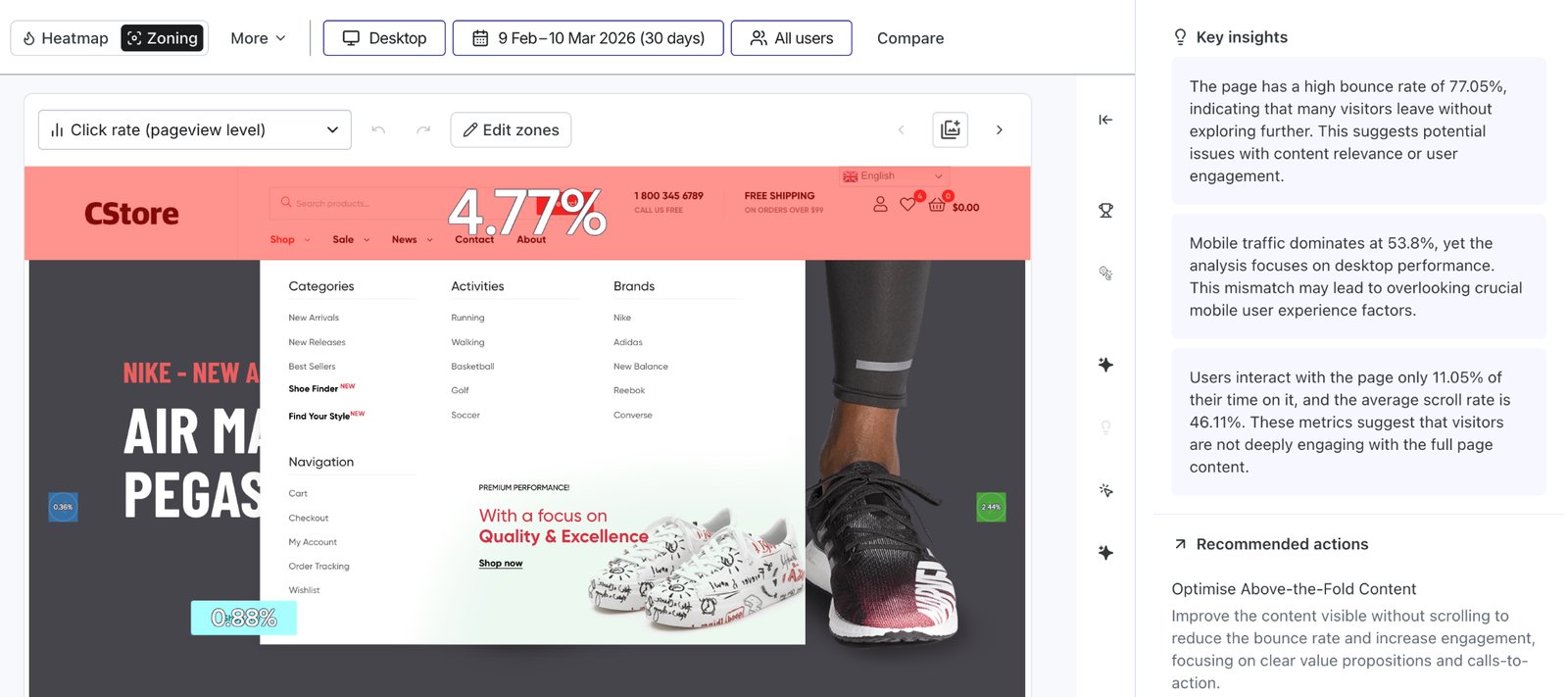
Image source: Contentsquare help center
Zone-based heatmaps measure engagement on each part of a page, such as a CTA or a lead form. On the sales-quoted tiers, impact quantification puts a revenue number on a segment or behavior you select.
Contentsquare is built for diagnosis. Native A/B testing comes only on the sales-quoted tiers, so self-serve teams will need to pair Contentsquare with a separate testing platform.
Contentsquare pros:
- Patterns without watching every replay: Sense AI, Contentsquare's AI assistant, summarizes replays and heatmaps across many sessions and answers questions in chat.
- Heatmaps split by test variant: Optimizely, AB Tasty, and Kameleoon integrations tag heatmaps and replays by test variant, so teams see why a variant won.
Contentsquare cons:
- Form analytics only on sales-quoted tiers: On self-serve tiers, B2B lead-gen teams can't see which field on a demo form makes visitors quit.
- Thin admin controls below the top tiers: Alerts and APIs are missing from the self-serve paid tier. Single sign-on (SSO) is limited to Google login below the sales-quoted tiers, so teams whose IT review requires company SSO need a sales conversation.
What users say about Contentsquare
Reviewers on G2 mostly praise Contentsquare’s analytical depth. Senior reviewers on Gartner Peer Insights tend to treat it as one input in a wider analytics stack:
- Faster diagnosis: A mid-market head of ecommerce (September 2026) says replays and Sense summaries replaced guesswork about what causes the drop-offs shown in analytics.
- Heatmaps tied to conversion rates: A financial-services senior analyst (August 2026) uses zone heatmaps over CTAs and lead fields to measure repeat clicks and conversion rates.
- Setup takes developer time: The same analyst says page mapping and tracking variables need significant initial effort and close developer coordination, and that advanced segmentation overwhelms non-analysts.
- Behavior needs follow-up research: An enterprise consultant (October 2026) says teams still need surveys or interviews to learn why users act. A VP-level reviewer on Gartner (July 2026) calls the reporting fairly shallow.
Sources checked October 2026.
Contentsquare pricing
Contentsquare’s Free plan is permanent, with 200,000 monthly sessions, one month of data access, one project, and replay capture for 5% of sessions (up to 10,000). Once an account on the Free or Growth plan hits its session limit, Contentsquare stops collecting new heatmap and funnel data until the monthly reset.
The Growth plan, which includes a 15-day trial that requires no payment details, is $49 per month (or $39 per month billed annually) for 7,000 sessions. It needs no annual contract, carries a 30-day money-back guarantee, and captures 15% of sessions.
The Pro and Enterprise plans capture up to 100% of sessions and are priced only through a demo. Voice of Customer, the survey and feedback product, is sold separately, with a free tier and a Growth tier from $79 per month.
Pricing from Contentsquare's pricing page. Verified October 2026.
Best for: Demand-gen and web teams that want to diagnose drop-offs on key pages before committing budget, and that test their fixes in a separate tool.
Fullstory
Fullstory helps companies understand and improve how humans and AI agents interact with digital experiences. It serves the research stage and is built as much for product and analytics teams as for marketers. When buyers visit several times before requesting a demo, Fullstory captures every web interaction, so growth teams see the whole path.
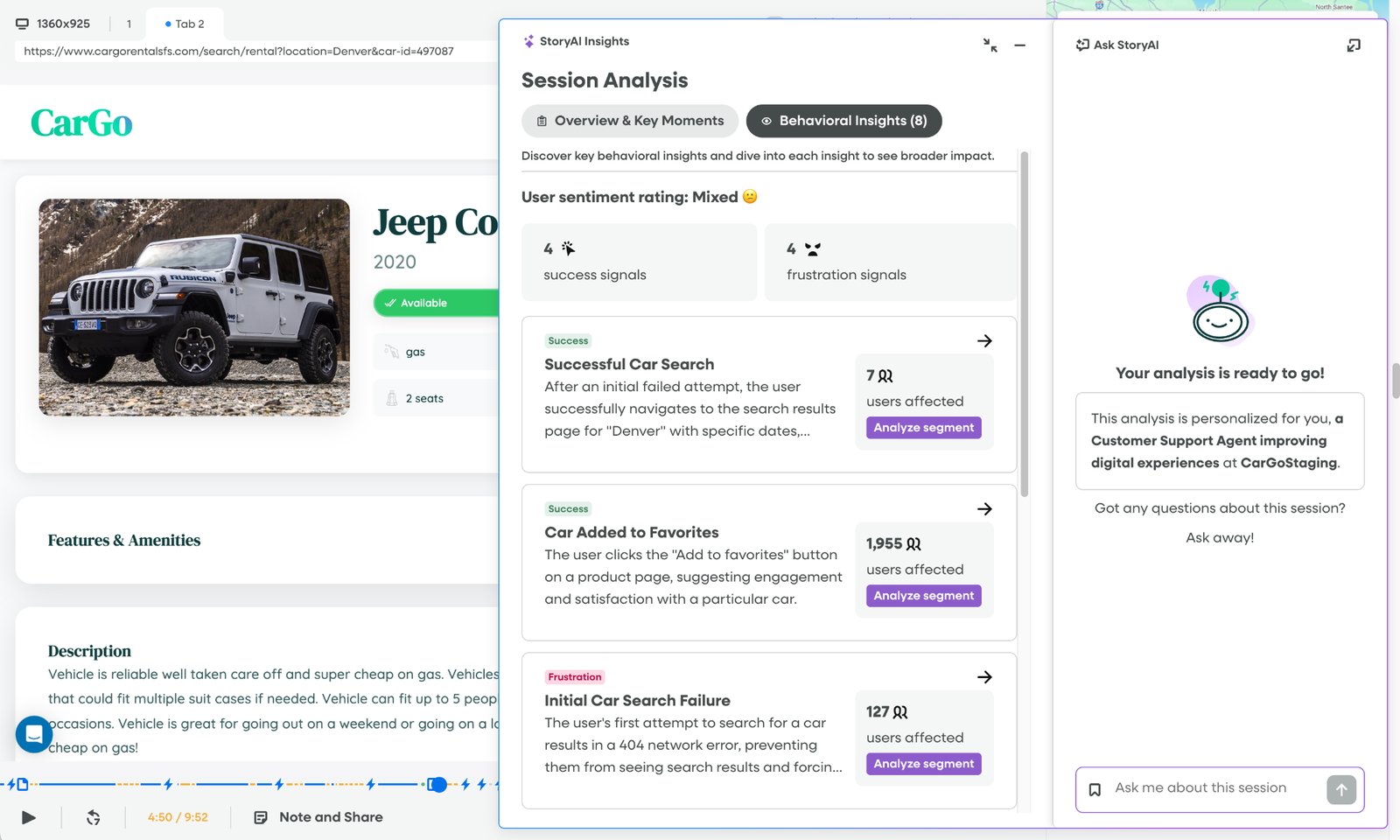
Image source: Fullstory help center
Mobile app capture is available as a paid add-on. Setup is one global script with no manual event tagging, so marketers don't wait on developers to tag each button.
Frustration signals flag rage clicks, dead clicks, error clicks, and thrashed cursors (erratic mouse movement). The StoryAI layer, powered by Google's Gemini, summarizes sessions and suggests improvements.
Fullstory pros:
- Funnels that span visits: Fullstory funnels mix page views with click events and can run across sessions, so a B2B buyer's research path shows up as one journey.
- Lead-form inputs stay masked: Three privacy modes (Full Capture, Form Privacy, and Private by Default) let teams hide what visitors type into forms while still recording the session.
Fullstory cons:
- No built-in testing: Fullstory has no native A/B testing and integrates with experimentation platforms instead, so teams pay for a second tool.
- Key controls are only at the top tier: SAML SSO and role-based permissions are only available at the top tier, and data export starts one tier lower. Below the top tier, teams sharing Fullstory across marketing and product can't limit who sees what.
What users say about Fullstory
G2 reviewers who rate it highest tend to be analysts, experimentation leads, and product heads with time to configure it. Capterra publishes its own summary of user reviews, and it flags an initial learning curve:
- Clear drop-off points: An enterprise digital product manager (January 2026) chains sessions inside funnels to follow conversion across multi-step processes.
- Day-to-day friction analysis: An enterprise experimentation lead (April 2026) uses heatmaps and replay for friction analysis on error clicks, dead clicks, and network errors.
- Journey setup friction: A mid-market digital marketing director (January 2026) says journeys can't start from a pasted URL, so users must find the page by name.
- Finding the right session takes work: The experimentation lead says, based on team feedback, that watching large numbers of sessions can be painful. Capterra's summary adds that search filters and finding relevant sessions are less intuitive at first.
Sources checked October 2026.
Fullstory pricing
Fullstory's Free plan has no time limit and needs no credit card. It includes 30,000 sessions per month, 12 months of retention, session replays, basic analytics, and up to 10 users. A 14-day trial covers up to 5,000 sessions and 20 seats and can convert to the Free plan.
Fullstory publishes no price for the Business, Advanced, and Enterprise plans and routes buyers to a pricing request and demo. Add-ons such as Mobile, StoryAI, and Guides and Surveys are also listed without pricing.
Pricing from Fullstory's plans page. Verified October 2026.
Best for: Growth analysts and marketing teams at mid-market or larger B2B companies that trace multi-visit buyer journeys and already run experiments in another tool.
UserTesting
UserTesting records real people using your site while they say what they think, so marketing teams hear, in each participant's own words, why a page is confusing. It supports moderated and unmoderated sessions with a panel across 60+ countries, plus AI-generated insight summaries.
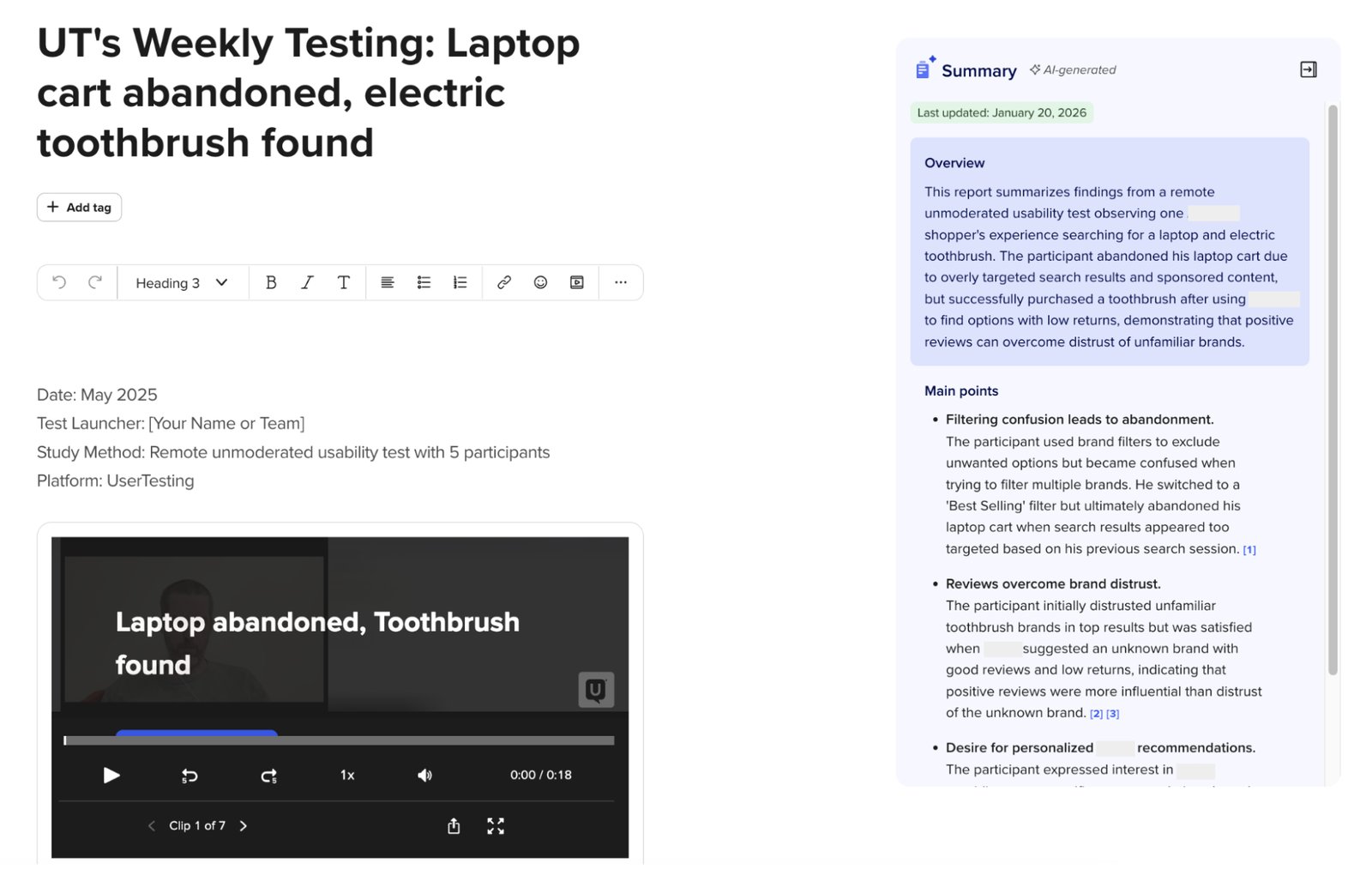
Image source: UserTesting help center
For B2B teams, recruiting is the hard part. A July 2026 release added participants from User Interviews (a research-recruiting service), including hard-to-find B2B and niche audiences.
UserTesting pairs well with a behavior analytics tool such as Contentsquare or Fullstory. Once analytics flags the page where visitors drop off, a UserTesting study on that page shows why before the team commits to a redesign.
UserTesting pros:
- Direct explanations from prospects: Video, transcripts, and sentiment analysis show which claim or layout confused a prospect, something a heatmap can't show.
- Research results inside AI assistants: In open beta, an MCP server lets teams create tests and read each test's results from Claude or ChatGPT.
UserTesting cons:
- Budgeting waits on sales: Teams that plan budgets cannot get a price without booking a sales call.
- Research capacity can go to waste: On usage-based contracts, session units expire at contract end, so teams that run fewer studies than planned lose what they paid for.
What users say about UserTesting
Reviewers on G2 lean on it for speed and qualitative depth. The one public review on Gartner Peer Insights comes from an engineer at a bank that pairs it with analytics tools:
- First feedback within hours: A reviewer at a mid-market software company (January 2025) says teams can launch a test and get first feedback within an hour or two.
- Context behind user behavior: The Gartner reviewer (February 2026) says analytics tools show what users do, and UserTesting shows why.
- Costs climb with use: An enterprise UX researcher (April 2026) calls it very expensive, and the Gartner review's headline says increasing costs pose usage challenges.
- Few integrations for outside data: The same UX researcher says its integrations fall short for bringing in data collected outside UserTesting.
Sources checked October 2026.
UserTesting pricing
UserTesting publishes no prices. It sells three editions (Advanced, Ultimate, and Ultimate+) under two models. Test-based Consumption bills on usage, with unlimited users and no per-seat charge.
Team-based Unlimited allows unlimited tests within a defined scope. Price varies by number of users, test types, and features. Teams buy session units upfront, and unused units do not roll over. Usage beyond the prepaid units (flex overage) is totaled monthly and billed quarterly.
One free test returns a video of a real person reviewing your website, usually in under an hour, according to UserTesting. Teams request a trial through a form, and UserTesting doesn't state the trial length or limits. Recruiting B2B participants through Advanced Targeting draws on a prepaid balance.
Pricing from UserTesting's plans page. Verified October 2026.
Best for: Brand and UX teams inside larger B2B marketing organizations that need to watch prospects react to a page before committing redesign budget.
Wynter
Wynter is an on-demand, self-serve B2B market research and buyer intelligence platform. Before copy goes live, Wynter shows product marketers whether it will land with target buyers. You upload a landing page, ad, or copy, and a panel of verified B2B professionals returns scores and verbatim comments by role and segment. Results typically arrive within 12 to 48 hours.
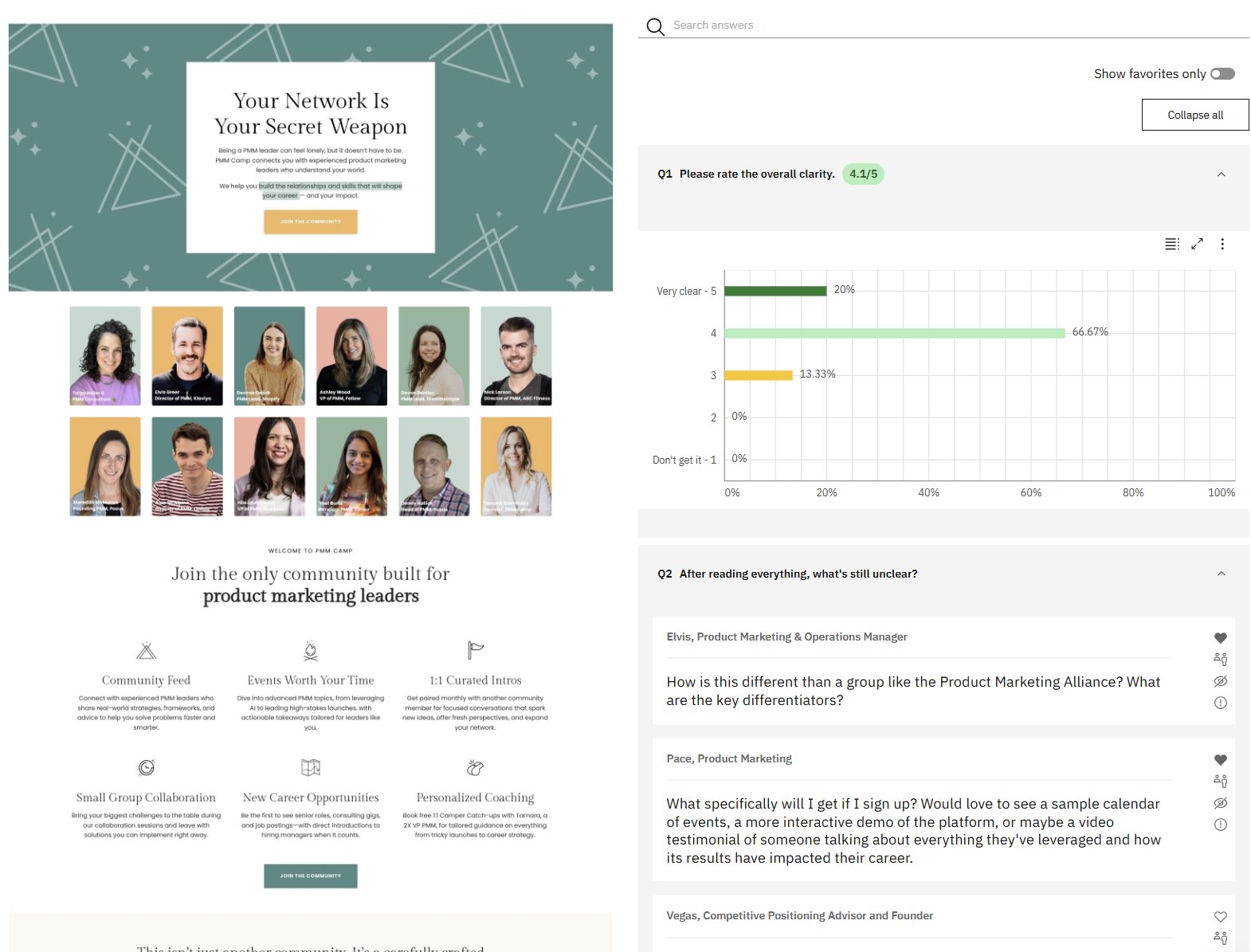
Image source: Wynter
According to Wynter, A/B tests need 500 to 700 conversions per variation, which most B2B landing pages don't reach in a quarter. Message testing needs no traffic because Wynter supplies the audience.
Wynter handles messaging validation, while UserTesting, Contentsquare, and Fullstory handle research. Wynter's own advice is to pre-test versions, then A/B test the winner on live traffic.
Wynter pros:
- Targeting by buyer profile: Wynter verifies panelists through LinkedIn and corporate email, and teams can filter them by job title, seniority, industry, company size, and geography.
- Head-to-head preference tests: Buyers choose among up to three versions of a tagline, value proposition, design, or pricing model.
Wynter cons:
- Small samples by design: Message tests default to 15 respondents (Wynter's qualitative saturation point), so results show direction without statistical proof.
- Little use for content marketing: Wynter isn't designed for informational content such as blog posts or newsletters, so content marketing teams get little from it.
What users say about Wynter
Wynter has few dated reviews, and most of these themes come from two April 2026 reviews on G2. A January 2025 review on Gartner Peer Insights agrees with them:
- Fast turnaround: Enterprise and mid-market reviewers praise response speed, and the Gartner reviewer calls results quick and efficient.
- Reach into niche audiences: The enterprise reviewer values how precisely it targets ideal customer profiles in hard-to-reach roles.
- Little training needed: A mid-market reviewer says several marketers used it without dedicated training.
- Basic interface: The enterprise reviewer calls the user experience somewhat rudimentary, and a mid-market reviewer wants more flexible templates.
Sources checked October 2026.
Wynter pricing
Wynter prices per test or per year, and it doesn't publish a monthly-billed price. Pay-as-you-go requires no commitment, starts at $899 per test, and costs about 1.5 times a Pro plan test. The Pro plan is $20,000 per year on a one-year prepaid contract with 20,000 credits (one credit equals $1) for self-run studies.
The Elite plan is $40,000 per year with 27,000 credits, a research advisor, and up to six fully managed projects a year. The Black plan is $100,000 per year with 70,000 credits and a research strategist. Wynter's verified panel has no free tier, but tests on your own panel are free and use an AI grader with 15 simulated personas.
Study cost varies with respondent seniority, test type, and sample size.
Pricing from Wynter's pricing page. Verified October 2026.
Best for: Product marketing and demand-gen teams whose B2B landing pages get too few conversions for A/B testing and who want verified buyers' feedback before a repositioning or pricing-page launch.
VWO
VWO gives CRO leads testing and on-page research from one vendor. It runs A/B/n, split URL, and multivariate tests through SmartStats, a Bayesian sequential testing engine, alongside heatmaps, session recordings, form analytics, funnels, on-site surveys, and personalization.
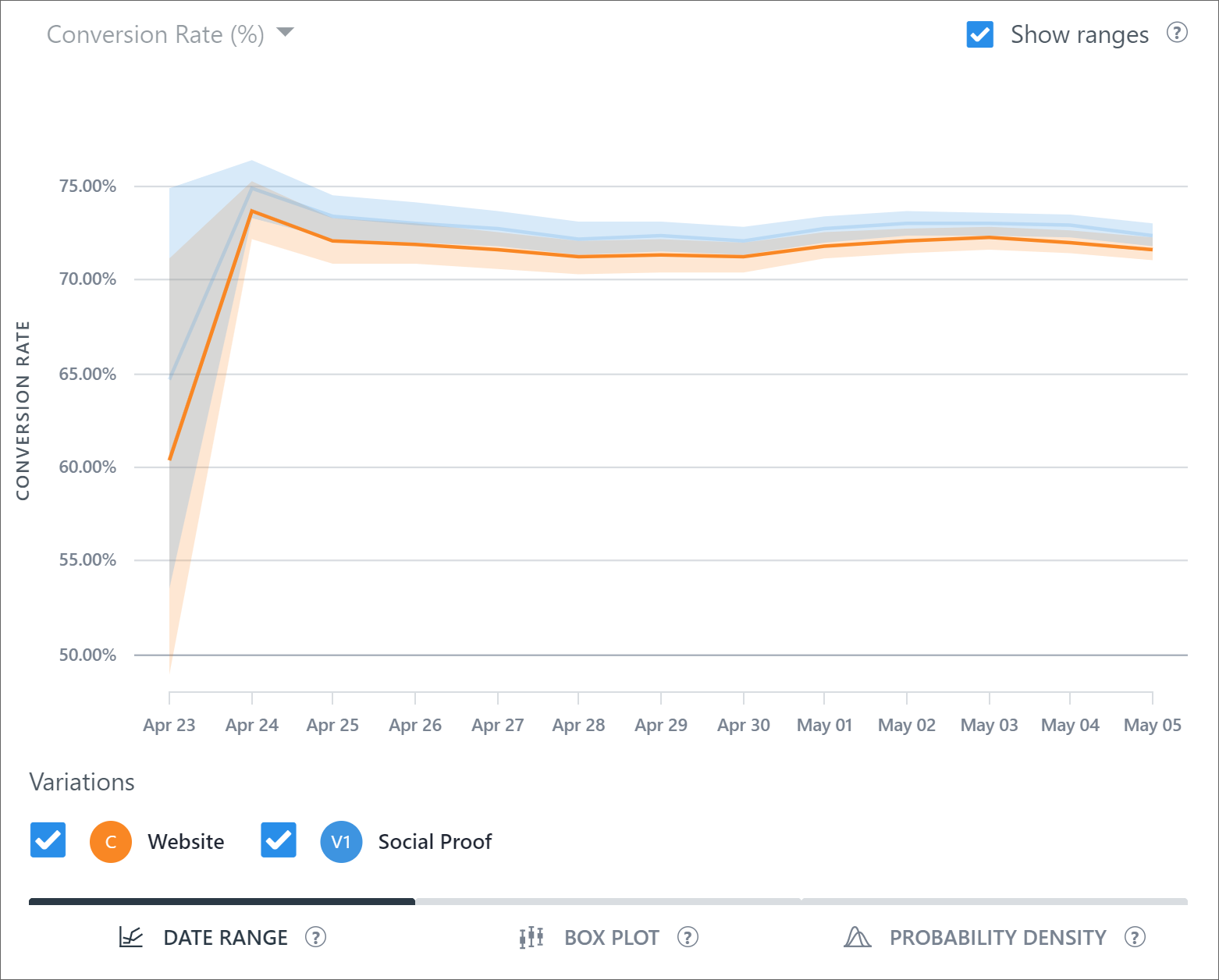
Image source: Wingify help center
A HubSpot integration lets teams run experiments against HubSpot lists, bringing CRM segments into the testing stage.
VWO and AB Tasty, which announced their merger in January 2026, began operating as one company under the Wingify brand on September 16, 2026. Breadth is the main reason to choose VWO, but its research modules are less deep than specialists like Contentsquare and Fullstory.
VWO pros:
- Live significance readings: SmartStats lets teams monitor significance as a test runs, without waiting for a fixed sample size.
- Unlimited experiments and variations: VWO does not cap testing campaigns, so a busy testing calendar does not raise the bill by itself.
VWO cons:
- No permanent free option: VWO says its free plan has ended, so teams can't keep a small testing program running at no cost after the trial.
- Advanced test types skip the entry tier: Multivariate testing, guardrails, and sample ratio mismatch detection (which catches broken traffic splits) are missing from the cheapest tier. Experimentation leads who need them start on a higher tier.
What users say about VWO
G2 reviewers value the testing product's breadth. A February 2026 reviewer on Gartner Peer Insights adds praise for an intuitive setup walkthrough for A/B and multivariate tests:
- No-code edits: A mid-market online project manager (May 2026) says the visual editor lets them change text, images, and buttons without writing code.
- Context for test results: A mid-market reviewer (August 2025) says heatmaps and recordings explain why a variation won.
- Reports need more flexibility: A mid-market performance marketer (June 2026) says some reports could offer more customization and flexibility.
- Flicker if the script is misconfigured: The same project manager says the asynchronous script can cause a slight flicker when it isn't set up properly.
Sources checked October 2026.
VWO pricing
Wingify's pricing page publishes no prices for VWO. Each module lists the Growth, Pro, and Enterprise tiers with a "Schedule a Demo" button.
Pricing is based on monthly active users for each product, and on monthly tracked users for behavior analytics, so total cost is hard to project across modules. A 30-day free trial with no credit card is available.
Social Proof and Urgency Messaging is an add-on on every tier. Heatmaps in campaign reports need Wingify Insights and come only on the Pro and Enterprise tiers.
Pricing from Wingify's pricing page. Verified October 2026.
Best for: Experimentation and CRO leads at mid-market B2B companies that want one vendor for testing, heatmaps, surveys, and personalization and whose key pages have enough traffic for multivariate tests.
Chili Piper
Chili Piper turns a demo-request form into a booked meeting before the lead leaves the page. It covers the pipeline stage and is built for sales teams with several reps sharing inbound leads. Its Form Concierge shows prospects live rep availability the instant they submit, so they book on the spot instead of waiting for a follow-up email.
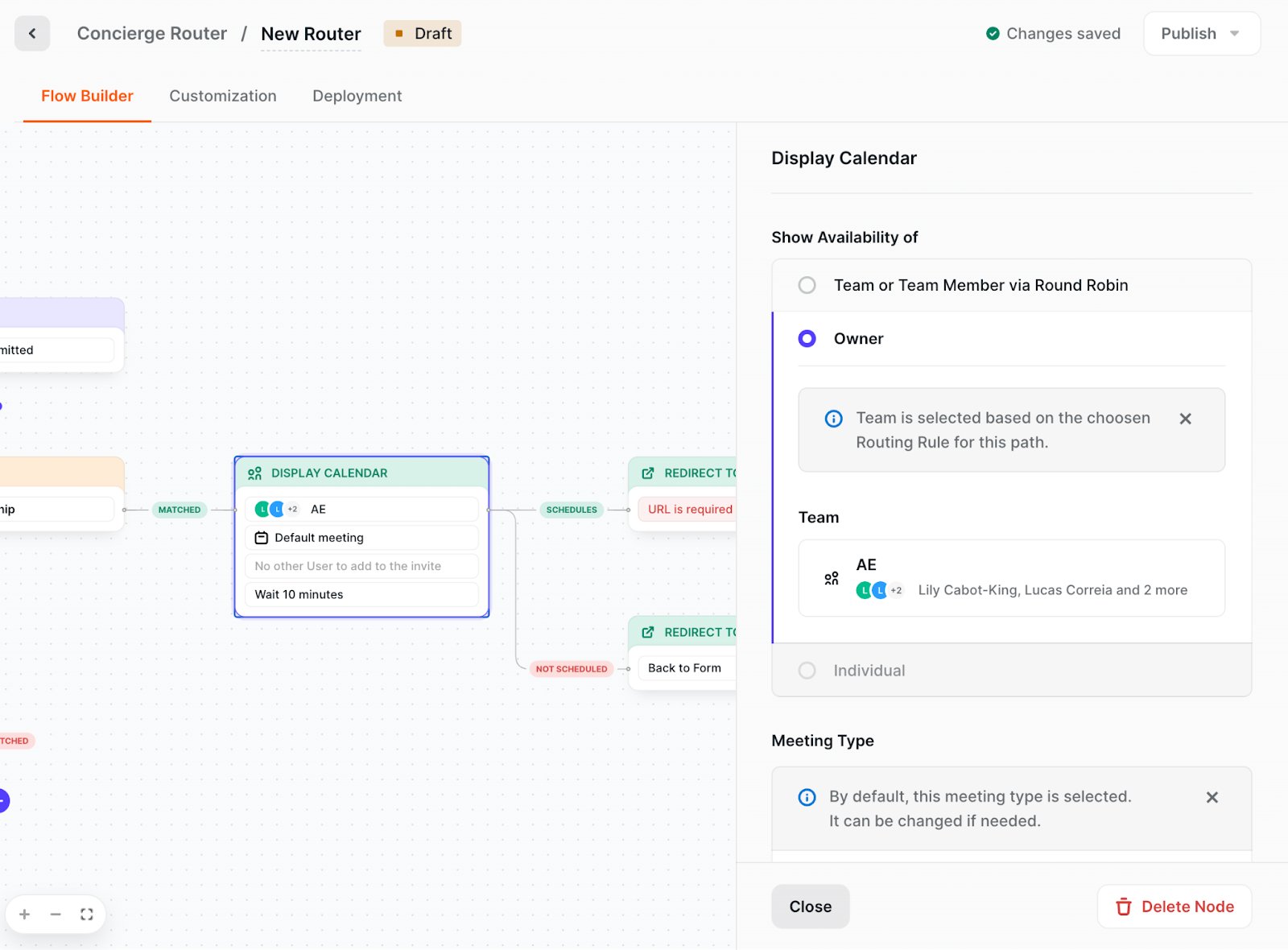
Image source: Chili Piper help center
Chili Piper also enriches the lead with company size, industry, and revenue data, then routes it by geography, company size, account owner, or any CRM field. One embed snippet covers HubSpot, Marketo, and custom HTML forms, while Typeform and Pardot use separate setups. Chili Piper also connects to Salesforce and HubSpot and documents setup for Webflow sites.
Chili Piper pros:
- Reps skip fake leads: Spam Checker filters fake submissions out of the routing flow before they reach a rep's calendar.
- Instant calls and meetings: Concierge Live connects a qualified prospect to a rep by phone or video right away.
Chili Piper cons:
- Pricing details are still settling: As of October 2026, Chili Piper is rolling out new pricing, and its comparison table marks AI-credit details as coming soon, so teams should confirm terms with sales.
- Extra steps to connect Salesforce: Salesforce has restricted uninstalled connected apps since September 2025, so Salesforce teams may need an admin to approve the initial connection.
What users say about Chili Piper
Most reviewers on G2 work in mid-market revenue and marketing operations, the roles that would run it for a demand-gen team:
- Form to calendar to CRM: A mid-market reviewer (March 2026) says meetings land on sales development rep (SDR) calendars immediately with details passed to the CRM.
- Complex routing handled: A revenue operations analyst (May 2026) says territory automation removed manual steps, and another reviewer says it handles workflows that native HubSpot routing could not.
- Admin skill required: A reviewer (December 2025) says small changes need an experienced admin, and the analyst notes that editing a duplicated routing node also changes the original.
- Integrations need upkeep: A reviewer at a mid-market marketing and advertising company (April 2026) reports ongoing technical challenges in maintaining form and CRM integrations.
Sources checked October 2026.
Chili Piper pricing
Chili Piper's Routing and Scheduling package starts at $1,250 per month billed annually ($15,000 per year) with up to 15 seats, then $45 per seat per month. It includes 45,000 AI credits a year. The Experiences package starts at $3,500 per month billed annually ($42,000 per year) with up to 30 seats, then $50 per seat per month. It comes with 150,000 AI credits a year.
ChiliCal, Chili Piper's scheduling app, costs $12 per user per month on its own, with a 200-seat minimum. Monthly billing is "not available at this time," and two-, three-, and four-year contracts take 15%, 25%, and 40% off. There is no free plan or trial, so buyers must book a demo.
Pricing from Chili Piper's pricing page. Verified October 2026.
Best for: Demand-gen and revenue operations teams with several SDRs or account executives on Salesforce or HubSpot, whose demo-request forms get enough volume that slow follow-up costs meetings.
Qualified
Qualified is built natively on the Salesforce Platform and reads and writes custom fields, objects, and business processes.
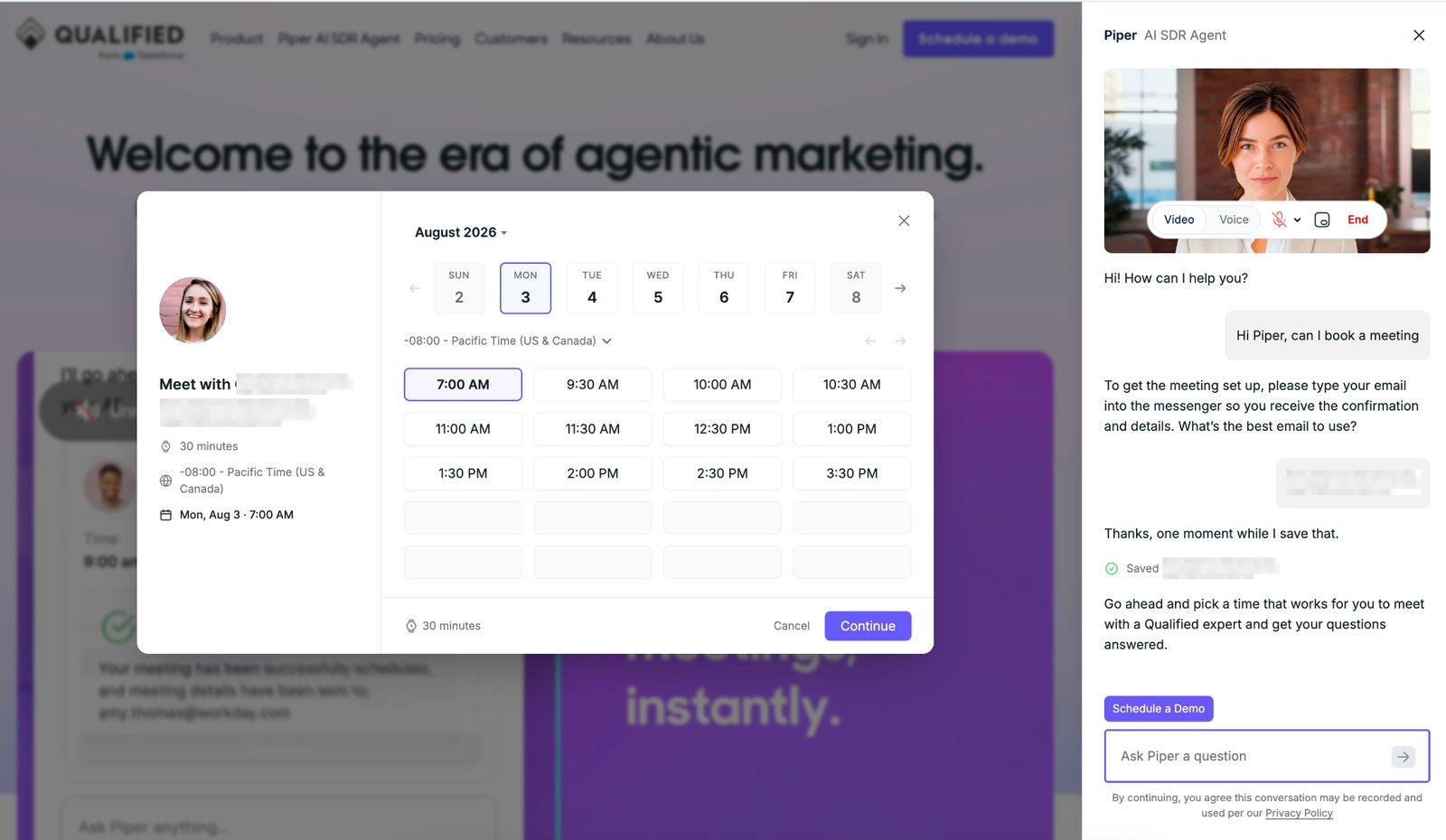
Image source: Qualified University
On your website, Qualified's Piper, an AI SDR agent unrelated to Chili Piper, qualifies visitors over chat, voice, or video and books meetings with them. For marketing teams, the main benefit is coverage when no human is online. Piper can also start a conversation when a visitor submits a form or clicks a button.
Within the pipeline stage, Piper is built for inbound pipeline and starts from a conversation, while Chili Piper's core product starts from a form. Piper for HubSpot, generally available since September 2025, brings the AI agent to HubSpot teams.
Qualified pros:
- Meetings without a form fill: In Pinned Mode, Qualified's Piper stays visible on the page and books meetings directly. Qualified reports 6x more meetings with qualified buyers in the first week after enabling it on its own site.
- Reps join the chats that matter most: Signals such as visit recency and frequency, and several visitors from one account, show reps which conversations to join first.
Qualified cons:
- Overage costs are not published: Qualified publishes no terms for traffic above a tier's session allowance, so teams with traffic spikes can't predict the bill.
- One agent profile below the top tier: Multiple agent profiles come only at the top tier, so teams that want separate agents for different audiences need the highest tier.
What users say about Qualified
Recent G2 reviews come mostly from revenue and marketing operations leads at mid-market and enterprise companies. On Gartner Peer Insights, where the product is listed as Qualified AI Conversations, a business development associate adds their frontline view:
- Chat that books meetings: A mid-market revenue operations manager (July 2026) reports over 500 conversations, 45 meetings booked, and a 64% offered-to-booked rate since go-live.
- Coverage outside SDR hours: Another revenue operations manager (July 2026) says their previous chat tool needed a person online, which left nights and weekends uncovered.
- Agent needs ongoing tuning: An enterprise retail reviewer writing before full go-live (October 2026) says the agent occasionally drifts around its guardrails. A director of marketing operations says the agent needs continuous adjustment.
- Uneven qualification: A Gartner reviewer (August 2026) says some chats don't perform well, and the review's headline calls the filters unreliable.
Sources checked October 2026.
Qualified pricing
Qualified publishes no prices. The Premier, Enterprise, and Ultimate tiers all read "Contact us," with no billing basis or free trial listed. The Premier tier includes the multi-modal agent, website and email conversations, meeting booking, and multi-language support. It covers one SDR agent profile, 250,000 monthly web sessions, and 2,500 monthly active email contacts.
The Enterprise tier adds agent handoff, MCP and API access, and a Salesforce sandbox, with 2 million sessions and 10,000 contacts. The Ultimate tier adds multiple agent profiles and dedicated IP, with 5 million sessions and 24,000 contacts.
Pricing from Qualified's pricing page. Verified October 2026.
Best for: Marketing and revenue operations teams at mid-market and enterprise B2B companies running Salesforce or HubSpot, whose sites draw high-intent traffic at hours when no SDR can answer chat.
How to choose the right CRO tool
Start with the stage where your program loses the most buyers, then match the tool to your traffic and CRM:
- Do your key pages earn enough conversions to A/B test? If they don't, live tests can run for months without a winner, so validate the messaging first. Wynter tests copy and positioning with verified buyers, and UserTesting shows you prospects using the page. Low-traffic sites that still want to test should focus on big changes and expect longer runs. If your pages do get enough conversions, VWO and Webflow Optimize are the testing options.
- Is the leak on the page or after the form? For visitors who abandon before converting, Contentsquare and Fullstory show what they did before leaving. For form fills that rarely become meetings, Chili Piper books the meeting at the time of submission. Qualified leads the pack with an AI chat agent that books meetings with or without a form.
- What do your site and CRM already run on? For a Webflow site, Optimize lets you run tests without installing or maintaining a testing script. On another CMS, Optimize and VWO both run through a JavaScript snippet added to the site, and VWO adds its own heatmaps and recordings. Chili Piper and Qualified both work with Salesforce and HubSpot. Chili Piper routes and schedules inside HubSpot CRM, while Qualified's HubSpot version is built around Marketing Hub.
Launch tests from the same place you build pages using Webflow
Webflow fits marketing teams that design and publish their own site and want to test pages without handing them to a developer. As an agentic web marketing platform, Webflow keeps building and testing in one place. You build in the Designer and test with Webflow Optimize, and Webflow Analyze adds clickmaps and scrollmaps without code or tagging.
Start free, build your highest-traffic landing page, then add Optimize once the site is on a paid plan and the page has enough traffic to test. Teams with more than 1M page views a year can talk to sales about Optimize Enterprise.
Sign up for Webflow to start building.

Unlock growth with SEO
Join Webflow and leading growth agency Graphite as they discuss actionable insights for scaling and achieving growth with SEO
Frequently asked questions
How much do CRO tools cost?
CRO tools range from free (behavior analytics from Contentsquare and Fullstory) to $100,000 per year (Wynter's top managed research offering). Prices vary because each vendor bills differently: by recorded sessions, tested page views, monthly active users, sales seats, or research credits. Chili Piper bundles seats into each tier and charges per extra seat, while Qualified caps tiers by monthly web sessions and email contacts.
Can a low-traffic B2B site still run a CRO program?
Yes, but each method needs a different amount of traffic before its results mean anything. Contentsquare advises collecting at least 2,000 to 3,000 page views before concluding a heatmap. Webflow suggests letting a test reach at least 20% of monthly traffic before judging it. Qualitative research needs far fewer people, since Nielsen Norman Group research finds that five participants uncover about 85% of usability problems.
Do you need both an A/B testing tool and a heatmap tool?
A full program needs both, because they answer different questions. A/B tests show what happens when a page changes, and qualitative tools such as heatmaps and replays show why. Some vendors are closing the gap. In October 2026, Contentsquare announced that Sense AI includes agentic experimentation, now in beta for selected customers, with integrations announced for Dynamic Yield, Optimizely, and Kameleoon.
What are the most common CRO mistakes?
VWO's list of common CRO mistakes includes testing with too small a sample and stopping tests early. According to VWO, testing tools are designed to report a result once confidence reaches at least 95%. Teams also act on heatmaps from short windows or low-traffic pages, where patterns are noisy. Mobile also gets overlooked, even though it accounted for 69.7% of website visits in late 2023, according to Contentsquare's 2024 benchmark.
Which AI is best for conversion?
Judge AI on the time it saves in diagnosis and setup. Webflow Optimize, Contentsquare, Fullstory, UserTesting, Wynter, VWO, Chili Piper, and Qualified publish no independent evidence that their AI features raise conversion rates. Contentsquare, Wingify, and Qualified publish lift figures, but the vendors or customers report them. A May 2026 Gartner survey found 69% of B2B buyers turn to sales reps to validate AI-generated insights.

Choose the right CMS for a scaling enterprise
Discover how the right CMS can allow teams to efficiently scale rich, complex content – all without writing code.


















