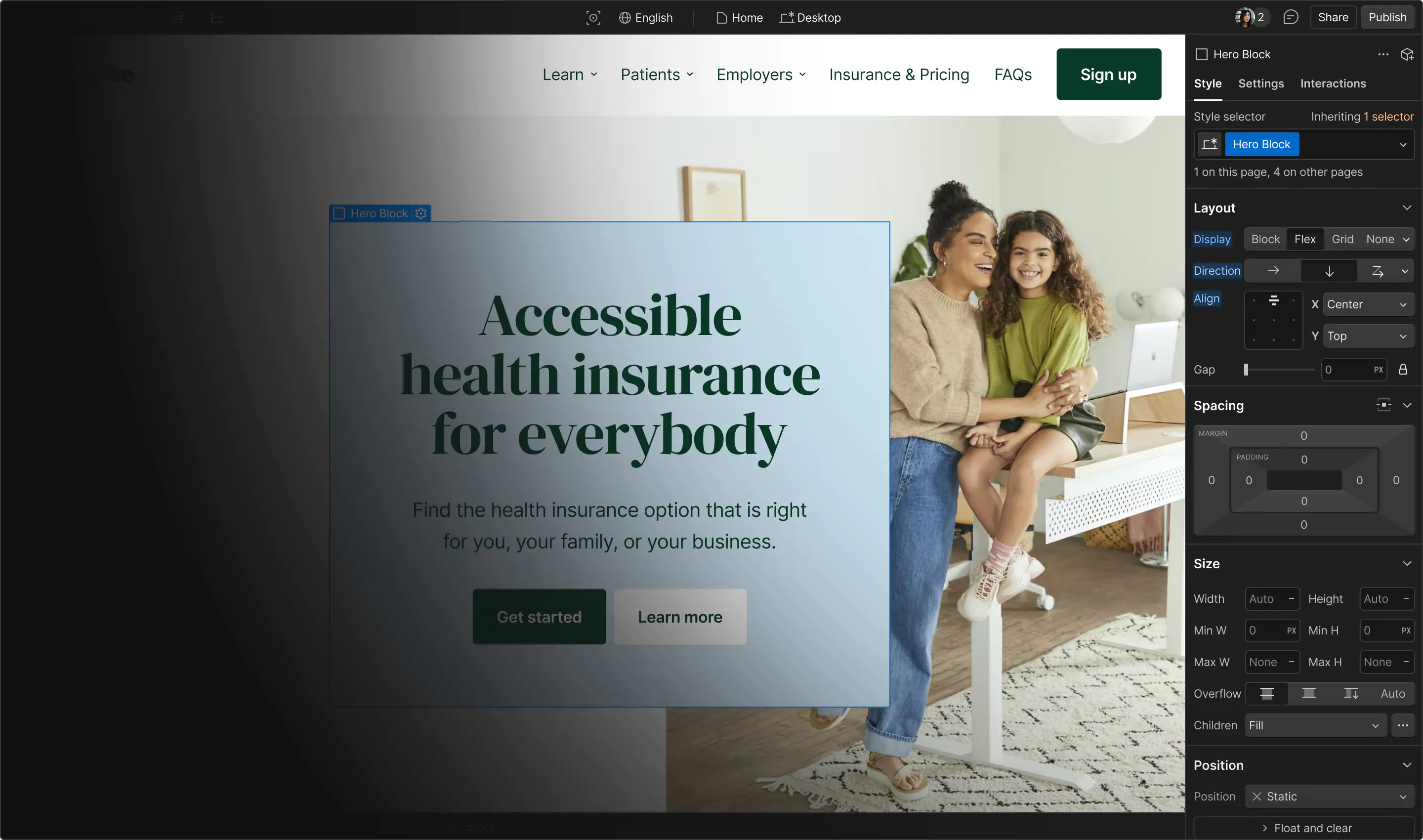
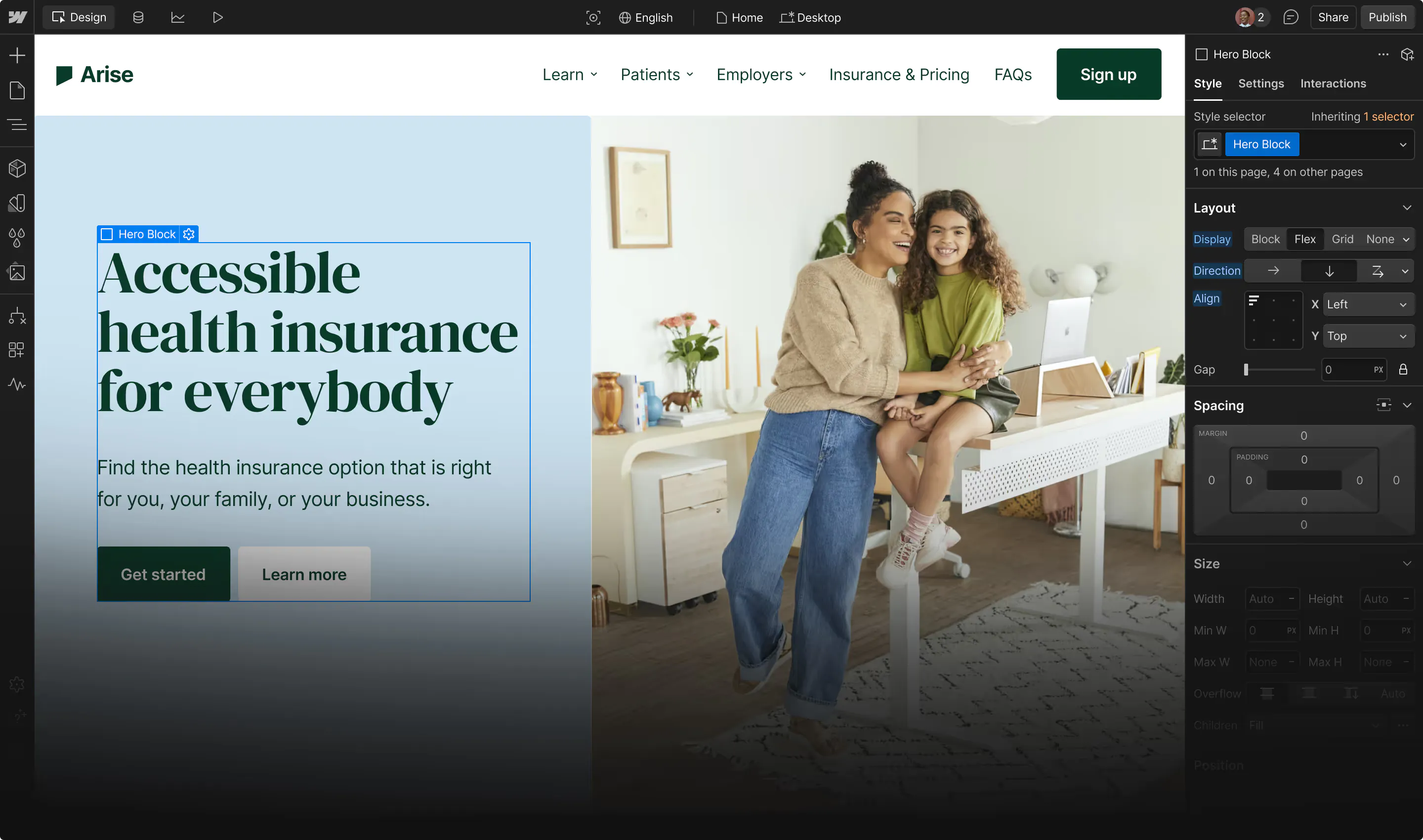







The right dynamic landing page tool depends on which visitor signal your traffic carries and whether you build new pages or adapt the ones you already run. Built-in testing comes next, because it decides how you prove the variants work.
B2B marketing teams routinely waste paid campaign budget on visitors who were never going to convert on a one-size-fits-all page. Search bids, paid social ads, and targeted account programs drive visitors with wildly different intentions to the same destination. When the copy fails to speak directly to what brought them there, they leave, and those hard-won clicks return zero value.
The stakes are highest in account-based marketing (ABM), where target account lists are tightly defined, and every visit represents significant acquisition effort. A dynamic landing page solves this mismatch by instantly adjusting its headlines, value propositions, and calls to action based on real-time visitor signals.
Those signals can be the keyword a visitor searched, the ad they clicked, or their stage as a lead or customer. Acting on those signals takes the right tool, and dynamic landing page tools fall into two groups:
- Landing page builders create the page and swap words or sections by keyword and campaign, which suits teams buying search traffic.
- Personalization engines adapt pages you already host using behavior, CRM, and account data, which suits ABM and pages that already draw traffic.
This guide explains how dynamic landing pages work, walks through five documented tactics, and compares eight tools on the signals they use, how they test, and what they cost.
Key takeaways:
- Choose Webflow if your team wants on-brand campaign pages with a variant for each persona, industry, or account, plus rules-based personalization on your site.
- Choose Unbounce or Instapage if search ads drive most of your traffic and you want headlines matched to each keyword or ad group.
- Choose HubSpot or Adobe Marketo Engage if the signal you trust most is CRM data, such as lifecycle stage or target account lists.
- Choose Optimizely or Dynamic Yield if an experimentation or ecommerce team already tests high-traffic pages and wants to target audiences by behavior, location, or uploaded lists.
- Start with Personyze if you want to personalize existing pages by keyword, campaign, or company from a free plan.
How dynamic landing pages work
A dynamic page swaps content as it loads, and the swap can extend to body copy and images. The change depends on who is visiting and how they arrived: the search keyword, UTM parameters, referral source, location, device, past behavior, or account data.
When the page detects no signal, it shows a default version, so every visitor still sees a complete page.
One of the primary benefits is message match, which means the page repeats the promise of the ad the visitor clicked on. Google lists "the expectations users have about your landing page based on the clicked ad creative" as one of the ad quality factors behind Ad Rank. Landing page experience is also one of the three components of Quality Score.
Static vs. dynamic landing pages
A static landing page shows every visitor the same content, so a campaign aimed at five audiences means building and maintaining five pages.
A dynamic approach either swaps content on one URL based on signals or generates a variant for each audience from one base page. Either way, the team maintains one design instead of five. The work moves to setup: the team has to define the rules and decide what the default version says.
Examples of dynamic landing pages
Each of these five tactics changes what a page says based on one visitor signal:
- Sport-specific pages for each audience
- An industry headline for construction visitors
- The searcher's own verb in the headline
- A landing page for each service region
- Offers matched to subscription status
Sport-specific pages for each audience (Veo)
Veo, which makes cameras and software for filming team sports, uses Webflow Optimize to match its site to the sport each visitor came for, based on the ad campaign that brought them there rather than a search keyword. A visitor who arrives from a rugby campaign sees rugby content right away.
In one homepage test, visitors shown lacrosse content converted 17% more than those shown football or soccer content. Separately, sport- and market-specific pages lifted engagement 37%.
An industry headline for construction visitors (Samsara)
Samsara's fleet tracking page drew visitors from the construction sector, and many of those companies run equipment rather than vehicle fleets. Webflow Optimize can target visitors by industry using company details matched from their IP address.
The customer story doesn't detail Samsara's exact rule, but the team used Optimize to show those visitors the headline "GPS Asset Tracking for Construction" in place of "GPS Fleet Tracking."
Samsara's customer story reports a 36% increase in lead-to-opportunity conversion from that one edit.
The searcher's own verb in the headline (Campaign Monitor)
The agency ConversionLab used Unbounce's dynamic text replacement to carry the verb in each search, such as "design" or "build," into Campaign Monitor's headline and calls to action. Visitors whose URL carried no keyword saw the default verb, "create."
Over a 77-day A/B test, the dynamic variant lifted trial signups 31.4%.
A landing page for each service region (Atlantic Relocation Systems)
Atlantic Relocation Systems offers moving services that vary by region, so prospects need to see what is available where they live. Instapage's team built a landing page for each of Atlantic's geo-specific residential moving ads, and visitors in each service area saw offerings specific to them.
Instapage's customer story reports a 198% increase in conversions and a 55% drop in cost per acquisition.
Offers matched to subscription status (Sky)
Sky, the European pay-TV broadcaster, uses Dynamic Yield to group visitors as prospects, current subscribers, or recently lapsed customers. In Italy, former Cinema or Entertainment subscribers saw one limited-time offer, while returning customers with no recent subscription saw another.
According to Sky's case study, returning customers who arrived from media campaigns converted at 23% versus 4% for the control offer.
How the top dynamic landing page building tools compare
We shortlisted the top tools that adapt campaign pages to each audience, based on platforms marketing teams evaluate for paid and ABM traffic.
Note that pricing differs by group: most landing page builders publish their prices, while most personalization engines quote them only on a sales call:
| Tool | Best for | Starting price (as of November 2026) | Rating (G2, as of November 2026) | Primary signal | Standout feature |
|---|---|---|---|---|---|
| Webflow | Marketing teams building on-brand campaign variants for each persona, industry, or account | Free plan; Optimize add-on $379/month (or $299/month billed annually) on a paid site plan; Campaigns from $2,000/month through sales | 4.4/5 | Audience variants plus UTM, traffic-source, device, and location rules | One brief generates the page, audience variants on their own URLs, and matching ads |
| Instapage | Paid-search teams mapping many ad groups to dedicated pages | Create plan $99/month (or $79/month billed annually); Optimize plan (first with dynamic text replacement) $199/month (or $159/month billed annually) | 4.3/5 | Keyword and URL parameters | AdMap (sales-led tier) shows each Google Ads campaign beside its landing pages |
| Unbounce | PPC teams that want keyword-matched headlines and AI routing on self-serve plans | Starter plan $29/month (or $22/month billed annually); Experiment plan (first with dynamic text replacement) $149/month (or $112/month billed annually) | 4.3/5 | Search keyword | Smart Traffic sends each visitor to the variant similar visitors converted on |
| HubSpot | Lifecycle marketing teams personalizing pages from CRM records | Free plan; Content Hub Professional (first with smart content on pages) $500/month with an annual commitment (or $450/month billed annually) | 4.5/5 | CRM lifecycle stage and list membership | Adaptive testing shifts traffic to the best of up to five variations |
| Adobe Marketo Engage | B2B demand teams running ABM on named account lists | Contact sales | 4.1/5 | Account lists and lead segmentation | Target account lists sync into web personalization segments |
| Optimizely | Experimentation teams testing on high-traffic pages they already own | Contact sales | 4.2/5 | UTM, referrer, location, and uploaded lists | Contextual bandits pick a variation for each visitor |
| Dynamic Yield | Ecommerce marketing teams with large catalogs | Contact sales | 4.5/5 | Behavioral affinity and predictive targeting | Predictive Targeting finds winning segments inside running A/B tests |
| Personyze | Small paid-media teams that want keyword, UTM, and company-data swaps from a free start | Free plan; Starter plan $149/month (or $134/month billed annually) | 4.9/5 | UTM, keyword, and referrer plus CRM data | Hosted pages arrive from the server already personalized |
| Tool → Best for → Starting price (as of November 2026) → Rating (G2, as of November 2026) → Primary signal → Standout feature |
|---|
| Webflow |
| Marketing teams building on-brand campaign variants for each persona, industry, or account |
| Free plan; Optimize add-on $379/month (or $299/month billed annually) on a paid site plan; Campaigns from $2,000/month through sales |
| 4.4/5 |
| Audience variants plus UTM, traffic-source, device, and location rules |
| One brief generates the page, audience variants on their own URLs, and matching ads |
| Instapage |
| Paid-search teams mapping many ad groups to dedicated pages |
| Create plan $99/month (or $79/month billed annually); Optimize plan (first with dynamic text replacement) $199/month (or $159/month billed annually) |
| 4.3/5 |
| Keyword and URL parameters |
| AdMap (sales-led tier) shows each Google Ads campaign beside its landing pages |
| Unbounce |
| PPC teams that want keyword-matched headlines and AI routing on self-serve plans |
| Starter plan $29/month (or $22/month billed annually); Experiment plan (first with dynamic text replacement) $149/month (or $112/month billed annually) |
| 4.3/5 |
| Search keyword |
| Smart Traffic sends each visitor to the variant similar visitors converted on |
| HubSpot |
| Lifecycle marketing teams personalizing pages from CRM records |
| Free plan; Content Hub Professional (first with smart content on pages) $500/month with an annual commitment (or $450/month billed annually) |
| 4.5/5 |
| CRM lifecycle stage and list membership |
| Adaptive testing shifts traffic to the best of up to five variations |
| Adobe Marketo Engage |
| B2B demand teams running ABM on named account lists |
| Contact sales |
| 4.1/5 |
| Account lists and lead segmentation |
| Target account lists sync into web personalization segments |
| Optimizely |
| Experimentation teams testing on high-traffic pages they already own |
| Contact sales |
| 4.2/5 |
| UTM, referrer, location, and uploaded lists |
| Contextual bandits pick a variation for each visitor |
| Dynamic Yield |
| Ecommerce marketing teams with large catalogs |
| Contact sales |
| 4.5/5 |
| Behavioral affinity and predictive targeting |
| Predictive Targeting finds winning segments inside running A/B tests |
| Personyze |
| Small paid-media teams that want keyword, UTM, and company-data swaps from a free start |
| Free plan; Starter plan $149/month (or $134/month billed annually) |
| 4.9/5 |
| UTM, keyword, and referrer plus CRM data |
| Hosted pages arrive from the server already personalized |
Webflow
Webflow is an agentic web marketing platform with two products for dynamic landing pages:
- Webflow Campaigns builds per-audience campaign pages
- Webflow Optimize personalizes pages already on your site
Webflow Campaigns has been generally available since October 20, 2026 and turns one campaign brief into an on-brand landing page and matching ad creative. It also creates a variant for each persona, industry, or target account, and every variant gets its own URL.
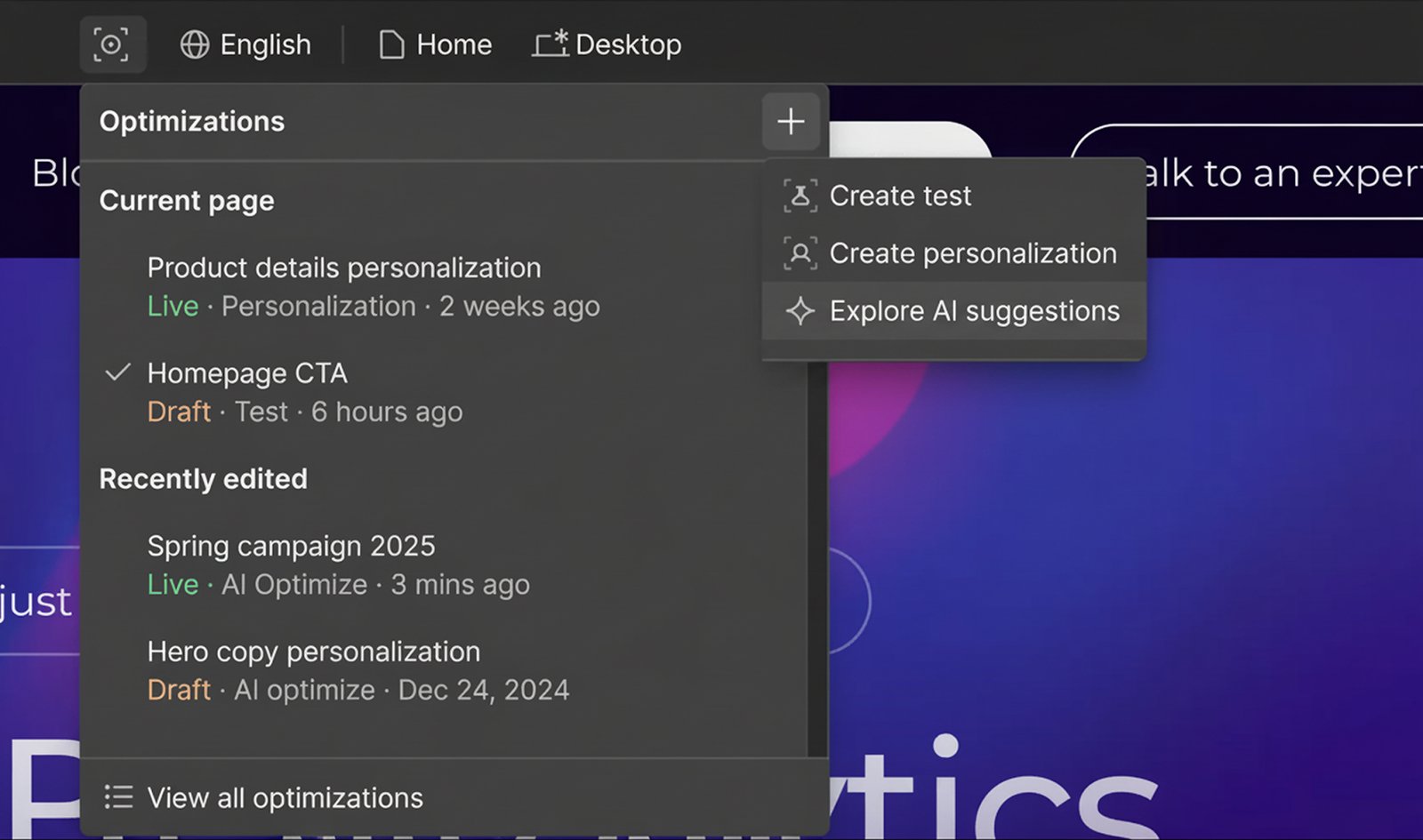
Image source:Webflow
To match your brand, Campaigns reads your live site and pulls out its colors, typography, and voice. Campaigns works alongside any CMS, so your main site doesn't have to run on Webflow.
Webflow Optimize handles per-visitor changes on a Webflow site, or on another CMS through a JavaScript snippet. It offers rules-based personalization by UTM parameters, traffic source, device, location, and on-site behavior.
Alongside those rules, Optimize runs A/B tests and AI Optimize, which decides in real time which variation each visitor sees. For example, visitors from LinkedIn ads can see "Talk to Sales" while all other visitors see "Get started for free."
Webflow pros:
- Pages and ads launch together: The Google Ads integration pushes pages and ad creative out as a Performance Max campaign. Each page variation becomes its own asset group.
- Pipeline reporting from the first lead: Campaigns connects HubSpot and Marketo forms and reports sessions, conversions, and influenced pipeline through HubSpot and Salesforce.
Webflow considerations:
- Account targeting set up with sales: Optimize's company-details targeting (industry, revenue, employee count) sits on Webflow's top tier. So do its 6sense, Demandbase, Salesforce, HubSpot, and Marketo integrations.
- Other ad platforms require a manual upload: Campaigns publishes ads straight into Google Ads. For Meta, LinkedIn, and Reddit, teams download the same creative and upload it in each platform's ad manager.
Pricing
- Starter plan: Free, on a webflow.io domain
- Basic plan: $25 per month (or $15 per month billed annually), for sites that don't need a CMS
- Optimize add-on: $379 per month (or $299 per month billed annually) for 25,000 page views, on a paid site plan
- Webflow Campaigns: From $2,000 per month (contact sales)
Best for: Demand generation and performance marketing teams that run persona, industry, or account campaigns across paid channels. The fit is strongest where every variant must stay on brand, and every lead must tie to pipeline in HubSpot or Salesforce.
Instapage
Instapage is a landing page builder for paid-search teams, designed so each active ad leads to a page written for it. On its sales-led tier, AdMap shows your Google Ads campaigns next to their landing pages and lets you manage each connection in one place.
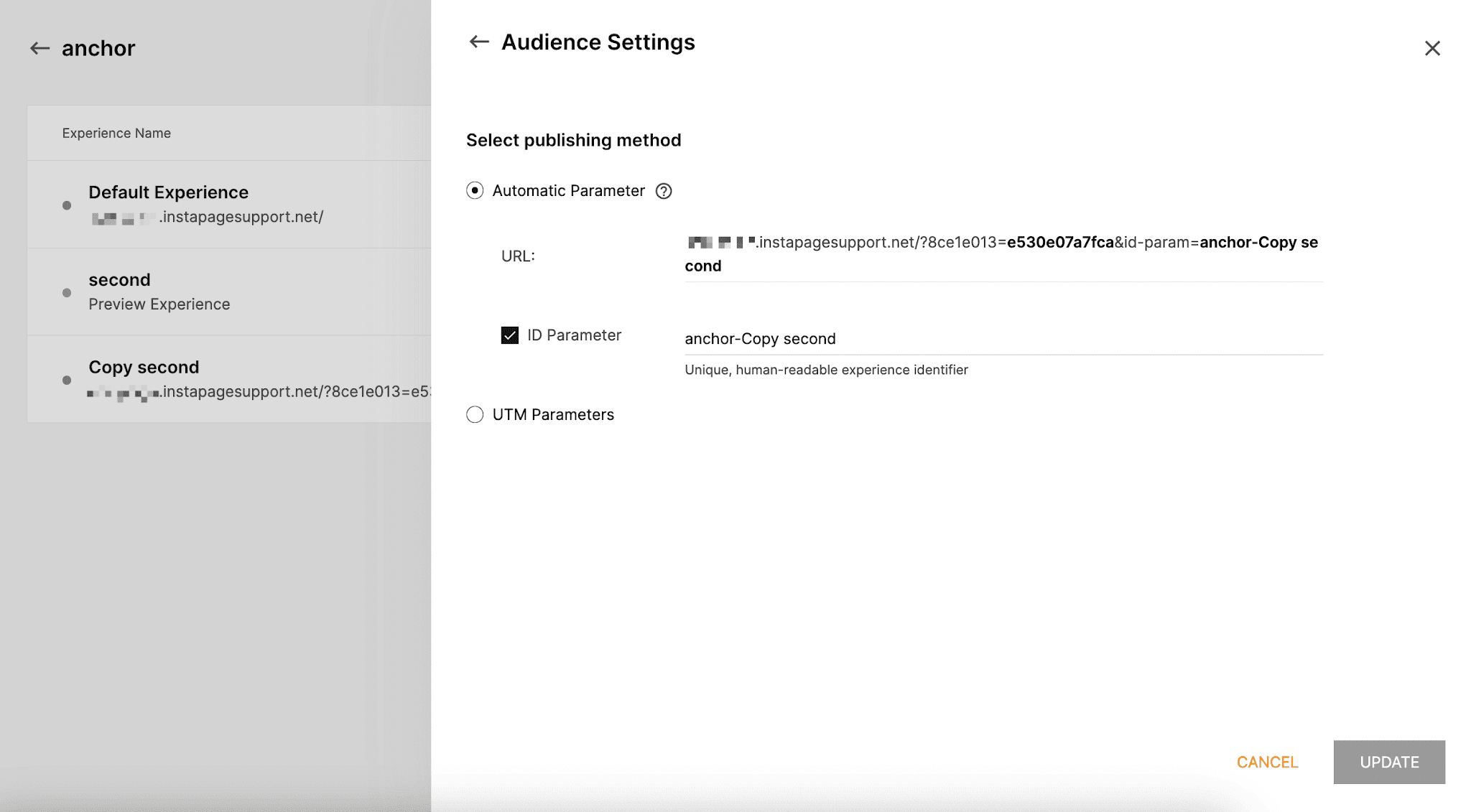
Image source:Instapage help center
Dynamic text replacement swaps words on the page for campaign values passed in the ad's URL parameters, such as search intent, demographics, or firmographics. For larger programs, Collections generate a set of pages from one template and a connected content table. On the sales-led tier, several personalized versions can share one URL.
Instapage pros:
- Visitors see only their variant: Server-side A/B testing picks the variant before the page reaches the browser, so the original copy never appears first (an effect called flicker). Teams can run several variants and change the traffic split.
- Fewer paid clicks on losing variants: AI experiments shift traffic toward the variants that convert better while the test runs.
Instapage cons:
- Personalization per ad needs a contract: Ad-to-page personalization and AI experiments are sold only through a sales contract, so teams can't try them before a demo.
- A busy campaign can end the trial early: The 14-day trial requires a credit card and caps at 2,500 unique visitors. Once you reach the cap, the account automatically switches to a paid subscription.
Pricing
- Create plan: $99 per month (or $79 per month billed annually) for 15,000 unique monthly visitors
- Optimize plan: $199 per month (or $159 per month billed annually) for 30,000 visitors, the first plan with dynamic text replacement
- Convert plan (adds ad-to-page personalization): Custom pricing (contact sales)
Best for: Paid-search teams, in-house or at agencies, that manage many Google Ads ad groups and need one view of where each ad sends its traffic.
Unbounce
Unbounce is a landing page builder that PPC teams use to repeat each visitor's search keyword on the page. Dynamic text replacement takes the visitor's exact search term from the URL and puts it in place of a headline or phrase the team has marked. When the parameter is missing, the page shows default text.
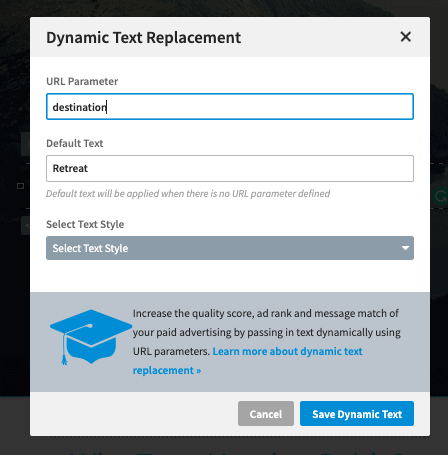
Image source:Unbounce help center
The same swap works on popups and sticky bars. In Unbounce's own example, a headline set up for "accounting software" shows "payroll software" to a visitor whose URL carries that keyword. Smart Traffic adds AI routing.
Instead of picking one winning variant, it learns from location, device, browser, and other visitor attributes, then sends each visitor to the variant that similar visitors converted on.
Teams can try keyword insertion, A/B testing, and AI routing without a sales call, because all three come on self-serve plans with published prices. Unbounce also offers a Model Context Protocol (MCP) server that lets AI assistants such as Claude or ChatGPT build and manage pages, including during the free trial.
Unbounce pros:
- Optimization on low traffic: Smart Traffic begins routing with as few as 50 visits, so a small campaign doesn't split its clicks evenly while waiting for a test to finish.
- Campaign data travels with the lead: UTM values pass into hidden form fields and appear in the Leads Table (Unbounce's lead list).
Unbounce cons:
- Traffic caps with overage fees: Each plan caps monthly visitors, and Unbounce bills a fee for each block of visits past the cap at the end of the billing cycle. A campaign that outperforms raises that month's bill unless the team upgrades first.
- Type I security attestation: Unbounce lists SOC 2 Type I, while several other tools here state SOC 2 Type II. The gap can stall vendor security reviews at larger companies.
Pricing
- Starter plan: $29 per month (or $22 per month billed annually) for 5 pages and up to 500 visitors
- Experiment plan: $149 per month (or $112 per month billed annually) for up to 30,000 visitors, the first plan with dynamic text replacement
- Optimize plan: $249 per month (or $187 per month billed annually) for up to 50,000 visitors, adding AI traffic routing
- Concierge plan: Custom pricing (contact sales)
Best for: PPC managers running Google Ads and Microsoft Advertising search campaigns who want one page to echo each visitor's search keyword.
HubSpot
HubSpot is a CRM platform whose landing pages can change based on what the CRM already knows about each visitor. Smart content rules swap modules (the content blocks a page is built from) based on any of these signals:
- Contact list membership
- Lifecycle stage
- Query parameter (such as a utm_source value)
- Country
- Device
- Referral source
- Browser language
A lifecycle stage rule, for instance, can upsell known customers while showing new leads a demo offer.
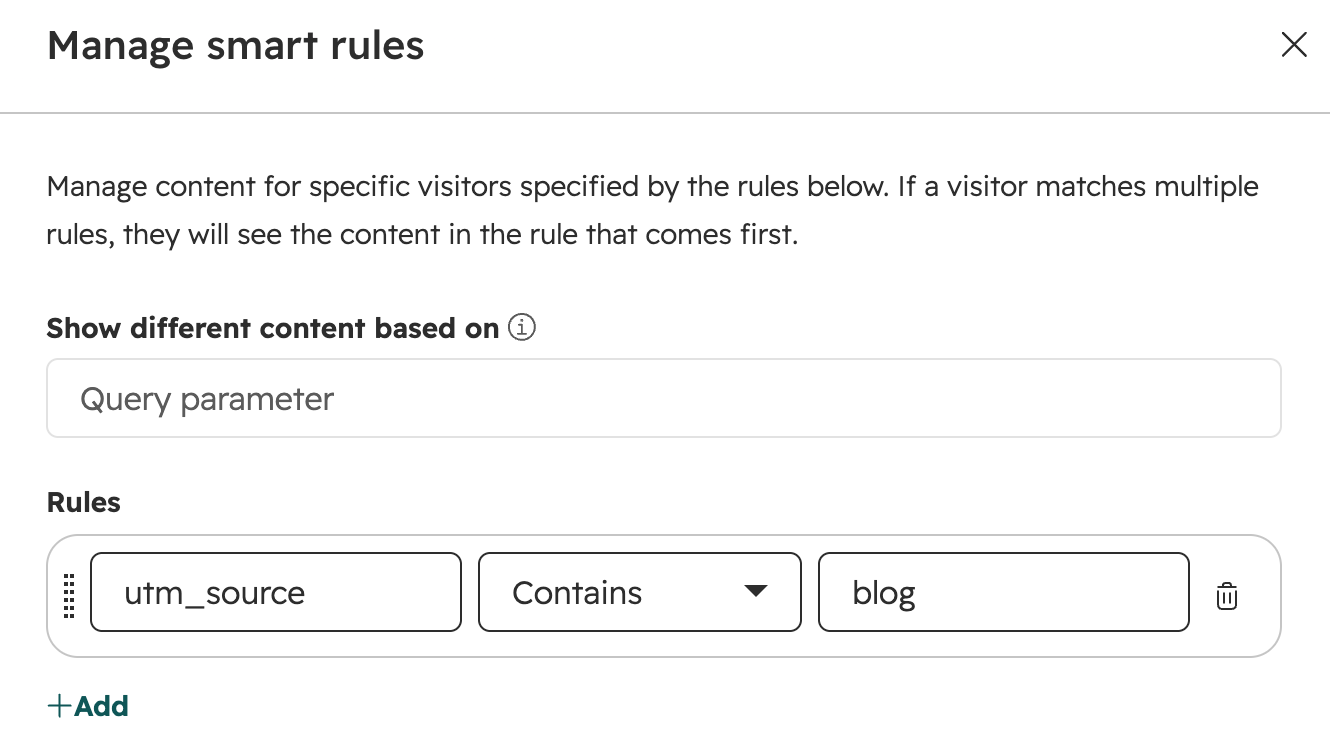
Image source:HubSpot knowledge base
A separate feature, dynamic pages, builds location or product pages from data. The feature generates a listing page plus a detail page for each row in HubDB (HubSpot's built-in database tables) or each CRM record.
Smart content for landing pages comes with Content Hub. Marketing Hub covers smart content in email only, so teams that want smart content on pages and in email need both services.
HubSpot pros:
- More page ideas tested in one run: Adaptive testing runs up to five page variations at once and gradually gives the best performer a larger share.
- One template, many pages: The detail pages don't count toward HubSpot's cap of 10 dynamic pages per data source. One template can cover a full location or catalog set.
HubSpot cons:
- Extra setup to combine signals: A module can follow country or lifecycle stage, not both. Combining signals means stacking modules and managing each one separately.
- Cookie-blocked visitors see the default: List and lifecycle rules match visitors to contacts through cookies, so browsers that block cookies get no smart variation. Device rules can also miss, because HubSpot can't always identify a device from the details the browser reports.
Pricing
- Free plan: Up to 2 users, with HubSpot-branded landing pages
- Content Hub Professional: $500 per month with an annual commitment (or $450 per month billed annually) for 3 core seats, the first tier with smart content on landing pages
- Content Hub Enterprise: $1,500 per month billed annually, for 5 core seats
Best for: Inbound and lifecycle marketing teams whose leads already live in HubSpot. These teams want returning contacts to see different offers by lifecycle stage, with forms, email, and reporting in the same system.
Adobe Marketo Engage
Adobe Marketo Engage is a B2B marketing automation platform with its own landing pages. You build segmentations from fields such as job title or industry, or from behavior such as pages visited. Then you mark landing page elements as dynamic so each segment sees its own content.
For example, a segment of high-scoring leads can get a sales offer, and everyone else sees the default content (e.g., a guide). Tokens (placeholders that fill in per visitor) insert names, dates, lead score, or any database field.
For ABM, Target Account Management lists (Marketo's named-account lists) sync into Web Personalization, Marketo's website personalization module, within five minutes. You can then personalize pages for those named accounts.
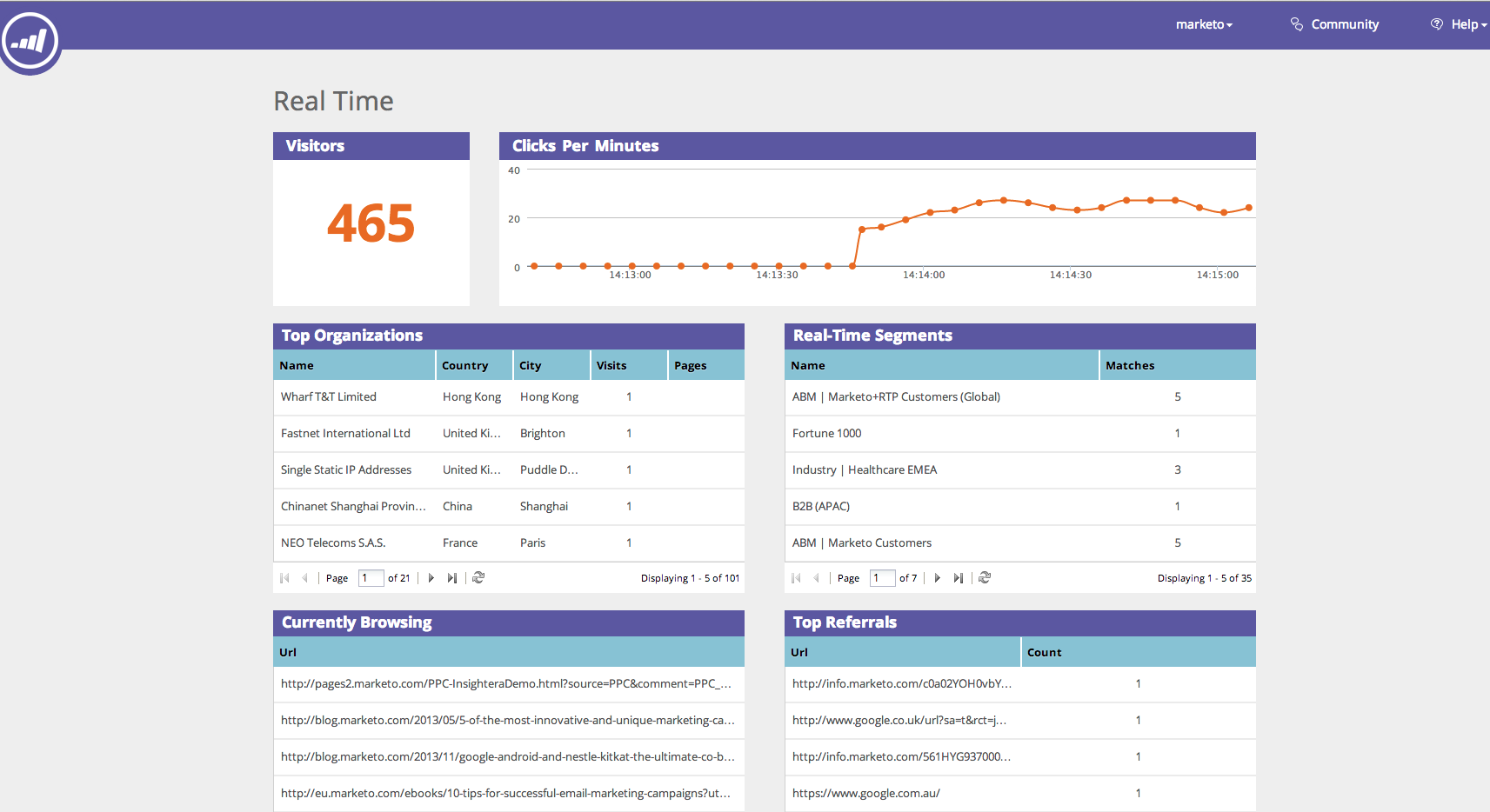
Image source:Adobe Experience League
Adobe also offers built-in AI agent skills (Coworker for Marketo Engage, formerly Marketo AI) and an MCP server.
Adobe Marketo Engage pros:
- One data source for pages and email: Page content draws on the same lead and account data that already drives email nurture and scoring.
- Conversations on the page: Dynamic Chat runs generative AI conversations that use lead and account fields, then sends meeting bookings and conversation summaries to the account owner in the CRM.
Adobe Marketo Engage cons:
- Setup before the first variation: Every landing page element is static by default. Dynamic content needs segmentation, a free-form page, and a form first. Edits to the default segment's block also apply to every segment.
- No budget figure before a consultation: The first cost figure comes from a sales quote, because Adobe publishes no package prices.
Pricing
- Growth package (core email, segmentation, and automation): Custom pricing (contact sales)
- Prime package (lead- and account-based marketing, with Target Account Management): Custom pricing (contact sales)
- Ultimate package (adds premium attribution): Custom pricing (contact sales)
Best for: B2B demand generation teams running ABM that already score and nurture leads in Marketo and want landing pages, chat, and email to respond to the same segments.
Optimizely
Optimizely is an experimentation and personalization engine for teams that already have pages and traffic. Optimizely Web Experimentation lets marketers change page elements in a visual editor without code. Teams can build audiences from any of these conditions:
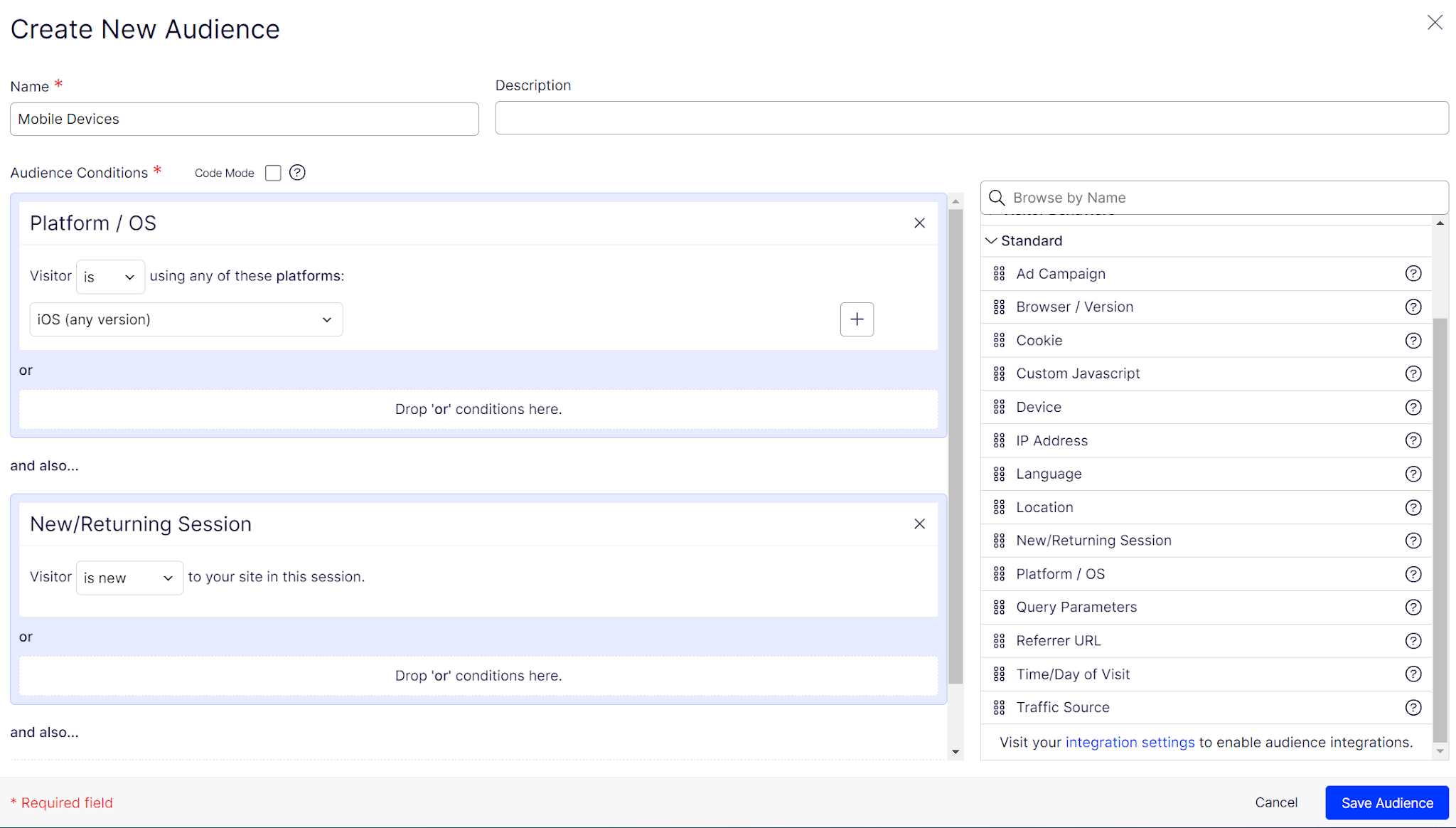
Image source:Optimizely docs
- Ad campaign (utm_campaign) values and query parameters
- Referrer URL and traffic source
- City, state, or region
- Device and cookies
- Uploaded lists of parameters, cookies, or ZIP codes
For example, a test can show one headline to visitors from a single ad campaign and another to everyone else. Optimizely Personalization then adds ongoing targeted experiences for named audiences. Feature Experimentation, a separate product, runs server-side tests in apps and APIs.
Optimizely pros:
- Lift figures teams can defend: By default, personalization campaigns hold back 5% of visitors on the original experience, and reports show statistical significance in real time.
- Different visitors, different winning variations: Contextual multi-armed bandits pick the variation most likely to convert, based on each visitor's attributes.
Optimizely cons:
- Client-side delivery costs speed: Web Experimentation changes the page in the browser, so it adds JavaScript and can flicker as variations load, especially on slower mobile connections.
- New landing pages need a second product: The visual editor updates existing pages and doesn't build landing pages from scratch. New pages come from a separate agent workflow in Optimizely's CMS.
Pricing
- Web Experimentation: Custom pricing (contact sales)
- Personalization: Custom pricing (contact sales)
Best for: Growth and experimentation teams at high-traffic brands that own their landing pages and want statistically rigorous tests and AI-assisted personalization across web and server-side channels.
Dynamic Yield
Dynamic Yield is a personalization platform for digital commerce teams, sold as Experience OS. Mastercard owns Dynamic Yield and says the product has been named a Leader in Gartner's Magic Quadrant for Personalization Engines eight consecutive times.
Audiences combine historical and current-session behavior, traffic channel, and device. They can also use campaign parameters from Audience Hub (UTM values or Dynamic Yield's own DYA parameter). Affinity scores, which rate each visitor's interest in product categories, can also define audiences.
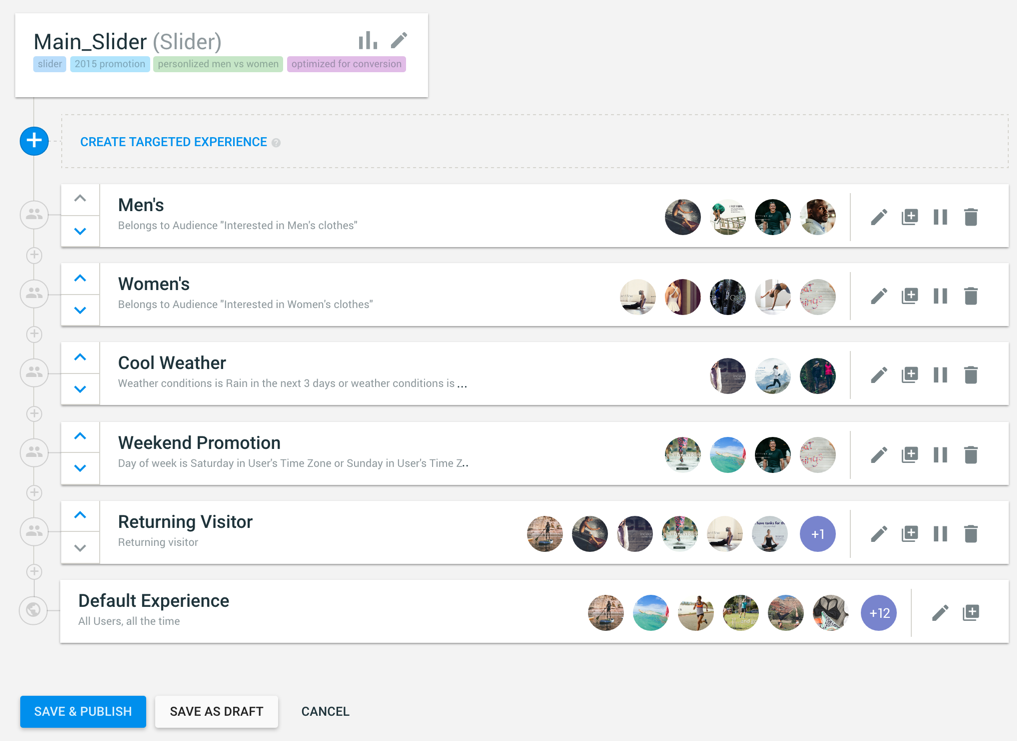
Image source:Dynamic Yield knowledge base
Marketers build landing page variations in a point-and-click visual editor. For custom-code campaigns, Dynamic Yield offers more than 100 prebuilt templates. Developers can also deliver experiences server-side through Experience APIs.
For anonymous visitors, geo-based predictive targeting draws on Mastercard's localized consumer spending data to find people likely to buy in chosen categories. Experience OS Agents let teams find opportunities, build experiences, and analyze results by typing requests in plain language. Built-in generators also draft text and image variations.
Dynamic Yield pros:
- Tests turn into personalization: Predictive Targeting runs in the background of every A/B test and surfaces segments where a variant outperforms the overall winner.
- Site interests reused in email: Affinity scores built from site behavior also target email promotions.
Dynamic Yield cons:
- Affinity needs commerce events: Affinity scores come from product views, add-to-cart, and purchase events. B2B lead-generation pages rarely produce those events. The model then has little behavior to score.
- Editor access needs browser setup: On script-based sites, the visual editor needs the Dynamic Yield Chrome extension. The alternative is to re-enable third-party cookies every 90 days.
Pricing
- Experience OS: Custom pricing (contact sales)
Best for: Ecommerce and digital marketing teams at retailers with large catalogs and steady traffic that want AI to find personalization segments across web and email from one system.
Personyze
Personyze is a personalization tool that reads the signals attached to each paid click: URL and UTM parameters, the matched keyword, referrer, location, and device. It adds CRM data, ABM platform data, or company data matched from the visitor's IP address.
With that data, Personyze swaps the headline, subhead, hero image, call to action, offer, and social proof on your existing page, at the same URL. Targeting draws on more than 70 visitor attributes, including session behavior.
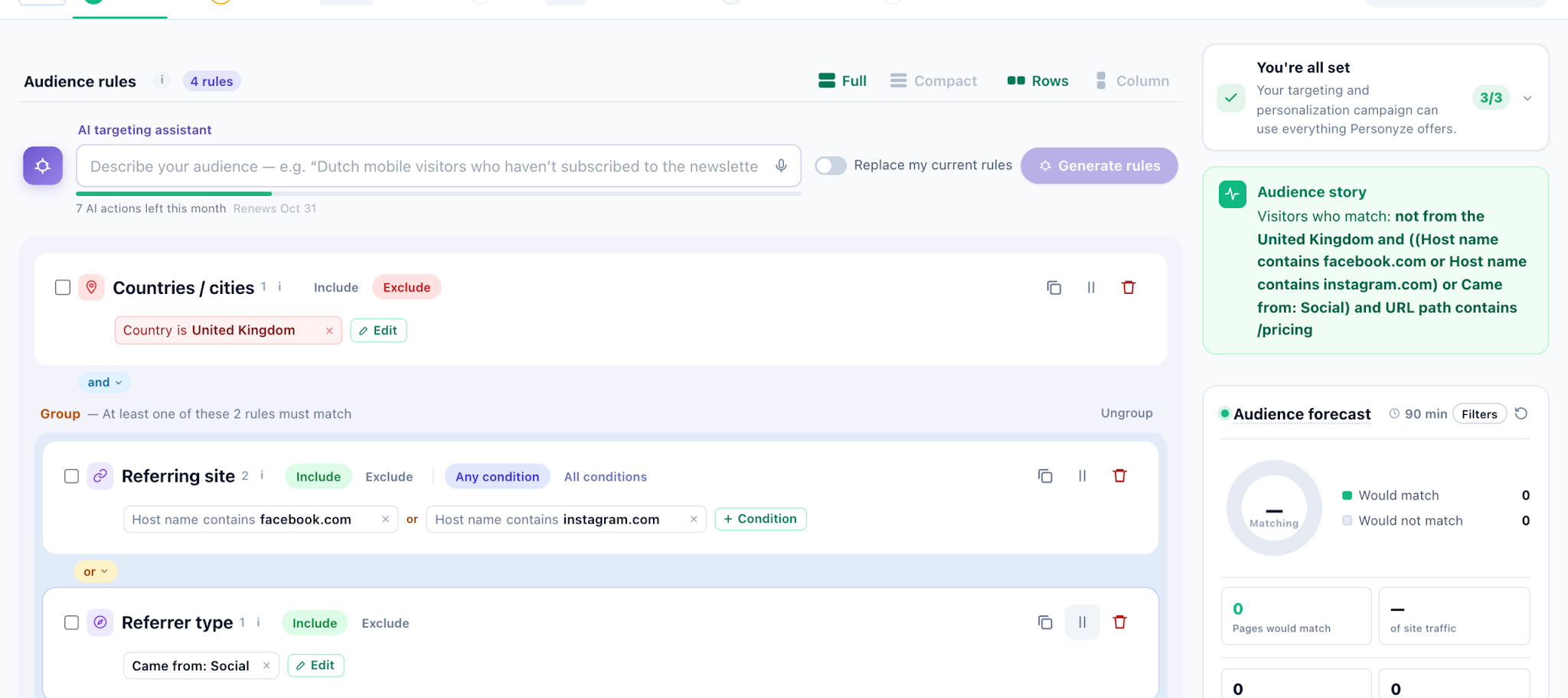
Image source:Personyze wiki
When a campaign has no page yet, Personyze can build one and serve it at its own URL. Personyze assembles hosted pages on the server and serves them from a CDN, so each visitor's version is in place before the page renders. Tokens in any text field fill in for each visitor so that a headline can show the visitor's company name and city.
Personyze pros:
- Company data before a form fill: Reverse-IP lookup matches the visitor's network address to a company without identifying the individual. B2B pages can then change by industry for visitors who haven't identified themselves.
- Testing with holdouts: A/B and multivariate tests on any element include significance calculations, segment splits, and holdout groups (visitors kept on the original page for comparison). Teams can apply a winner one audience at a time.
Personyze cons:
- Existing pages need anti-flicker setup: The default script loads without blocking the page so that the original content can show before the swap. Personyze recommends firing its tag early and hiding the page until the swap finishes.
- Hosted pages cost extra: Building and hosting a page from scratch is a separate add-on on every plan.
Pricing
- Free plan: 5,000 pageviews on 1 domain
- Starter plan: $149 per month (or $134 per month billed annually) for 50,000 pageviews
- Growth plan: $250 per month (or $225 per month billed annually) for 100,000 pageviews
- Hosted Landing Pages add-on: $49 per month on any plan, for pages Personyze hosts
Best for: Small paid-media and growth teams that want to test personalization on their current landing pages before committing to an enterprise engine. The free plan gives them room to prove lift first.
How to choose the right dynamic landing page tool
The following three questions can help you find the right dynamic landing page tool for your campaigns:
- Does your traffic arrive with a keyword? If most of your budget goes to search ads, look at Unbounce, Instapage, and Personyze, which swap the headline to match the visitor's query from the URL. Keyword replacement works only on networks that pass a search keyword, such as Google Ads and Microsoft Advertising. Traffic from LinkedIn or Facebook ads needs audience rules or account data instead. Webflow Optimize, HubSpot, Adobe Marketo Engage, and Personyze all work from those signals.
- Are you building the page or adapting one you already run? If the page doesn't exist yet, Webflow Campaigns, Instapage, and Unbounce can build it. If it already lives on your site, Webflow Optimize, Optimizely, and Dynamic Yield can personalize it in place. HubSpot, Adobe Marketo Engage, and Personyze do both (build new pages and adapt existing ones).
- Do you need to prove lift or maximize conversions? Teams that report results to finance should keep a fixed control or holdout group. Optimizely and Personyze both support holdouts. Teams that care more about conversions during the test can let AI allocation decide: Unbounce's Smart Traffic, Instapage's AI experiments, or Webflow's AI Optimize.
Matching your primary traffic signal, setup architecture, and reporting requirements to the right tool ensures every campaign dollar delivers maximum conversion efficiency.
Launch on-brand campaign variants and personalize your site from one platform
Webflow fits marketing teams that send each audience from paid channels to a page built for it. Marketers create and publish pages themselves on Webflow's structured CMS and managed hosting. Campaigns builds standalone campaign pages and ads alongside any CMS. Optimize personalizes and tests existing site pages. In either workflow, brand standards guide the content.
To try Webflow's page building before you commit, sign up for free. Then add Optimize to a paid site plan when you're ready to personalize. Webflow Campaigns is sales-led, so teams that want per-audience variants and matching ads can talk to sales to scope a first campaign.
Unlock growth with SEO
Join Webflow and leading growth agency Graphite as they discuss actionable insights for scaling and achieving growth with SEO

Choose the right CMS for a scaling enterprise
Discover how the right CMS can allow teams to efficiently scale rich, complex content – all without writing code.