
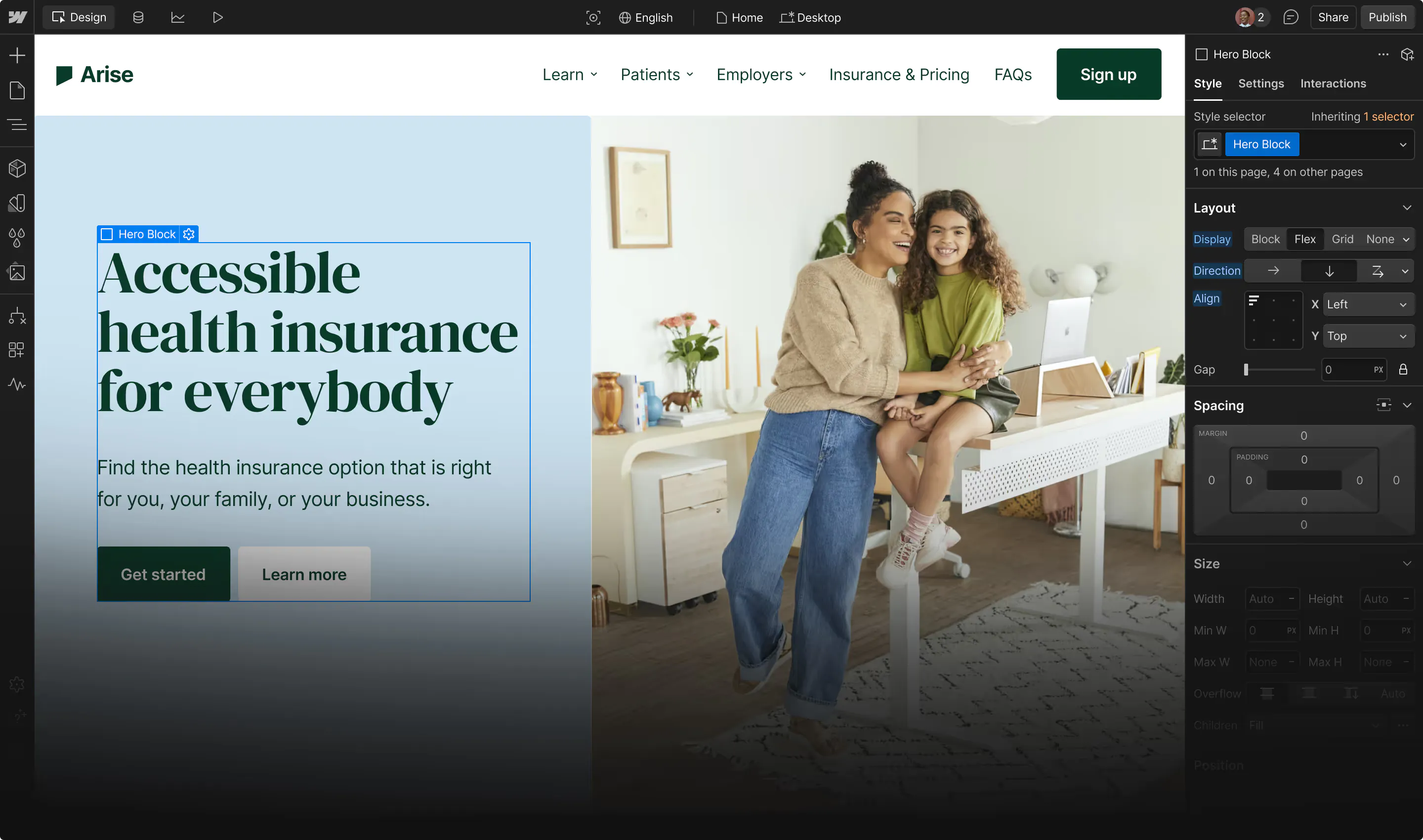







You can adopt agents on your marketing site and keep a clear record of who changed what. It takes a few controls at the right points, and they’re mapped out below.
A marketing site used to have two kinds of visitors: people and search crawlers. Now one page can be built by an agent, scraped by a second agent, summarized for a potential customer by a third, and optimized overnight by a fourth that studied yesterday's traffic.
You control some of these agents but not all the data they ingest and train on. The ones that you do not control make the marketing site a product with agent users, and products need product security. A marketing site is usually public with no login required to view or break. Adversaries go after whether the site still says what you wrote, serves what you built, and reports what real visitors did. This article calls those content integrity, delivery integrity, and signal integrity, and looks at where each kind of agent touches them.
Five agents, three kinds of integrity
Five agent roles show up on a marketing site today, agents that:
- build,
- read or scrape,
- analyze its visitor data,
- optimize the site from that data,
- adversarial agents that attack
Each role touches at least one of three things worth protecting the integrity of:
- Content - what the site says and links to.
- Delivery - how that content reaches a browser, including DNS, redirects, third-party scripts, hosting, and the publish pipeline.
- Signal - the visitor and behavior data the site produces, plus every decision made from it.
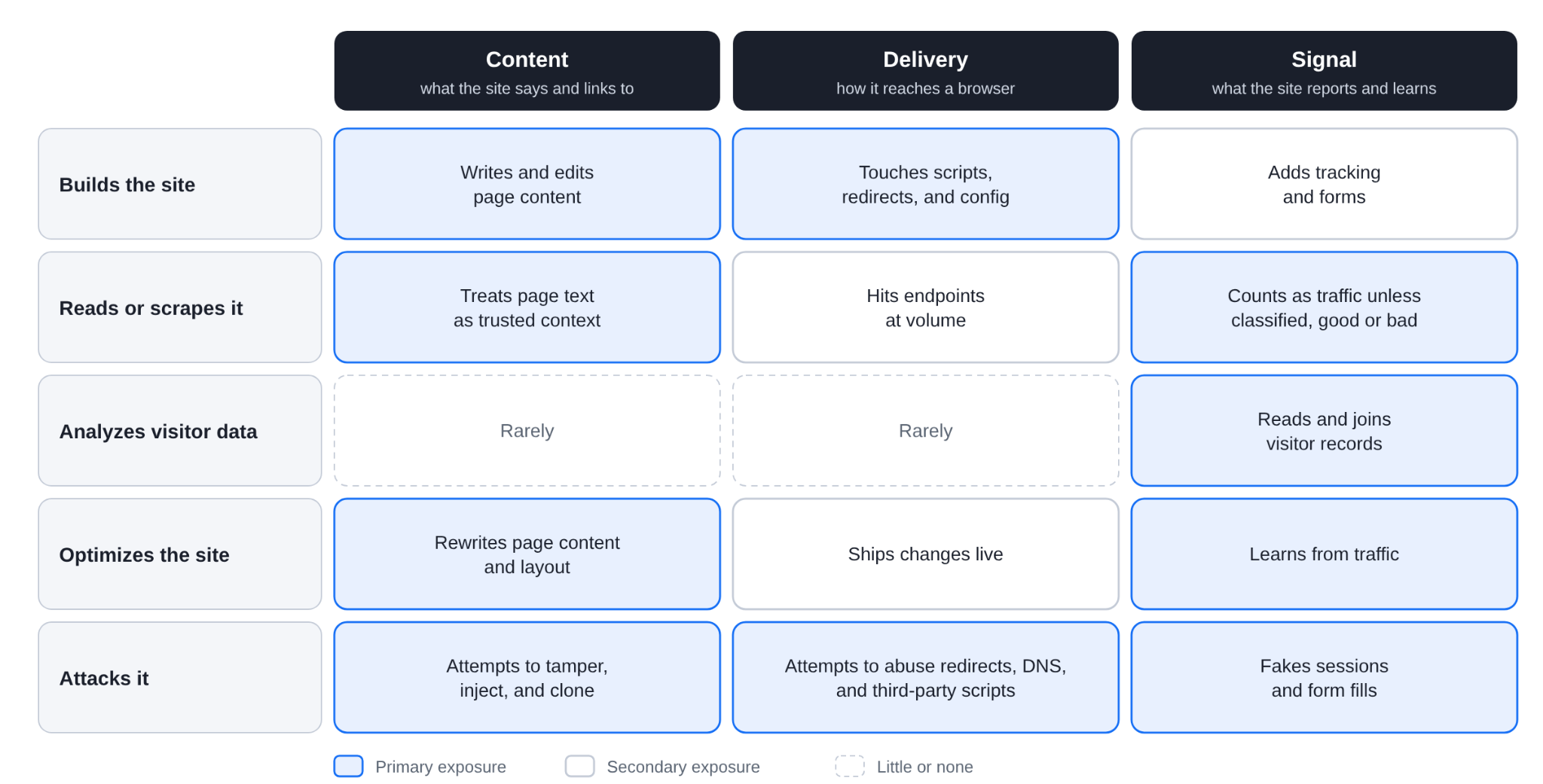
Figure 1. Where each agent role touches a marketing site. Shaded cells are the primary exposure.
Because the content is public, the checks that matter are integrity checks. An agent with write access can be talked into making unapproved changes, so you need governance over what it may touch and logs that show what it did.
Agents that build sites
Builders are usually the first agents a team adopts, so they set the pattern for every agent that follows. A builder agent writes pages, config, scripts, and redirects. The risk sits in what it reads before it writes. A doc, a ticket, a scraped competitor page, or a CMS field can carry instructions, and an agent can follow them.
Recent incidents show the shape of this. In July 2025, someone slipped a destructive prompt into a pull request for the Amazon Q Developer extension for VS Code, and it shipped in production version. AWS removed it and said no customer resources were affected, and reports indicate a formatting error kept the prompt from running. The same month, a Replit coding agent reportedly deleted a production database during a code freeze, despite instructions not to change anything. Replit's response was to separate development and production databases automatically. The causes differ from provenance checks to agents stepping outside their boundary.
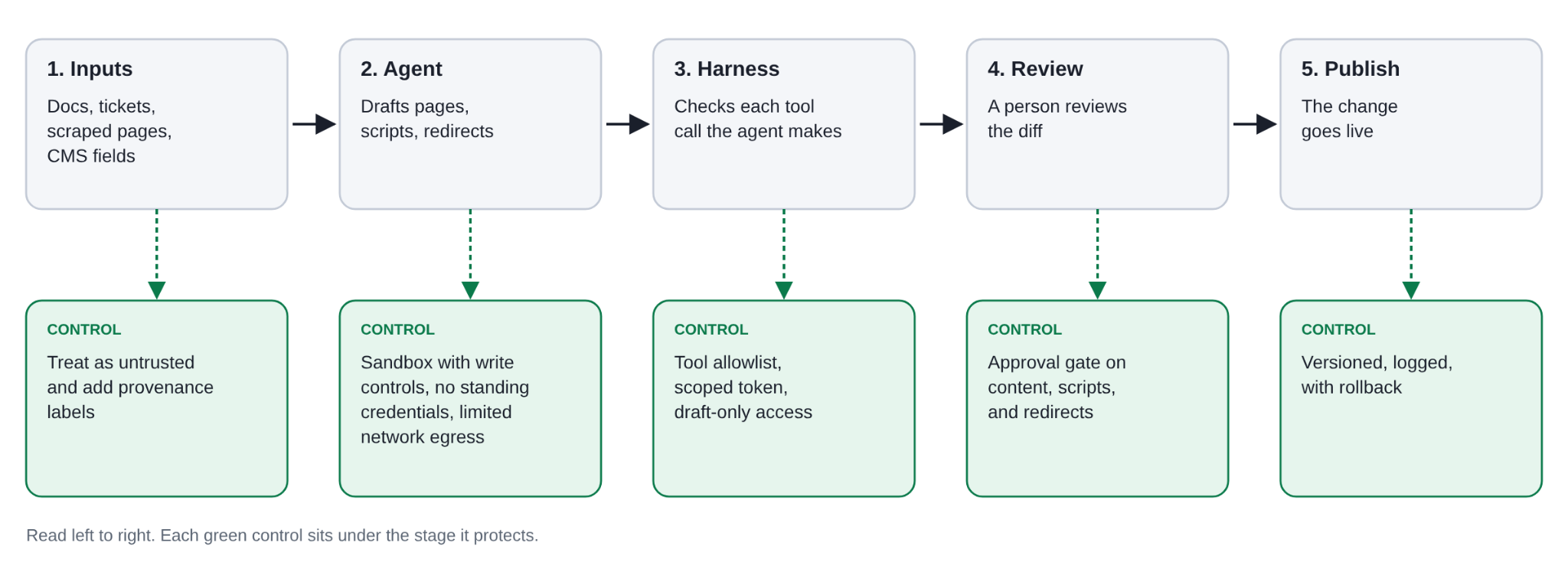
Figure 2. A builder agent's path from input to publish, with the control at each stage. Read left to right.
The incidents above failed at different stages of Figure 2. Amazon Q failed at the input and review stages, where untrusted text in a pull request reached a trusted release. Replit failed at the harness, where an instruction to freeze changes was the only barrier between the agent and a production database. A marketing site has the same exposure and three layers around the agent carry those controls
- The agentic SDLC is the process - where agents act across plan, draft, review, and publish, and which stages need a human decision.
- The agent harness is the control layer - the code around the model that decides which tools the agent can call, with which credentials, and what gets logged or approved.
- The sandbox is the containment layer - an isolated runtime with no standing credentials, restricted network egress, and no path to production data.
For a marketing site, that translates into a few working rules.
- Give builder agents draft access and keep publishing behind a person.
- Review a diff of content, scripts, and redirects. A summary written by the agent describes what it believes it did.
- Treat every input as untrusted, including your own docs and tickets, because anyone who can edit them can steer the agent.
- Add provenance records - which agent changed which page, from which inputs.
Webflow’s AI site builder drafts a multi-page site and design system from a prompt. The Webflow MCP server connects AI tools like Claude to a site, so an agent can design, build, and manage it through natural conversation or agentic workflows.
Webflow’s controls map to the rules above. Agent Instructions give an agent your design system, voice, CMS, and policies as skills and rules stored with your site, and agents should read them before they act. They guide an agent but don’t enforce anything, and an agent follows them as an input, so edit access matters: only Site managers and Designers can change them, and new ones stay off until someone reviews and turns them on. To see what an agent is doing, agent presence shows where any agent connected through the Webflow MCP server is working on the canvas, the same way you’d see a teammate. For the record afterward, the Site Activity Log for enterprise labels each change as Human, Webflow AI, or MCP.
Site roles do the enforcing. They let a team give a builder a narrow role, such as a Marketer with publishing switched off. That role can build pages from components but can’t publish, create API tokens, or open custom code. On Enterprise plans, design approvals go further. A role without the “Edit main site without approval” permission works in page branches, and its changes reach the main site only after required reviewers approve them.
Source by Webflow, now in research preview, is a new platform purpose-built for teams and agents to drive growth on the web, together. Source’s site building agents work directly on your codebase. It’s designed to let teams decide how much autonomy those agents have, from requiring human approval for every change to giving agents more freedom for lower-risk work, and to hold agent actions to the same roles, permissions, and review systems as human work, with a record of what changed and which agent changed it.
Agents that read and scrape the site
Search is turning into answers, and answers are built from your pages. Agents read page text as context, and a page can contain text no visitor sees. In August 2025, Brave researchers hid instructions behind a spoiler tag in a Reddit comment. When a user asked Perplexity’s Comet browser to summarize the page, Comet followed them and exfiltrated a one-time password. Perplexity patched the issue. Any field attackers can write to on your site, such as comments, reviews, form-fed content, or CMS entries, can carry the same kind of payload to every agent that reads it.
The agent also might not see the same page you do. Researchers at SPLX showed that a site can check the user agent and serve AI crawlers different content than it serves browsers. The same technique works against you if an attacker gains write access to your site: they can change what AI systems say about you while every human check looks clean. Monitor what agents see, not only what browsers see.
Before you can control which agents read your site, you need to see them. AI bots don’t show up in standard visitor analytics, so most teams have no record of which ones visit or what they request. Webflow’s LLM bot insights fills that gap with data from your site’s server logs, so it covers the bots it tracks whether or not visitor tracking is on. It groups each bot by purpose: agentic bots that fetch pages live to answer a user’s question, training bots that collect content for model development, indexing bots that map pages for retrieval, and bots with more than one purpose. You can view activity for the whole site or a single page, filter by provider or category, and export the data as a CSV.
That gives you a baseline. Bots often focus on different pages than human visitors do, and a jump or drop after you publish is easy to spot. A page that agents fetch heavily is also a page where tampered content or injected text reaches the most readers, which makes it a good place to start the integrity checks below. The view covers named LLM bots. It doesn’t flag traffic as hostile, and it doesn’t show a user’s original query or whether a page was cited.
Visibility tells you who is there. What to do about them is a separate decision, because scrapers differ in intent. An indexer that maps your pages for retrieval and a collector that copies them for training both read public content, and you may want to allow one and not the other. Scrapers that hit your endpoints at volume add hosting cost and can slow the site for real visitors, and they count as traffic in your analytics unless something classifies them. A robots.txt file states your preference but doesn’t enforce it. Set a policy for each purpose, enforce it with rate limits and bot rules, and carry the classification into analytics so scraper traffic stays out of the data your optimization agents learn from.
Agents that analyze visitor data
Analysis agents work with the most sensitive data on the site: behavior tied to real people. Webflow shows what this looks like in practice. Webflow Analyze records click events, sessions, bounce rate, time on page, and audience attributes such as traffic source, region, and device. Teams can connect an AI tool to the Webflow MCP server and ask about their site’s traffic and engagement, including page-level data, goals, and filtered results, without opening Analyze. That connected tool is an analysis agent.
The shape of the data limits what the agent can expose. Analyze uses anonymous identifiers and, according to Webflow, collects no personally identifiable information, and it relies on local storage instead of cookies. This is the setup the controls below call for: an agent that reads an anonymized dataset, not raw visitor records. If you build your own analysis agents, keep sensitive identifiers out of their context, run them in a sandbox, and give them read-only access.
Two things still need your attention. The first is consent. Analyze lets you choose always-on, opt-in, or opt-out tracking, and the opt-in and opt-out methods need a consent management solution to work properly. The tracking method decides which visitors are in the data, so the consent choices you apply belong in the dataset before an agent reads it. The second is signal quality. An analysis agent reports what the site counted, and it learns from the same signal that attackers can pollute. Classify automated traffic before it reaches the agent, or its answers describe bots as much as people.
Optimization agents close the loop
Optimization agents turn signal into action. They rewrite headlines, reorder sections, and adjust audiences from traffic data. That makes signal integrity a content integrity problem. If an agent learns from poisoned traffic, it ships a confident change based on bad data, and the changed page produces more skewed data for the next round.
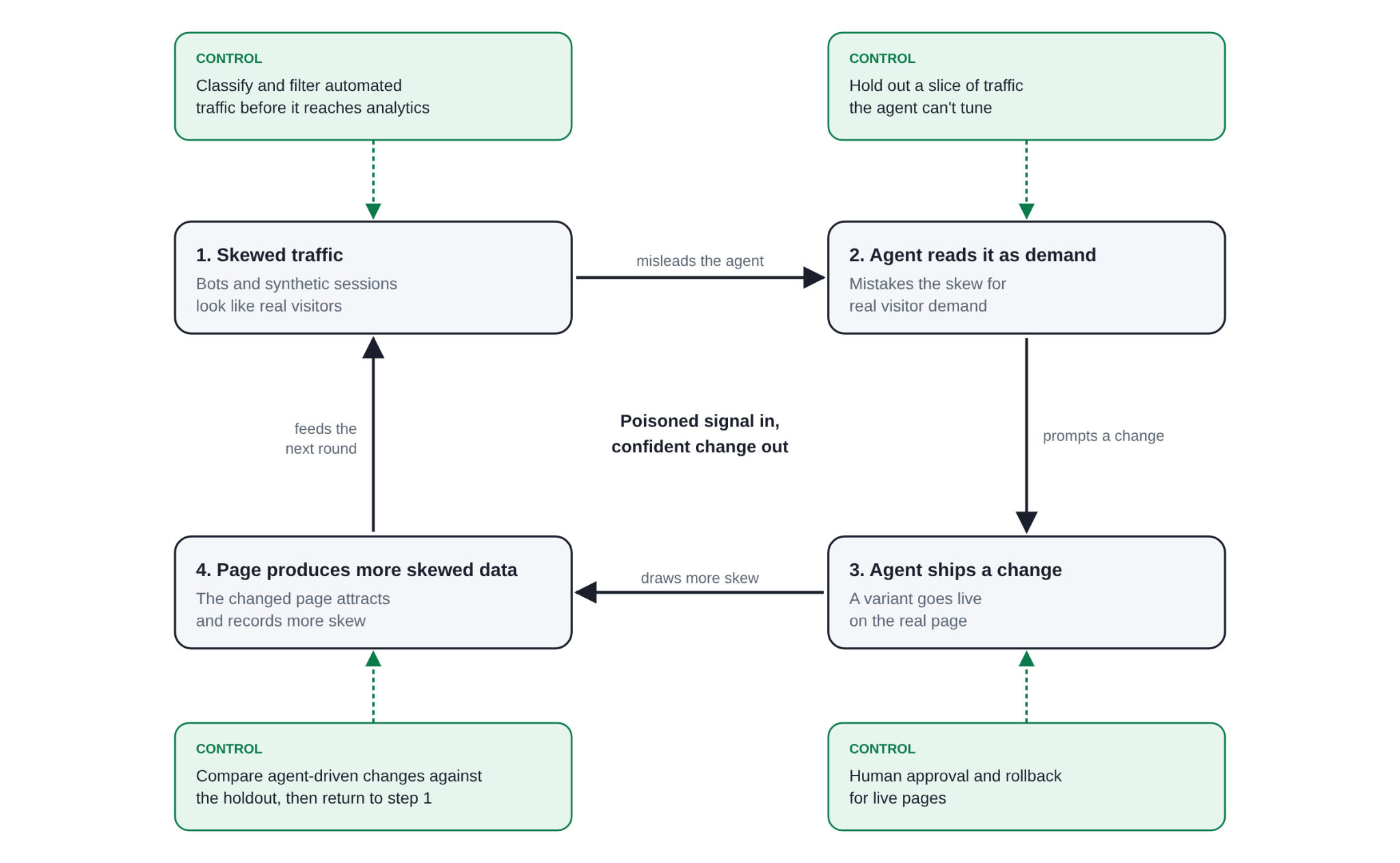
Figure 3. How an optimization loop goes wrong, and what site owners should do at each step.
A person who sees a conversion spike from a country you don't sell in asks questions. An agent ships the variant. The fix is to make the loop checkable: validate signal before an agent acts on it, hold out traffic the agent can't tune, and require approval and rollback for changes to live pages.
Webflow Optimize shows where this loop exists in a product. An optimization has a target goal, and its variations can be tested with a traditional A/B/n split, shown by personalization rules, or handled by an AI-optimized mode that uses machine learning to serve the best-performing variation and adapt as visitor behavior shifts. That last mode is the loop in Figure 3: whatever counts as a conversion becomes the signal the system learns from, so automated traffic that completes the goal action can push a weaker variation forward. A variation can also redirect a visitor to a different page, which puts redirect destinations in scope for the delivery checks above. For teams using these features, treat the target goal as a security decision. Pick goals that bots find hard to fake, filter automated traffic before it reaches results, and have a person review results before an AI-optimized variation becomes the default.
Agents that attack the site
A marketing site does not require a login to view its public content. Attackers go after integrity: they attempt to change what the site says, hijack what it serves, or corrupt what it reports. Automation already does this at scale, and agents lower the cost further. In testing by hCaptcha's threat group, browser agents run against 20 common abuse scenarios attempted nearly every malicious request without any jailbreaking. Most block attempts failed because the tool lacked the capability.
Content
Content attacks change what visitors read, or send them to a copy of your site. In July 2025, Okta reported that attackers were using Vercel’s v0, a tool that builds web pages from natural-language prompts, to clone sign-in pages for brands including Microsoft 365 and cryptocurrency companies. Okta’s researchers reproduced the attack with a single prompt asking for a copy of their own login page, and Axios reported it can take as little as 30 seconds. Vercel restricted access to the sites Okta identified. The same approach can reproduce a marketing site.
Agents that run on your site raise a related problem, and the attacker doesn’t have to be an agent. In December 2023, a visitor talked the chatbot on a Chevrolet dealership's site into agreeing to buy a new Tahoe for $1 and calling it a legally binding offer. In February 2024, a Canadian tribunal ordered Air Canada to pay $812.02 after its chatbot gave a customer wrong bereavement fare information. The tribunal wrote that "it makes no difference whether the information comes from a static page or a chatbot." It treated the chatbot's words as the company's words.
Platforms carry part of the response. Webflow's Acceptable Use Policy prohibits using the platform for impersonation, fraud, malware, and content altered to mislead people, and Webflow’s Trust and Safety team removes sites that break it. Removals come from automated detection and from reports, and ~1000 sites are taken down each day. If you find a site impersonating yours on Webflow, you can report it through the form linked in the policy or at abuse@webflow.com.
Delivery
Delivery attacks hijack the path between your content and the visitor's browser, and they don't need to touch your page. In 2024, a company acquired the polyfill.io domain and changed the script it served, which redirected mobile visitors on more than 100,000 sites to scam pages. The site owners hadn't changed a line of code, and Google began warning advertisers whose landing pages loaded the script. A week after the disclosure, Censys still counted nearly 385,000 hosts referencing the domain, including 182 government sites.
DNS follows the same pattern. Guardio Labs found more than 8,000 domains and 13,000 subdomains tied to well-known brands hijacked through dangling CNAME and SPF records, then used to send about five million emails a day under those brands' names. Open redirects borrow a trusted domain's reputation the same way. Cofense found that every US .gov domain abused in phishing campaigns between November 2022 and November 2024 was used for an open redirect, and KnowBe4 documented a 2025 campaign against finance and healthcare organizations that relied on open redirects in legitimate services.
Agents make the search for these cheaper. Finding a dangling record or a redirect parameter is a scanning problem, and agent tooling can follow a hit through to a tailored phishing page faster than a script could.
Signal
Signal attacks corrupt what the site reports. Fake form fills, synthetic sessions, and scripted browsing pollute analytics, attribution, and audiences. The scale is real: Imperva’s 2025 Bad Bot Report found that automated traffic reached 51% of web traffic in 2024, and bad bots accounted for 37%. Forms are the most direct path from a bot into a marketing team’s CRM, so they are a good place to start. Webflow's form spam protection offers four methods that you can combine. The reCAPTCHA field asks visitors to identify themselves as human before they submit, although Webflow notes that it can hurt user experience and that more advanced bots can get around it. A site-level bot blocking setting uses AI to analyze mouse movements, inputs, and other signals, and blocks submissions from bots on every form on the site. A second site-level setting, spam filtering, checks all the form data sent on your site and filters out spam submissions. The honeypot technique adds a hidden field that real visitors never fill in, so a filled field marks the submission as spam. Because the CAPTCHA can be circumvented, none of these should carry the load alone.
The damage reaches visitors too. A visitor's history is the record that drives what they see next. When synthetic sessions merge into real audiences, or identities get stitched together wrongly, retargeting and personalization act on the wrong history, and real visitors get irrelevant offers.
How to secure your marketing site against agents
The controls differ by layer, but the first step is the same for all three: list every agent that touches your site, including the ones you don’t operate. You can’t protect a layer from an agent you haven’t counted.
Content. Review agent-authored changes like code. Keep a record of which agent changed what and from which inputs, and alert on diffs nobody requested. Fetch key pages with common AI crawler user agents and compare the result to what a browser gets.
Delivery. Allowlist redirect destinations, and remove any endpoint that redirects to an arbitrary URL. Audit DNS for dangling CNAME records and SPF includes that point at services you no longer use. Keep an inventory of third-party scripts, and apply Subresource Integrity or serve them from your own origin where you can. The polyfill.io incident is the case for it.
Signal. Classify automated traffic before it reaches analytics. Rate-limit and validate form submissions, and layer the protections your platform offers, such as bot blocking, spam filtering, and a honeypot field. Tag agent-originated sessions so they never feed audiences or optimization.
Across all of it. Apply least privilege to every agent, keep logs you can query, and put a person in front of the publish step.
Your marketing site now has more kinds of visitors, and some of them can edit it.
If an agent changed what your site says tonight, would you know which one it was, what it read first, and who approved the change?