Win over potential clients by showcasing your skills and results.
A web design case study shows off your approach to a project, highlighting how you simplified navigation, improved accessibility, or designed a clearer user journey. And, great case studies act as sales assets that communicate results and drive conversions because they help clients see how you work and the value you provide.
Read on to learn more about the benefits of case studies, and find out how to structure them effectively.
What’s a website design case study?
Your web design portfolio shows what you’ve created — case studies show the results. Each case study is a complete breakdown of a successful project, showcasing the full journey from initial problem to final outcome.
Most web design case studies include visuals like screenshots, wireframes, mockups, and before-and-after comparisons. Meanwhile, text copy explains the challenges you overcame, the decisions you made, how the website came together, and how you brought value to the client.
Benefits of web design case studies
Here are a few benefits of adding case studies to your portfolio site.
Demonstrate expertise
A good case study shows you can solve problems by highlighting the exact challenges you tackled. These are often multi-step processes, like designing a more logical checkout flow or creating a landing page that guides attention to a key call to action (CTA). Walking through a challenge in detail reassures clients that you care about what they want and know how to turn requests into successful products.
Build trust and credibility
Case studies give your work real-world context while showing potential clients that you have a provable track record. Naming clients (when possible), sharing each project’s context, and highlighting your role makes your portfolio verifiable, which helps people decide whether your experience matches their needs.
You can also add customer testimonials and reviews to your case studies. This kind of social proof builds trust faster and gives leads a reason to contact you.
Strengthen value proposition
A great case study doubles as a ready-made pitch. Instead of telling potential clients how you can help, you’ll show them a similar project and walk them through a narrative. It’s easier for clients to understand your value when they see how you think and why that thought process delivered results.
You can explain how you turned requests into goals, then made design choices backed by clear wireframes. For example, you might show how a vague request like “make it pop” led you to add more color or size contrast to primary CTAs so they improved conversions.
Improve communication
Case studies require you to explain design choices in a way non-designers can understand. You have to articulate what changed and why that mattered — maybe you cut down the steps to complete a form so it didn’t frustrate users, or you built a layout that made pricing more transparent to strengthen trust.
And, the process of creating case studies can make you better at handling pitches and feedback. When you know how to clearly communicate why a design decision matters, you reduce uncertainty. Clients can follow your logic and see that choices are directly tied to the project’s business goals.
Inspire future projects
When you document your own work, you’re also building a library of ideas you can reuse and improve on. Maybe a layout concept didn’t make the final cut for one project, but it fits perfectly into a later design. You might also notice that certain elements or decisions keep showing up in successful builds. Over time, case studies become personal inspiration, reminding you of what works and offering ideas for what to experiment with next.
What makes an effective web design case study?
Strong case studies:
- Are descriptive and scannable. They have clearly divided sections, descriptive headings, and purposeful visuals, so visitors always know what they’re looking at.
- Tell a clear story. An effective web design case study should flow in a logical sequence, where each section naturally sets up the next.
- Show behind-the-scenes decision making. Give plenty of context, so readers understand the problems and see how you arrived at the solutions. Focus on the exact moments where your judgment shows, whether you redesigned a form or simplified navigation.
- Offer proof of results. Close by showing what improved. Even when you can’t share exact success metrics, you can still be specific about results, like reduced steps in a checkout flow or better readability.
How to structure a web design case study: 5 key elements
Each section in your web design case study should move the reader forward and build confidence that you can deliver results. Here’s how to structure website case studies.
1. Thoughtful page design
Your website is an example of your work, so your case study page design should represent your skills. One good approach is to present the page like a product experience — scroll-triggered animations mark progress through each case study, side-by-side comparisons make improvements obvious at a glance, and microinteractions encourage two-way engagement.
But however you format the page, present outcomes in a visual manner that busy prospects can understand at a glance. For example, animated comparisons and interactive prototypes communicate change faster than walls of text, reducing cognitive load for viewers.

Get started for free
Create custom, scalable websites — without writing code. Start building in Webflow.
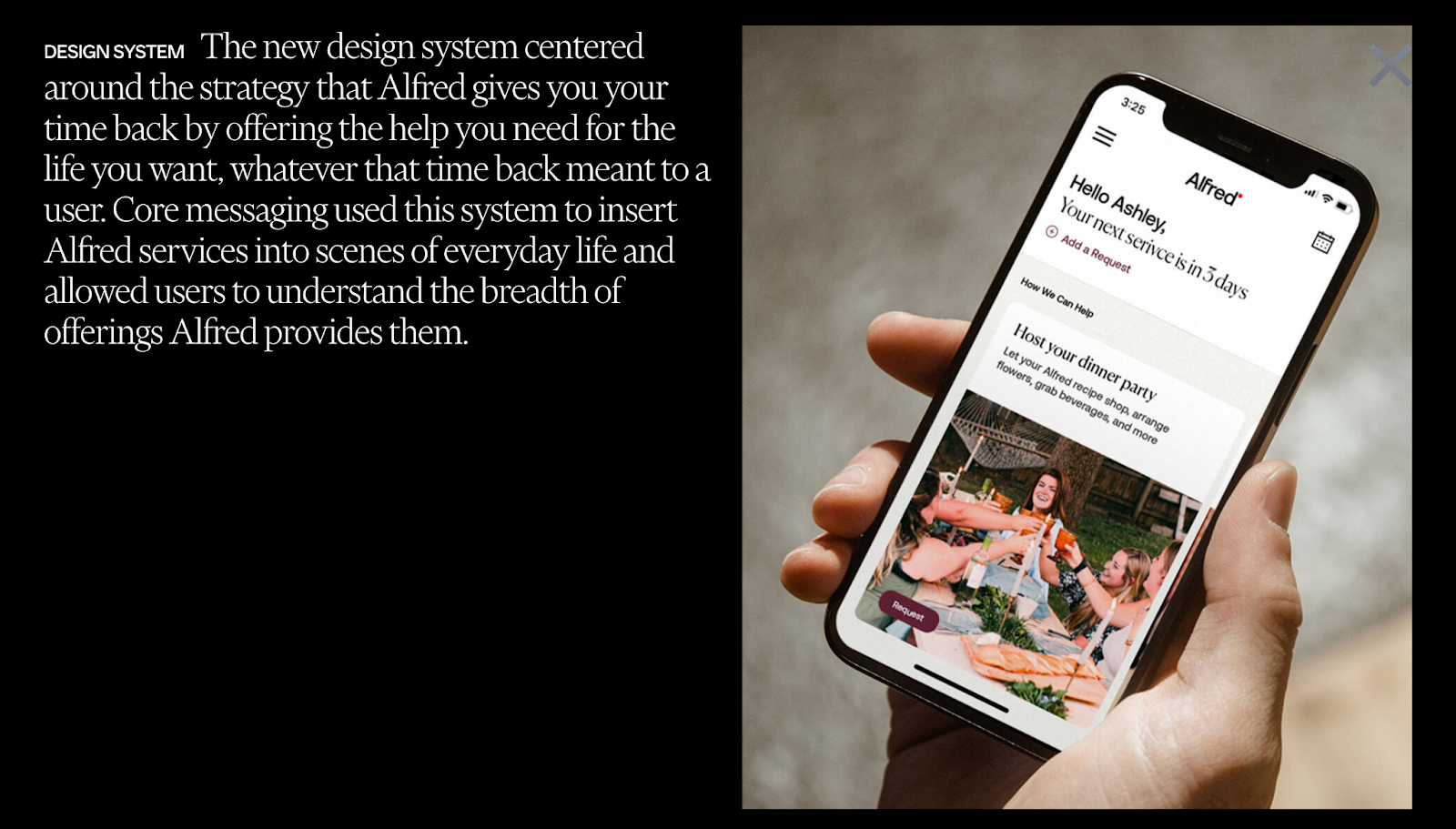
Company Policy’s website is a great example of how to make your work stand out. Projects like “Hello Alfred” and “Google CES” open with brief overviews, then contain animated visuals, screenshots, and mockups to showcase decisions and results. The page itself has a minimal design, using lots of whitespace and simple color choices to help the case studies take center stage.
2. Specific challenges
Explaining a project’s challenges upfront gives context for every decision that follows, and it shows that your solutions are responses to genuine business needs. State each client’s problems and requests in conversational language, along with the goals and constraints — including timelines, stakeholders, and content limitations.
3. Concrete solutions
This element demonstrates your judgment and design process, so potential clients can quickly figure out if you’re the right fit. Show exactly what you designed, and explain key decisions that shaped the final product. And vary up the solutions to represent your full skillset — you might talk about content, page structure, user experience improvements, and accessibility choices.
But don’t highlight every change; focus on what directly impacted the project’s direction. For example, if a color shift was purely cosmetic, you might keep it out of the case study. Instead, you could focus on a decision to add more spacing and improve tappable areas for mobile users, showing a solution-oriented approach that's tied back to the initial problem.
4. Clear impacts
It's not enough that your designs look good — they have to produce real results. So explain what changed after your case study websites launched, showing outcomes your audience is likely familiar with, like conversions, signups, demo requests, or bounce rates. If you can’t share exact metrics, include qualitative wins, such as customers asking fewer support questions thanks to a new FAQ page.
5. Social proof
Case studies are more convincing when they’re backed up by short, impactful quotes from clients. Social proof strengthens your claims, and it explains the stakes and outcomes using language potential clients can relate to.
Keep client testimonials scannable and connected to the sections they support — preferably next to before-and-after redesigns or at the end near results, so readers already have the full picture.
How to choose the right projects for your case studies
These criteria can help you decide which projects deserve to be highlighted on your website:
- Relevance to future work. Choose work that matches the direction you’re heading in and the types of clients you want to attract. If you plan to prioritize graphic design projects, for instance, don’t put art direction front and center.
- Clear problems and solutions. Look for projects where you can clearly describe the ‘before’ and transition to a logical ‘after.’ Well-defined problems give your decisions meaning and show that you can identify and address specific issues.
- Measurable outcomes. Prioritize projects where you can show that you made a concrete difference for the client. Metrics are ideal, but qualitative indicators and testimonials also show impact.
- Visual wow factor. Pick projects that look good in screenshots and comparisons, and have enough depth to tell a complete story backed by plenty of visuals. Extras like animated stats or short ‘watch me design’ videos pop off the page, hold attention longer, and make results more impactful.
Let your work do the talking with Webflow
Well-designed, proof-backed case studies give prospects confidence that you’ll deliver value and solve their problems. When you curate the right projects and present them persuasively, you tell visitors exactly why they should hire you.
Webflow provides the tools and design environment you need to build case studies that are easy to maintain and convincing to potential clients. Reusable components let you create a structure once and apply it throughout your portfolio, while animations and interactions help you showcase progress and results in an engaging way.
Create case studies that convert with Webflow.
Build websites that get results.
Build visually, publish instantly, and scale safely and quickly. All with Webflow's agentic web marketing platform.