


User-centered design prioritizes site visitors in design decisions so your website has a seamless user journey.
The best ways to ensure a strong user experience (UX) on a website don’t stop at high-quality graphics and fast loading times. By implementing a user-centered design process, you can improve the time on page and other important engagement metrics, as well as the overall user journey, for your clients’ websites.
Leaning into user-centered design (UCD) requires designers to change some of the ways they approach usability testing and UX. This article outlines the four key user-centered design principles to help you navigate those differences, along with some practical guidelines for applying those principles in your web design projects.
What’s user-centered design?
User-centric design is a way to approach your UX design process that involves gathering user research and feedback early on, and using it to guide your design decisions. The biggest benefit is that testers can help you catch UX issues sooner and prevent costly mistakes from finding their way into your build.
All the prototyping and usability testing necessary for UCD means it takes longer to make design decisions. But by informing every decision with data, UCD helps you save time and effort in the long run.
User-centered design in action
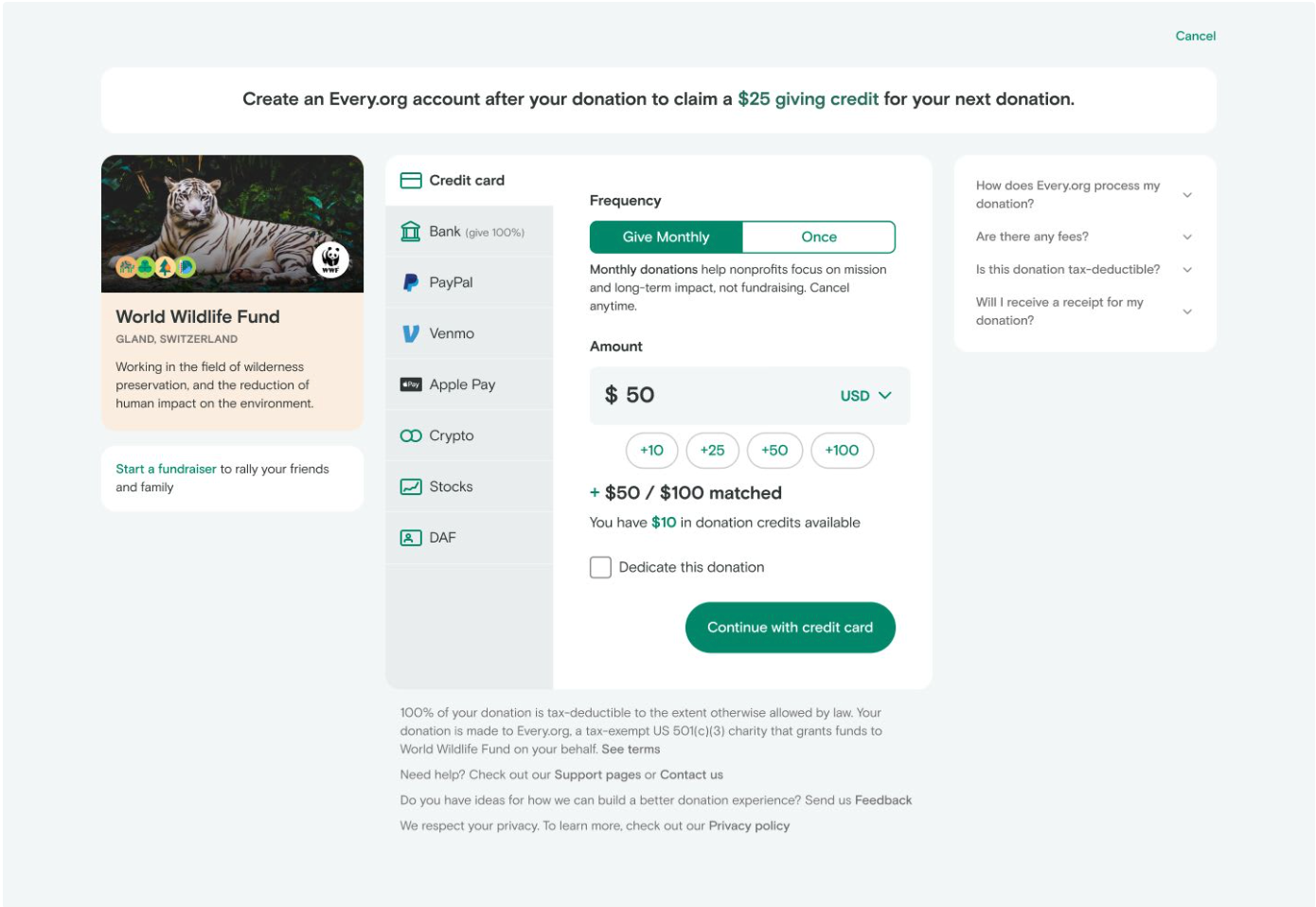
Non-profit platform Every.org has a great example of success with user-centered design success. The organization thought its site design was working well enough because the click-through rate on its Donate button was healthy. However, when the organization reviewed screen recordings, it discovered that users clicked the button and then bounced due to a cluttered UX. By streamlining the user journey and simplifying the UI, Every.org raised the donation rate by 29.5%.
UCD vs. UX vs. HCD
UCD, UX, and human-centered design (HCD) are closely related terms with subtle but important differences:
- User experience is a high-level design concept that encompasses the entire user journey. UX designers consider a product or website’s overall user experience, from the first click to the last interaction.
- User-centered design is a UX design process that involves users early through research, interviews, and usability testing.
- Human-centered design is a broader approach to design thinking that prioritizes emotional and social considerations. HCD guides designers toward empathetic business goals that respect users’ time, money, and engagement.
4 key principles of user-centered design
A UCD process lets you interact with potential users who try out prototypes, user journey maps, and design ideas. You’ll get the most out of usability testing and research when you prioritize these four principles.
1. Empathy
Empathizing with users means listening to their feedback with an open mind and being prepared to reset your expectations. Some of their ideas might require you to go back to the drawing board or sacrifice your favorite parts of a page, but it’s worth it in the long run. Being willing to listen to and understand your users helps you surface problems before launch, and the sooner you identify those issues, the smoother your design process will be.
2. Data-driven decision-making
Analyzing user behavior gives you crucial data to help you find the most user-oriented design solutions. Everything from the time a user spends on each page to the number of interactions it took them to find something can be useful data points to back up design decisions with hard numbers.
3. User involvement throughout the design process
The sooner you bring user testing into your UCD process, the better. UX prototyping involves talking to test users about your site, which brings new perspectives and guides you toward confident design decisions. A few wireframes and some general context are generally all you have to give a user to get valuable feedback in return.
4. Alignment between business goals and users’ needs
As you hear from users, you’ll invariably get a few suggestions about changing high-level expectations, like the price point or target audience. You don’t have to change your client’s business model, but take these recommendations to heart: You can use them to construct user personas, suggest new subscription tiers, and shift visual emphasis on a page.

Build websites that get results.
Build visually, publish instantly, and scale safely and quickly. All with Webflow's agentic web marketing platform.
The user-centered design process in 4 phases
UCD processes aren’t one-size-fits-all. Every design team will need to navigate user testing and iteration in their own way, but they generally move through these four phases.
Phase 1: Specify the context of use
Conduct interviews and user research to understand potential visitors’ expectations. Ask open-ended questions that invite them to describe user pain points or use cases that your client’s website could address:
- “What tools/services do you use to do ____?”
- "What do you find most frustrating about ____?"
- "Tell me about a time when ____ didn't work as you expected."
- “How do you feel before and after you use ____?”
- “Would you use a website that does ____ this way?”
Use this information to create user personas that explain who your target audiences are, their requirements, and how they want to interact with your website. Give each persona a name and background information so all your designers can approach the process with a more concrete understanding of your potential users.
Phase 2: Specify business and user requirements
Compare users' expectations for your website with your own and identify where they don’t align. For example, you might have envisioned a simple one-page website that ends with a sign-up form. But if your users all say they want a sticky navigation menu and multiple pages, you might need to reconsider your site’s overall structure.
Phase 3: Generate design solutions
Create prototypes that turn initial user feedback into navigable experiences so you can test usability. But don’t get too far into your design process just yet: Low-fidelity wireframes and storyboards are enough for people to understand the basics, so you can validate ideas with real users before you spend time and money committing to them.
Phase 4: Iterate and evaluate
Bring your prototypes to users and watch real people try them out. Capture screen recordings to share with other designers and make note of everything you learn, no matter how small. Look for instances where users became frustrated with an interaction or where the next step in the user journey isn’t obvious.
Once users are done, share what you learned with the team and iterate on your designs to eliminate issues. As you steadily move into high-fidelity prototypes and, ultimately, your first build, repeat this step to keep your development on track.
How to apply user-centered design to websites
You can apply UCD principles to every part of your website design, not just the UX. In every scenario, you’ll prioritize the user’s needs, interact with them during the design stages to gather feedback, and turn their insights into well-informed choices.
Accessibility
Both user-centered and human-centered design help you identify potential accessibility issues. Ask testers how well they can read text, make out images, and intuit the intended user flow without any external guidance. All these points are crucial to satisfying audiences with a broad range of ability.
Visual hierarchy
Your website’s visual hierarchy is one of the most essential elements when it comes to user experience. If a lot of feedback mentions the user is confused or frustrated, it’s probably because you aren’t using visual techniques like intuitive layouts, readable font pairings, and the golden ratio to stress the hierarchy.
Multi-user journey mapping
Create user journey maps for each persona and pay close attention to the differences between them. One might take a longer path to complete a task, while another takes a shortcut through the footer. These behaviors reveal opportunities to create branching paths that suit multiple kinds of users.
Personalization
While you don’t have to personalize a site for every individual visitor, you can tailor the UX for each persona. Make clear and unique paths toward common use cases and away from unnecessary distractions. A UCD process is the best way to gather the feedback you need to curate each one.
Self-paced UX for complex websites
For websites with complex structures, a UCD process can help you discover unexpected ways users interact with your site. For example, they might start reading a blog article, then search your site for use case examples that add context. If you don’t have what they’re searching for, you’ll know you need to fill that gap.
Center users from start to finish with Webflow
UCD means putting your users at the heart of every design choice and finding innovative ways to meet their expectations. It’s an iterative approach to UX design that’s slow to get started, but offers a big payoff. By frontloading user research and usability testing, you’ll learn crucial insights early on that help you arrive at a first build you can launch with confidence.
All that testing and prototyping will be easier with a visually oriented, scalable website builder like Webflow. With Webflow’s agentic web marketing platform, you can create and edit your site’s visual style, text, and layout to put together something to show users fast.
Get started on your next design with Webflow.
Freelance web design boot camp
Explore what a successful, fulfilling web design career can look like with this free, comprehensive course.
.jpeg)