










Resolving marketing inefficiencies means going beyond workflow tweaks and evaluating whether your tools are up to the task.
Everything in your martech stack should directly contribute to key engagement or revenue metrics. These tools are among the larger line items in most budgets, so they have to be well worth the investment. That means it’s essential to conduct regular martech stack audits of your platforms as well as how effectively you use them.
A martech stack audit involves reviewing all the marketing tools your team relies on, looking for ways to streamline workflows. If it’s possible to do more with less through automation or integration, a thorough audit should surface those opportunities.
In this article, you’ll learn how to conduct an audit of your marketing tech stack, so you can maximize the ROI these tools provide.
What are the key components of a martech stack?
Before you start an audit, you’ll need to identify which martech tools are safe to phase out to make room for better, more cost-effective solutions. Here’s the baseline marketing technology your stack should include.
Analytics and data management
Analytics software tracks and visualizes data to provide real-time insights your team can use to make decisions. For example, a tool like Webflow Analyze helps with research by monitoring website traffic sources and search performance.
Marketing automation
Marketers need some way to orchestrate all the campaigns and ads required to reach customers, and that’s where automation platforms like Zapier and Salesforce step in. These tools integrate with the rest of your martech stack to streamline workflows and eliminate inefficiencies. For instance, you can create custom automations that send lead nurturing emails out at appropriate times to segmented audiences.
Content management and optimization
A content management system (CMS) helps your team compose and schedule new content, whether that’s blog posts or landing pages. For best results, opt for a platform that brings all your website and content creation tools together, like Webflow CMS. Then, invest in search engine optimization (SEO) and answer engine optimization (AEO) tools that help you improve discoverability.
Design and operations
Your team likely uses a variety of operations and workflow tools to design assets, collaborate, and track projects. This miscellaneous category includes marketing-adjacent software like Figma and InDesign, and it’s a common place to go overboard on cost and complexity. When auditing these tools, look for opportunities to consolidate your stack and cut out redundancies.
When do you need a martech stack audit?
Your marketing technology budget can steadily creep up if you aren’t careful, and you may find yourself switching between tools that perform similar tasks. If one or more of the following situations sounds familiar, it may be time for a martech stack audit.
Certain tools don’t get used
When once-crucial platforms become ignored desktop icons, that typically means your team has moved on to other tools that serve the same purpose. This can happen if your team adopts a new CMS that automates tasks you used to perform manually, like composing drafts or generating metadata. Instead of clearing out the old tech for those workflows, you end up paying for tools that are rarely or never used.
Data lives in disconnected places
Data silos waste time and budget on manual reconciliation, and they tend to result in more errors. Unifying all your analytics software means everyone draws insights from the same up-to-date source. And you’ll save money by paying for one data platform, rather than a disparate collection that’s less effective anyway.
Spending doesn’t lead to results
Even once you’ve trimmed your tech stack down to the essentials, you might still be overpaying for the services you kept. Look at your add-ons and packages to see if you pay for features or seats you don’t use, and find out if other parts of your tech stack provide the same capabilities for less.

The future of marketing is now
Thought leaders from Silversmith, Accel and Webflow discuss the current and future impact of artificial intelligence on the marketing landscape
How to conduct a martech stack audit: 5 steps
Now that you know what you need and what to look for, here’s how to conduct a detailed martech stack audit.
1. Create a comprehensive inventory
The first step is to get an accurate picture of what you have, so you don’t cut out essential tech. Create a list based on the categories we looked at earlier, and fill it with all the marketing tools and services your team uses.
Look beyond just the marketers, since writers, editors, and developers might use the same platforms as part of your larger website stack. For especially complex setups, create a flowchart that illustrates how all these tools fit together.
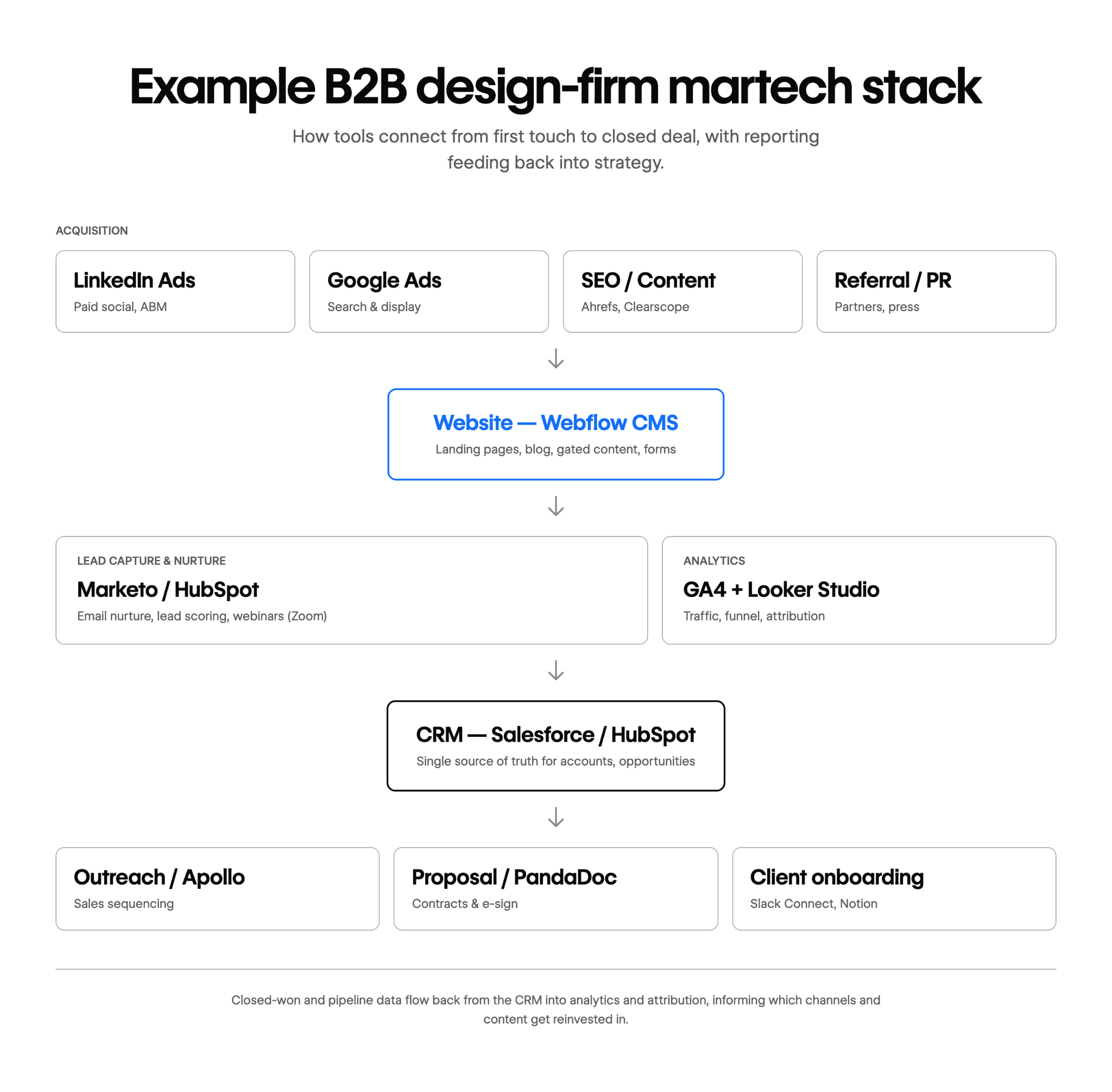
2. Review each marketing solution
Now that you’ve captured the big picture, it’s time to scrutinize every tool one by one, so you can identify gaps and weak points. Research the platforms and speak with the people who rely on them to learn how they’re useful. While opinions may vary, keep an eye out for clear trends, such as shared complaints or dependencies.
To structure your approach, start by picking a common workflow, such as setting up an email marketing campaign. Then, follow the SOPs for that workflow step by step, looking at each tool used in the process and considering how it fits with what comes before and after.
3. Evaluate and score your tools
Once you’ve researched the various tools and services, return to your list and rate every piece of software based on its importance. Here’s a 1–5 rating system that can help; add the results for each platform together for a global significance score.
4. Identify overlaps and gaps
Compare the scores for all the tools you evaluated, and look for places where platforms that do similar things have very different results. For example, two SEO tools with similar scores might be worth the investment, as long as each offers something unique. But if one platform is clearly superior to the other, see if you can remove the latter tool entirely or replace it with a stronger alternative.
Remember that every streamlining opportunity you identify comes with at least some cost. People who use the tool being replaced will need retraining, and you’ll need to update the SOPs. You might also have to pay a cancellation fee or finish your current contract for enterprise accounts, so it’s worth timing these transitions carefully.
5. Get feedback on your martech cuts
Create a list of all the martech tools you’ve decided to cut or replace, and share it with the relevant teams. Clearly explain why each platform is on the list and what team members stand to gain by replacing it.
This gives everyone a final chance to identify issues before you make the switch. Plus, keeping everyone in the loop should make adoption smoother, reducing resistance to new workflows.
Optimize your martech stack with Webflow
Your martech stack audit will likely identify at least a few opportunities to streamline. You may also notice a consistent theme: smaller, narrowly focused tools eventually get replaced by larger platforms that cover more ground. The more comprehensive a solution is, the more integrated your workflows will be, and the more budget you’ll save.
Webflow is a complete agentic web marketing platform that gives you everything you need to build and manage digital experiences. In one place, you get tools for design, content management, analytics, and optimization. And with Webflow Enterprise, you have a martech solution that scales alongside your team and its requirements.
Learn more about the key role Webflow can play in your martech stack.

Build with Webflow
Break free from the constraints of traditional platforms. Migrate your site to visual-first platform that combines design flexibility with powerful CMS capabilities.


















