






Feature
Interactions
Mouse move animations using Interactions with GSAP
IX3 adds a new continuous, pointer driven trigger that brings native mouse tracking interactions to parity with effects designers previously had to hand roll in GSAP or custom code.
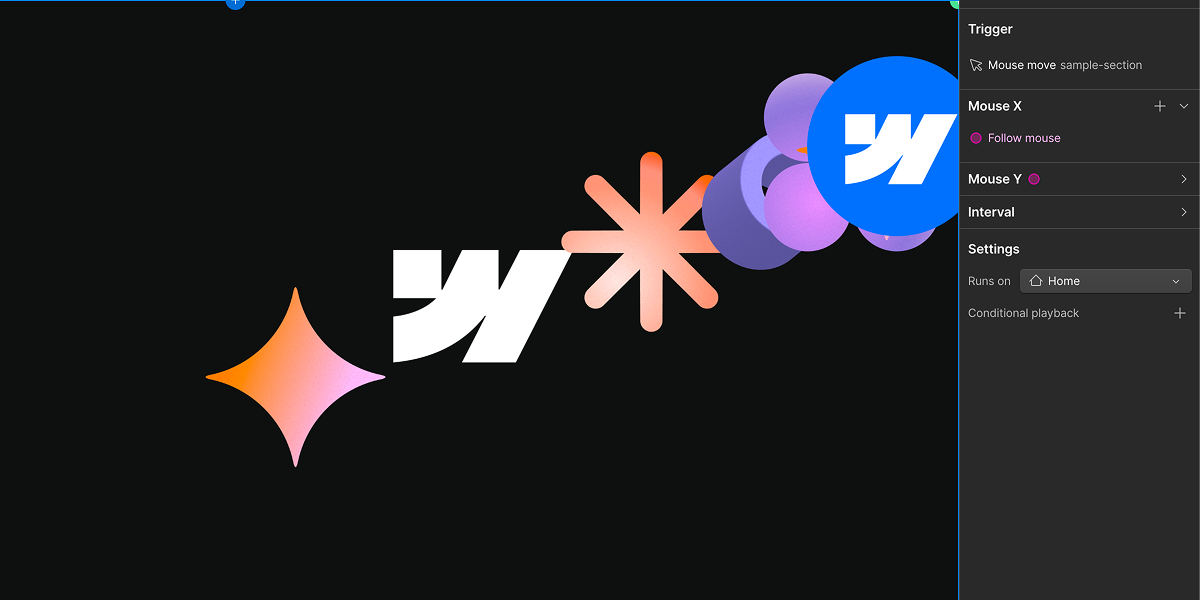
Designers who want an element's animation state to respond continuously to cursor position, think elements that follow the cursor, magnetic buttons, parallax effects on mouse move, or spotlight and glow effects that track the pointer, previously had no native way to build it.
Three new coupled IX3 primitives, built on GSAP's Observer and quickSetter under the hood, solve this problem:
- Mouse Move trigger: tracks pointer position relative to the trigger element by default, or the full viewport if you choose, and normalizes it into an X and Y progress value between 0 and 1 that drives interaction timelines continuously. It includes configurable smoothing (50ms by default) and a defined resting position (center, or 50/50) for when the cursor leaves.
- Mouse Follow action: lets other elements, not just the trigger element, follow the cursor. It supports per element stagger and chain follow smoothing with deterministic seeded ordering, which enables magnetic and parallax cursor follow effects across multiple elements.
- Interval actions: fire action groups based on distance or velocity as the cursor moves, so an interaction can react to how fast or how far the cursor has traveled, not just where it currently is.
Related updates



















Get started for free
Try Webflow for as long as you like with our free Starter plan. Purchase a paid Site plan to publish, host, and unlock additional features.
Try Webflow for as long as you like with our free Starter plan. Purchase a paid Site plan to publish, host, and unlock additional features.