






Enhancement
Elements
Box element and expanded tag selectors
Build with one Box element, then style the HTML underneath it with 19 new global tag selectors, including section, nav, header, and footer.
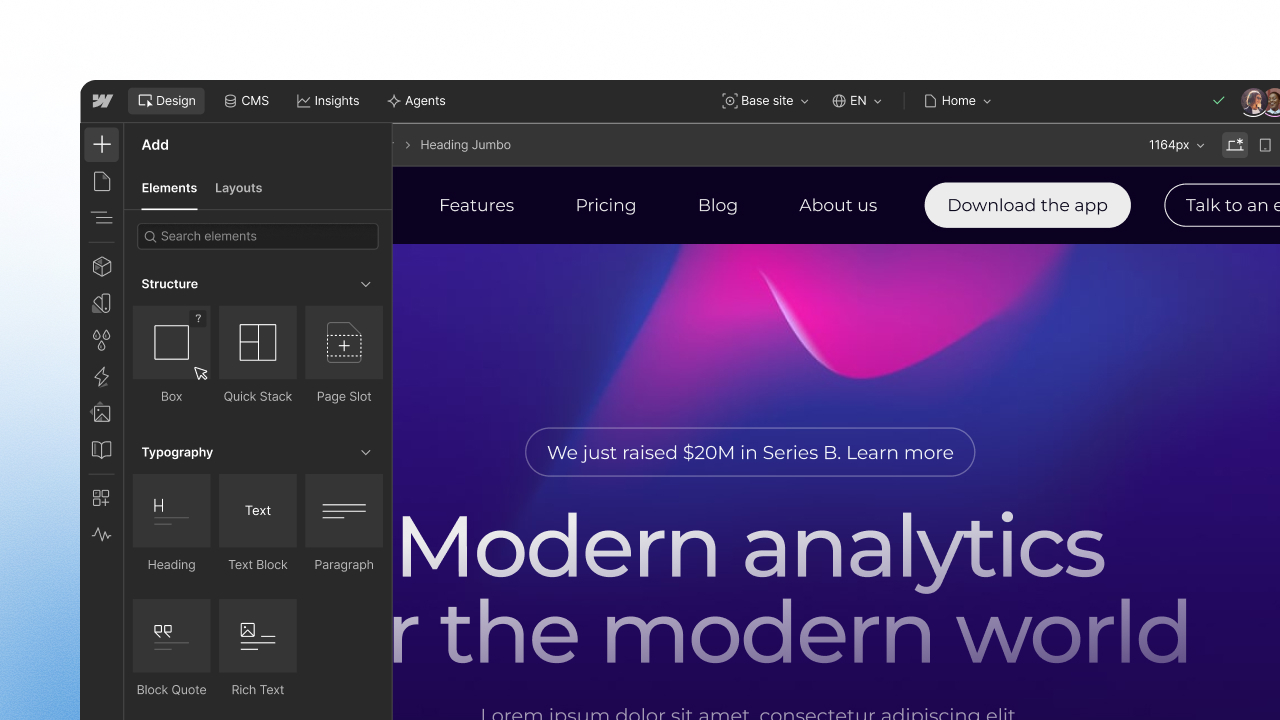
We're updating how you build structure and style it in Webflow: one Box element with the HTML tag as a setting, and tag selectors for many more elements. The result is semantic markup with fewer element choices, and one place to style it.
Box element
Box is one element for structure, with the HTML tag as a setting, so you spend less time choosing between overlapping elements and more time building with the right markup. It takes the place of Div Block, Section, Container, Columns, Grid, V Flex, and H Flex in the Add panel.
With Box, you can:
- Search Quick Find for
box,div, orsection, or search for a tag to add a Box with that tag already set, likeBox <address> - Read your page structure in the Navigator, where each semantic tag has its own icon and name
- Set a Box to div, section, nav, header, footer, main, article, aside, address, or figure, and change it at any time without swapping out the element
Your existing elements keep working and are hidden in the Add panel, not removed. A Box with the Div tag publishes the same output as a Div Block.
Tag selectors
Tag selectors let you set base styles once, on an HTML tag, like a type selector in CSS. We've expanded support for many more elements, including div, section, nav, header, footer, main, article, aside, address, button, input, textarea, select, and more. A Box takes its tag from a setting, so a Box set to section picks up your All Sections styles. New tag selectors start empty, so your site looks the same until you change one, and styling All Divs also styles a Box with the Div tag.
Use the API and MCP server
You can create and work with Box elements through the Designer API and Webflow's MCP server, just like you do in Webflow. To check a Box's HTML tag, including for custom elements, use getTag().
Both the new Box element and the expanded tag styling selectors are available to anyone with the Designer role, on any plan including Free.
Related updates






















Get started for free
Try Webflow for as long as you like with our free Starter plan. Purchase a paid Site plan to publish, host, and unlock additional features.
Try Webflow for as long as you like with our free Starter plan. Purchase a paid Site plan to publish, host, and unlock additional features.