






Remove Background
Connect Remove Background with Webflow to remove image backgrounds on the canvas without uploading files to external servers.

Remove Background by divRiots strips backgrounds from images right on the Webflow canvas, using an on-device AI model to deliver a transparent PNG to your asset library in one click. No exporting to Photoshop, no cloud round-trip, no image data leaving your machine.
That speed matters if you regularly need cutout images in Webflow, whether you're iterating on landing pages, handling NDA-bound client photos, prepping product catalogs, or avoiding one-off image-processing scripts.
How to integrate Remove Background with Webflow
What is Remove Background? Remove Background (officially named remove.backgrd) is an image editing app built by divRiots. It uses on-device machine learning to detect and remove backgrounds. Files stay on your computer and are never sent to external servers. The output is a fully transparent PNG at the original image's size and quality.
Reach for Remove Background inside Webflow when you need transparent images during the design and build phase. If you're preparing a product grid or standardizing team headshots, you can process images without leaving the canvas. The app runs inside Webflow during build time and prepares assets for the site before you publish.
The Remove Background app handles one-click background removal directly on the Webflow canvas without writing code.
Remove Background processes images locally with no server-side component. The marketplace app is the sole integration path. If you need runtime background removal on a published site, use custom code in head and body tags or a Code Embed element to call an external API-based service.
Install the Remove Background app
The Remove Background app is approved in the Webflow Apps Marketplace. It replaces the manual workflow of exporting an image, processing it externally, and re-uploading the result. Processing consumes credits from your divRiots One subscription.
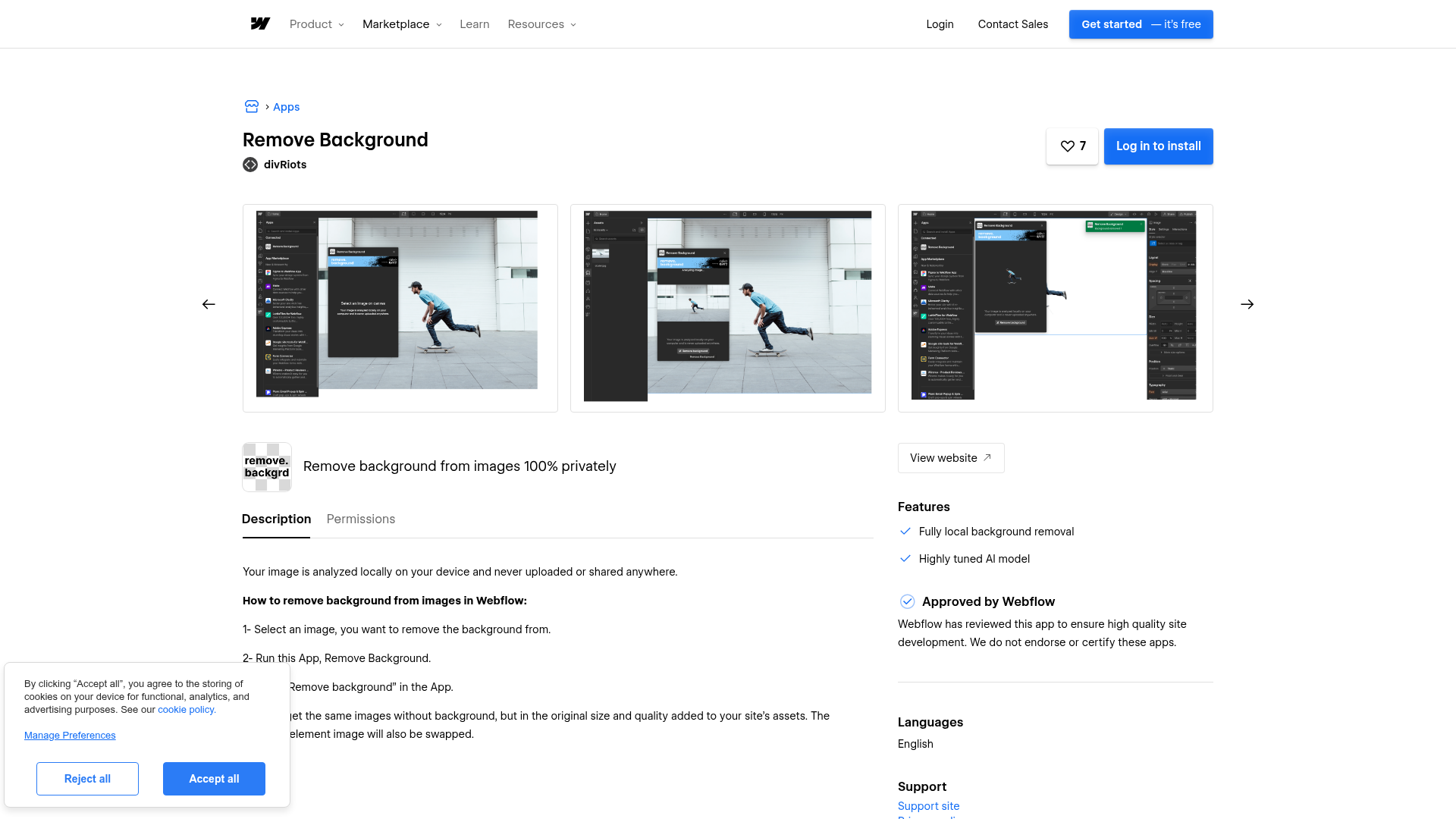
To set up the integration:
- Open your Webflow site and select the image element you want to process on the canvas.
- Open the Apps panel and launch the Remove Background app.
- Click Remove background.
- The processed transparent PNG is automatically added to your site's asset library, and the selected element's image is swapped with the new file.
No additional Webflow plan requirement is called out for using the app. Check the divRiots pricing page for current plan details.
Capabilities include:
- On-device AI background removal with no cloud upload
- Transparent PNG output at original size and quality
- Automatic asset replacement on the selected canvas element
Remove Background processes one image at a time through its interface rather than running bulk catalog automation. For hundreds of Webflow CMS items, you'll need a separate API-based removal service. Pair that service with the Webflow Data API to upload assets and update CMS fields.
Remove Background handles design-time asset preparation only. It works inside Webflow during build time and supports local processing on your device. The app's privacy architecture explains this boundary: the AI model runs entirely on your device, and images never reach any external server. This local-processing design makes the tool useful if you're an agency handling confidential client imagery or working under data restrictions. According to the divRiots launch post, the team built the tool because a privacy-first option was missing from design tool marketplaces. The same architecture also means there's no API, webhook, or automation connector. A server-side API would require image data to leave your machine, which conflicts with the local-processing model.
What can you build with the Remove Background Webflow integration?
Integrating Remove Background with Webflow lets you prepare transparent image assets directly on the canvas without switching to external editing tools.
- Consistent product catalogs: Remove backgrounds from product photos and place them on uniform white or branded backgrounds across your e-commerce collection. If you run a clothing store, you can process each garment image and swap it into a Collection List layout with matching visual treatment. The one-click process keeps you inside Webflow rather than batch-processing in a separate editor.
- Standardized team directories: Turn inconsistent headshots into uniform transparent portraits. If you're building an About page for an agency, you can isolate each team member's photo and place them over the same branded gradient or color.
- Layered hero compositions: Extract a subject from a photo to add depth to hero sections. If you're working on a SaaS site, you can isolate a product screenshot's subject and layer it over a branded gradient with text between foreground and background elements.
- Privacy-compliant image editing: Process confidential or NDA-protected client photos without uploading them to any external service. If you work with a healthcare organization or legal firm, you can prepare imagery knowing the files never leave your device.
If you need more control over bulk processing across hundreds of CMS items or visitor-facing background removal at runtime, the API integration path covers those cases with full flexibility.
Frequently asked questions
Remove Background works only inside Webflow during the design and build phase. It processes images on your device and saves transparent PNGs to your site's asset library. Once your site is published, the app is absent from the live site's code and behavior.
All image processing happens locally on your computer. The AI model runs on-device, and no image data is sent to divRiots' servers or any third-party service.
Remove Background processes one image at a time inside Webflow and has no API. For bulk automation, use a separate API-based removal service. Pair it with the Webflow Data API to upload processed images and update collection items programmatically.
Remove Background outputs a transparent PNG. The Remove Background app listing says the processed image is added to your site's asset library at original size and quality. If the PNG exceeds the 4 MB CMS image field limit, host it on an external CDN and reference it with a URL in a CMS text field.
CMS image fields accept a maximum of 4 MB per image. Transparent PNGs can be larger than the original file depending on the source format and image content, so check the output file size before adding it to a CMS collection. If files exceed 4 MB, host them on an external CDN and store the URL in a CMS text field instead.
Description
Remove Background by divRiots removes image backgrounds locally on your device inside the Webflow canvas, saving transparent PNGs to your asset library without uploading files to external servers.
This integration page is provided for informational and convenience purposes only.

Goat Slider
Connect Goat Slider, a CMS-driven slider app, with Webflow to add dynamic carousels and sliders that automatically update when your content changes.
Pixcap Editable 3D Icons and Characters
Connect Pixcap, a customizable 3D asset library, with Webflow to browse, customize, and insert 3D icons, illustrations, and characters directly in Webflow without 3D modeling skills.
CutCopy
Connect CutCopy with Webflow to move variable collections and element attributes between projects instead of rebuilding them by hand.

Devblocks CMS Image Optimizer
Connect Devblocks CMS Image Optimizer with Webflow to batch-convert existing CMS images to WebP without re-uploading a single file.
Flowdrive
Connect Flowdrive, an external file and video hosting service, with Webflow to host videos and enable file uploads without Webflow's Business plan requirement.
Lummi
Connect Lummi, an AI visual asset library, with Webflow to source and insert commercial-use images inside the canvas.

Image Management
Convert Webflow CMS collection images to WebP or AVIF inside Webflow with the Image Management app, or script the same job with the Assets API.

Smootify Icons
Connect Smootify Icons with Webflow to place SVG icons from eight icon libraries on the canvas, styled without uploads or code.

Clip Path Bae
Connect Clip Path Bae with Webflow to clip images, divs and other elements into polygon, circle, ellipse or custom SVG shapes without writing code.
Related integrations
Get started for free
Try Webflow for as long as you like with our free Starter plan. Purchase a paid Site plan to publish, host, and unlock additional features.
