






Clean Styles
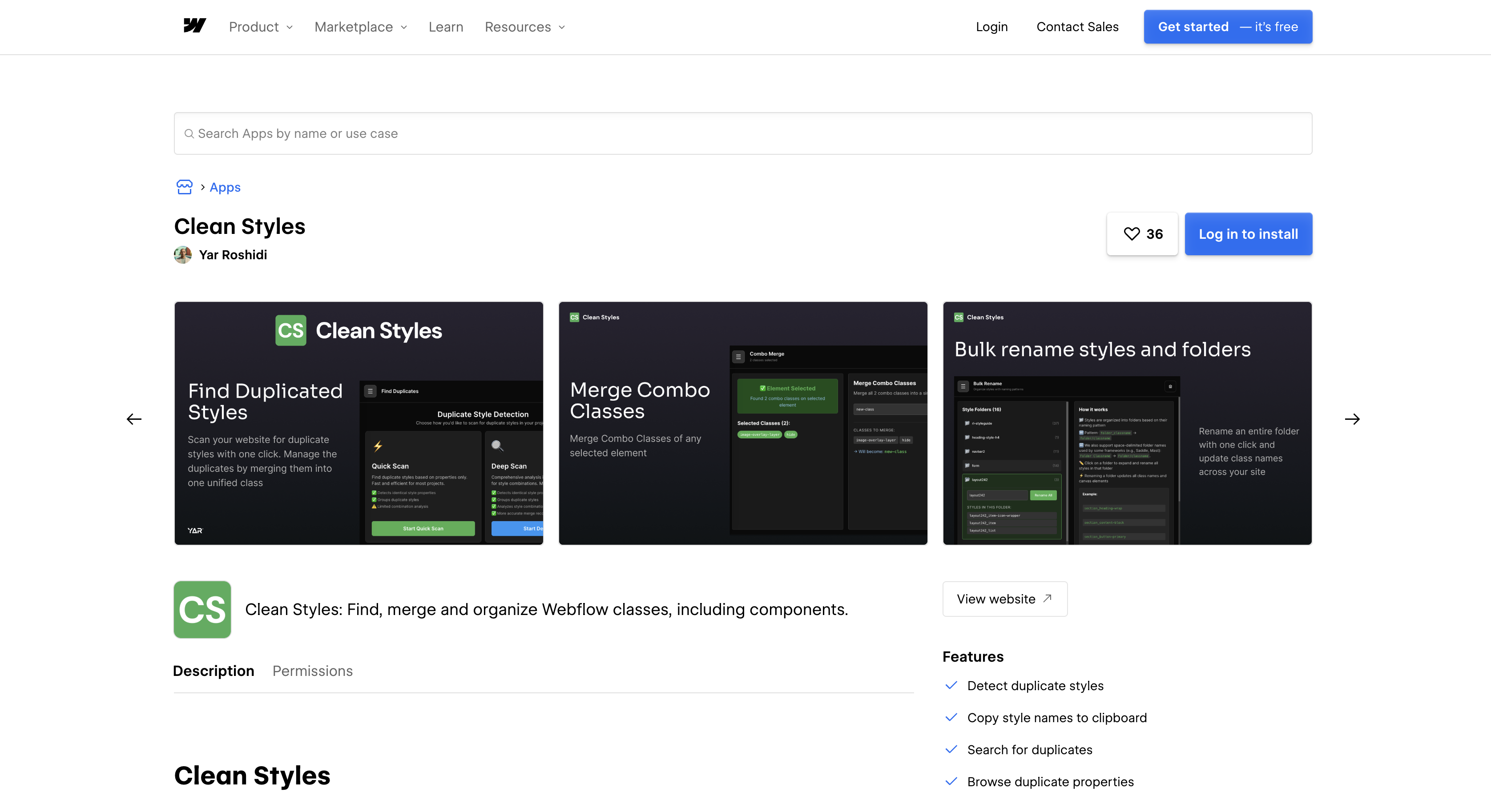
Clean Styles merges duplicate classes and bulk-renames styles inside Webflow, with no code and no external account.

Style sprawl builds up on any site where several designers contribute sections. Two people style the same element under different class names, and both classes ship. The native cleanup in the Style selectors panel only deletes classes that nothing uses. Clean Styles fills that gap by consolidating duplicates instead of just deleting orphans.
Installing Clean Styles adds a panel inside Webflow. It indexes styles across pages and breakpoints, groups the duplicates, and merges each group into one class you choose. Merges keep per-breakpoint and pseudo-state values intact, and an optional toggle applies them inside Component definitions too. A bulk rename step then moves the surviving classes into folder-style groups. Nothing runs on the published site, and no code gets injected.
Agencies running multi-collaborator builds get the most out of this pairing. Duplicate styles created under different names are the core problem the app targets. Freelancers use it before client handoff, so the style panel the client inherits is deduplicated. Template creators run it on cloned starters before building a UI kit. Marketing teams run it on landing pages that have accumulated redundant classes through iterative edits.
How to integrate Clean Styles with Webflow
What is Clean Styles? Clean Styles is a Webflow app built by Yar Roshidi of YAR Innovative Solutions FZCO. It runs as a panel inside Webflow and finds identical styles across pages and breakpoints. It merges them into an existing or new consolidated style and bulk-renames classes into folder-style groups. Its Marketplace listing registers it as a Designer Extension that requests no OAuth scopes, so it works through the Designer API on the canvas and holds no Webflow Data API access to your site. Per that listing, it does not inject code, rewrite CSS, sync externally, or store styles remotely.
At the end of a build, a site created by several designers needs a deduplicated style panel before the client takes over. Clean Styles also helps at the start of a design system, when a cloned template carries an inherited class structure nobody wants to build on. Ongoing maintenance presents another use case: a retainer client's site may have grown through several update cycles. The CSS grew with it.
The Clean Styles and Webflow integration supports two approaches. The Clean Styles app handles duplicate detection, merging, component-aware edits, and bulk renaming inside Webflow without writing code. The Designer API and Data API cover custom style scanning and publish-triggered audits, but you have to build your own app to use them.
Most teams only need the app. Clean Styles exposes no API of its own, and the Webflow API path exists for behavior the app does not cover.
Install the Clean Styles app
The Clean Styles app listing is the single supported way to connect the two, and nothing needs configuring afterwards. Every Workspace role except Reviewer can install and uninstall Apps, and at the site level that narrows to Site manager and Designer. There is no Code Embed to place and nothing to paste under head and body tags. You also skip external accounts entirely. The app declares two capabilities on its listing, "Access site data" and "Designer workflow," and requests no Data API scopes alongside them.
To set up the integration:
- Open the Apps panel in the left toolbar and search for "Clean Styles", or go to the Marketplace listing.
- Click Add to site on the listing, or Install on site from the Apps panel.
- Select the Workspaces or sites where you want the app installed.
- Click Authorize app.
- Back in the Apps panel, hover over Clean Styles and click Launch.
Once installed, the panel gives you these controls without any code:
- Find duplicates fast: The scan identifies identical styles across every page and breakpoint in the project.
- Merge your way: Each duplicate group collapses into an existing style you nominate or into a new consolidated one.
- Components aware: An optional toggle applies the same merges inside Component definitions instead of skipping them.
- Bulk rename into folders: The Organize stage normalizes naming and nests the surviving classes into folder-style groups.
- Combo Merge: Stacked combo classes consolidate into a single style rather than staying spread across several selectors.
- Unified scan: Indexing targets the pages likely to hold duplicates, which keeps a scan usable on a large project.
- Live progress feedback: Updates run in batches while the panel reports progress, and the listing says Designer history is respected.
Authorizing at the Workspace level grants access to every current and future site in that Workspace. Scope the install to a single site if you only want to clean one project. Apps also don't open while you work in a secondary locale.
Scan and merge duplicate styles
The core workflow runs in five stages the listing calls Scan, Review, Merge, Components, and Organize. Each merge replaces a duplicate group site-wide with one target style. When two duplicates disagree on a property, the merge defers to the target you picked rather than guessing.
To merge duplicates:
- Open Clean Styles from the Apps panel and run a scan.
- Review the duplicate groups and the suggested action for each.
- Select the duplicates you want to collapse and choose a merge mode, either into an existing style or into a new consolidated style.
- Toggle Component editing on if you want the merge applied inside Component definitions, then confirm.
Back up the project before you confirm a large merge. The listing says the app respects Designer history, and Yar Roshidi publishes no separate in-app reversal, so how far Webflow's own undo walks a batch merge back is not something the vendor documents. What is certain is the blast radius: this is a Designer Extension with no Data API access and no publishing rights, so a merge changes the canvas and reaches visitors only when you publish. Large projects take longer, because the app works page by page in batches.
After merging, clear zero-usage classes with the broom icon in the Style selectors panel (press G to open it). Don't remove classes referenced only in custom code (styles guide).
Bulk rename classes into folder-style groups
After merging, the Organize stage lets you rename many classes at once and nest them into folder-style groups. Teams use this step to bring an inherited project in line with whatever naming convention they follow. It replaces renaming one class at a time in the Style selectors panel.
To rename in bulk:
- Open the Clean Styles panel and go to the Organize stage.
- Use Bulk Rename to align naming and create a folder-style structure.
Updates run in batches with live progress feedback, and Designer history is respected, per the Marketplace listing.
Build with the Webflow APIs
Clean Styles publishes no API of its own, and its Marketplace listing declares no OAuth scopes, so there is nothing external for a server or an automation platform to call. It uses Webflow's official APIs internally, and the same Designer API v2 surface is open to any developer. If you need a scan rule the app lacks, build a Designer Extension. For an audit that fires when a site publishes, build a Data Client app. A workflow that combines current-page Designer API operations with site-wide Data API access requires a Hybrid App with both Data Client and Designer Extension options selected. A server-side, Data-API-only audit can use a Data Client app without a Designer Extension, per the Designer Extensions docs.
These API surfaces cover the work:
- Style methods:
getAllStyles,createStyle,getStyleByNameandremoveStyleread, create, look up and delete styles on the canvas, and the Designer API reference lists the ability each one needs. - Rename in place:
style.setNamerenames a class while keeping its properties, its combo parent, and every element it is applied to. - Page endpoints: The Data API page list endpoint and the per-page DOM endpoint let a server walk a whole site, and
POST /v2/sites/{site_id}/publishrepublishes it. - Webhooks: Registering a webhook on
site_publishgives you a real-time hook to run an audit from, with a documented limit of 75 registrations per trigger type per site.
The main constraint is scope. The Designer Extensions docs state that "Designer APIs only access content on the current page, not other sites or pages." A site-wide analysis can list pages and retrieve each page's DOM through the Data API, but those DOM responses are not Designer SDK element objects. Designer-side element methods still operate only on the page currently open in the Designer, so site-wide processing means analysing one page at a time, which is why any tool working this way takes longer on a large project.
Scan a page for unreferenced styles
A per-page scan compares every style on the site against the styles actually applied to elements on the open page. Treat the result as a candidate list, since a style missing from this page may be used on another.
The script checks the user's Designer mode with canForAppMode, reads the site's styles with getAllStyles and the page's elements with getAllElements, builds the set of referenced names from element.getStyles(), and reports the result with notify. Style names arrive from style.getName(), which returns a Promise, so each one has to be awaited.
// 1. Confirm the user's current Designer mode allows style changes.
const caps = await webflow.canForAppMode([
  webflow.appModes.canAccessCanvas,
  webflow.appModes.canModifyStyles,
]);

if (!caps.canAccessCanvas || !caps.canModifyStyles) {
  await webflow.notify({
    type: 'Error',
    message: 'Open the canvas in design mode to clean up styles.',
  });
} else {
  // 2. Read every style on the site, and every element on the open page.
  const allStyles = await webflow.getAllStyles();
  const elements = await webflow.getAllElements();

  // 3. Collect the style names this page actually references.
  const referencedNames = new Set();
  for (const el of elements) {
    if (!el.styles) continue;
    const styles = await el.getStyles();
    for (const style of styles) {
      referencedNames.add(await style.getName());
    }
  }

  // 4. Anything left over is a CANDIDATE only. A style unused here may be
  //    used on another page, so never delete straight out of this loop.
  const candidates = [];
  for (const style of allStyles) {
    const name = await style.getName();
    if (!referencedNames.has(name)) candidates.push({ style, name });
  }

  // 5. Remove one only after you have confirmed it is unused site-wide.
  //    removeStyle needs canModifyStyleBlocks and rejects a style that is
  //    still applied to an element anywhere on the site.
  // await webflow.removeStyle(candidates[0].style);

  await webflow.notify({
    type: 'Success',
    message: `${candidates.length} styles are unreferenced on this page.`,
  });
}
To confirm "unused" site-wide, list pages with GET /v2/sites/{site_id}/pages, retrieve each one with GET /v2/pages/{page_id}/dom, and parse class references out of the returned markup. Those responses are plain DOM data, so the Data API cannot turn them into Designer SDK element objects or call element.getStyles() on them remotely.
Consolidate two classes into one
This sequence reproduces a Clean Styles merge by hand, which is useful when you want to log every property change or apply your own conflict rule. In Designer API v2 changes apply as soon as you invoke them, because .save() was removed from these objects (v2 migration guide).
Copy properties per breakpoint and pseudo-state rather than in one pass: getProperties and setProperties both take a breakpoint and a pseudo-state, and a merge that ignores them silently flattens hover and mobile values.
// 1. Look up the style you want to retire.
const oldStyle = await webflow.getStyleByName('old-button-style');
if (!oldStyle) throw new Error('Source style not found.');

// 2. Create the consolidated target. createStyle needs canCreateStyleBlocks,
//    the primary locale, and design site mode.
const newStyle = await webflow.createStyle('button--primary');

// 3. Copy properties across, one breakpoint and pseudo-state at a time.
const props = await oldStyle.getProperties({ breakpoint: 'main', pseudo: 'hover' });
await newStyle.setProperties(props, { breakpoint: 'main', pseudo: 'hover' });

// 4. Repoint every element on the open page at the new style.
for (const element of await webflow.getAllElements()) {
  if (!element.styles) continue;
  const current = await element.getStyles();
  if (!current.some((s) => s.id === oldStyle.id)) continue;
  const updated = current
    .filter((s) => s.id !== oldStyle.id)
    .concat([newStyle]);
  await element.setStyles(updated);
}

// 5. Remove the old style once no element on any page still uses it.
await webflow.removeStyle(oldStyle);
Step 4 can only mutate elements on the page currently open in the Designer, so run the reassignment while each page is open before you reach step 5. Listing pages or pulling their DOM through the Data API will not call element.setStyles() on them for you.
Trigger a style audit when a site publishes
A Data API webhook lets you run a server-side check every time the site goes live, say after a Clean Styles session. Republish if the check passes. This needs a Data Client app or site token with pages:read and sites:write scopes.
To implement this:
- Register the webhook with
POST /v2/sites/{site_id}/webhooksand a body of{ "triggerType": "site_publish", "url": "https://your-server/audit-hook" }. - When the
site_publishpayload arrives withsiteId,publishedOn, anddomains, list pages withGET /v2/sites/{site_id}/pages?limit=100. - Fetch each page's markup with
GET /v2/pages/{page_id}/domand check class names against your rules. - If a follow-up publish is needed, call
POST /v2/sites/{site_id}/publishwith{ "publishToWebflowSubdomain": true }.
On Enterprise sites, GET /v2/sites/{site_id}/activity_logs with the site_activity:read scope returns styles_modified and site_published events. You can see when styles were modified relative to publishes.
What you can build with the Clean Styles Webflow integration
Integrating Clean Styles with Webflow lets you collapse duplicate and redundant classes across an entire site without renaming or reassigning them one element at a time.
- Audit-ready client handoff: Run a full scan on a finished corporate or portfolio site, merge every duplicate group, and deliver a style panel the client's team can maintain without sorting through redundant entries.
- Multi-designer marketing site cleanup: On a multi-page marketing site where several designers each styled their own sections, merge the duplicate styles created under different names into one class per element type.
- Template and UI-kit foundations: Clone a starter template, deduplicate the inherited class structure, and use Combo Merge to flatten stacked combo classes before building a component library or submitting to the Template Marketplace.
- Landing page CSS reduction: Clean redundant styles off a campaign microsite that accumulated them through iterative edits, which cuts the weight of the CSS Webflow ships with every page.
If you need site-wide scan rules or publish-triggered audits the app does not cover, the API path handles them. Start with our Webflow CMS API guide to get a token and make the first call.
Frequently asked questions
The vendor documents no in-app reversal, so do not count on one. The Marketplace listing says the app respects Designer history and merges properties carefully, deferring to the target style you picked when two duplicates disagree, but it stops short of promising an undo for a confirmed batch merge. Back up the project first. Merges land on the Designer canvas, so nothing reaches visitors until you publish.
At the Workspace level, every role except Reviewer can install and uninstall Apps: Owner, Admin, Guest, and the combined Site manager, Designer, Marketer and Content editor group all carry the permission. At the site level it is narrower, and only Site manager and Designer can install. Review authorized apps under Site settings > Integrations tab > Authorized apps, and revoke access under Site settings > Apps & integrations tab.
No. The Marketplace listing prices Clean Styles at free and lists no required plan, and the app runs entirely inside Webflow with nothing to paste into custom code. You do not need an external account either. It is a Designer Extension, so it uses no Code Embed, injects no code, and rewrites no CSS.
No. Clean Styles registers as a Designer Extension with no OAuth scopes, so it publishes no external API and no webhook endpoint for Zapier, Make or n8n to call. Automation around style cleanup has to go through Webflow's own webhooks and the Data API instead, which run against your site rather than against the app.
Clean Styles merges duplicate and redundant classes into one style. The broom icon in the Style selectors panel does something narrower: it deletes classes that nothing uses, and it cannot merge anything. Clean Styles also handles combo classes through Combo Merge and offers a toggle for Component definitions, which the built-in cleanup does not. Neither one can see classes referenced only in custom code or in a custom class attribute, so check those by hand before deleting. Install the app to run a first scan, then finish with the broom icon.
Description
Install the Clean Styles app inside Webflow to scan for duplicate classes across pages and breakpoints; after merging each group into a single style, use bulk rename to arrange the remaining classes in folder-style groups. No custom code or external account needed.
This integration page is provided for informational and convenience purposes only.

FlowScript.dev

Cutcopy
Connect CutCopy with Webflow to transfer variable collections and element attributes between sites without rebuilding them manually.

Finsweet-table-of-contents
Connect Finsweet Table of Contents with Webflow to generate anchor link navigation automatically from the headings in your content.

MathJax
Connect MathJax, an open-source math display engine, with Webflow to render LaTeX equations as typeset formulas with built-in accessibility, screen reader support, and cross-browser consistency.

Awesome Table
Connect Awesome Table with Webflow to display filterable Google Sheets data on any page without building a custom backend.

Slater
Connect Slater with Webflow to write, test, and deploy custom JavaScript and CSS through a dedicated editor with staging environments, version history, and AI code generation.

Flowblock - Code AI
Connect Flowblock - Code AI, an AI-powered code editor, with Webflow to write and deploy custom JavaScript and CSS

Formly & Flowplay
Connect Formly and Flowplay with Webflow to enhance functionality without custom coding.

Claritee
Send approved Claritee wireframes into Webflow as editable layouts, then spend your time on styling instead of rebuilding sections.
Related integrations
Get started for free
Try Webflow for as long as you like with our free Starter plan. Purchase a paid Site plan to publish, host, and unlock additional features.
