









With a clear blueprint and reusable components, you can build and grow complex websites for your clients.
Managing a small website is usually straightforward, even when each page is designed individually. But as a site grows to include diverse content types like articles, landing pages, team profiles, and galleries, web designers rely on standardized frameworks to maintain quality and consistency.
Content modeling organizes a website’s information into a clear, expandable structure. In this article, we’ll explain what content modeling is and how to apply it to your own client builds.
What’s content modeling?
Content modeling is a way to organize everything a website contains. This model breaks down digital content into various types, such as blog posts and contact forms, then defines what information and elements each of those types includes.
This framework also lays out how all the different kinds of content connect. The result is a map that shows how the site functions at a high level, and how each individual piece is structured. This allows you to build a site that you or your client can expand over time with minimal effort.
Key aspects of content modeling
A useful model needs to answer a few practical questions, such as what kinds of content the project needs, and what rules will keep everything consistent as the site grows and different people work on it.
To do that, your content model should include these important elements:
- Content types. This can be any website element that follows a repeatable structure, such as articles, case studies, event listings, and team member profiles.
- Fields and attributes. Separating an article’s headline, body copy, featured image, and publication date into distinct fields makes the information more reusable. Similarly, attributes allow you to apply set styles to many elements quickly.
- Relationships. Content often interconnects in similar ways; for example, articles may link to author profiles, while event listings might connect to venue pages.
- Validation rules. When multiple people add content over time, small inconsistencies can pile up quickly, from mixed date formats to slightly different category names. Validation rules keep those errors in check by requiring certain fields, limiting formats, or restricting entries to pre-approved options.
- Taxonomies and tags. As a content library grows, clear categories such as topic and audience keep related entries organized. Tags add more flexibility, but they also need oversight so small variations don’t clutter the system.
Types of content to include in your model
Most sites contain a variety of content types, and they all need to be represented in your model. While specifics depend on the website's goals and audience, here are a few examples of what your content model might contain:
- Articles. These could be traditional articles, news reports, case studies, or blog posts. Typical elements include titles, authors, publication dates, body copy, featured images, tags, and related content links.
- Product listings. Ecommerce sites often display standardized sections or pages devoted to individual products. This content type tends to rely on fields like item names, descriptions, images, specifications, categories, and ‘buy now’ buttons.
- Landing pages. Many sites, especially SaaS projects, feature landing pages dedicated to specific topics or audiences. A landing page structure might rely on headlines, taglines, feature descriptions, calls to action (CTAs), and contact forms.
- Galleries. This versatile content type can be used to display information about featured articles, products, portfolio pieces, or team members. Galleries are often straightforward to save space, relying on basic elements like titles, descriptions, images, and captions.

UX design websites from the Webflow community
Find inspiration from the Webflow community for your UX design website.
How to create a content model: 3 steps
A content model should reflect the client’s unique goals, existing content, team workflow, and plans for future growth. You can follow these three steps to build a model for your next project.
1. Identify content types and elements
First, identify all the kinds of content the site contains (or will contain). Focus on the types you or the client will use often while building and maintaining the website. For example, if the client intends to publish weekly blog posts, they’ll need a structure that keeps all those articles consistent.
Then, look at each content type individually and break it down into key elements. Case studies usually rely on text and images, while landing pages may contain a large number of separate pieces that need to flow together smoothly.
2. Establish relationships within and between content types
Now that you know what the site’s building blocks are, it’s time to consider how they relate. Look back at the list of elements for each content type, and lay them out logically. Consider structure, such as whether product images should be placed before or after descriptions, along with dependencies, like related posts links that need to reflect each page’s topic.
Once you’re done, zoom out and review how elements interrelate between content types. You may use the same contact form on both landing and service pages, for instance. Or a featured news section on the website’s home page may need to pull in images and descriptions from articles with specific tags.
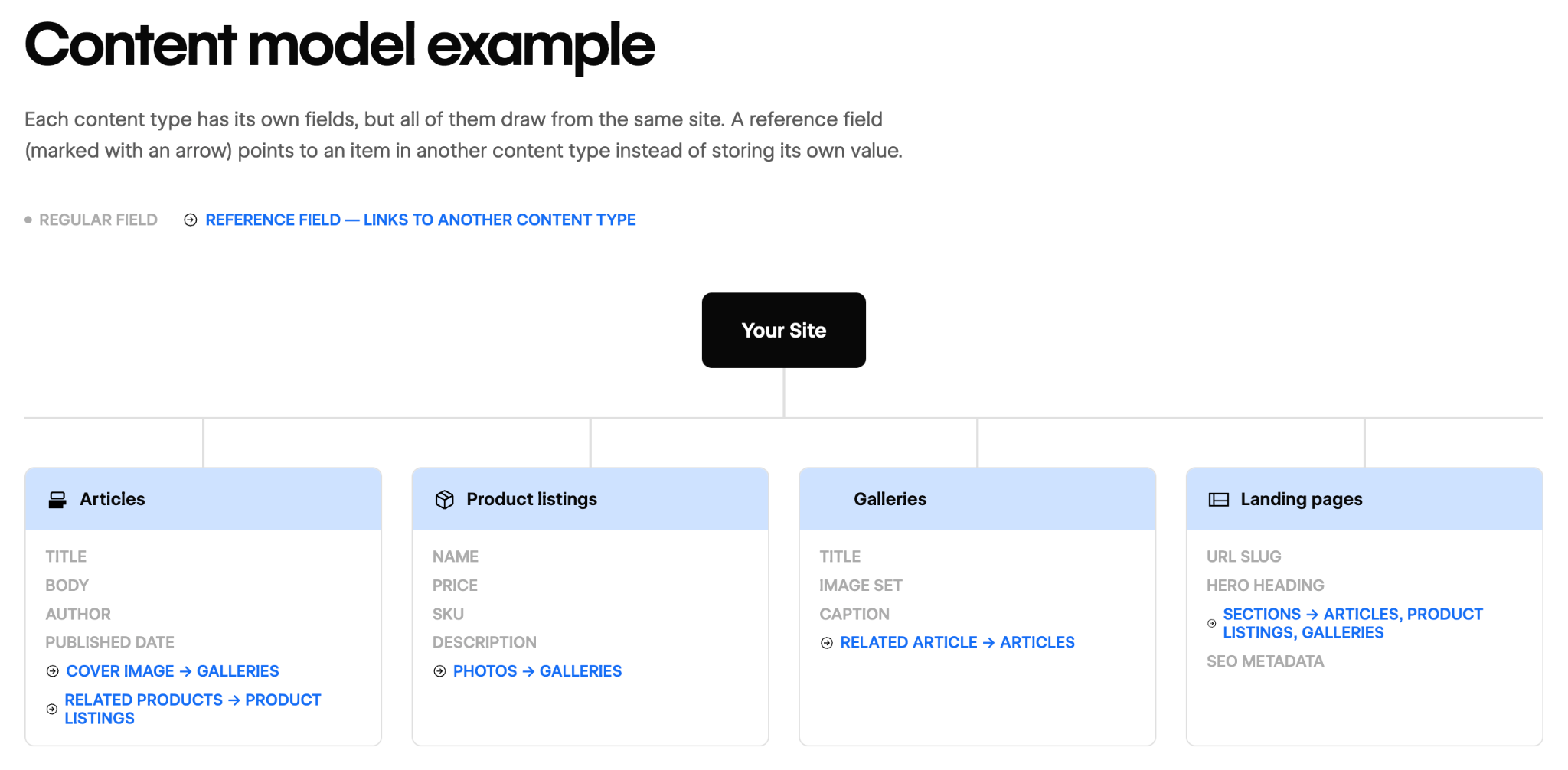
Before building anything, translate all this information into a visual format. You can create your proposed structure using a diagram or spreadsheet, or you can use a wireframing tool. Seeing the content types and connections often exposes missing information and redundancies. Plus, you can share your content model with the client to get their feedback.
3. Create the website’s structure and refine it
At this point, it’s time to translate the content model into an on-page design. Start by laying out the structure for each content type. Then create individual pieces like forms and galleries one at a time, making sure each works with every content type it will appear in.
Where possible define elements like formats, limits, requirements, and allowed values upfront. And use clear, descriptive names to keep all components and assets organized.
Once the foundation is in place, you can start adding in test or real content. Even a model that works neatly on paper is still likely to break in unexpected ways when translated to the actual website. Make sure one content type looks good and functions properly before moving on to the next, and solicit feedback regularly.
Build a structured sites and reusable components with Webflow
A well-planned content model accomplishes a lot, starting with giving you and your client a clear, agreed-on vision before the build begins. Taking the time to create a content model also helps you identify ways to improve the design early and solve problems before they’re embedded in code.
When you’re ready, you can make your content model a functional reality with Webflow. CMS tools let you create clear but flexible structures using collections, reusable components, custom fields, and variables. You can test your model extensively using staging sites, and give clients the right amount of access through custom permissions.
Take your content model from vision to deliverable with Webflow.
Build websites that get results.
Build visually, publish instantly, and scale safely and quickly. All with Webflow's agentic web marketing platform.


















