





Building a dynamic, intent-focused user experience can make your website become your best salesperson.
Many B2B marketing websites are a snapshot of a moment in a marketing campaign, but audiences today may not reach out to sales after simply seeing those pages. Instead, visitors use your websites to gather data and make a decision about your offering before reaching out. Making your B2B website into a pipeline engine lets you turn your online presence into sales rep that users already view it as.
In this article, we’ll show you how a B2B website can work as a pipeline engine, how it differs from the typical brochure-style site, and how you can measure its performance.
How does a B2B website function as a pipeline engine?
A B2B website becomes a pipeline engine when it can independently capture and qualify leads, then help them book meetings with your team. Their path tells you about their needs, so when the hand-off to sales finally happens, the sales rep gets useful behavioral data about each lead.
Let’s compare a standard brochure website with a B2B pipeline engine website.
The way information moves also makes a pipeline engine work differently from a brochure website:
- Architecture: A pipeline site accommodates various buyer intents using personalization and dynamic content strategies. Those approaches send people down a tailored pipeline, so they naturally self-select their way through it.
- A closed loop: You capture behavioral data as the contact moves through the pipeline. When it comes time to meet, your sales rep can look back at that data to personalize their pitch.

Choose the right CMS for a scaling enterprise
Discover how the right CMS can allow teams to efficiently scale rich, complex content – all without writing code.
How can a B2B website strategy automatically qualify leads?
A B2B website works like a choose-your-own-adventure novel, except you know more about the types of ‘readers’ you’re getting. You can use that information to build a website that offers dynamic paths tailored to specific buyer intents.
Page specificity and buyer self-selection
A website can funnel your readers toward the best ‘ending’ by giving them increasingly specific content. For example, users might pick the solution they want to learn more about, then read about a specific use case, then review the pricing page before reaching a scheduler.
Each page should have a clear, definable audience. It should explain to them how part of your process works and what they can expect (both from your process and your offering). Website localization can also sort and route visitors in international markets through paths that fit their needs best.
The branching path visitors take will tell you all you need to know about what they want and why, and they’ll have an idea of what to expect from your company.
Instant scheduling and speed-to-meeting
At the end of each path, don’t just point visitors into a contact form and prayhope they’ll reach out. Instead, present them with a calendar and ask, “When do you want to meet?” If you’ve optimized the pipeline effectively, they’ll have the momentum necessary to quickly make a decision and schedule the meeting.
Not every visitor will be ready to jump in by the end of the path, no matter how airtight your pipeline is. Low-pressure calls to action (CTAs) like “See how it works” and “Learn from our customers” can help buyers keep you on their radar as they bring research back to stakeholders or continue comparing your offering to the competition’s.
Conversational agents and account intelligence
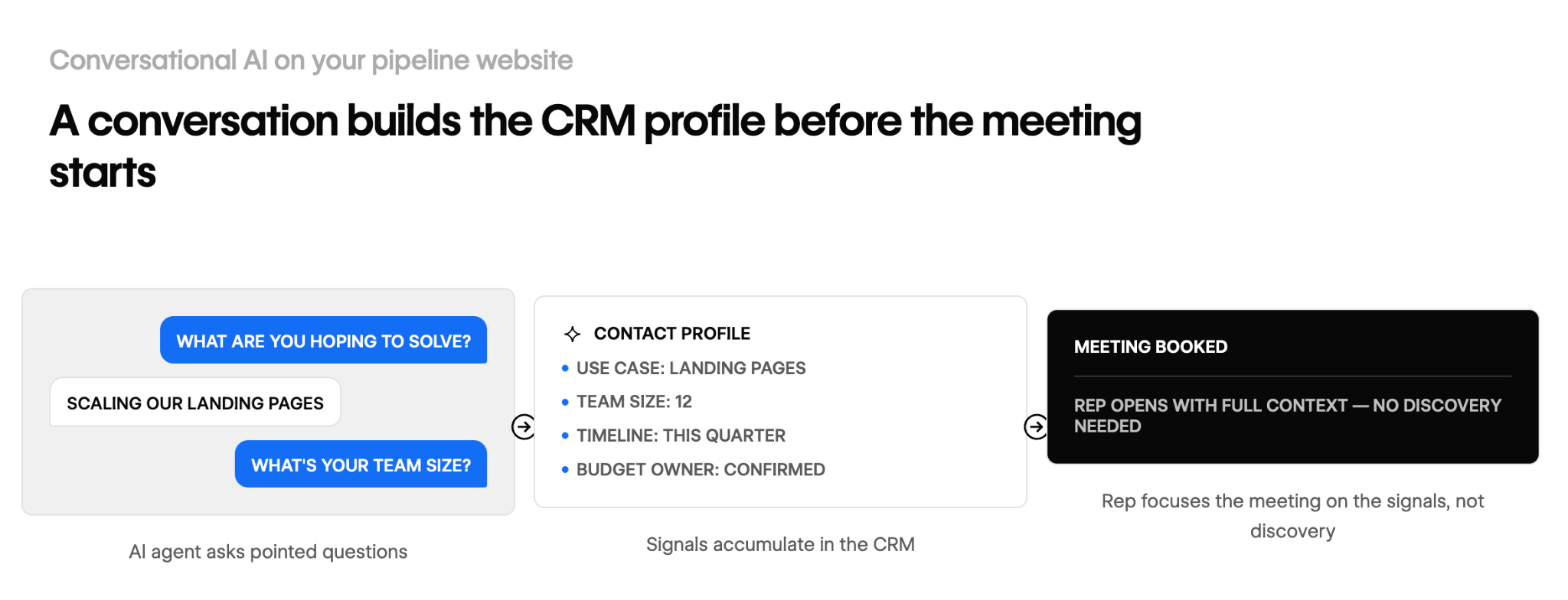
You can move people through your pipeline website using conversational AI agents. Those agents can ask pointed questions to build your context for that contact and personalize their experience. By the time they book a meeting, their customer relationship management (CRM) profile will have a wealth of useful signals that sales reps can focus on during the meeting.
Connect your website to CRM and sales workflows for better-qualified leads
A CRM plays a major role in your pipeline engine. It collects and stores all the behavioral data you’re gathering, which serves two purposes:
- Lead qualification: The website gives leads information to sales. You’re learning about the customer — what they want, what they’ll use your offering for, and how much they’re willing to pay.
- Performance monitoring: The sales team improves the website. You’re learning where the pitfalls are in the pipeline — where people backed out, bounced, or hesitated in their path.
You’ll need to refine your workflows to ensure your marketing automation platform picks up every signal your website sends. The trick to gathering high-quality data is ensuring your website automatically copies this information into your CRM.
There are a few common mistakes in that process that can cost you potential revenue:
- Form fields not mapped to the CRM: Your data fields must match perfectly for auto-fill, or you’ll need to add a data mapping step to ensure that every input gets to your CRM accurately.
- Routing delays: Actions should follow triggers almost instantly. For example, when a lead books a meeting, they should receive an automatic confirmation email immediately, not an hour later.
- Marketing and sales using different definitions: When a marketing qualified lead (MQL) shows up on the sales team’s calendar, it should arrive with actionable qualification data sales can use without needing a member of the marketing team to translate.
It can take some time to get the workflows and handoffs right, and you may still experience bumps along the way. It’s worth the effort, though, because a fine-tuned pipeline engine produces faster follow-ups and better-qualified leads, no matter your company size.
Measuring performance: Metrics that show your site is generating pipeline
Most website performance metrics measure activity, not the actual contribution each page makes to the pipeline. It’s like measuring how good a road sign is at directing traffic: It’s more helpful to know how many people got to the right place after reading it, not just how many people looked at it.
Measuring real pipeline contribution means understanding whether pages are successfully routing contacts through the most applicable paths. Here are a few metrics that can help you do that:
- Pipeline influenced by page: If the pipeline is working properly, each page should send leads down a path with increasingly specific content. If not, you’ll notice that leads are moving horizontally between pages, not down the marketing funnel.
- Time from first visit to booked meeting: Branching paths should keep the journey from a lead’s first visit to scheduling a meeting relatively short (no more than four or five pages). However, each user journey is different, so some might need to take longer because the journey is more detailed or there are more factors for stakeholders to consider.
- Conversion-to-opportunity rate: A pipeline engine should turn a higher percentage of leads into qualified sales opportunities. If it isn’t, the paths might be too long, overcomplicated, or not enticing enough.
With a pipeline engine, you’ll likely have to cross-reference some historical data points to form a complete picture. Here are a few metrics you may already be tracking that are good starting places for understanding pipeline data:
- Total sessions: The number of people visiting your site or any of its pages may not tell you much on its own. In addition , you also need to know how many sessions followed the path you laid out for each target audience.
- Time on page: The time someone stays on a page should correlate to each path you design. To make this metric useful, compare the time leads of similar sizes and needs spend on each page.
- Raw form fill volume: Teams learn how a lead heard about you and what they’re interested in through the pipeline, so those fields don’t need to show up on a contact form. You’ll still track how many people filled out forms and booked meetings, but there will be fewer actual fields to monitor.
Turn your website into your best salesperson with Webflow
All it takes to transform your website from an online brochure to a pipeline engine are new pages built deliberately for specific user experiences. With the right website builder, you can do that just by fine-tuning pages that already exist.
As an agentic marketing platform, Webflow’s CMS is built to help you enhance your website at scale. You can experiment with automations using Webflow Optimize to find the right improvements. Once your page is live, monitor relevant metrics with Webflow Analyze, and use native integrations to keep all those data points flowing into your CRM. All these features work out of the box, and you can mix and match them to create a platform plan that’s right for you.
Explore how Webflow can help you guide leads through your site.

Build with Webflow
Break free from the constraints of traditional platforms. Migrate your site to visual-first platform that combines design flexibility with powerful CMS capabilities.


