










Claude can write the code behind a motion video in minutes. Keeping that code running on a live site, across every browser and device, is the harder part. Claude + GSAP gives you animations from a prompt backed by robust code you can confidently deploy.
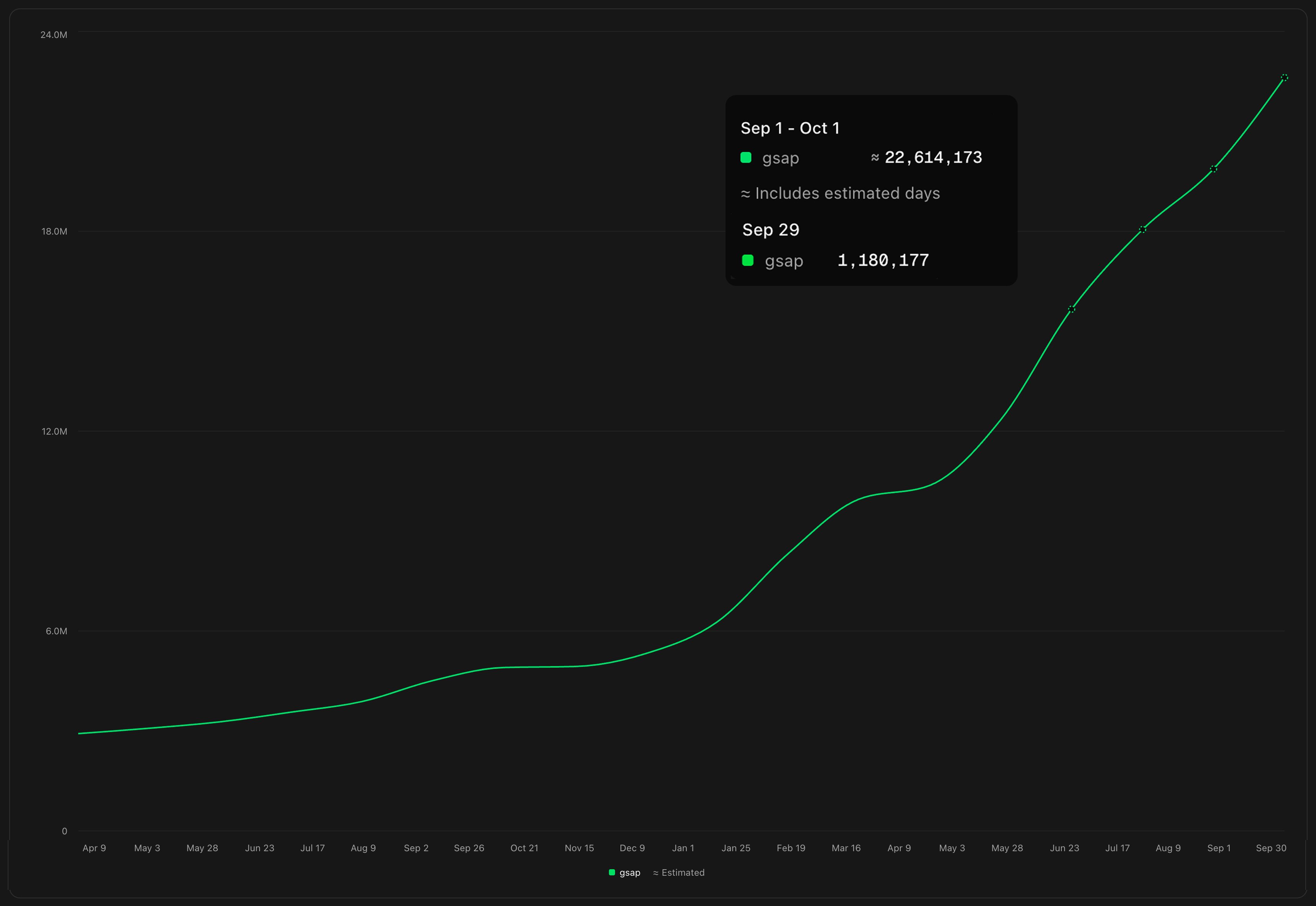
On Monday, September 28, GSAP surpassed 1 million daily downloads on npm for the first time. It was an exciting moment for the GSAP team, and it landed at the start of an unusual week. Weekly downloads normally grow a few percent. The week of September 27 saw just over 7 million downloads, almost 50% more than late August.
It didn’t take long to realize what was going on - the internet was having a bit of an animation moment. Anthropic had released Claude Opus 5.5, and it is quite good at motion. We were tagged in hundreds of posts, the usual web demos you’d expect, but also a huge amount of videos. That was new. So how were people getting videos out of a chatbot?
Well Claude can't actually create video. It does what it’s best at - it writes code. It builds the scene with web technologies like HTML, SVG, and canvas, with Three.js for anything 3D, and writes code to animate it all. A headless browser then steps through the animation in frames, and ffmpeg stitches those frames into an MP4. So the video output is really a web page under the hood.
Making videos vs building for the web
One thing you might notice if you poke around in the code, for video output - Claude doesn't always use an animation library, unless prompted for a specific tool, It’ll often roll its own engine. For a video, that's usually fine. It runs once, in one browser, at one size, and then it's baked into pixels. If it looks right when you hit render, you're good to go. But the web isn’t as simple. Websites have to work across all sorts of devices, browsers and connection speeds, and they have to keep working, through browser updates and tweaks to the code.
Claude can write animation code in seconds, but someone still has to look after that code once it's live. That's the bit an animation library takes off your plate. When a browser ships a new bug, it’s on the library team to fix it, not you, and the next person (or agent) who opens your project doesn't have to decode a homemade engine - they’ll have docs, examples, and a community to lean on.
Making your own motion videos
The prompt that kicked off this trend was just
Make a 15-second motion graphics video that shows what an incredible motion designer you are. Go all out.I gave Opus the GSAP brand assets, a brand guideline file and prompted
Make a 15 second showreel video. Use GSAP for the animation and the assets attached. Use Three.js and shaders alongside SVG. This is for a blog about how to create motion graphics with Opus.
It’s undeniably an impressive jump in capability. I can see why social was flooded with people posting their experiments.
If you want a little more control over the end result - another route is to go with HyperFrames. It's HeyGen's open-source framework for turning HTML into video. It gives you a tested pipeline that renders the same way every time, plus a live preview, a CLI, and extras like captions, voiceover, and ready-made blocks. It also comes with skills for Claude Code that teach it the conventions up front, so Claude spends its effort (and tokens) on the creative work instead of the plumbing.
Supercharge your GSAP skills
If you're animating with GSAP, your skills carry straight over to the web - specifically these skills. We wrote them to teach Claude (and plenty of other agents) the things that make web animation hold up in the real world. That means using gsap.matchMedia() so animations adapt to different screen sizes and respect people who've switched on reduced motion. It means animating transforms instead of layout properties so things stay smooth, and ensuring you’re cleaning up your animation properly in JS frameworks. It's the fiddly stuff you'd normally learn the hard way. Every GSAP plugin is free now too, thanks to Webflow, so go and have a play with Physics2D or MorphSVG while you're at it.
If everything moves, nothing stands out
A week on from that million-download Monday, my feeds look very different. Every other post is a slick motion reel, and I've started scrolling past them almost without looking. That's an odd feeling for someone who spends most of her time thinking about animation.
Now that anyone can produce that kind of polish in a few minutes, it's a good moment to pause and remember what motion is for. Good animation does a job. It guides someone's eye, explains how two ideas connect, shows that something changed, or makes an interface feel more intuitive.
The good news is that taste in motion is something you can build, and there are some brilliant people sharing their expertise. These are a few of my favourites:
- Emil Kowalski's animation skills. Emil's design engineering philosophy, packaged up for your agent. It's a great way to learn why some animations feel right and others don't.
- Material Design's motion guidelines. A thoughtful breakdown of how motion can communicate structure and meaning in an interface.
- Osmo. A library of wonderful, production-ready web animations to learn from and build with, either in custom code or in Webflow
- Made With GSAP. Beautiful effects with structured walk-throughs to back them up. Perfect for inspiration and for people curious about the code.



















